Opus 5.5 + Jev: The Complete Setup (10x Your Output)

TL;DR: How to set up, connect, and run Opus 5.5 + Jev for cheaper, faster, and more productive AI workflows.
I haven't seen anybody else on the timeline talk about this.
You can combine Opus 5.5 + Jev to build AI workflows that are faster, cheaper, and far more reliable than running everything through just one model.
The crazy thing is, it's actually quite easy to set up and only takes a few minutes to get running.
In this article, I'm going to cover everything you need to know about how to build and use this elite AI system:
Let's get right into things:
Intro to Jev + Opus 5.5
At its core, this system runs Opus 5.5 for deep reasoning tasks and routes any smaller tasks through Jev for cheap, fast decisions.
You get the best of both worlds: deep reasoning from Opus and efficiency from Jev.
Jev Handles the Judgments
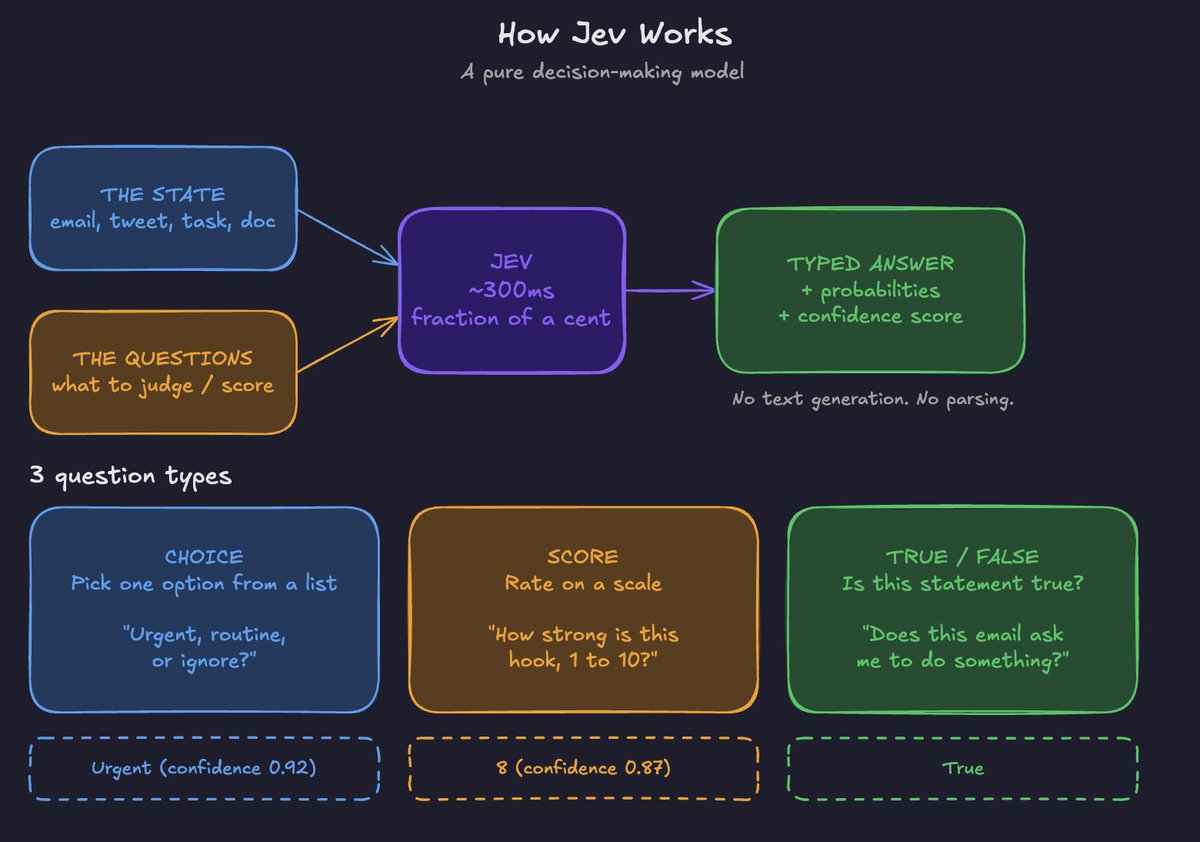
Jev is a pure decision-making model.
You give it two things:
With this info, Jev can return probabilities and confidence scores (you'll see how this comes in handy in a second).
Jev answers three types of questions:
Opus 5.5 Handles the Thinking
Opus 5.5 is the best "thinking" model in the world right now.
I like to use it for:
The only downside is that Opus 5.5 is quite expensive when run daily and on its own.
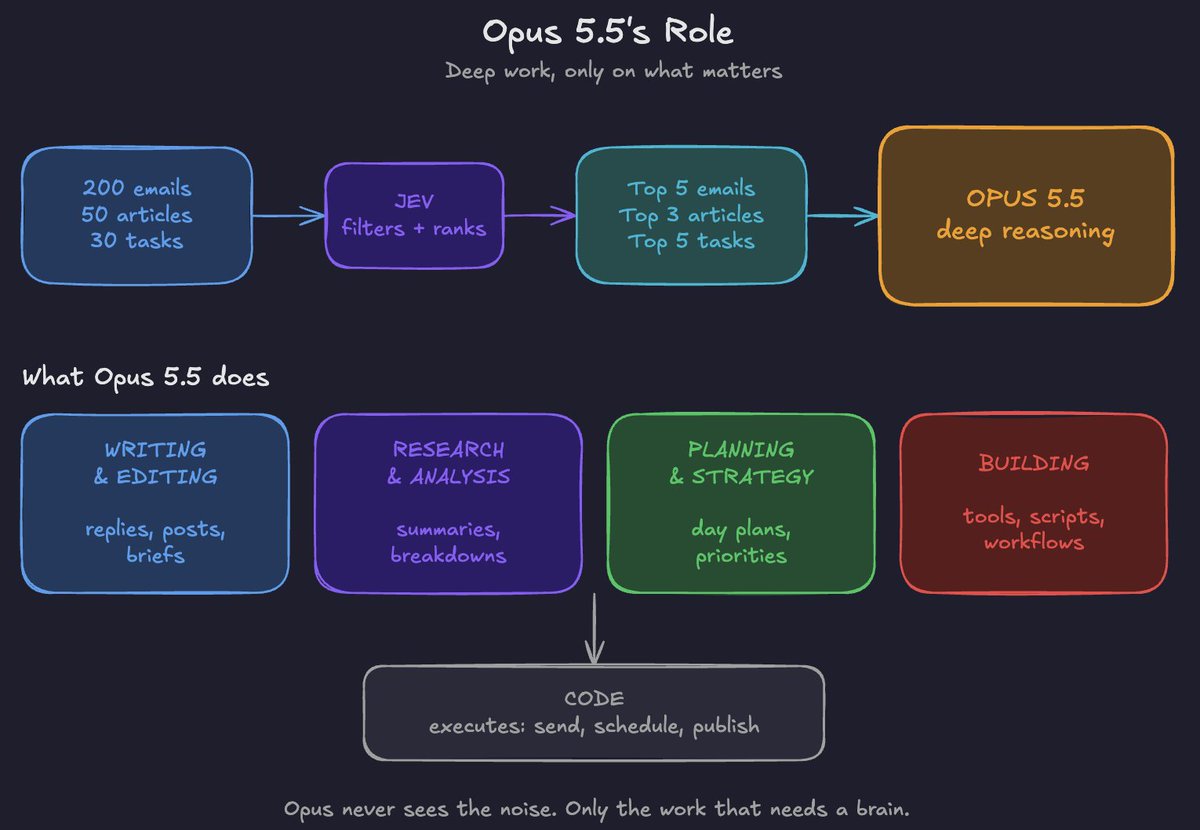
By adding Jev on top, Opus only sees what actually needs it.
For example: Let's say you're running an Email triage workflow. Instead of having Opus scan thousands of messages from your inbox, Jev can score them by priority and show Opus only the 5 emails worth replying to.
Why the Combination Works
The system is essentially:
Jev judges → Opus thinks → Code executes on the backend
By using this system, your outputs are:
It's quite easy to connect the two:
Connecting Jev + Opus 5.5
Step-by-step roadmap on how to route your workflows through both models:
Step 1: Test Jev in the Playground
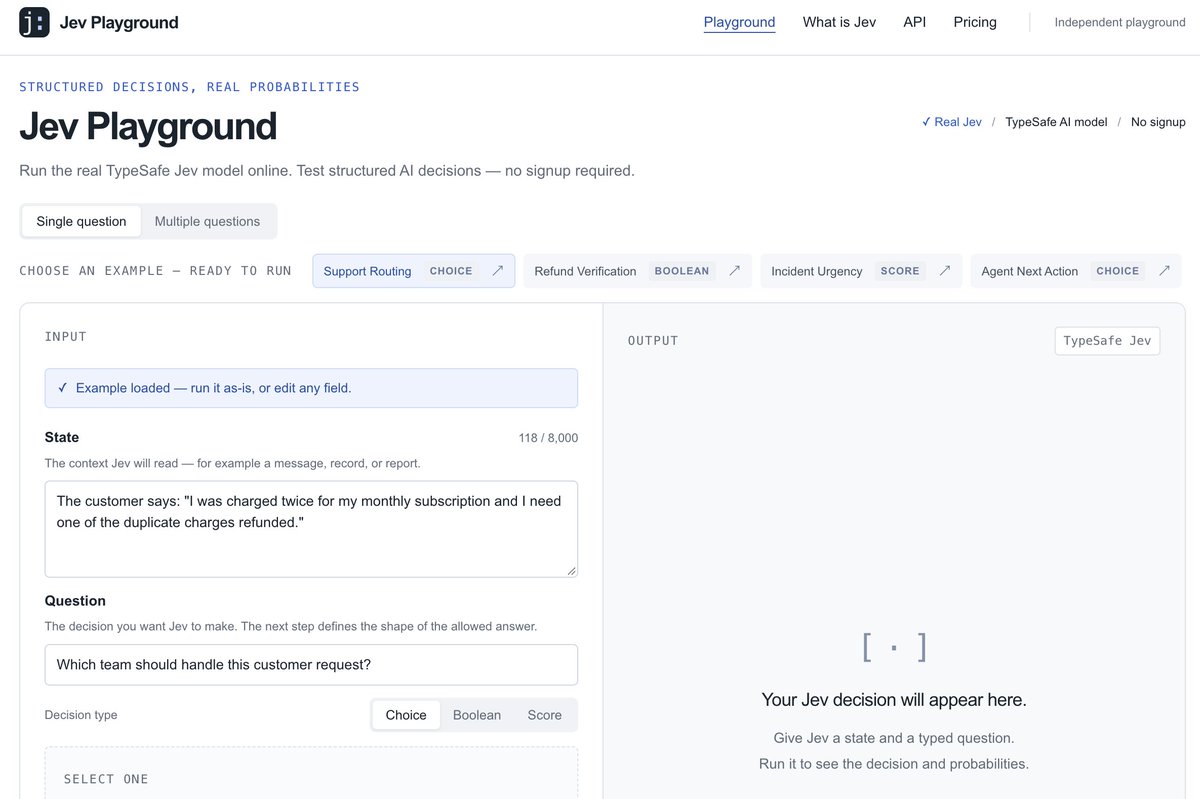
This is a good low-friction way to test Jev before committing to connecting it to Claude.
You can head to https://jevplayground.com/ and test Jev immediately.
Send a couple of sample prompts here to get a feel for how Jev outputs.
You'll see every answer come back at once, with probabilities and confidence scores.
Step 2: Get Your API Key
Once you've tested Jev for your workflow (let's say Email sorting), grab an API key so we can connect to Claude.
Head to console.typesafe.ai/keys and create a key.
Then add it to your environment so Claude Code can use it:
export TYPESAFE_API_KEY="your-key-here"Step 3: Set Claude Code to Opus 5.5
Open Claude Code in the terminal and run /model to select Opus 5.5.
Step 4: Install the TypeSafe Skill
This is a key step. TypeSafe has a skill pack that teaches Claude Code exactly how Jev works.
How to interact with Jev, etc.
Run these two commands in your terminal to install the correct skills:
claude plugin marketplace add typesafe-ai/skills
claude plugin install typesafe@typesafe-ai
Restart Claude Code once it's installed.
Step 5: Connect Your Apps
The workflows I'll show you in Section III pull from your inbox, calendar, and notes. So, make sure to connect the apps you want Opus to work with (Gmail, Google Calendar, Notion, Slack) through Claude's connectors.
Step 6: Running Your First Test
The prompt below will run your first cheap tests through your TypeSafe API Key:
FIRST RUN PROMPT

Using the TypeSafe skill, help me build an AI productivity system
where Jev handles fast decisions and you (Opus 5.5) handle the deep
work.

1. Ask me what tasks eat most of my day (email, research, content,
   planning, etc.)
2. For each one, identify which steps are simple judgments (sort,
   score, filter, yes/no) that Jev should handle, and which need
   real reasoning from you.
3. Run a few cheap test queries with my TYPESAFE_API_KEY to check
   the Jev questions work.
4. Propose the first workflow to build, and walk me through it
   before writing any code.
How to Build Perfect Workflows
If you want to be successful with routing tasks through both models, there are a few general principles you need to apply to get the best possible outputs:
1. Map the Workflow Before You Automate It
Before Opus writes a line of code, break the task into steps and label each one:
EXAMPLE: CLEARING YOUR INBOX

Pull unread emails .............. Action (code)
Is this urgent? ................. Judgment (Jev)
Does it need a reply? ........... Judgment (Jev)
Archive the junk ................ Action (code)
Summarise what matters .......... Thinking (Opus)
Draft replies ................... Thinking (Opus)
Send after approval ............. Action (code)
2. Write Atomic Questions
Every Jev question should be very specific and check only one thing. Remember, Jev is not a text-output model; it can only give yes/no answers and a confidence score before routing to Opus.
BAD:  Is this email important?

GOOD: Choice: Urgent, needs reply, FYI, or ignore?
      True/false: Sent by a real person?
      True/false: Asks me to take an action?
      Score: Sender importance (low, medium, high)
3. Give Jev the Right Context
Context is king in this system.
4. Route by Confidence
High confidence → code acts automatically
Medium confidence → Opus takes a closer look
Low confidence → flagged for you
Step 5: Keep Everything in One File
Have Opus put every Jev question and threshold in a single config file, and log every decision with its confidence score. When something goes wrong, you can easily change the workflow.
Step 6: Test Small, Then Schedule
Test your questions in the Playground on a few real examples. Once successful, THEN scale to a full automation inside Claude Code.
Example Workflows
A few sample workflows so you can get some ideas of what the system is capable of:
Workflow 1: Inbox Triage + Management
What Jev judges (per email):
What Opus 5.5 does:
Reads only the urgent and needs-reply emails, summarises each in one line, and drafts replies in your voice from a Claude Skill for you to approve.
INBOX TRIAGE PROMPT

Using the TypeSafe skill, build an inbox triage workflow for my Gmail.

1. Pull unread emails from the last 24 hours.
2. For each email, ask Jev:
   - Choice: urgent, needs reply, FYI, or ignore
   - True/false: sent by a real person (not automated)
   - True/false: asks me to take an action
   - Score: sender importance (low, medium, high)
3. If Jev is highly confident an email is "ignore", archive it.
   Label FYI emails. Flag anything with low confidence for my review.
4. For urgent and needs-reply emails, you (Opus 5.5) write a
   one-line summary and draft a reply in my tone. Do not send
   anything without my approval.
5. Give me a short digest: what was archived, what needs me, and
   the drafts.

Put all Jev questions and confidence thresholds in one config file
so I can review them.
Workflow 2: Research Filter
A workflow to get deeper, better-curated research:
(works for any topic)
RESEARCH FILTER PROMPT

Using the TypeSafe skill, build a research filter.

My focus areas: [e.g. AI agents, crypto x AI, trading automation]

1. Take the list of links or documents I give you (or pull them
   from my saved Notion page).
2. For each item, ask Jev:
   - Score: relevance to my focus areas (low, medium, high)
   - True/false: contains genuinely new information
   - True/false: has a specific, actionable takeaway
   - Choice: news, tutorial, opinion, or research
3. Combine the answers into a single ranking. Weight relevance
   twice as heavily as the other factors.
4. Read only the top 5 in full and write me a one-page brief: key
   points, what's new, and what I should do with it.

Show me the full ranked list too, so I can see what was cut.
Workflow 3: Content Grader
Such a valuable workflow for content creators.
You can produce exceptional content with this (and of course edit the filters from Jev as needed):
What Jev filters (per hook or content draft):
Opus can then come in and edit, tweak, and actually write the content in your voice by pulling from a skill file.
CONTENT GRADER PROMPT

Using the TypeSafe skill, build a content grader for my hooks and
drafts.

1. Take the list of hooks or drafts I paste in.
2. For each one, ask Jev:
   - Score: clarity of the main idea (low, medium, high)
   - Score: specificity (vague to concrete)
   - True/false: creates curiosity
   - True/false: generic enough that anyone could have written it
3. Rank them all and show which criteria each one failed.
4. You (Opus 5.5) rewrite the bottom half, fixing only what failed.
5. Run the rewrites back through Jev and show me before vs after.
Pro Tips
Closing
I hope you've found this Opus 5.5 + Jev article valuable.
If you did, be sure to follow me here @aiedge_ - Every single week, I post breakdowns covering the hottest topics in AI.
If you enjoy written AI content, feel free to subscribe to my free newsletter.
My team and I send a weekly AI recap, one powerful AI workflow build & keep you up to speed on everything in the AI space.
100% free; read past publications here 👉 https://newsletter.aiedgehq.co/