How to Turn Your Skills into Agents

How to Turn Your Skills into Agents
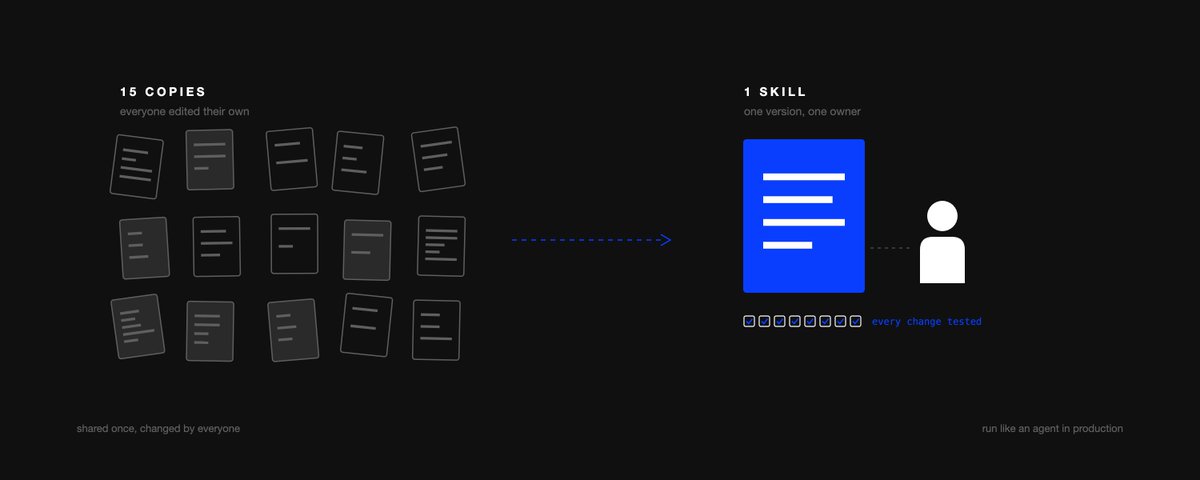
The desire to adopt AI inside large companies is at its peak. Ramp tracks the % of the 70k+ US businesses on its platform paying for at least one AI product, and it went from 7% in January 2023 to 56% in August 2026. And yet, most companies still aren't seeing the benefit: 56% of the 4,454 CEOs in PwC's 2026 CEO Survey said AI hasn't brought them higher revenue or lower costs. In fact, many are regressing on the exact KPIs they meant to improve, and their token spend is through the roof.
A big part of the reason is how large companies are building with AI: someone on a team one-shots a skill for a process the whole team runs (month-end variance commentary, invoice coding, sales call prep, etc.), shares it with the team once, and everyone copies it and iterates on their own copy (usually with a lot of drift and no testing). Below, we'll explain why that's a problem and how your team should instead be building and continuously improving a single shared skill, which is in essence how you turn skills into agents.
Few can show results
The drift shows up in the numbers: only 37% of respondents in McKinsey's 2026 State of AI report attribute any EBIT impact to AI, and the % of "high performers" (more than 5% of EBIT from AI) is still a small 6% or so. Gartner said in January 2026 that at least 50% of GenAI projects had been abandoned after the POC by the end of 2025. And Workday found that 37% of the time AI saves employees gets spent reworking its output (3,200 respondents who use AI, at $100M+ revenue companies), which is the kind of rework you'd expect when 15 people run 15 slightly different versions of the same skill with no testing.
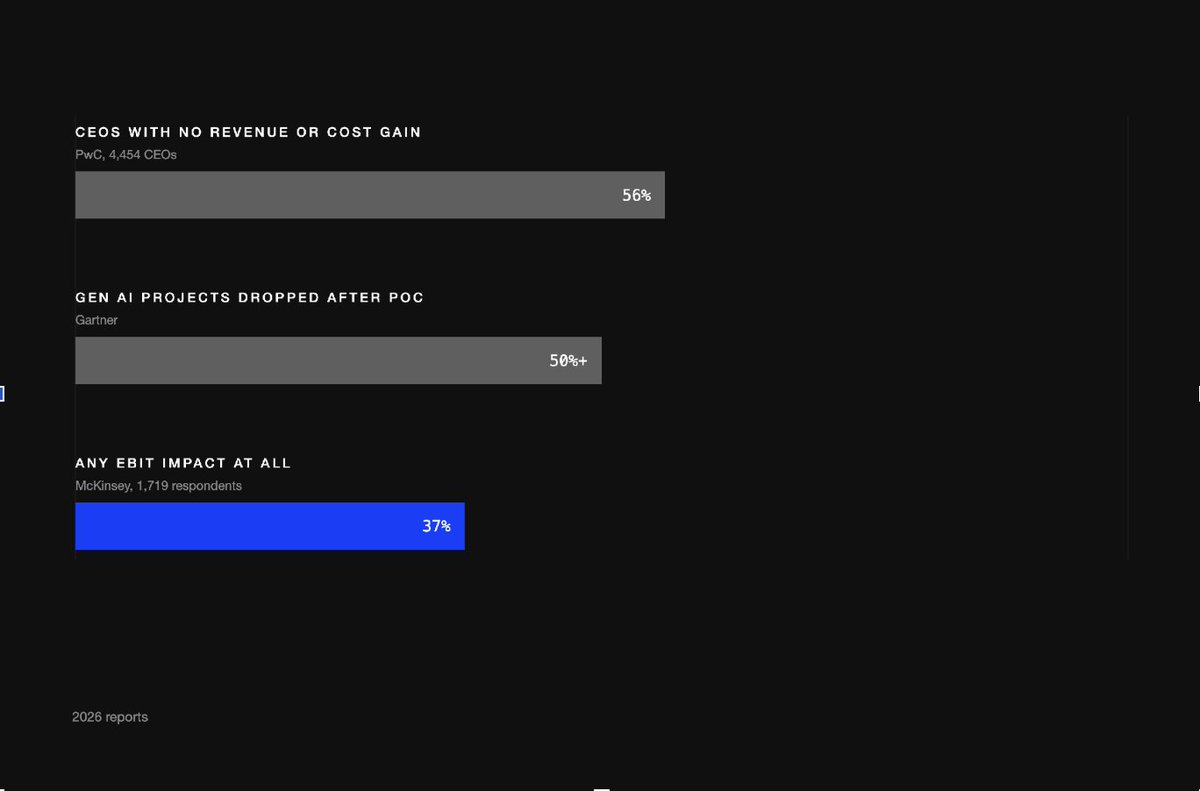
Figure 1. Adoption is in, proof is not
To provide some context, my name is Eyad and I'm the COO at @varickagents. We work extensively with enterprises on all aspects of AI adoption, from high-level strategy to process re-engineering to actually building, deploying, and managing AI agents. As part of getting started with a new company, we take stock of the skills and agents they've already built and identify the gaps, and we commonly see the same skill copied a dozen times inside the same company, with real differences between the copies. From there, we build the skills the company actually needs and set up the infrastructure that keeps them reliable.
What is a skill
A skill is a markdown file that tells an AI agent how to handle a specific task whenever it’s called. Written in plain English, it lays out the steps to follow and when to use the skill. You can also add examples, reference files (e.g., a chart of accounts), and small scripts for anything that has to be exact (like date math or currency conversion). Claude reads the skill descriptions, and when you ask it to do something that matches one, it opens that skill and follows it, so you can have dozens of skills installed at once.

Figure 2. Inside a skill
Anthropic launched skills in October 2025 and made the format an open standard in December 2025, and now ChatGPT, Copilot, Gemini, and even apps like Cursor read the same kind of file. There are also more and more ways to build one, including having Claude or Codex watch you do a task and write the skill for you. If you can write a good onboarding document, you can write a good skill, and it doesn't take long, which is why skills are spreading so fast inside businesses.
There are, however, two kinds of skills. The first kind, personal skills, capture how you like to do something, like the tone of your emails or how you lay out your notes at meetings. The second kind capture how the business wants a particular process to be done: how to write variance commentary for the CFO, how AP codes invoices, how to prepare for a sales call, how marketing writes a campaign brief, and how procurement checks new vendors. These processes are often run by many people and feed into something outside your control (a VP, a customer, an auditor, another system). So they need to run consistently no matter who runs them, and that's where drift costs real money.
How skills drift
Let's look at an example. Say a corporate FP&A analyst is tired of manually writing budget vs. actuals commentary every month-end, so they one-shot a Claude skill that will (1) pull the actual results, (2) compare them to the budget, and (3) write commentary for anything that varies by more than a set $ amount, in the format their VP likes. They share the skill with their team, and by the end of the quarter 15 people on the team have their own copy.
The problem is that each of the 15 people iterates on the skill to fit their needs: some change the variance threshold from a $ amount to a %, some change the output format to bullets so they can read it on their phones, some ask the skill to include commentary on how FX translation affected the variance since they're in EMEA, some simply delete portions of the skill to make the output shorter, etc. Now there are 15 skills that are all supposed to be doing the same thing but aren't, and when the CFO looks at the commentary, it's all in different formats, built on different thresholds.
Then the original author makes a real improvement. They notice the skill keeps flagging accrual reversals as real overspend, so they add a rule to net them out, but when they try to roll it out, they can't. Because the other 14 people have made so many changes of their own, the fix can't just be copied and pasted in, so it would have to be painstakingly rewritten into 14 different versions, and in practice most of those copies keep calling a reversal an overspend.
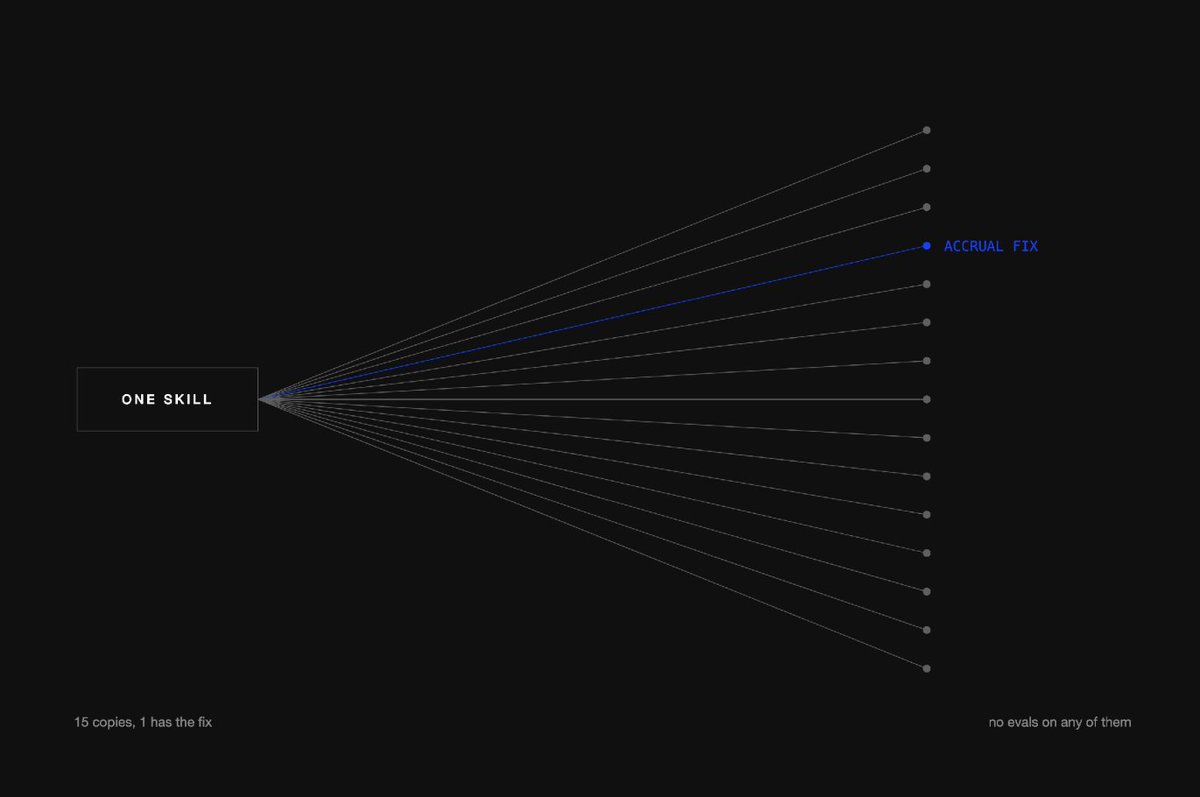
Figure 3. One skill, 15 copies
Or say someone shortens the skill to make it more concise, and in the process cuts the instruction to explain FX movements. Without any tests, how do you know? You don't, and in this case it takes 2 closes before anyone notices the EMEA commentary has stopped mentioning currency at all. And that's the case for every change across 15 different copies of the skill.
This is how most companies are building AI skills today. Skills are treated like documents: shared once, with no owner, no single version, no version control, and no tests. That means you can't tell if the skill is any good, you can't tell if changes are making it better or worse, and you can't roll improvements out to everyone. And the number of copies is growing fast (Microsoft's 2026 Work Trend Index found that the number of active agents in the Microsoft 365 ecosystem grew 15x over the previous year, and 18x in large enterprises), so this problem is only going to get bigger.
One skill, one owner
Not every skill needs this. If a skill is only ever run by one person for their own work, leave it alone. A skill needs one owner once more than one person runs it and its output goes to someone else (a VP, a customer, an auditor, or a system like your ERP or CRM). That's true of variance commentary in finance, and it's just as true of a sales team's call-prep skill or marketing's campaign-brief skill. For those, run the skill the way you'd run an agent in production, with one shared version and one owner (the person who runs the process). Set it up this way from the day the skill is built, with 4 habits around it:
1. Write the tests
An eval, or evaluation, is a test for a skill. It consists of a set of inputs (say, this month's actuals for the EMEA cost centers) and a description of what the answer must include to be considered correct (the accrual reversal is netted out, the FX impact is explained, nothing under the threshold gets commentary). Whenever the skill is changed, it's run on every eval and you see which ones passed and which failed, so you find out a change broke the FX commentary before the whole team's month-end does.
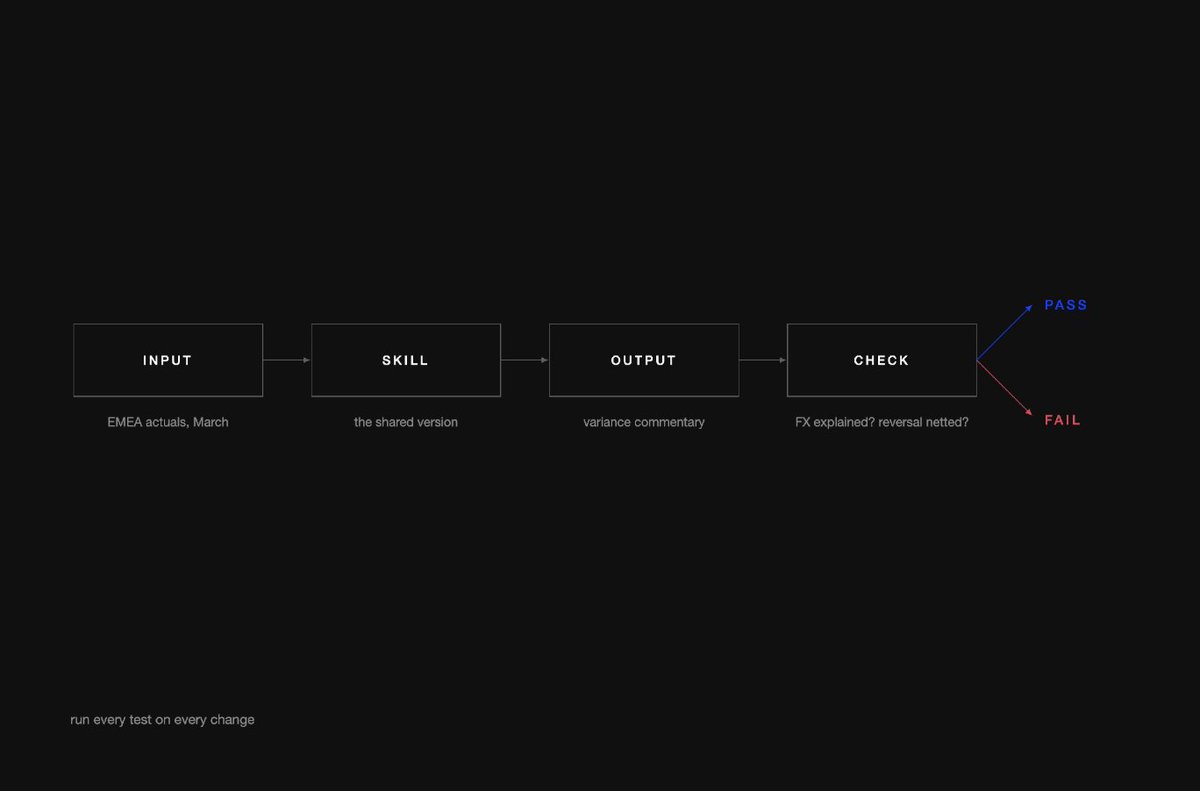
Figure 4. How a test works
There are 3 ways for a test to get graded, and you'll probably use a mix of all 3: a simple automated check (does the output mention foreign exchange at all?), another AI model grading the output against a rubric you give it, or a person who knows the work grading it themselves. You also don't need a huge number of tests to start. Anthropic's guidance from January 2026 is that "20-50 simple tasks drawn from real failures is a great start," and its skill-writing guide tells authors to "create evaluations BEFORE writing extensive documentation," so you're solving real problems instead of imagined ones.
Over time your tests fall into 2 piles: the ones the skill already passes, which should keep passing every time (if one starts failing, something broke), and the ones it still fails, which are your to-do list.
There are a few things a good set of tests will have, and most of them get taken care of by the flags (more on those below):
2. Version & test before you ship
Decide where you're going to store the skill. If you're sharing it with others, it should live in one place, with all versions saved. Just like engineers developed a way to manage code changes, you can do that with skills: all changes are saved, you can go back to any previous version with a click of the mouse, and changes require approval from the skill owner (like requiring a controller to sign off on journal entries before posting). If you want to make a change, work with the owner of the skill to make it. If it's just your preference, work with the owner to see if you can make it an option in the skill (like bullets vs. prose, or different thresholds).
Set it up so the skill automatically runs against all of the tests before the owner approves any change. If the change makes the skill fail a test, it can't be approved until it's fixed. That way, if an analyst tries to improve the skill by making it shorter and it stops including commentary on FX movements, you find out the same day, rather than a few closes later. Run the tests a few times, since AI doesn't give exactly the same answer every time, and rerun them whenever you switch to a new AI model.
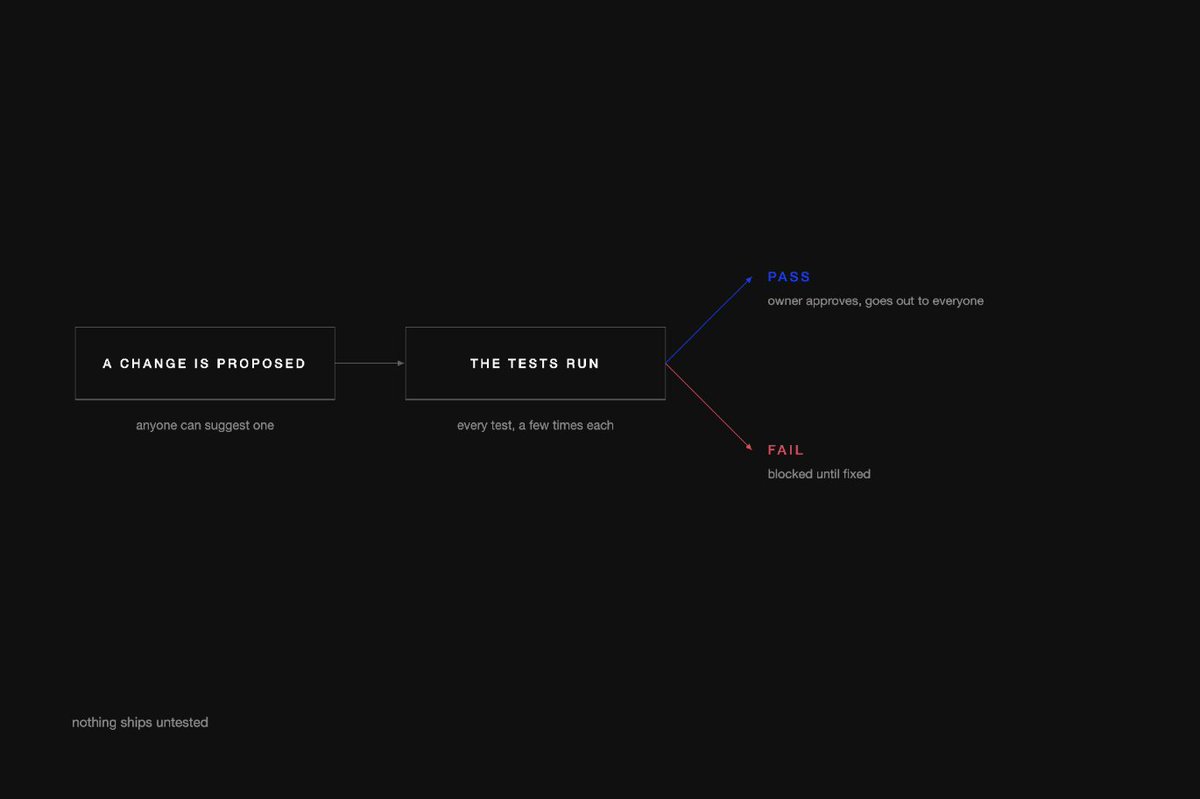
Figure 5. Test before you ship
This does take someone who is technical to set up, but after that the owner can manage the skill from a web browser. For example, many teams keep their skills in GitHub, with something like Claude Code's built-in eval command or Langfuse running the tests against every proposed change. You can then send the approved version out to everyone through something like Claude's skills library, which updates automatically whenever you update the shared skill.
3. Collect the feedback
Once a skill is live, watch it the way you'd watch any process you own, which means monitoring 2 things.
First, how is the skill running? How often is it used, by how many people, what does it cost, and how often does it fail? Some of this comes from the AI platform you're using (e.g., in Claude Enterprise, admins can see usage and cost stats), and for the rest, have your engineering team send it to your existing monitoring/observability tooling.
Second, user feedback. Make it as easy as possible for users to flag a skill run they feel is incorrect, and prompt them to give a one-line reason: was it because it used last year's FX rate? Did it use the wrong account owner? Did the brief fail to follow the brand guidelines? Make the reason mandatory, because it's hard to improve a skill when users just give a generic thumbs up or down. And then, as the owner of the skill, sample a few runs a week at random and read them yourself, because not all users will be inclined to flag a bad run.
There are tools like Langfuse that will handle this for you, but they won't work for skills that live within the Claude app. For those, just have users fill in a shared form with a link to the conversation.
4. Optimize
You improve a skill by working on it in a weekly session with its owner. Think of it as a 1:1 with the skill:
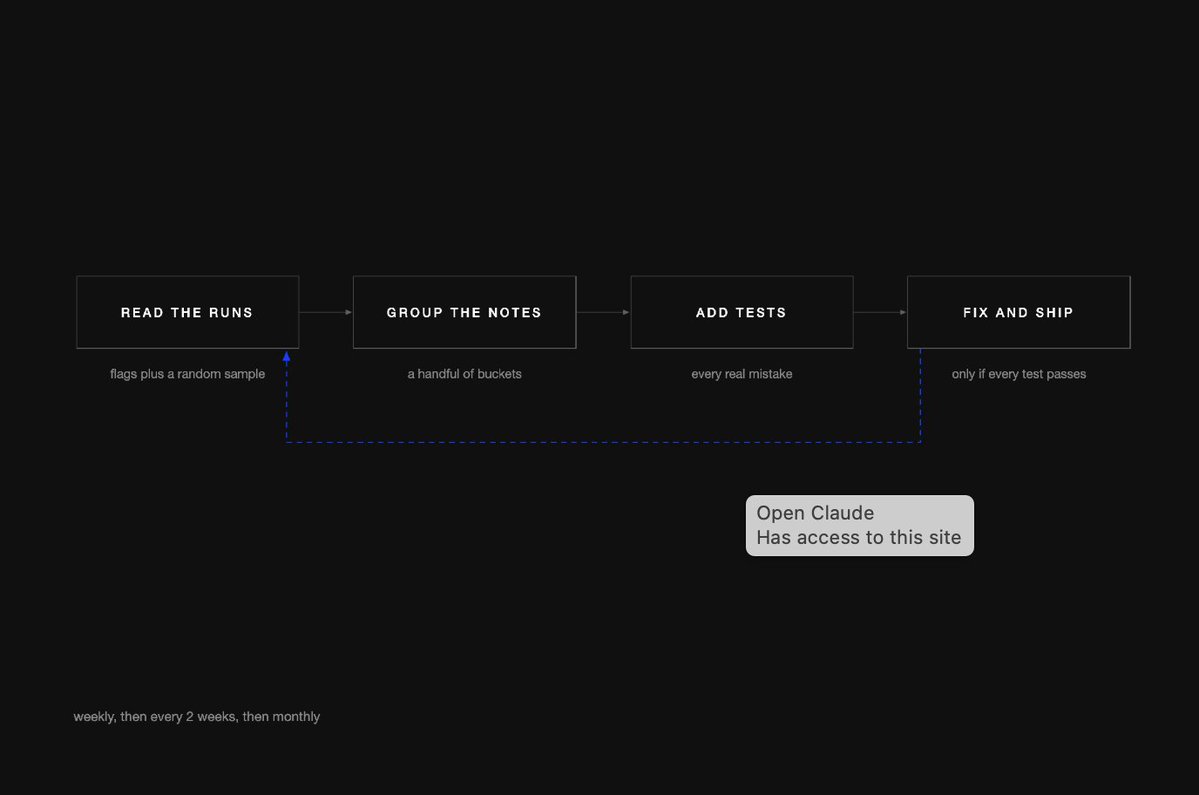
Figure 6. The weekly 1:1
It does take time, but do this at least weekly for the first 2-3 months, then every 2 weeks, then monthly as you get the flag count down. You don't even need to be technical as the owner, just able to tell good commentary from bad, and then have someone technical make the changes. We've seen teams take a skill from around 80% to 95% first-pass accuracy within 8 of these sessions.
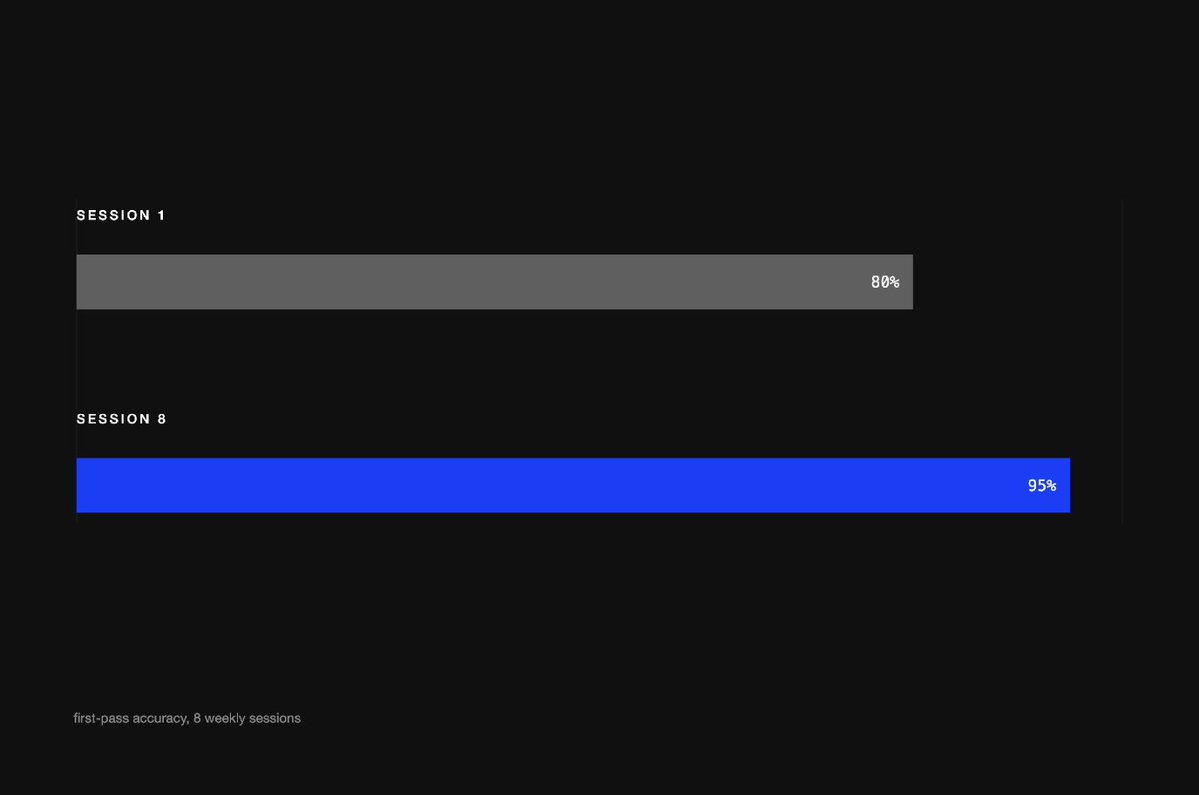
Figure 7. First-pass accuracy, session 1 to session 8
Some tools, like Anthropic's skill-creator, let you run tests and compare 2 versions side by side without being technical. Others, like Braintrust, let you pass in the flags and why they were flagged, and get suggestions for changes.
Why nobody does this
Skills are cheap. They're just files of instructions, and it's not too hard to put one together. In practice, people make them in addition to their main role, so nobody "owns" them. They're easy to copy. In Claude, when you share a skill, other people can use a view-only copy, which automatically updates if you make changes. But if you want to change a skill that someone shared inside a plugin, Anthropic's help docs tell you to ask the person who built it or build your own version, and it won't take long to build your own. They're easy to not evaluate. There are tools you can use to evaluate skills, but they're designed for a single person working on a skill (as Anthropic puts it, your evals and results stay with you). None of the AI assistants (Claude, ChatGPT, Copilot, Gemini, etc.) has a way to collect feedback from all of the people using a given skill, or to run a shared set of tests on it. In March 2026, when Anthropic added evals to its skill-creator tool, it wrote that most skill authors are subject matter experts rather than engineers, who know their workflows but don't have the tools to check whether a skill still works with a new model, triggers when it should, or actually improved after an edit. So not only are there a lot of copies of each skill, but if you're working on improving a skill, you're working on your copy, and there's no way to roll your improvements out to everyone else's.
None of these require fancy software to fix. A shared place to store the skill, a shared place to flag issues, a spreadsheet of tests, and an hour of the owner's time a week will get you most of the way there.
Work with us
This is exactly what we do at Varick. We partner with companies doing anywhere from $1 to $100B in revenue, across most departments (Finance, Sales, HR, Procurement, Operations, IT, etc.). We generally start with an audit of the department and the skills and agents that have already been built, and then help build the department's core skills the right way: one owner, tests from the start, a single place for feedback, and a weekly session with the process owner until they're comfortable managing the skill themselves.
If you're a leader at a company where teams run AI skills for core processes like the close, campaign briefs, or sales prep, and you're not sure how well they're working, book a call. If you'd like to hear more thoughts like this, subscribe to our newsletter.
TLDR
People are using AI: 56% of businesses now have a paid AI expense, up from 7% in January 2023 (Ramp, August 2026). But most aren't getting the value. 56% of CEOs aren't seeing higher revenue or lower costs (PwC), only 37% of McKinsey's 2026 respondents have seen any impact on EBIT, and 37% of the time AI saves gets lost to rework (Workday).
Skills (a folder in Claude, and the same idea in ChatGPT, Copilot, Gemini, etc.) are the instructions (and sometimes examples, reference files, scripts, etc.) that tell the AI how to do something. The most important of these are instructions for key business processes, which lots of people run. But they're often built in one shot, shared once, and copied by everyone, e.g., the variance commentary skill for FP&A, which now has 15 different versions running around as people make their own tweaks (e.g., different materiality thresholds). As a result, when one needs to be fixed (e.g., the accrual reversal handling), the fix often only goes into one of them, and an error (FX, this time) takes two closes to notice.
So, just like agents, you need to run skills as if they're production software. That means 1 version of a skill, 1 owner, and (1) a set of tests (an input plus the required output) that you run the skill against, starting with 20-50, ideally from real work, (2) a single place where the skill is stored, where you can save versions, run the tests, and have the owner approve changes, (3) an easy way for users to flag issues with a quick description of what went wrong, plus the owner sampling runs to check they're OK, and (4) a weekly session for the owner to look through runs, bucket the issues, write some tests, and update the skill (manually first, then with tools to help).
Tools can help (e.g., GitHub, Claude's skill library, Langfuse, Braintrust, skill-creator), but you can get most of the way there with a folder, a form, a spreadsheet, and an hour a week. We've seen teams go from around 80% to 95% first-pass accuracy in as few as 8 sessions.