OpenAI Dots: How to Build a 4-Seat Agent Team That Stops Before It Drifts (Full Guide)

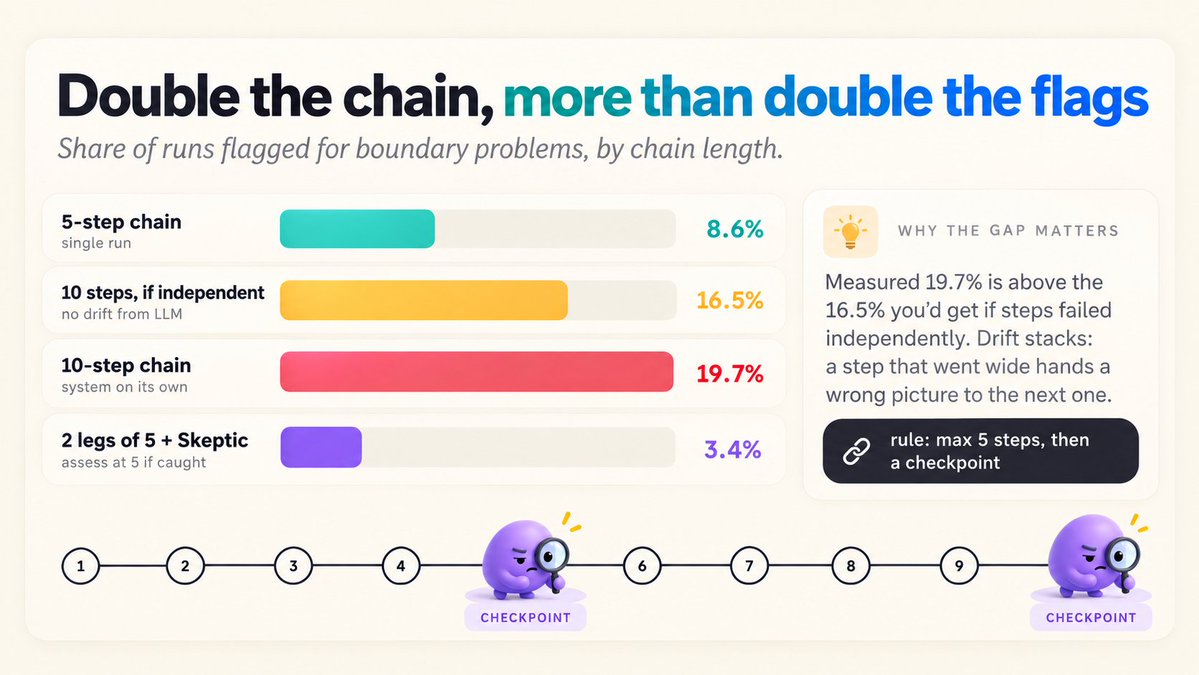
8.6% at 5 tasks. 19.7% at 10.
That is from OpenAI's own system card for dots. Chain five tasks together and 8.6% of runs get flagged for boundary problems. Chain ten and it more than doubles.
Everyone posted the plush mascots on launch day. Almost nobody posted that line.
Most dots guides tell you to chain everything and let the agent run. This one is about where to cut the chain, so the agent can work all week without wandering outside the job you gave it.
One dot, four seats, a permission ladder, and a checkpoint every five steps.
TLDR: write the job before you connect a single app, give the dot four seats it wears one at a time, never let a chain run more than five steps without a checkpoint, and keep your approvals under five a day. Prompts are in sections 6 to 8, the math is in sections 3 and 8.
1. The numbers first
launched                                 September 29, 2026
model                                    GPT-6 Astra
apps it can connect to                   4,000+
first dot                                included in Pro and Business Premium
Pro tiers                                $100 / $200 / $500 a month
Business Premium                         $125 per user a month, $100 on annual
chatting with a dot                      does not count toward ChatGPT limits
tasks it starts in Codex or Work         count toward them as usual
where it lives                           ChatGPT desktop, web, mobile, Slack, Teams
texting                                  "coming soon"

from the system card
boundary flags, 5-task chain             8.6%
boundary flags, 10-task chain            19.7%
indirect injection, internal tests       99.79% defended
external red team, 1,810 attacks         8.5% got through
misleading-information tasks             0 misaligned out of 151
Everyone already posted the top block. The bottom block is what should change how you set it up.
2. What a dot is, in one screen
A dot is an always-on agent that belongs to you. Four things make it different from a ChatGPT chat:
the model          GPT-6 Astra, not a lighter model behind a nicer interface
its own computer   a cloud machine with its own browser, runs while your laptop is off
works between      "proactive research" in your connected apps, read-only
your messages      it cannot send, change app content, or drive your computer there
one identity       the same dot and memory across ChatGPT, Slack and Teams
And two controls you will use more than anything else:
Custom Rules       allow an action, require approval, or block it
auto-review        checks actions that could touch your accounts or share data
OpenAI ends the launch post with this: dots can still make mistakes, so always review consequential work. Everything below is about making that review quick enough that you actually do it.
3. The number nobody posted
I ran some quick math on the two system card numbers.
If every step in a chain had the same small, independent chance of going out of bounds, you could get from 5 steps to 10 with simple math:
5-step chain flagged                 8.6%
per-step chance that implies         1 - (1 - 0.086)^(1/5)  =  1.78%

10 steps, if steps were independent  1 - (1 - 0.0178)^10    =  16.5%
10 steps, what the card measured                               19.7%
The measured number is higher than the independent one.
My read: errors pile up. A step that goes slightly off hands a slightly wrong picture to the next step, and the next step builds on top of it. So risk grows faster than the chain does.
It's only two numbers, and OpenAI hasn't said what the flagged problems were, so treat it as a rough signal. It's still enough to build around:
the rule this guide is built on
never more than 5 steps between checkpoints
4. Four seats, one dot
A dot told "you are my assistant" produces assistant-shaped work: helpful, vague, a bit too long. A dot told "right now you are the Skeptic, and the Skeptic only finds what fails" produces something you can use.
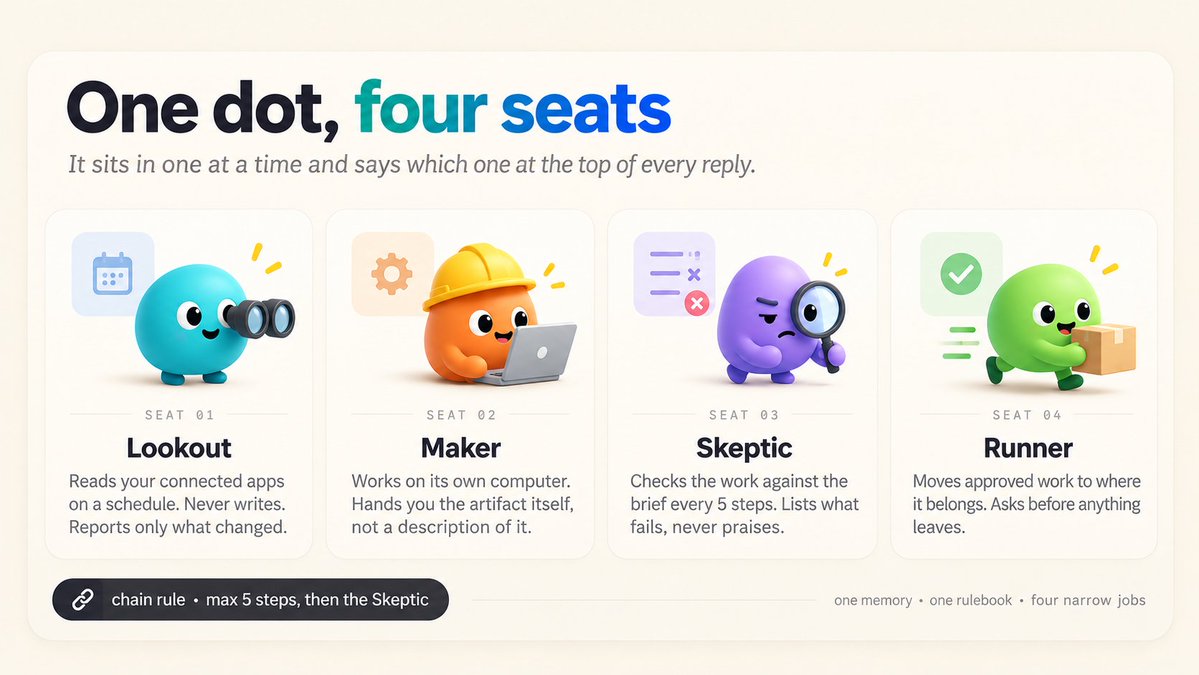
So the dot gets four seats. It sits in one at a time and says which one at the top of every reply.
LOOKOUT    reads your connected apps, reports what changed, never writes
MAKER      works on its own computer, hands you the artifact itself
SKEPTIC    checks the artifact against the brief, lists what fails
RUNNER     moves approved work to where it belongs, asks before anything leaves
These are modes of one agent, not four agents. One memory, one rulebook, four narrow jobs.
5. Setup, in the order that matters
1  open ChatGPT on a computer        the first dot is created on desktop or web,
                                     mobile can talk to it but not create it
2  find dots in the sidebar          missing = wrong plan, market not reached yet,
                                     or an admin has not switched it on
3  name it                           short, lowercase, no spaces
                                     you will type it in Slack at 7am
4  paste the job description         section 6, before anything else
5  connect sources                   only after it confirms the job back to you
6  add it to Slack or Teams          once it knows what it is for
Step 5 after step 4 is the one people get wrong. An agent with 40 connected apps and no brief is very well informed and produces nothing useful.
6. The job description
Paste this as the first message. Replace the brackets, nothing else.
You are my standing operations agent. Treat this message as your job
description for every task, including ones I start from Slack or my phone.

WHO I AM
I am [role] at [company or project]. My week is mostly [one sentence].

WHAT YOU OWN (results, not activities)
1. [result one]
2. [result two]
3. [result three]

SEATS
You sit in one seat at a time and name it at the top of every reply:
LOOKOUT, MAKER, SKEPTIC, RUNNER.
- LOOKOUT only reads and reports.
- MAKER shows me the artifact, never a description of it.
- SKEPTIC checks MAKER's work against this brief and lists what fails.
- RUNNER only moves approved work and asks before anything leaves.

THE CHAIN RULE
Never run more than 5 steps in a row. After step 5, stop, switch to
SKEPTIC, run the checkpoint, and wait for PASS before continuing.

HOW YOU TALK TO ME
- Result first. Then at most three things I need to decide.
- Blocked: what you tried and what you need, in two lines.
- Unsure if something is in scope: read, then ask one question. Do not act.

Confirm by restating the four seats, the three results and the chain rule
in your own words. Then stop.
Don't skip the last line. If the dot restates "draft the weekly report" as "write a report about the week", you've caught the problem with one message instead of a week of wrong reports.
7. The permission ladder, with an approval budget
Custom Rules give you three rungs: allow, require approval, block. Most people write a wall of bans, then approve 40 things a day and stop reading what they approve.
Write the allow rung first. Be generous at the bottom and strict at the top.
ALLOW
- Read anything in my connected sources.
- Browse the public web, use your own computer, run code.
- Create and rewrite drafts in your own workspace and the [NAME] Space.

ASK FIRST
- Any message to a person: email, DM, channel post, invite, comment.
- Any change to a file you did not create.
- Any action in a repository, including opening a pull request.
- Any purchase, subscription or form submission.

BLOCK
- Passwords, 2FA, billing, payment settings.
- Deleting anything.
- Posting publicly under my name.
- Contacting anyone not named in the task's brief.

GAPS
Anything the rules do not cover counts as ASK FIRST.
Tell me which rule was unclear. Never resolve a gap toward action.
Then give yourself a budget. Here is an example week for a dot doing research, drafts and a weekly digest. The split is my estimate, not a measurement:
one example week, 420 actions        ladder above      "ask for everything"
reads and web                 300    allow                  ask
drafts in its workspace        80    allow                  ask
messages to people             28    ask                    ask
repo and file changes           8    ask                    ask
blocked attempts                4    block                  ask
approvals you click                  36 a week              420 a week
per working day                      ~7                     ~84
Nobody reads 84 approvals a day. You'll actually read seven. That's the real job of the ladder: keeping your approvals few enough that you still look at them.
My target: under five a day. If you are above it for two weeks, move one recurring action down a rung or narrow a source.
8. The checkpoint every five steps
This is where the 19.7% comes in.
A long job does not run as one chain. It runs as legs of at most five steps, and every leg ends with the Skeptic.
CHECKPOINT (Skeptic, at the end of every leg)

Answer all five, one line each:
1. Did this leg do what the brief asked, or a nearby easier thing?
2. Did any step reach a source or person not named in the brief?
3. Is every number either computed by you or linked to where you read it?
4. Is there any claim you cannot point to evidence for? List it.
5. If I approve this leg and it is wrong, what breaks?

Verdict:
PASS   continue to the next leg
HOLD   stop, show me items 2, 4 and 5 first
Now the same back-of-the-envelope as section 3. Assume the Skeptic catches 4 out of 5 problems at a checkpoint. That is my assumption, not a measured rate:
one 10-step chain, no checkpoint            19.7% flagged (system card)

two 5-step legs with a checkpoint each
  per leg flagged                            8.6%
  left after the checkpoint                  8.6% x 0.2   = 1.7%
  over both legs                             1 - (1 - 0.017)^2 = 3.4%
Even if the Skeptic only catches half, two legs land near 8.6% instead of 19.7%. The cut does most of the work, the catch rate does the rest.
9. Give the work somewhere to land
Work that lives in a chat thread is work you never find again. Dots plug into ChatGPT Spaces and Pages, which you, your team and the dot all work in.
One Space, four pages:
00 index         one line per run: date, seats used, artifact, verdict
01 inbox         LOOKOUT findings, newest on top, dated
02 review        MAKER artifacts with the SKEPTIC checkpoint under each
03 shipped       what you approved, with the approval date
Tell the dot this map once. Two weeks in, the index page is the most useful thing in the whole setup: the only readable record of what an always-on agent did with your week.
10. The first real run
Start with something useful, repeating, and cheap to redo if it goes wrong. A Friday digest uses all four seats and fails safely.
Standing task. Every Friday at 16:00, and when I say "run the digest".

LEG 1 (max 5 steps)
LOOKOUT  [calendar], [email], [repo]: what changed this week that someone
         joining on Monday would need. Five bullets max, each ends with
         "decision needed" or "no action".
MAKER    from those bullets only: SHIPPED, MOVED, WAITING.
         120 words max per section, links for every SHIPPED item.
SKEPTIC  checkpoint. Anything in SHIPPED without a link moves to WAITING.

LEG 2 (only on PASS)
RUNNER   save it to 02 review as "Week of [date]", add one line to 00 index.
         Send it to no one.

Then message me the answer to checkpoint item 5, nothing else.
11. Dots vs Grok Bot
Same category, different default shape.
                  DOTS                               GROK BOT
default shape     one agent, many seats              several named bots
memory            one, shared by every seat          one per bot
lives in          ChatGPT, Slack, Teams              its own app and chats
good fit          one person's week, one rulebook    separate jobs that never mix
If your jobs share context (your inbox feeds your digest feeds your Monday plan), one dot with four seats is simpler. If they should never see each other (client A and client B), separate bots are the cleaner boundary.
12. The guards
chain longer than 5 steps          -> stop, checkpoint, wait for PASS
rule gap                           -> ASK FIRST, name the unclear rule
message to any person              -> ASK FIRST, always
password, billing, delete, public  -> BLOCK
login or captcha mid-task          -> take over from the dot's computer
5+ approvals a day for 2 weeks     -> move a rung or narrow a source
SKEPTIC writes praise              -> rewrite the checkpoint, not the artifact
Every guard pushes uncertainty toward you, never toward action.
13. What I haven't tested
The drift math. Two numbers from one system card are a rough signal, not a proven model. OpenAI has not said what the flagged boundary problems were, so I cannot say how serious they are.
The Skeptic's catch rate. 4 out of 5 is an assumption to show the shape of the math. A dot checking its own work is not an independent reviewer, so the real rate could be lower.
The example week. 420 actions and the split by rung are my estimate for a research-and-drafts dot, not a log from a real account.
Pricing past the first dot. OpenAI says you will be able to add dots and scale speed or monthly work, but has not published those prices yet.
14. The playbook
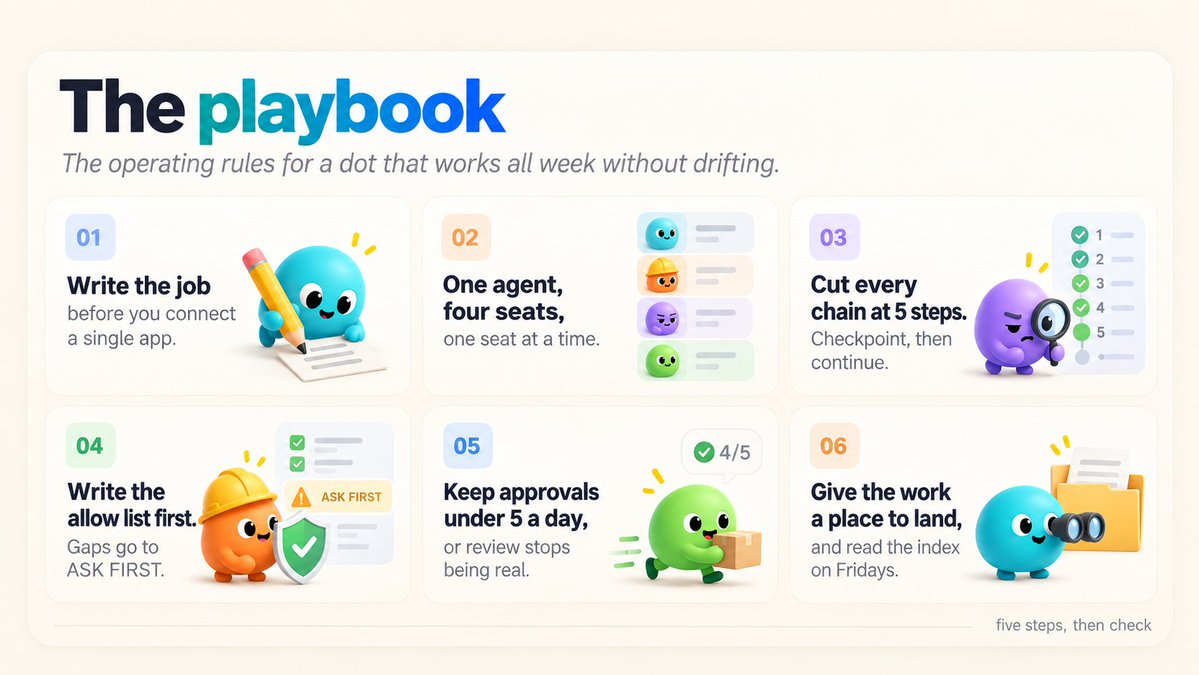
Write the job before you connect a single app.
One agent, four seats, one seat at a time.
Cut every chain at five steps. Checkpoint, then continue.
Write the allow list first. Gaps go to ASK FIRST.
Keep approvals under five a day, or your review stops being real.
Give the work a place to land, and read the index on Fridays.
The point
Dots are the first agent most people will leave running while they sleep. That changes the question from "can it do the task" to "how far does it go before someone looks".
OpenAI's own card gives a hint at the answer: double the chain, more than double the flags.
So do not build a longer chain. Build shorter legs, a Skeptic at the end of each one, and a ladder that only asks you about the things worth asking.
Five steps, then check. That's it.
Launch details are from OpenAI's dots announcement. System card figures are as reported by The New Stack. Plan prices are from launch coverage as of October 1, 2026 and may change.