THE COMPLETE CLAUDE CODE GUIDE: EVERYTHING YOU NEED TO START TODAY

Claude Code went from zero to more than $2.5 billion in annualized revenue in under a year, according to Anthropic figures from February 2026. Its weekly active users doubled within weeks. It is estimated to write around 4% of all public GitHub commits worldwide.

And yet most people who follow AI news every day have never opened it once.
Here is the manual that did not exist: in order, no fluff, with the technical parts actually explained. If you already use it, jump to section 8. If not, start here.
Save this post, and send it to the friend who still uses AI only as a chat.
1. What Claude Code is, and why it is not a chat
A chat takes text and returns text. Claude Code takes a task and runs a loop:
That pattern is called the agentic loop. Everything you learn from here on improves one of those four phases.

Three practical consequences:
2. Where to use it
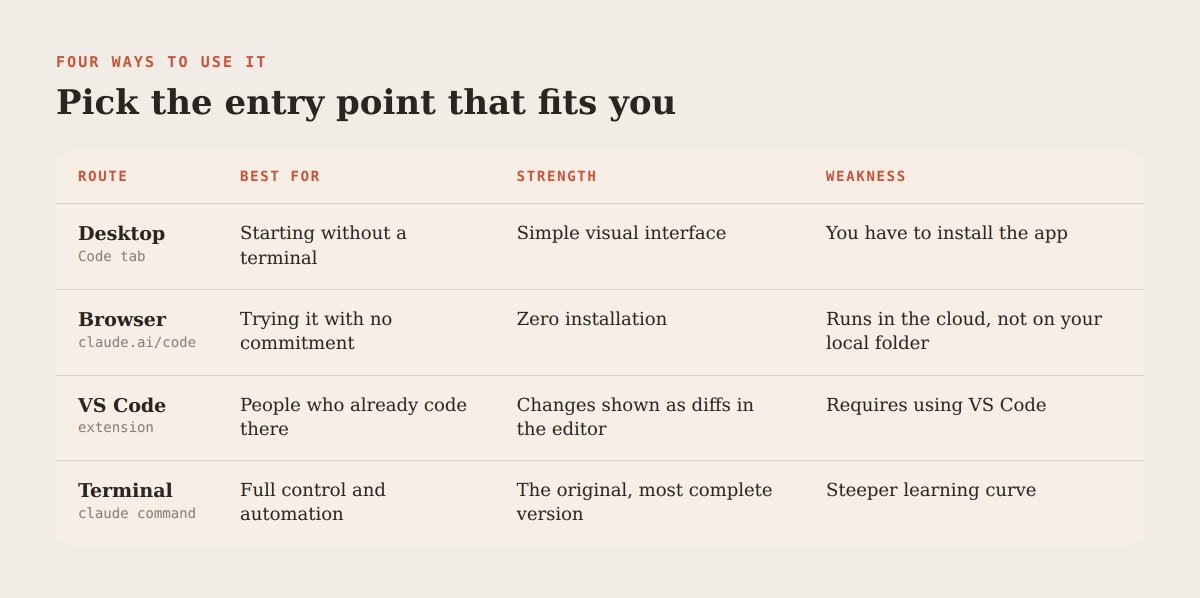
Native install on Mac and Linux:
curl -fsSL https://claude.ai/install.sh | bash
On Windows, from PowerShell:
irm https://claude.ai/install.ps1 | iex
npm install -g @anthropic-ai/claude-code also works. Then go to your project folder, type claude, and sign in the first time. You need a paid plan that includes it, such as Pro or Max, or API credit for pay-as-you-go.
Warning: install commands and plans change often. Check the official docs the same day you install.
3. The concept that explains everything: context
Claude has a context window: a limit on how much text it can hold in mind at once. Everything goes in there: your messages, the files it read, the output of every command, your instructions.
When it fills up, two things happen. It performs worse, because it struggles to separate what matters from noise. And it starts forgetting early instructions.
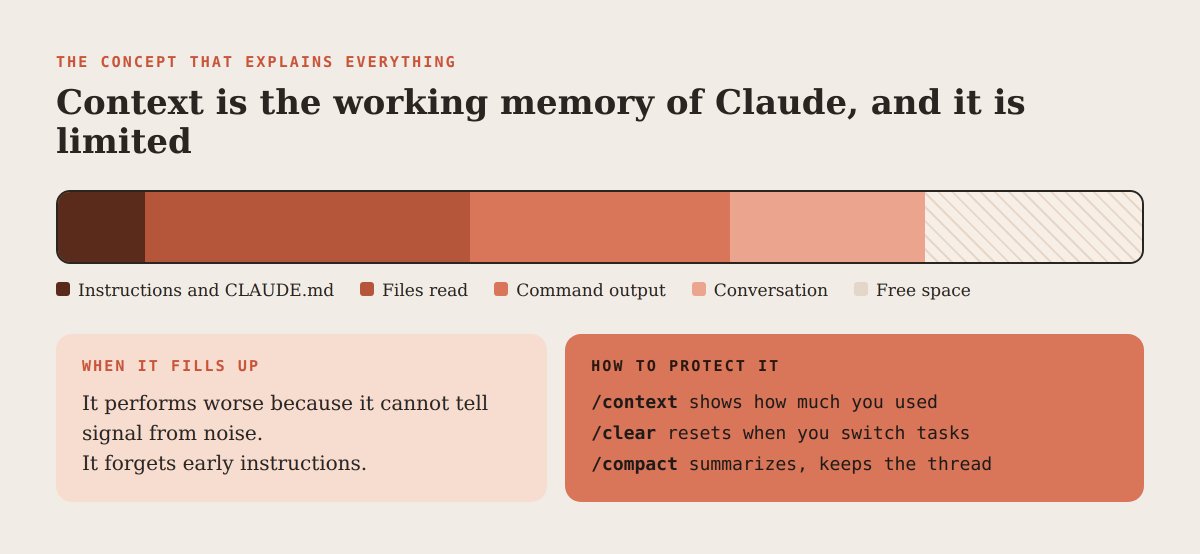
Almost all advanced technique comes from this
Golden rule: one task, one conversation.
4. Permissions: what it can do without asking
By default Claude asks for approval before editing files or running commands. Toggle modes with Shift plus Tab:

You can also set permanent rules in the project settings file inside the .claude folder: what is always allowed, what needs confirmation, and what is blocked, such as reading your secrets file.
Tip: start strict. When a safe command keeps interrupting you, add it to the allowed list. Your setup grows with real trust.
5. CLAUDE.md: the project memory
CLAUDE.md is a plain text file in your project root that Claude loads at the start of every session. It is its instruction manual about you and your project.
It exists at several levels, and the more specific one wins: global in your user folder, per project in the repository root, and per subfolder, loaded when Claude works in that area. You can import other files from it with the @ symbol followed by a path.
Start with /init: Claude explores the project and drafts one. Then edit it. What to include:
What to avoid: explaining the obvious, pasting whole docs, writing novels. A 400-line CLAUDE.md usually performs worse than 40 well-chosen lines. And every time you correct it twice for the same thing, that correction belongs in the file.
6. How to ask well: explore, plan, execute, verify
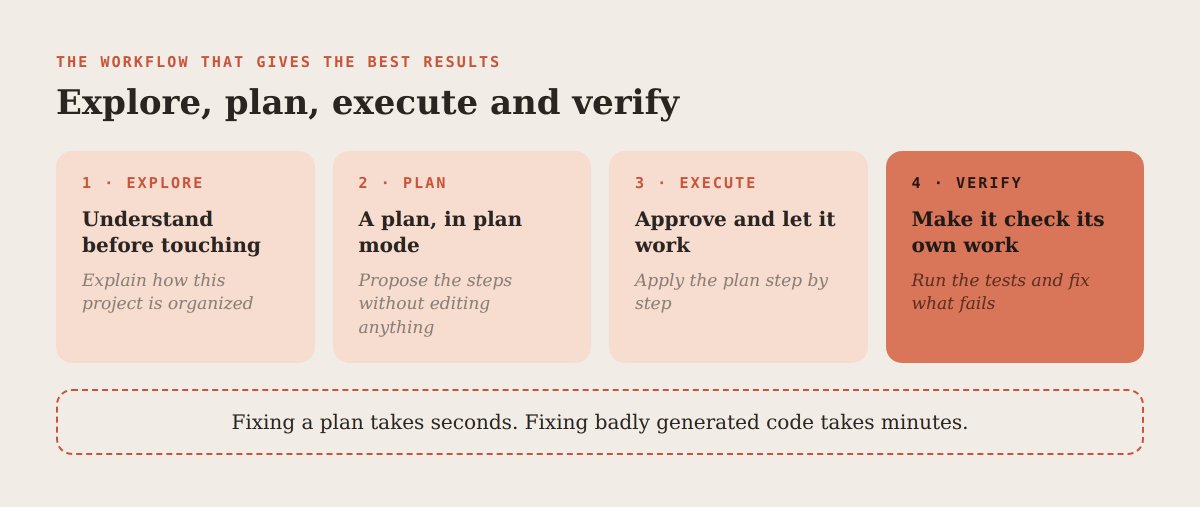
The point that most separates beginners from experts: give Claude a way to check its own work. A test, a linter, a command that must exit clean, a page that must load. An agent that can verify itself corrects itself. One that cannot hands you something that merely looks right
A good prompt has a goal, a scope and a done criterion. For example: the signup form fails with uppercase emails; reproduce it with a test, fix it in the validation layer, and do not stop until all tests pass.
If it drifts, press Escape to interrupt and redirect. Press Escape twice, or use /rewind, to go back to an earlier point in the conversation and the changes.
Warning: Claude will always give you an answer. That does not mean it is correct. Read every diff before approving.
7. The commands to master
From the terminal, claude -c continues your last conversation and claude --resume lets you pick an earlier one.
Tip: the habit that improves results most is running /clear between different tasks. A clean conversation beats a long, polluted one.
8. Extending Claude: skills, commands, subagents, hooks and MCP
This is where Claude Code stops being an assistant and becomes a system of your own.

Skills. A folder inside .claude/skills with a SKILL.md file. The top block holds a name and a description of when to use it; the instructions go below. Claude reads the description and activates the skill when it fits. Ideal for flows you repeat, like your way of reviewing code or writing a post.
Custom commands. A markdown file in the commands folder becomes a slash shortcut. It can take arguments through the $ARGUMENTS variable. Use it for tasks you always run the same way.
Subagents. Markdown files in .claude/agents that define a helper with its own name, description, allowed tools and instructions. It runs in a separate context and returns only the result. Perfect for research or reviews you do not want cluttering your main conversation.
Hooks. Commands that run automatically at specific moments: before a tool is used, after it, or when Claude finishes replying. Typical uses: format a file after every edit, block writes to sensitive folders, or run tests when it finishes. The key difference: an instruction in CLAUDE.md is a suggestion Claude can forget; a hook always runs.
MCP. Model Context Protocol, the open standard for connecting Claude to external tools like Gmail, Notion, Slack, databases or browsers. You add servers with claude mcp add. With MCP, Claude goes from touching files to operating on your real services.
Plugins. Bundles of skills, commands, subagents and connections you install at once.

Warning: do not turn everything on the first day. Start with CLAUDE.md and plan mode. Add a new piece only when you feel the problem it solves.
9. Automation: Claude Code without a conversation
The -p flag runs Claude non-interactively: it receives one instruction, answers and exits. It follows Unix conventions, so you can chain it with other commands through pipes.
Real uses: review the files changed on a branch, summarize the errors in a log, fill templates, or plug it into scheduled tasks and continuous integration pipelines. It is the step from using Claude to building processes with Claude.
10. Security and cost
11. Common beginner mistakes
12. Your first-week plan
Pick a real project, even a small one. Learning on a real case beats a hundred tutorials.

If after a week you do not see the value, cancel with no hard feelings. But do not be one of those who read this, feel ready for twenty minutes, and never open the tool.
Words you can ignore for now
Worktrees. Working on several copies of the project at once without them stepping on each other.
Agent SDK. Building your own agents on the same base as Claude Code.
Checkpoints. Automatic save points to undo changes.
Output styles. Adjusting how Claude responds and acts in each session.
If you skipped this section, you skipped the right one. Come back when you need it.
Hope this was helpful.