DGX Spark Handbook

Author: @0xSero
Reviewers: @alexocheema and @alexzfunk
Special thanks to: @MiaAI_lab
If you are considering running inference locally, you will no doubt learn about this interesting golden brick. It's a machine built to serve AI locally, designed to be small, clean, quiet, and relatively cheap (NVIDIA's DGX Spark page).
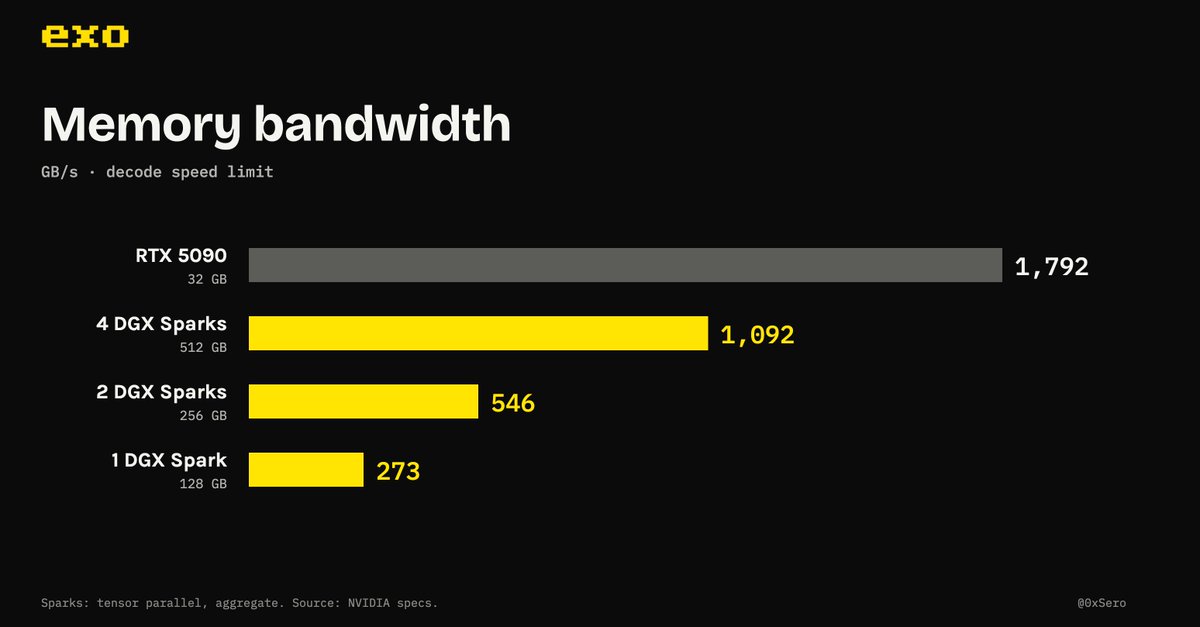
When I first heard of the DGX Spark, I wasn't a fan. Despite its 128 GB of memory, the 273 GB/s memory bandwidth seemed too low. For reference, an RTX 5090 has about 6.5x the bandwidth (1,792 GB/s), despite only having 32 GB of VRAM.
When the Spark first launched, inference engineering practices such as speculative decoding weren't as widely adopted, and most small models were not quite as capable.
As the AI industry progresses and grows, intelligence is being compressed into smaller and smaller sizes, which enables these little boxes be used to their full potential.
Now the DGX Spark is capable of running very intelligent models at parity with cloud services on speed, all from the comfort of your home or office. There is an abundance of AI software that can help you code, file your taxes, study, or just entertain you.
By speed I mean the tokens per second one person sees. The cloud hardware is much faster, but providers share it between many users and tune for cost per token, so each user gets less of it. At home the box is yours, so all of it goes to you. More in the advanced notes.
Sparks are meant to be linked
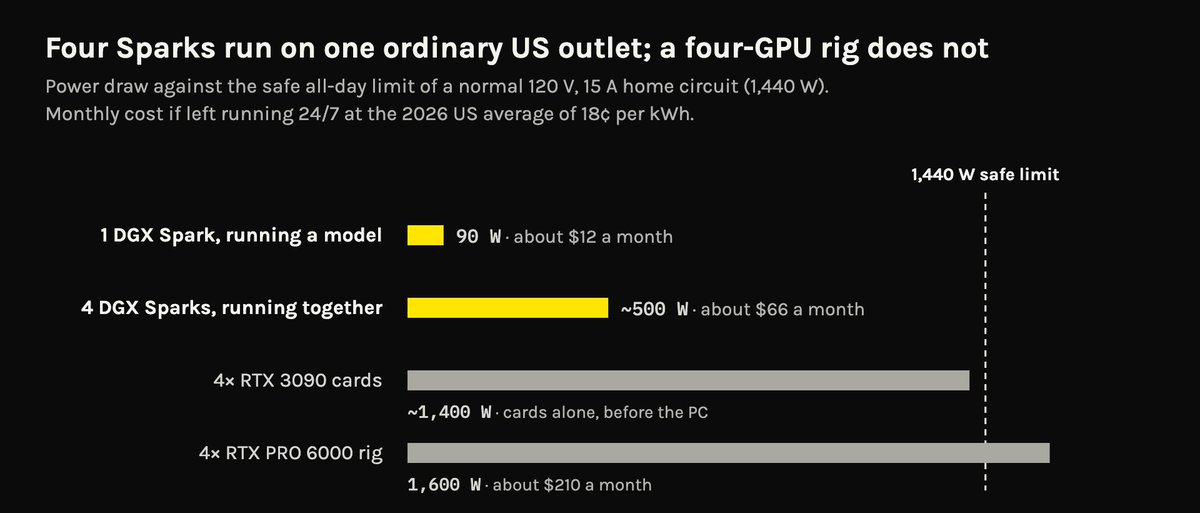
The DGX Sparks draw very little power. They often sit around 95 W with a model loaded and serving.
Because of that, they don't require much cooling and are rather quiet compared to discrete GPUs. You can stack 2 to 4 of these on a standard American circuit without any fear. That, not raw efficiency, is the point: per unit of memory speed, a data center B300 does roughly twice as much work per joule (see the advanced notes). The Spark just plugs into a normal wall socket.
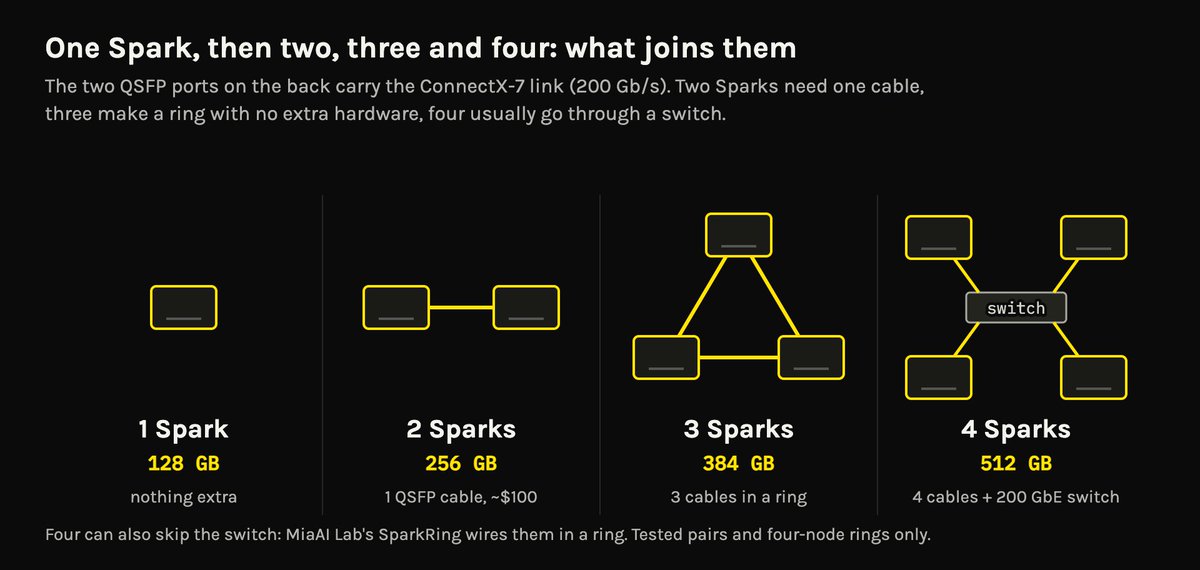
Every Spark has a ConnectX-7 network card with two QSFP ports, rated at 200 Gb/s, or 25 GB/s. This lets you wire Sparks together to increase memory and effective memory bandwidth.
With tensor parallelism, every weight matrix is split across the Sparks, and each Spark reads only its own share, from its own memory, at the same time as the others. So the read speed adds up (NVIDIA's own scaling test):
This scales close to linearly. In NVIDIA's own test, writing got 2x faster on two Sparks and 3.7x faster on four (table 3). It works this well because the ConnectX-7 link has very low latency, and CUDA can move data between Sparks from inside the GPU code (more on why).
Memory adds up the same way: 128 GB each, 512 GB for four, with about 120 GB per Spark effectively usable for AI workloads.
The ability to stack Sparks alleviates its biggest issue, lower memory bandwidth. Its low power draw on a normal socket makes it incredible for a single user or a small household.
Dense vs MoE
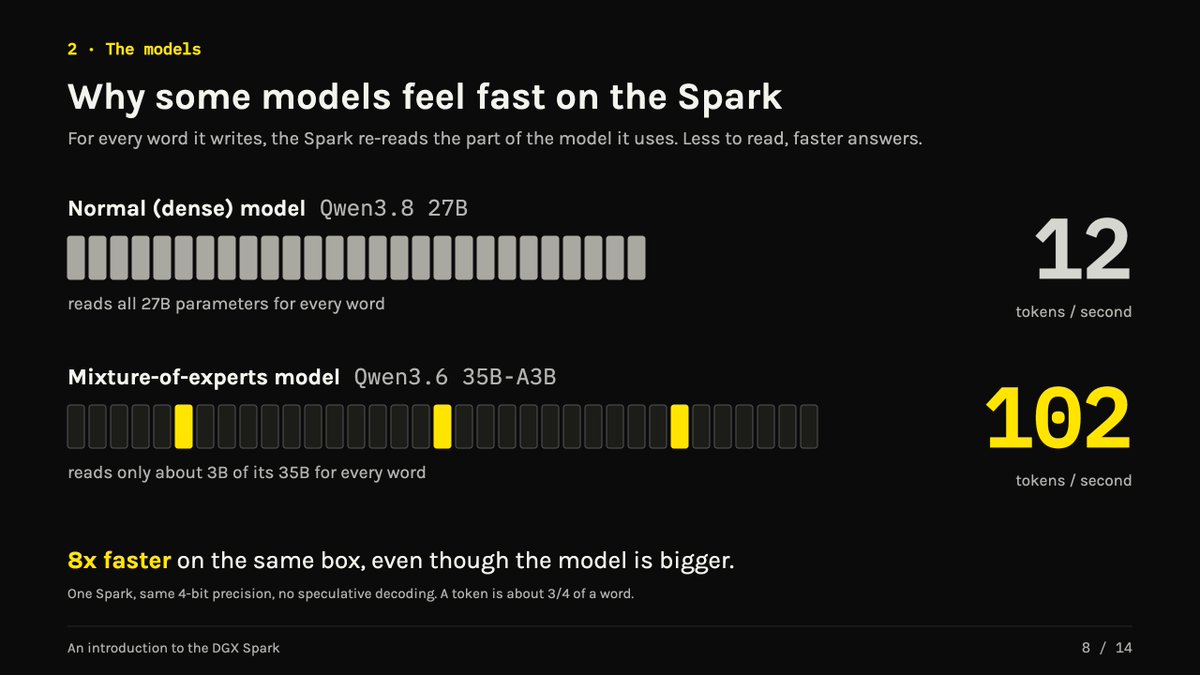
Right now there are two main model architectures: sparse and dense. Mixture-of-experts models like Qwen3.6-35B activate only 3B parameters per token generated, 9x fewer than Qwen3.8-27B.
This makes sparse LLMs especially suitable for the DGX Spark. They pair well with its lower memory bandwidth, giving users a fast experience despite the total size of the model.
MoE isn't just good for the DGX Spark. It's a better architecture in data centers too. What changed for local is a threshold: we expect a certain speed, and the dense models that were smart enough were too big to run that fast at home. MoE models crossed that line, so they're now both useful and fast on local hardware. Dense models may get there eventually too.
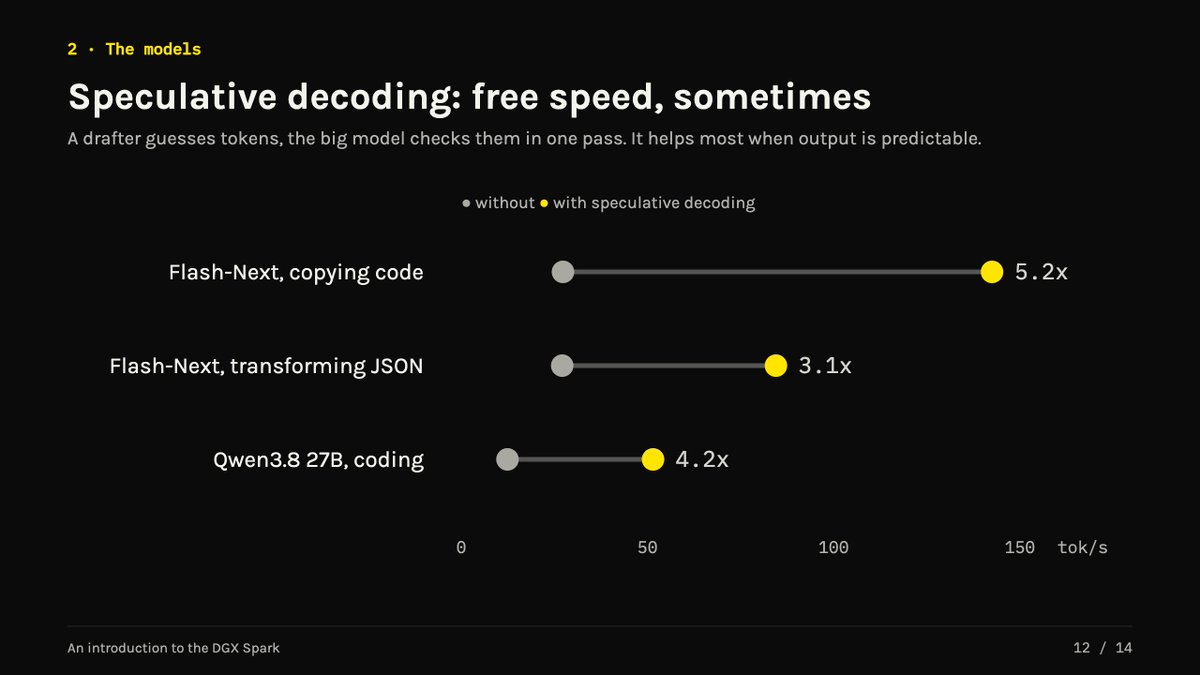
Speculative Decoding
Any LLM with MTP, DSpark, or DFlash will be a better fit, since the draft models are typically tiny and don't require much computation to generate a correct token.
It significantly improves the throughput the Sparks are capable of, at the cost of 1 to 2 GB of memory, which the Spark has in abundance.
Like MoE, speculative decoding helps everywhere, not just at home. But together they're what pushed local AI over the threshold. The best open models used to run painfully slowly on home hardware.
Many agents at once
One Spark can serve eight or more requests together, each still at conversation speed. For example, Qwen3.6-35B, which is capable of basic coding, computer and browser use, video and image editing, and general support, can serve up to 8 concurrent sessions, each at about 40 tok/s.
For reference, on the ChatGPT Pro subscription, GPT-6-Astra runs at an average speed of 37 tok/s.

This works because the Spark has a lot of compute for its memory speed. Serving eight people still means reading the model once per step, but doing eight times the maths, and the Spark has maths to spare. At 16-bit, it has about 100 TFLOPS for 273 GB/s, roughly 370 operations per byte of memory read. An M3 Ultra has about 26 TFLOPS for 819 GB/s, roughly 32 (EXO's numbers). That's about 11x more compute per byte, before counting the Spark's 4-bit hardware, which Macs don't have.
Real work
Qwen3.6-35B on one Spark created a video that got 80,000+ views within a day. It took just 3 minutes: it took a folder with 3 videos, stitched them together, and sped the video up 4x while keeping the frame rate below X's limit.
Costs
The DGX Spark originally listed at $3,999, and that was hiked to $4,699. Prices went up across all hardware in 2026.
The real price is higher. NVIDIA's own store is sold out. The cheapest one I can find is about $5,000, used ones sell for around $6,000, and on 21 September I saw NVIDIA's site asking $7,999 for the same box I paid $4,699 for five weeks earlier.

NVIDIA's marketplace on 21 September. Post

Buying advice
Power, noise and your electric bill
The noise and heat discrete GPUs generate is nothing to scoff at, with 4x 3090 you could easily use 1600-2000w for 1/5th the memory. I had to move my RTX Pro 6000 tower out of my office as it was regularly cooking the room to 35c.
A normal US home circuit can safely run about 1,440 watts all day (US electrical code). Anything more needs a new circuit, which means an electrician.
Where these numbers come from. Each figure is a different kind of reading, so here they are side by side. Monthly cost assumes the machine runs at that draw 24 hours a day, at 18 cents per kWh:
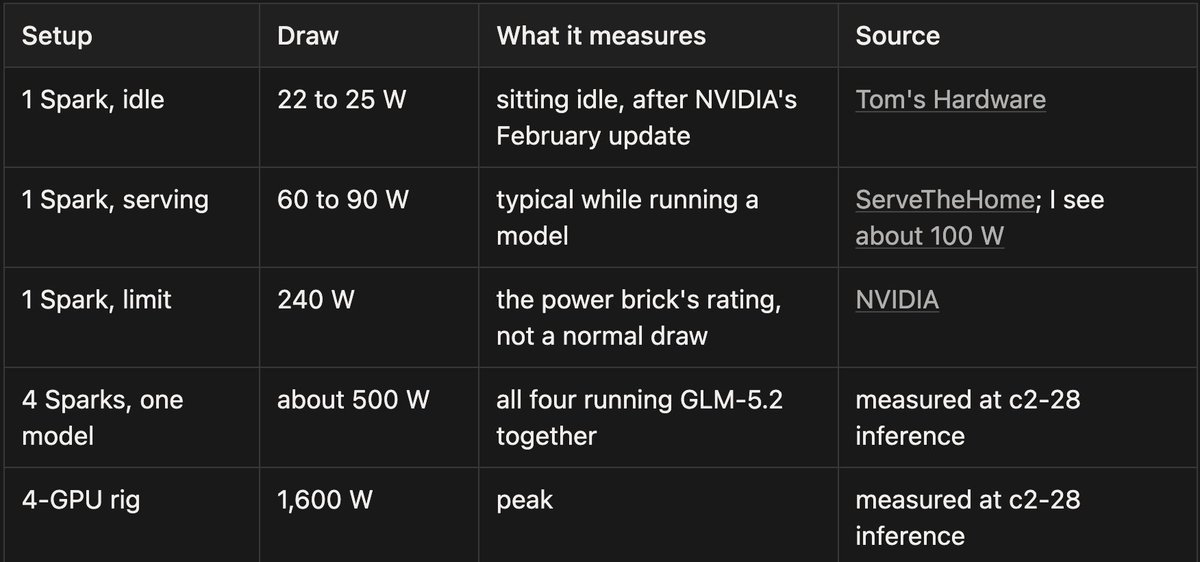
Why four Sparks use more than four times 90 W. The 90 W figure is one Spark serving a model on its own. When one big model is split across four, every Spark works on every word and keeps its network link busy, so each one draws more, about 125 W on average in my reading. So $12 and $66 a month are what running flat out around the clock would cost. Real use, with idle time, costs less.
Electricity isn't getting cheaper either. US home prices are up about 5% this year, to around 18 cents per kWh, partly because of all the new data centers. In August, my own bill doubled to $1,000 a month, with the GPU rig, two Sparks and four air conditioners all running.
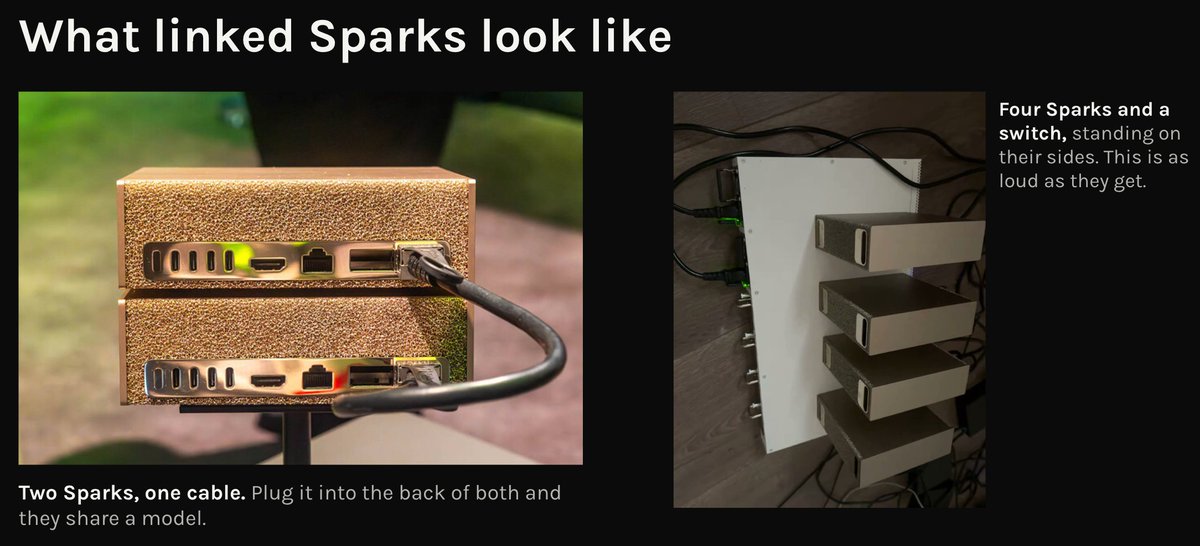
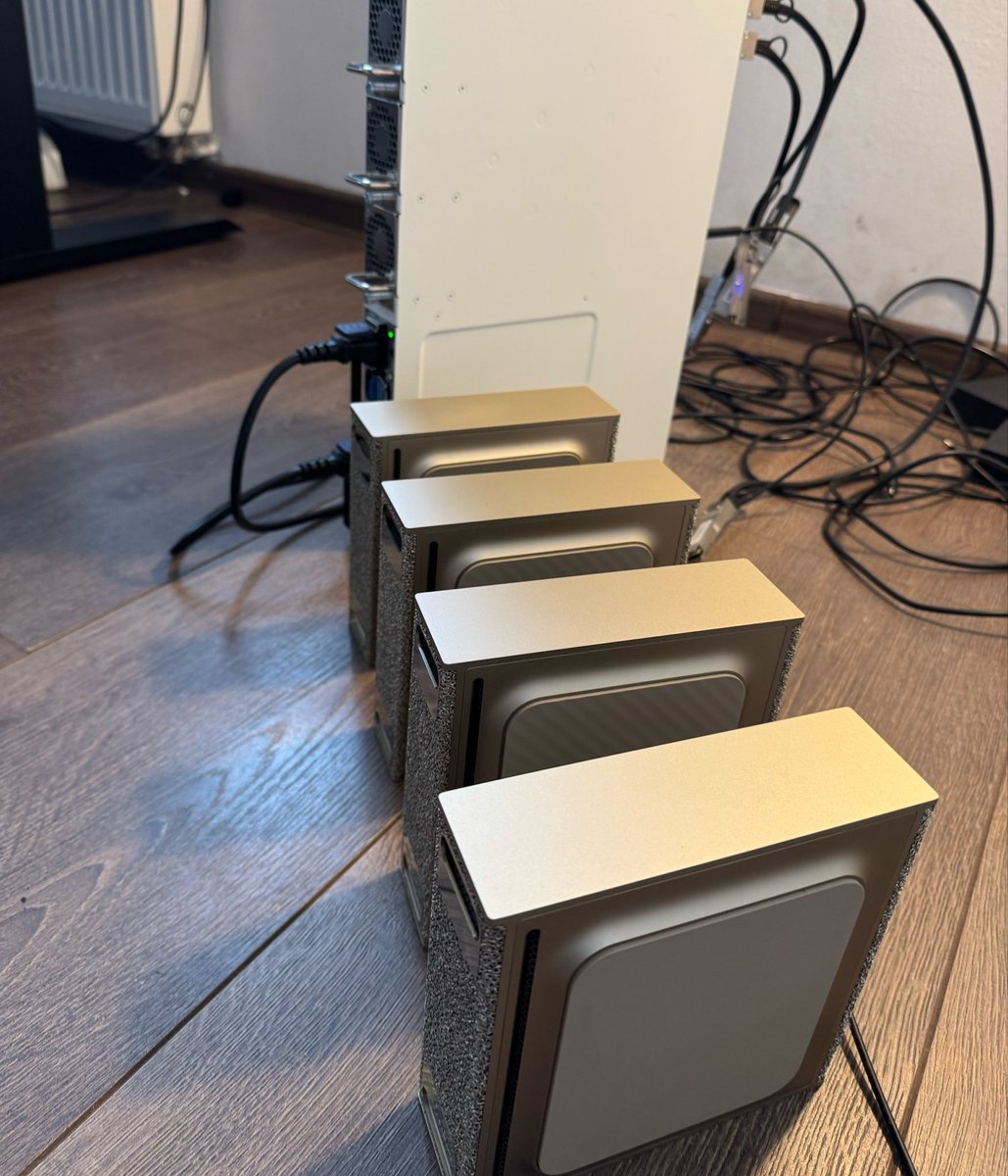
And the noise? My GPU rig sounds like a jet engine. This is the loudest my four Sparks ever get:
A few practical notes:
The six models I actually run
I've tried dozens. These are the six I keep coming back to.
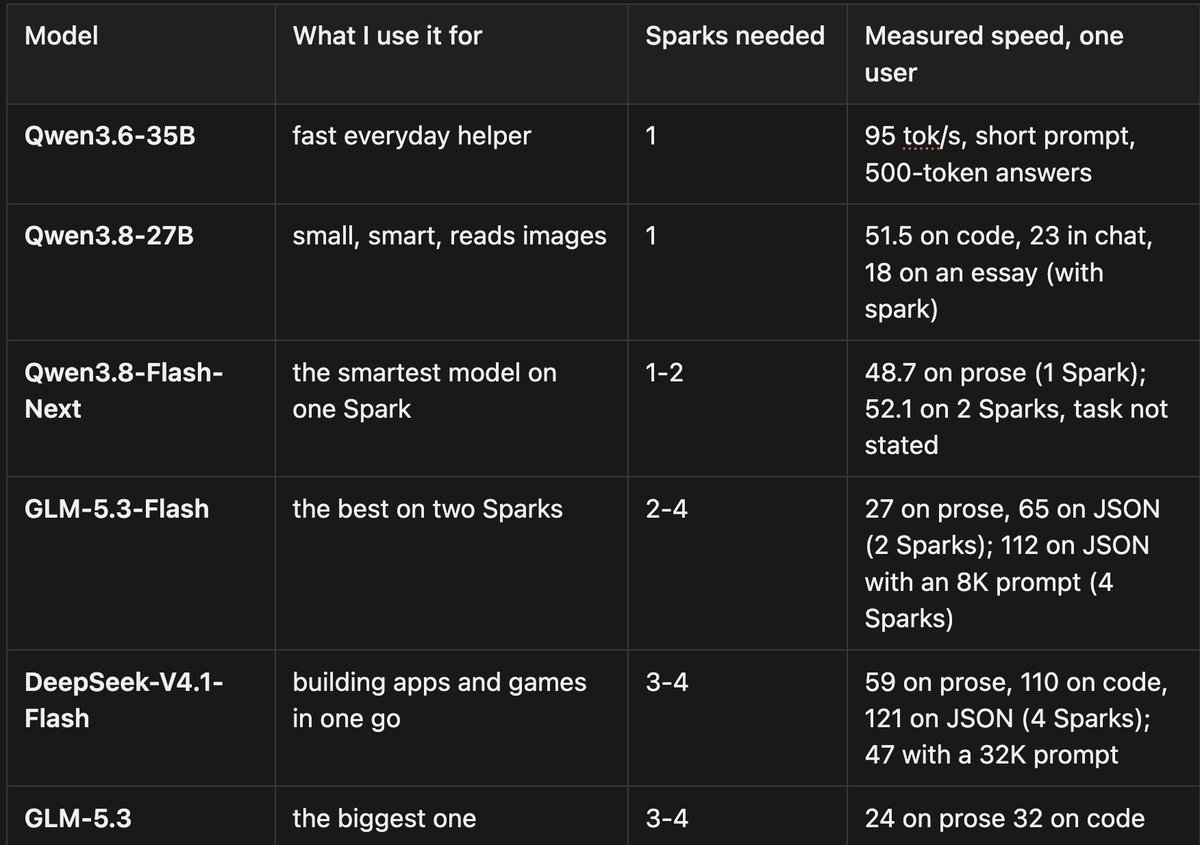
A token is roughly three quarters of a word, and anything over 30 reads like a normal conversation.
Why every number names a task. Most of these recipes use speculative decoding, where a small helper guesses ahead. Code and JSON are easy to guess, prose isn't, so the same model on the same box can run twice as fast on one than the other. Longer prompts slow things down too. So every speed here says what was being written and how long the prompt was:
A proper way to measure this across many tasks is NVIDIA's SPEED-Bench, which tests speculative decoding on real prompts from 11 categories and input lengths from 1K to 32K tokens. I haven't run it on the Sparks yet.
Qwen3.8-Flash-Next on two Sparks building animations and a small game. (21 September) Post
Where to get them. Each model has an official page, and section 6 has a tested Spark recipe for every one:
How big models fit at all
The answer is quantization. Quantization compresses a model's weights, and it's lossy: each weight is stored with fewer bits (say 4 instead of 16), so the model shrinks to a quarter of the size, but some detail is lost. The aim is to get as close as possible to the original model's behaviour while compressing the weights.
The more you compress, the worse the quality. Turboderp measured this for Qwen3.8-27B. Each dot is one compressed version. Further left is smaller, lower is closer to the original:
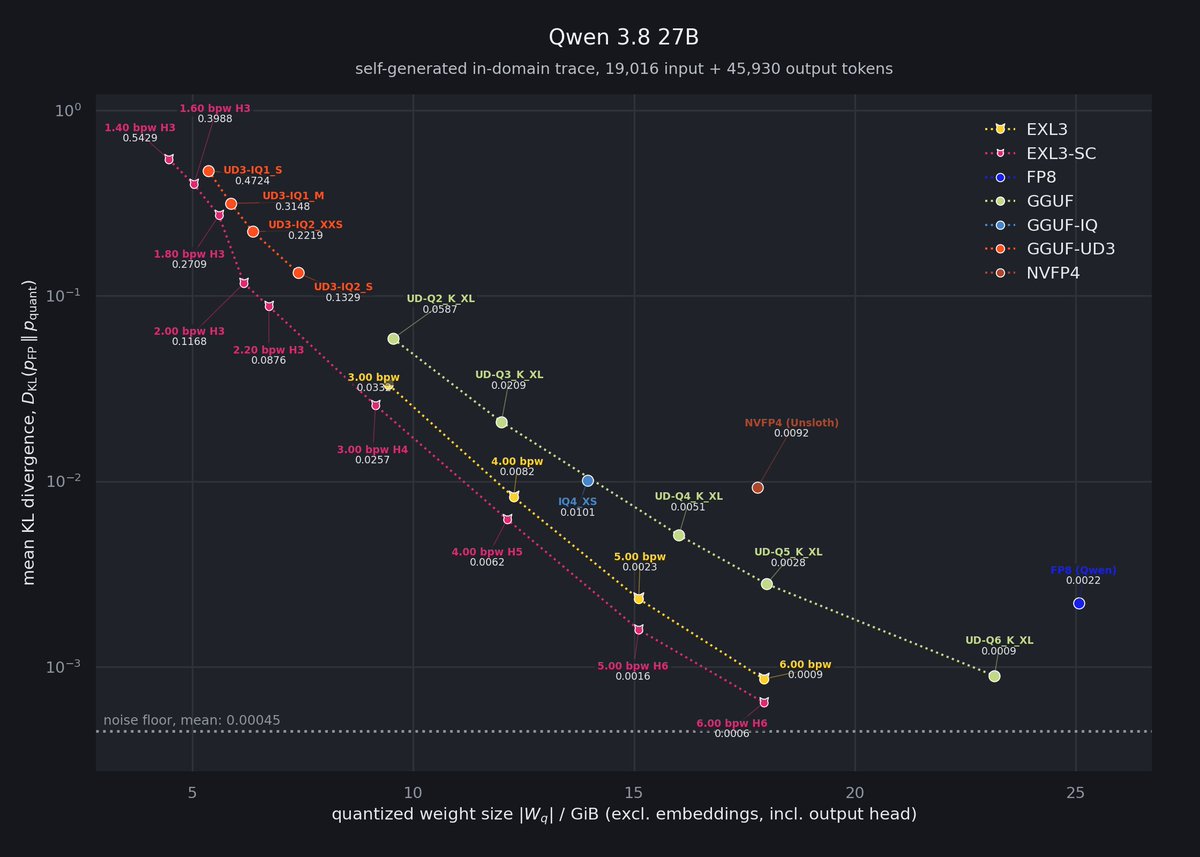
Mean KL divergence against disk size for compressed versions of Qwen3.6-35B-A3B, from several providers. Log scale. Chart: https://huggingface.co/turboderp/Qwen3.8-27B-exl3
Two formats matter on the Spark:
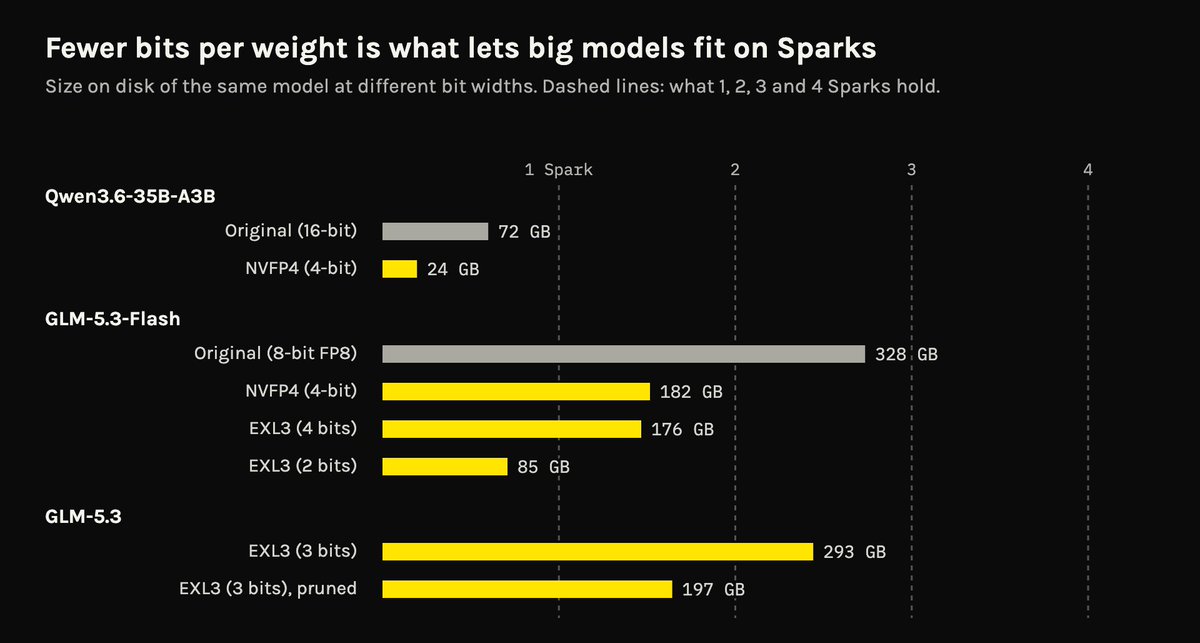
Tip: 4 bits is the sweet spot for smaller models, 3 bits for larger models
How to tell if a squeezed model is still good. Good model cards report how close the small version stays to the original. Two numbers to look for:
6. From one Spark to four: a step-by-step path
This is the part I get asked about most. Go one step at a time. Each step works on its own, so stop wherever you're happy.
Most recipes below come from MiaAI Lab, who packages the best Spark setups into repos you can clone and start with one script. A few are mine. Every one lists what it was tested on and how fast it ran.
Do these once, on every Spark:
Step 1: one Spark
Start with LM Studio. Follow NVIDIA's step-by-step guide, download Qwen3.6-35B, and start chatting. It takes about an hour. This tells you the box works before you touch anything harder.
Then move to a recipe. Recipes use vLLM or SGLang, which are faster than LM Studio and serve many agents at once. Pick one:
The first one is the easiest. It's three lines:
git clone <https://github.com/MiaAI-Lab/Unsloth-Qwen3.6-35b-NVFP4-DGX-Spark.git>
cd Unsloth-Qwen3.6-35b-NVFP4-DGX-Spark
./start.sh
When it's up, you have an OpenAI-style address on the Spark. Point Pi, opencode, Open WebUI, or whatever tool you use at it.
Tip: if a model won't start, it's almost always memory. Close other models first. One Spark runs one big model at a time.
Step 2: two Sparks
This is the setup I recommend most. As I put it in August: "2 DGX Sparks and you're set."

The cable. You need one short QSFP cable between the two QSFP ports. Any of these work (cable guide):
The link runs at 200 Gb/s whichever you buy. Don't use USB-C or the 10 GbE port for this. They are far too slow.
Set up the link. Follow NVIDIA's connect two Sparks playbook. It gives each port an address and checks the speed. Then set up passwordless SSH from the first Spark (the "head") to the second (the "worker"). Every two-Spark recipe needs that.
I recommend asking claude or gpt to set this up for you, it's easier.
Pick a recipe:
Most two-Spark recipes look alike: copy the example settings, put in both Sparks' addresses, download, start. This is the GLM-5.3-Flash one:
cp .env.example .env     # set HEAD_IP and WORKER_IP
./download.sh
./start.sh
Heads up: linking Sparks works, but it's where the software is least polished. Follow a tested recipe and set aside an afternoon the first time.
Step 3: three Sparks
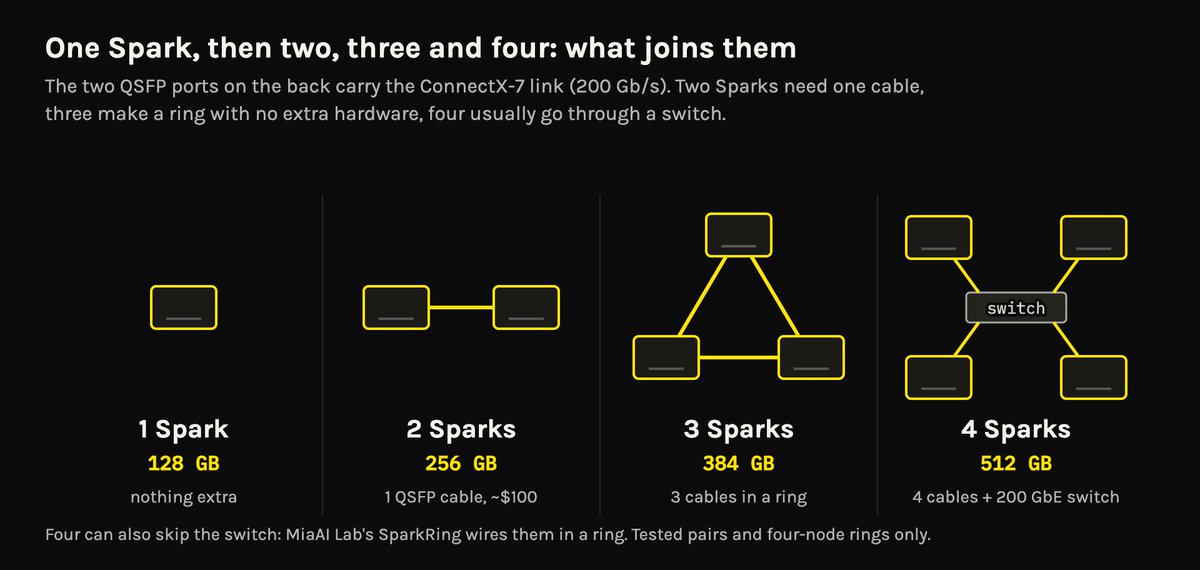
Three Sparks need no switch. Each Spark has two QSFP ports, so you cable them in a triangle: A to B, B to C, C to A. That's three cables. NVIDIA supports this as a switchless ring.
Three Sparks give you about 384 GB. That's enough for things two can't hold:
The DeepSeek recipe is a good example of how the bigger ones run. It's a few steps, not one:
./start.sh doctor    # checks ssh, docker, links, disk
./start.sh share     # shares the model folder with the other Sparks
./start.sh serve     # starts the workers, then the head
Tip: some models only split evenly by 2 or 4. Check that the recipe says "3x" before you buy the third.
Step 4: four Sparks
Four Sparks give you about 512 GB. There are two ways to connect them.
Option A: a switch (what I use). Every Spark gets one cable to a 200 GbE switch, so each one is one hop from every other. NVIDIA has a playbook for this. The switches people use:
As I said in September: "I don't think there's a better deal on the market than 4x sparks with a microtik switch."
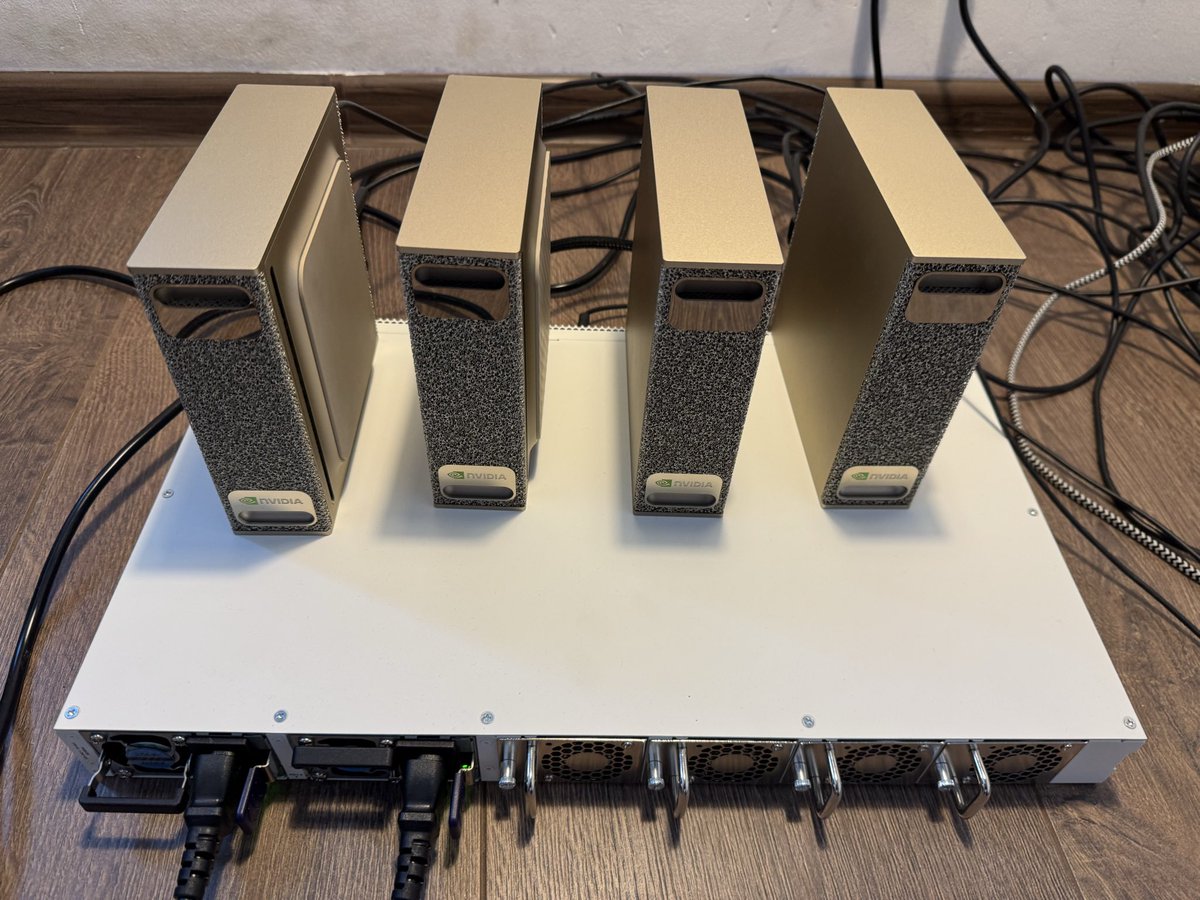
Option B: no switch. Wire the four in a ring, each Spark cabled to its two neighbours. Sparks that aren't neighbours talk through the one in between. It saves the switch, but it's harder to set up:
Pick a recipe:
My own best runs on four are 118 tok/s for GLM-5.3-Flash with a DFlash2 helper, and 83.8 to 95.3 tok/s for DeepSeek-V4.1-Flash on short prompts (post).
Tools that help at every step

Conclusion
The Spark is a memory box. It holds big models, runs them quietly on house power, and gets better every time you add another one.
If you're starting today:
Would I buy them again? Yes. And if I were starting over, I'd buy two on day one.
Advanced: how linking Sparks scales
You don't need this to use a Spark. It's for when you want to know why the numbers look the way they do.
Close to linear, for writing
Every word the model writes means reading the model's active weights from memory. Split the model across Sparks and each one reads its share at the same time, so the read speeds add up.
NVIDIA measured this. Going from one to two to four Sparks, the time to write each word fell from 269 ms to 133 ms to 72 ms. That's 2.0x with two and 3.7x with four (NVIDIA's blog, table 3).

It gets that close because the ConnectX-7 link has very low latency, and the swaps between Sparks can happen inside the GPU code itself. This explanation for Macs covers the same idea in more detail.
After each layer, the Sparks swap their partial results before the next layer can start. The swap is small, but it happens for every layer and every word. Each one costs a little time that doesn't shrink when you add Sparks.
The other two ways to go faster
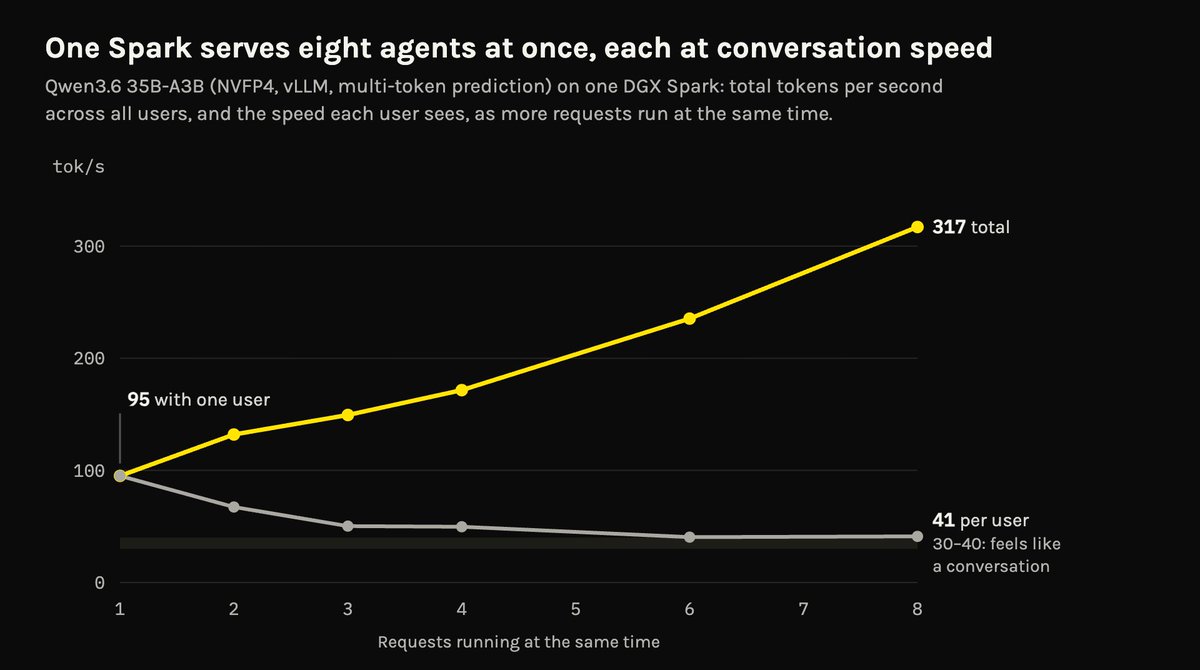
Qwen3.6-35B-A3B at 4 bits on one Spark, with a speed-up helper on. Source: local-ai-registry speed test, August 2026.
Cloud AI and Local AI are different
A cloud GPU is far faster than a Spark. But cloud providers share each GPU between many users, and they pick a point on the trade-off between cost per token and speed per user. Most pick cost, so each user gets fewer tokens per second than the hardware could give one person. InferenceX charts that trade-off for Qwen3.8-Flash-Next.
At home, that trade-off doesn't exist. The box is yours, so you can spend all of it on one person. That's why a Spark can feel as fast as a cloud service, even though the hardware isn't.
sm_121: why Spark software is its own world
Every NVIDIA GPU has a "compute capability" number that tells software which instructions it has. The Spark's GPU is 12.1, or sm_121 (Simon Willison's first look). The RTX 5090 and RTX PRO 6000 are sm_120, a close cousin. NVIDIA's data center chips, B200 and B300, are sm_100 and sm_103, a different family.
That matters because the fastest AI code is written for one family at a time. When the Spark launched, a lot of it either didn't run or ran slowly (NVIDIA forum, vLLM issue).
The fix has been people writing Spark-specific code:
Advanced: the Spark as a research machine
This is the part I didn't expect. The Spark is slow at writing, but it's very good at reading. Most research work on models is reading.
What the Spark does best: prefill
A model does two different jobs:
So a Spark reads prompts 13 to 41 times faster than it writes:
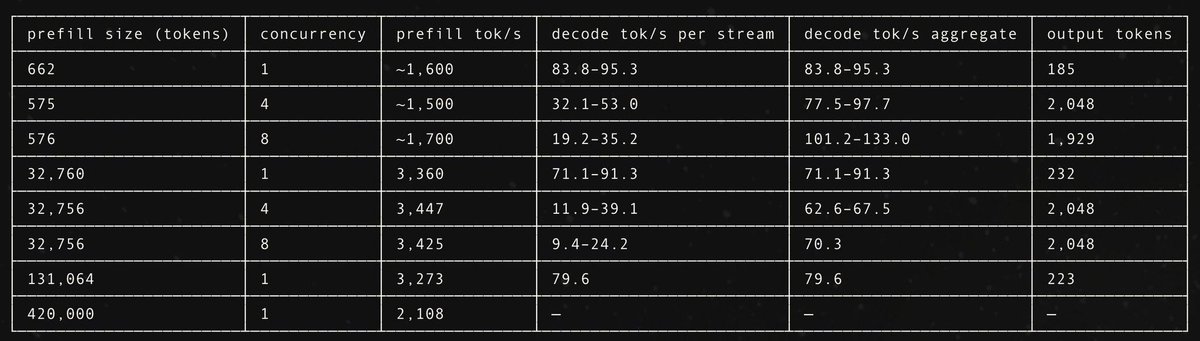
DeepSeek-V4.1-Flash on four Sparks: 3,360 tok/s reading a 32K-token prompt, 3,273 at 131K, while writing stays around 70 to 95. (20 September) Post
Why that's what research needs
Almost everything I do to make models smaller is reading, not writing:
My own workflow moved for exactly this reason. "I'm running all my pruning/exl3/benchmarking on the DGX Sparks now, I get the 6000s for inference. It's slower, but 2-3 days vs 12h is fine." The one-Spark DeepSeek that passed 100,000 downloads is a REAP-pruned, EXL3-squeezed model.
How that ties into research goals
If your goal is to learn something about a model, the Spark fits well:
Advanced: GB10, GB300, and the Spark as extra memory
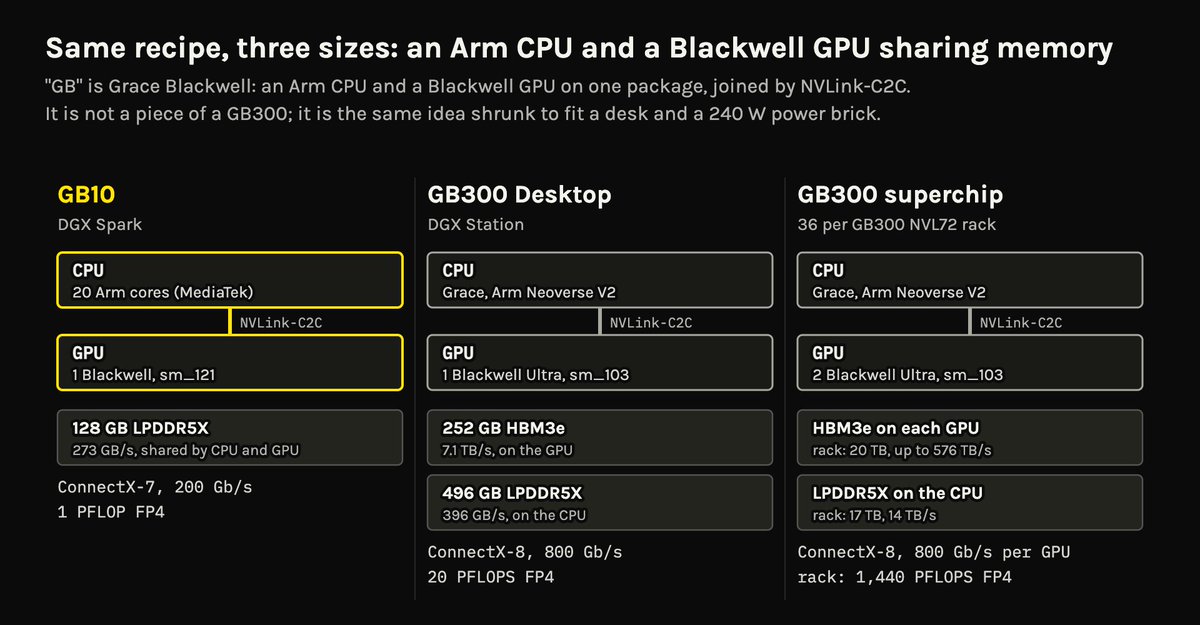
"GB" means Grace Blackwell: an Arm CPU and a Blackwell GPU on one package, sharing memory over a fast link called NVLink-C2C. The GB10 in the Spark is the smallest version of that idea, with a 20-core Arm CPU built with MediaTek.
The GB300 is the data center version: a Grace CPU with Blackwell Ultra (B300) GPUs. It sits in NVIDIA's GB300 NVL72 racks, and one GB300 powers the DGX Station. The GB10 isn't a piece cut from a GB300. It's the same design, made small, which is why the same software runs on both.
Conclusion
The DGX Spark has carved a space out for itself in my home and is growing in support, usefulness, and capability by the day.