Grok Bot for Solutions Engineers

The open secret about solutions engineering is that we don't own anything. The product belongs to product. The number belongs to the account exec. The roadmap belongs to someone I have to go and charm quarterly. What an SE actually owns is the next sixty minutes: the demo that has to land, the workshop that has to stick, the security objection at minute thirty-eight, the follow-up that has to sound like me and arrive before the customer writes their own recap.

And nobody reports to us. You can be the most senior SE in the building and your org chart is still dotted lines in every direction and a solid line to nothing.
The role is shifting under our feet anyway. Customers arrive having already tried the product, already read the docs, sometimes already built the integration badly. The value of an SE is less "explain the thing" and more "be the person who's already thought three meetings ahead." That takes preparation time nobody gives you.
Grok Bot has been the biggest change to how I work this year. Bigger than any feature I've demoed, which is saying something given what I demo for a living.
What Grok Bot actually is
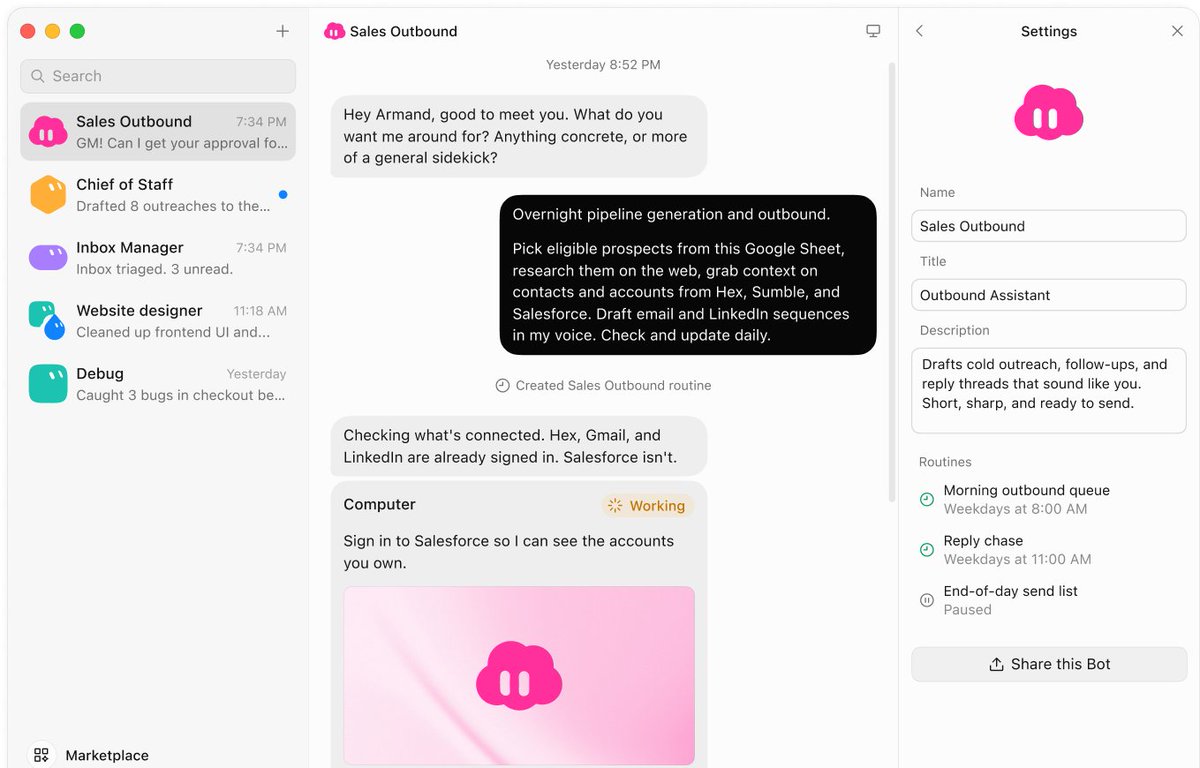
Grok Bot is a team of always-on bots, each with its own computer. They sit connected to my Slack, Gmail, calendar and call notes, run on schedules or triggers, and do multi-step work while I'm in a meeting. The framing that made it click for me: it isn't a smarter autocomplete, it's headcount. For the first time in my career, something reports to me. I refer to them as my team, and I mean it.
The gap Bots cover
If you're an SE, you know the pain. Back-to-back calls, no gap to prep, and you jump from one straight into the next. I don't always remember what I promised last Tuesday. Two extra names show up on the invite an hour out, no note on who they are. And the next sixty minutes still have to land.
Here's who covers that gap...
My Grok Bot team - Pokemon Themed

Chief of Staff. The only generalist. Owns calendar, Slack and inbox triage, and produces the morning attention list and the pre-meeting brief. I used to walk into a call cold and spend the first ten minutes rediscovering context the customer assumes I have. Now, thirty to sixty minutes before any external call, I get five bullets: who's in the room and what they care about, what we promised last time, prep I haven't done, one risk, and links to the relevant decks and demo assets.
The setup prompt is roughly:
Before any external meeting, cross-reference the invite with Slack, email, and my call notes. Give me: attendees and their angle, open promises from us, prep I haven't done, and one risk. Five bullets max. Skip internal holds and anything titled "focus" or "hold".
The last clause matters. You don't want to be briefed on your own lunch block (learned the hard way). It's also told to stay quiet if nothing changed. A chief of staff who narrates a normal day is a liability.
Demo Builder. Spinning up demo accounts, folders and environments eats the time I should spend personalising. This bot does it through its own virtual machine, much faster than I can, across Snowflake, Databricks, Grafana and Notion. That speed is the entire reason I get to personalise for customers instead of reusing a generic tenant. I built a full cloud data warehouse > dbt > dashboard demo in under ten minutes, starting with no accounts and no dummy data.

Roaster. Nobody watches their own calls back, so the same miss repeats next week, and the week after. After every Gong call, Roaster watches the recording and rates it: talk track, missed questions, the places where I explained when I should have asked. It pulls tips from how other people on my team handled the same motion and tells me what to take into the next call. Blunt because I told it to be. Slightly annoying. Frequently right.

Deckster. A new meeting lands and I need a deck that looks like mine, not a generic template. Deckster builds it in Figma or Google Slides using my design, my style and my rules, pulling context straight from emails, Granola notes or other bot conversations. I don't copy anything over. It also keeps my existing decks alive: a weekly routine sweeps them and updates the content with the latest product changes, so I'm never presenting a slide that's a release behind.

Enablement Partner. The workshop is the easy part. The value dies in the follow-through nobody has time for. This bot autonomously owns everything after: the recording becomes trimmed clips of the useful segments, a Q&A sheet from what was actually asked, and skill or follow-on session ideas mapped to what that team is trying to do. It drafts the follow-up sequence; I review and send. That's a standing rule, not a preference.
🚨 Trial Watcher 🚨. Evaluations go quiet, and you find out the trial died Friday when you check in on Monday. Deal-katchu watches clocks and expiries: which evaluations are going quiet, which trial dies Friday, which technical champion hasn't logged in since kickoff.

Why not "just use Agents"?
I tried that first. It was mediocre at everything. Context from one job bled into the next and nothing came out sharp. A generalist blob will not spin up a personalised Snowflake tenant well and also write decks and brief me.
So: named bots with scoped memory and their own computers. Chief of Staff does not write decks. Deckster does not RSVP to my Monday pile. Demo Builder does not rate my calls. Failure is legible. When something comes out wrong, I know exactly which teammate to retrain.
Lessons
If you remember one thing from this article, make it this:
↪️ If it doesn't land, make a skill. The first time something I'm trying doesn't sound right, or doesn't work, I don't prompt harder. I write a skill so the next one already does. That's what 10x'd the work.
The point
None of this replaces the sixty minutes. It just means I walk into them prepared like someone with a team behind her, because, finally, I have one.
If you're an SE running Grok Bot, I'd genuinely love to see your setup. Tell me what your team looks like and write your tips below.
