Graph Engineering: The Complete Guide to Building Multi-Agent AI Systems

Most people building multi-agent AI systems are focusing on the wrong layer.

They obsess over prompts, models, tools, memory, and how many agents they can spawn.
But once you have more than one agent, the hardest problem is no longer making an individual agent smarter.
It is deciding how the work itself should move.
Which agents can run at the same time? Which ones actually depend on each other? What data should move between them? Where should results converge? What gets verified? What happens when one node fails? And which actions should remain impossible until a human approves them?
That layer has a name:
Graph Engineering.
A graph turns a pile of agents into a system.
Instead of:
A → B → C → D → E
you start thinking in nodes, dependencies, parallel branches, reducers, verification gates, loops, failure domains, and human checkpoints.
By the end of this guide, you’ll know how to design multi-agent systems that are faster, cheaper, easier to debug, and much harder to fool.
If you want more practical breakdowns on AI agents, workflows, and systems like this, subscribe to my Substack: @LunarResearcher
And follow me on X: @LunarResearcher
1. A workflow is not a checklist
The easiest way to waste an AI system is to confuse order with dependency.
Suppose your workflow says:
Most people run those four steps in order because they were written in order.
But the first three do not need each other.
They only need to finish before step four.
So the real shape is:
            pricing ──────┐
                          │
reviews ──────────────────┼──→ market brief
                          │
      docs ───────────────┘
That drawing contains more engineering information than the numbered list.
The important question is not:
“What comes next?”
It is:
“What information must exist before this can start?”
That single question exposes fake dependencies immediately.
If task B never consumes anything produced by task A, then A → B is not a real dependency.
It is just waiting.
2. The graph needs state, not just arrows
Once people discover parallel agents, they usually make the next mistake: every agent receives a huge prompt and returns a huge blob of text.
That works in a demo.
It collapses in a real graph.
A useful graph needs explicit state.
Not “whatever the previous model said.”
Actual state.
For example:
ResearchFinding {
  claim
  evidence
  source
  confidence
  timestamp
}
Now the next node is not reading a conversation.
It is reading an object.
That difference sounds small. It is not.
Structured state gives you three things:
1. Replaceability.
You can swap one worker for another without rewriting everything downstream.
2. Inspectability.
You can see exactly what entered and left a node.
3. Determinism around the model.
The model can still be fuzzy inside the box, while the interface around the box stays strict.
This is how you stop building a chain of chats and start building a system.
The agent can improvise.
The graph should not.
3. Use the dependency test before you add another agent
There is a brutally useful test for every arrow in your workflow:
What exact data crosses this arrow?
If you cannot answer that in one sentence, the edge is suspicious.
Bad answer:
“The next agent should know the previous agent finished.”
That is status, not dependency.
Better answer:
“The reviewer receives the researcher’s claim, source URL, and evidence excerpt.”
Now the edge has meaning.
You can apply this test to almost any workflow:
review file A → review file BWhat crosses?
Nothing.
Delete the edge.
extract invoices → calculate totalWhat crosses?
The invoice values.
Keep the edge.
generate three headlines → choose the strongest
What crosses?
The three candidate headlines.
Keep the edge.
The goal is not to maximize parallelism.
The goal is to remove fake synchronization.
4. Parallelism is not free
Once people realize independent work can run at the same time, they often go too far.
Twenty workers become two hundred.
Two hundred become two thousand.
The graph gets wider.
The bill gets wider too.
Parallelism reduces wall-clock time.
It does not magically reduce the amount of work.
In fact, wide graphs often create new costs:
So every serious graph needs a width budget.
Think of it like memory allocation.
You would not launch 500 database queries just because the database technically accepts connections.
Do not launch 500 agents just because your runtime technically can.
A useful rule:
Add width only when the extra worker increases coverage more than it increases reconciliation cost.
Five researchers looking at five genuinely different angles can be excellent.
Fifty researchers searching the same topic with slightly different prompts is usually noise generation.
The unit you should optimize is not “number of agents.”
It is useful independent coverage per dollar.
5. The critical path matters more than total steps
A linear workflow is slow because every duration is added together.
If five tasks take:
8s + 12s + 6s + 10s + 9syour workflow needs roughly 45 seconds.
If four of those tasks are independent, the system may only need to wait for the slowest one before merging.
Suddenly the important number is not the sum.
It is the critical path.

That changes how you should read a workflow diagram.
Do not count boxes.
Look for the longest unavoidable path from start to finish.
That path determines latency.
Everything else is an optimization opportunity.
This is why a 40-node graph can finish faster than a 7-node chain.
The graph is bigger.
The critical path is shorter.
6. Compress before you reason
Here is one of the most expensive architecture mistakes in agent systems:
20 workers
    ↓
one giant synthesis prompt
All raw outputs get shoved into one final model.
Now the final node has to:
You have turned your smartest model into a garbage collector.
Do not do that.
Put a reducer before synthesis.
The reducer should remove work that does not require judgment.
Examples:
deduplicate IDs
sort by timestamp
group by source
drop malformed records
count votes
normalize labels
remove exact duplicates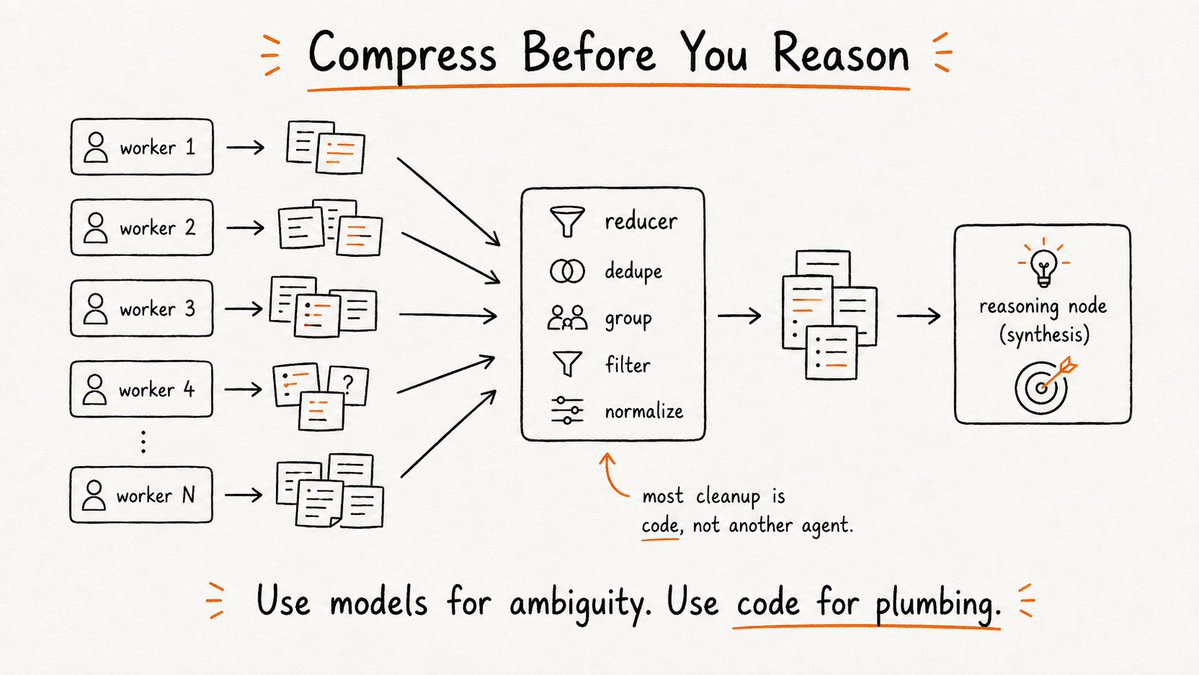
Most of that should be plain code.
Not another agent.
Then your expensive reasoning node receives a smaller, cleaner set.
The architecture becomes:
workers
   ↓
deterministic reduce
   ↓
reasoning / synthesis
This is one of the strongest cost optimizations in the whole design space.
Use models for ambiguity.
Use code for plumbing.
7. Verification should be asymmetric
A worker should not be rewarded for defending its own answer.
That creates confirmation pressure.
Instead, give verification a different objective.
The worker says:
“Find the strongest answer.”
The verifier says:
“Find the reason this answer should be rejected.”
Those are not the same task.
Good verification is adversarial.
For a research system:
WORKER:
Find evidence supporting or explaining the claim.

VERIFIER:
Try to falsify the claim.
Check the source.
Check the date.
Look for conflicting evidence.
For code:
WORKER:
Implement the change.

VERIFIER:
Try to break it.
Run tests.
Inspect edge cases.
Look for regressions.
For strategy:
WORKER:
Build the recommendation.

VERIFIER:
List conditions under which this recommendation fails.
The verifier should have permission to kill output.

Otherwise it is decoration.
A useful graph does not just create more candidates.
It creates a selection pressure that bad candidates must survive.
8. Design failure domains before the graph runs
A real graph assumes nodes will fail.
Not because your system is bad.
Because distributed work always fails somewhere.
A request times out.
A source disappears.
A tool returns malformed data.
A model ignores the requested format.
A worker gets rate-limited.
The architecture question is:
How much of the graph should die with it?
The wrong answer is:
“Everything.”
Each node should live inside a failure domain with an explicit policy:
ON FAILURE:
1. retry once
2. retry with fallback model/tool
3. return structured failure
4. continue if quorum is still sufficient
5. block only if this node is critical
Now a graph with ten researchers can still produce a valid report if one fails.
But the final output should know that only 9/10 completed.
That is the distinction between resilience and silent incompleteness.
Never hide missing work.
Degrade visibly.
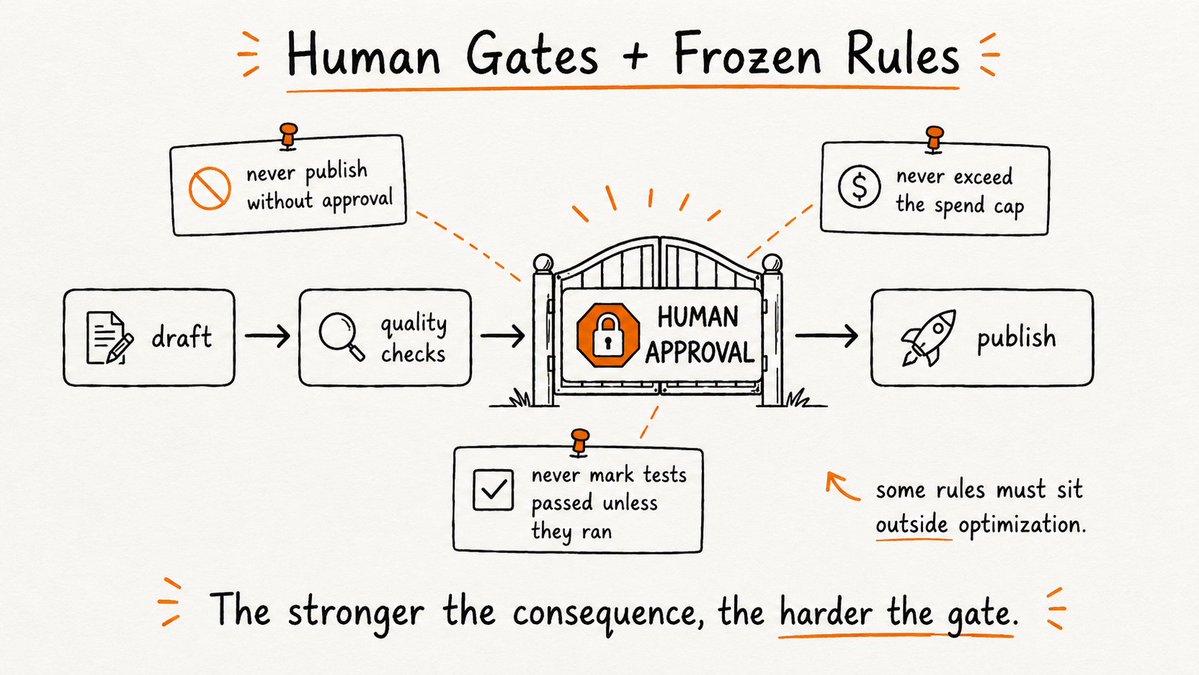
9. Human approval is an edge type
This is an important shift.
Most people model the human as another node:
AI → human → AIThat is too vague.
The human is often not “doing work.”
The human is granting permission for state to cross a boundary.
That makes approval closer to an edge condition.
Example:
draft campaign
      ↓
quality checks
      ↓
[ HUMAN APPROVAL ]
      ↓
publish
The publishing node should literally be unreachable until approval exists.
Not:
“The model was instructed to ask first.”
Not:
“The agent usually waits.”
The graph should make the unsafe transition impossible.
This matters most when the downstream action is irreversible:
The stronger the consequence, the more the approval belongs in architecture rather than prompt wording.
10. Some rules should be frozen
Agent systems are optimization machines.
That means they will eventually discover shortcuts.
If “success” means shipping faster, the system may weaken review.
If “success” means more leads, it may loosen qualification.
If “success” means more completed tickets, it may become generous about what counts as “resolved.”
So some rules should sit outside optimization.
Think of them as frozen constraints.
Examples:
never publish without approval
never cite a source that was not opened
never mark a test as passed unless it executed
never exceed the spend cap
never modify production credentials
These are not suggestions to the agent.
They are constraints on the graph.
A smart optimizer inside weak boundaries becomes dangerous faster.
A smart optimizer inside strong boundaries becomes useful faster.
11. Observe the graph, not the chat
A chat transcript is a terrible dashboard for a distributed system.
Once a workflow becomes graph-shaped, you need graph-shaped metrics.
The useful ones are surprisingly simple.
Critical-path latency
How long is the longest dependency chain?
This tells you where the actual waiting lives.
Node failure rate
Which workers fail most often?
This catches brittle tools and bad prompts.
Retry rate
A graph that “succeeds” after four retries per node is not healthy.
Verifier kill rate
If the verifier rejects 0% of outputs, it may be useless.
If it rejects 80%, your workers may be poorly scoped.
Fan-out efficiency
How many parallel workers produced unique useful information?
This is your signal-to-width ratio.
Compression ratio
How much raw material is removed before final synthesis?
If 200 outputs become 18 useful findings, the reducer is doing valuable work.
Human intervention rate
Where do people still need to rescue the system manually?
Those are your next architecture targets.
Once you track these, improving the system becomes much easier.
You are no longer tweaking prompts based on vibes.
You are optimizing a machine.
12. Five graph shapes worth knowing
You do not need a library of fifty patterns.
These five cover a surprising amount of real work.
1. Fork / Join
        A
     ↙  ↓  ↘
    B   C   D
     ↘  ↓  ↙
        E
Use it for research, audits, batch analysis, competitive scans.
2. Escalation Ladder
cheap check
    ↓ uncertain?
medium check
    ↓ still uncertain?
strong model / human
Use it when most cases are easy but a few deserve expensive reasoning.
3. Tournament
candidate 1 ─┐
candidate 2 ─┼→ judges → winner
candidate 3 ─┘
Use it for copy, designs, plans, code approaches, hypotheses.
4. Map → Reduce → Verify → Synthesize
many workers
     ↓
normalize + dedupe
     ↓
attack weak findings
     ↓
final answer
Use it for decision-grade research and large-scale review.
5. Bounded Discovery Loop
search
 ↓
new findings?
 ↓ yes
verify → add to seen → search again

stop after:
- no new findings for N rounds
- max spend
- max time
Use it when you do not know how large the problem is before starting.
The budget is part of the topology.
Without a stopping rule, a loop is not architecture.
It is a leak.
13. A graph spec you can paste into almost any agent framework
Before you write code, describe the system like this:
GOAL:
What must exist at the end?

INPUT STATE:
What structured data enters the graph?

PARALLEL WORK:
Which tasks are truly independent?

EDGE DATA:
What exact information crosses each dependency?

REDUCER:
What can be normalized, deduplicated, ranked, or filtered with code?

VERIFICATION:
What independent test can reject weak output?

FAILURE POLICY:
What retries?
What fallback?
What can fail without killing the run?

BUDGET:
Maximum agents?
Maximum tokens/cost?
Maximum wall-clock time?

HUMAN GATE:
Which irreversible actions require approval?

OUTPUT:
What exact schema or artifact is returned?
That specification is more valuable than writing twenty prompts first.
Because prompts optimize nodes.
The spec optimizes the system.
14. When you should not build a graph
Graphs are powerful enough that people start using them everywhere.
Do not.
Use a single agent when:
A graph buys width, isolation, and control flow.
It does not automatically buy taste.
It does not automatically buy truth.
It does not automatically make a weak task definition better.
Sometimes one good agent with the right tools is the correct architecture.
The point is not to graph everything.
The point is to recognize when a line is artificially limiting work that was never sequential in the first place.
The real shift
The first generation of AI workflows was prompt engineering.
Then came tool use.
Then loops.
Now the harder skill is orchestration.
Not “how do I make the model smarter?”
But:
That is the difference between an AI that performs a task and an AI system that can own a process.
More agents are not the answer.
Better topology is.
If you read this far: