Loop Engineering: the Boris Cherny Method - system that prompts your coding agent for you

Most developers still prompt their coding agent by hand. Type, wait, read the diff, type again. You are the loop.

"I don't prompt Claude anymore. I have loops running that prompt Claude and figuring out what to do. My job is to write loops." - Boris Cherny, creator of Claude Code
This article explains what that means, shows how to tell if you actually need one, and then walks through every piece of a working loop with prompts you can copy right now.
Part 1 . The Concept
What a loop is and what it replaces
A prompt is one instruction. You ask, you get an answer, you decide what to do next.
A loop is a goal the AI keeps working toward until it gets there, without you prompting every step. You define the purpose once. The loop handles the rest.
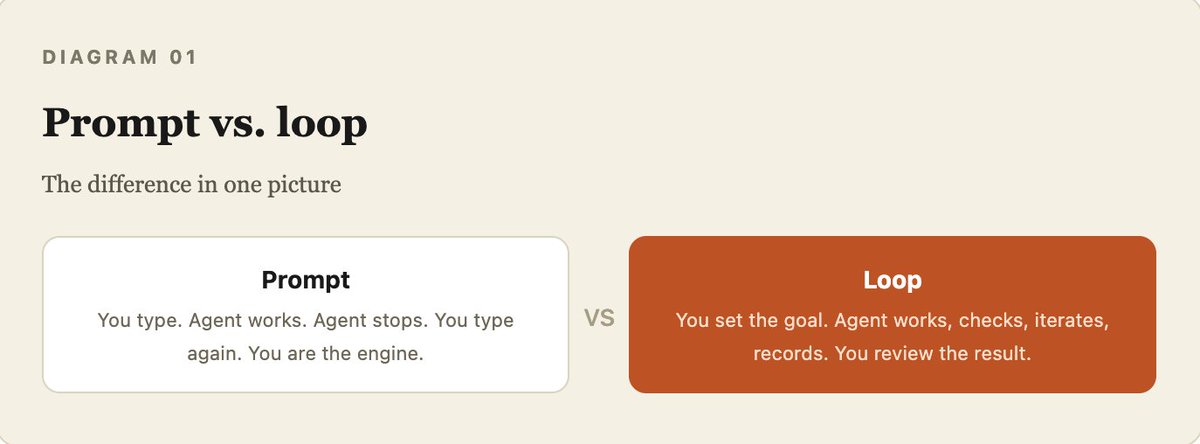
Three parts make or break every loop:

Part 2 . The Test
Do you actually need a loop?
Not every task deserves one. A loop earns its cost only when all four conditions hold. Miss one and a manual prompt still wins.

Good first loops: CI failure triage, dependency bumps, lint-and-fix passes, flaky test reproduction, issue-to-PR drafts on code with strong tests.
Skip for now: architecture rewrites, auth or payments, production deploys, anything where "done" is a judgment call.
Part 3 . The Build
How to build a working loop, step by step
Everything below maps to the building blocks Cherny describes publicly. Each step has a prompt you can paste right now.

01 Write the goal, not the next prompt.
Instead of steering Claude turn by turn, write down what "done" actually means, once, and let it keep working until that condition is true.
Claude Code's /goal command does exactly this. A separate, smaller model checks whether the condition holds after every turn, so the agent that did the work is never the one deciding whether it is finished.
You will work in a loop until the task meets the bar below.
Do not ask me questions. Make a sensible assumption and continue.

TASK: [describe exactly what you want produced]

DONE MEANS (be strict, all must hold):
- [condition 1, e.g. all tests in test/auth pass]
- [condition 2, e.g. lint is clean]
- [condition 3, e.g. no function longer than 40 lines]

EVERY TURN:
1. State the one next step.
2. Do it.
3. Check your result against DONE MEANS. List what still fails.
4. If everything holds, print FINAL and stop.
   If not, fix the weakest point and go again.
02 Separate the maker from the checker.
The model that wrote the code is too generous when grading its own homework. A loop without an independent check is just an agent agreeing with itself on repeat.
The fix is structural: a second pass with different instructions, whose only job is to find what is wrong.

You are the VERIFIER, not the author. A different agent wrote the
attached work. Your only job is to find what is wrong.
Do not praise it. Do not summarize what it does well.

Check against these criteria:
- [criterion 1]
- [criterion 2]
- [criterion 3]

For each: output PASS or FAIL with the exact line or reason.
If everything passes: APPROVED.
If anything fails: REJECTED + the single most important fix first.
03 Give it memory that survives the session.
An agent forgets everything when the conversation ends. Claude Code solves this with CLAUDE.md, a file it reads at the start of every session.
When Claude makes a mistake, the correct response is not to fix it in chat and move on. It is to have Claude write the lesson into that file so every future session inherits the fix.
Add a permanent rule to CLAUDE.md based on the mistake you just made.
Write it as a short, direct instruction a future session will follow.
Not a description of what happened.

Format:
- MISTAKE: [one line]
- RULE: [the exact behavior to do instead, every time]

Then confirm the file was updated.
04 Keep a state file so tomorrow's run resumes, not restarts.
Agents have short memory by default. What they learn in one session is gone by the next unless you write it down. A state file is anything that lives outside the conversation and records what is done, what failed, and what is next: a markdown file in the repo, a Linear board, a JSON blob.
Without it, every run starts cold and re-derives context at full token cost. With it, the loop resumes where it left off. You can also open that file at any time and see exactly what the loop has been doing.
For long-running loops, pair the state file with a standing spec (VISION.md) the agent rereads each run. State tells it where it is. The spec tells it where to go.
Before starting any new work, read STATE.md in full.

Update it after every run with:
## Last run
[timestamp] - [summary of what happened]

## Completed
- [task, commit hash if relevant]

## In progress
- [task, current status]

## Escalated to human
- [task, reason it could not be resolved autonomously]

## Lessons learned (write here, not in chat)
- [any rule worth promoting to CLAUDE.md]

Never start a new run without reading this file first.
05 Isolate parallel agents with worktrees.
Two agents editing the same files is the same headache as two engineers committing to the same lines without talking. A git worktree gives each agent its own checkout on its own branch. One agent's edits literally cannot touch another's files.
Worktrees solve the mechanical collision, but you are still the ceiling. Your review bandwidth decides how many parallel agents you can actually run. Start with two, not ten.
Run these as parallel, isolated sub-agents, each in its own worktree:

1. [agent A task, e.g. fix the failing auth tests]
2. [agent B task, e.g. update dependency X]
3. [agent C task, e.g. unify duplicated validation logic]

Rules:
- Each agent works only inside its own checkout.
- No agent may modify files outside its assigned scope.
- Report back only when each one is verified by the gate,
  not merely when it claims to be "done."
- If two agents need to touch the same file, flag it as a
  conflict and escalate instead of guessing.
06 Connect it to your real tools via MCP.
A loop that can only see your local files can only ever suggest things. Connectors, built on the Model Context Protocol, let the agent read your issue tracker, open a pull request, post to Slack, query a database, hit a staging API.
This is the actual difference between an agent that says "here is the fix" and a loop that ships the fix, links the Linear ticket, and pings the channel once CI is green. Both Claude Code and Codex speak MCP, so a connector you wrote for one usually works in the other.
The connectors that pay back fastest for loop work, in order:
Using the GitHub connector: scan open issues labeled "bug" from the
last 7 days.

For any issue where the fix is a single, testable change:
1. Create a branch named claude/fix-[issue-number]
2. Implement the fix
3. Run the test suite
4. If tests pass, open a PR linking back to the issue
5. Post a summary comment on the issue

For anything riskier:
leave a comment explaining why it needs a human. Do not open a PR.
07 Add the heartbeat so it runs without you.
A loop you trigger by hand is a script you happened to run today. The heartbeat fires it on a schedule, an event, or a condition, without you thinking about it.
The key detail with /goal: the evaluator checking completion is a different model from the one doing the work. The maker cannot declare itself finished. This is the maker-vs-checker split from step 02, applied to the stop condition itself.
Set up a recurring loop:

Cadence: every [30 minutes / morning / on new commit]
Goal: [the condition that means done for this cycle]

On each run:
1. Read STATE.md first
2. Check for new work matching the scope
3. Do the work
4. Run the verification gate
5. Update STATE.md with results
6. Stop

Notification rules:
- If goal is met silently: just archive.
- If a blocker appears: ping me with [channel/method].
- If token spend exceeds [N] this cycle: pause and report.

Do not wait for my input between steps.
08 Turn every verifier rejection into a permanent rule.
This is what makes the loop improve over time, not just run faster. Step 2 catches a flaw. Step 8 makes sure the flaw never comes back. Distill the rejection into a hard rule and write it into the file the loop reads before doing anything.
Over a few projects, your constraints file becomes living documentation that enforces itself. The verifier has less to catch each time because the rules keep tightening. This is the honest version of "self-learning": the model is not retraining its weights. The system around it is getting smarter.
Review everything the verifier rejected across the last [N] runs.
Group the rejections by root cause.

For each recurring cause, write one hard rule into CLAUDE.md using
this format:

# CONSTRAINTS.md - loaded automatically
- [rule distilled from the rejection, written as a direct instruction]
- [another rule]
- Scope-lock: do not touch anything outside the task's stated scope.

Do not just fix the individual output.
Bake the lesson into the file every future run reads first.
Then re-run the last failed task with the new constraints applied
and confirm the rejection no longer triggers.
09 Scale from one loop to a small fleet.
Cherny runs several loops at once: one hunts architectural improvements, another unifies duplicated abstractions, both submitting PRs indefinitely. But the order matters more than the number.

The metric that matters once you have more than one: cost per accepted change. If your accepted-change rate drops below 50%, the loop is costing more than it saves.
I want to add a second parallel loop alongside the one already running.

Existing loop: [name / purpose of loop 1]
New loop: [purpose, e.g. hunt for duplicated code to unify]

Rules:
- Keep them in separate worktrees.
- Both write to the same STATE.md but in clearly separate sections.
- Each loop has its own verification gate.
- If both loops try to touch the same file in the same cycle,
  the second one yields and logs the conflict.
- Report a combined summary at the end of each cycle.
10 Promote the loop to a background agent.
The final move. Once the loop is stable and skill-backed, point it at a trigger: a schedule, a webhook, a file drop. Let it run proactively, surfacing only the deliverable and deviations. The only human left in the loop is the question you set and the decision you make on the answer.
Run skill "[name]" on a weekly schedule.
Trigger: [schedule / new file / webhook event]

On each run:
1. Execute the full workflow
2. Apply constraints from CLAUDE.md
3. Verify against the goal
4. Deliver output + diff vs last run

Only ping me if a deviation crosses [threshold].
Otherwise update STATE.md and archive the run.
Part 4 . The Honest Part
Where this goes wrong
Token costs compound. A loop re-reads context and retries whether or not the run ships anything. Comfortable with unlimited tokens, reckless on a metered plan.
Loops fail quietly. Without a hard stop condition, a loop can declare itself finished when it is not, spending on confidence instead of results.
An unattended loop is an unattended attack surface. Anything that can merge code or hold write access needs permissions re-checked on a schedule, not set once.
Loops change the work, not the need for you. The faster a loop ships code you did not write, the bigger the gap between what your repo contains and what you understand. Read the diffs.
The mistakes that turn a loop into a money pit
Part 5 . What Cherny Thinks Comes Next
The part that survives
When asked what humans will ultimately stay uniquely good at, Cherny did not say code, design, or product sense. He said values: teaching the system what to care about, the same way you teach a person, not a function.
He has described running hundreds of Claude instances that monitor Twitter, GitHub, and Slack, surfacing product ideas automatically. Most of those ideas are bad today. He expects most to be good within months. The ceiling is not the model. It is the quality of the loop you build around it.
His own arc proves the point. Late 2024: Claude writes 10-20% of his code. Mid 2025: he uninstalls his IDE. 2026: he does not prompt Claude at all. He designs the systems that do.
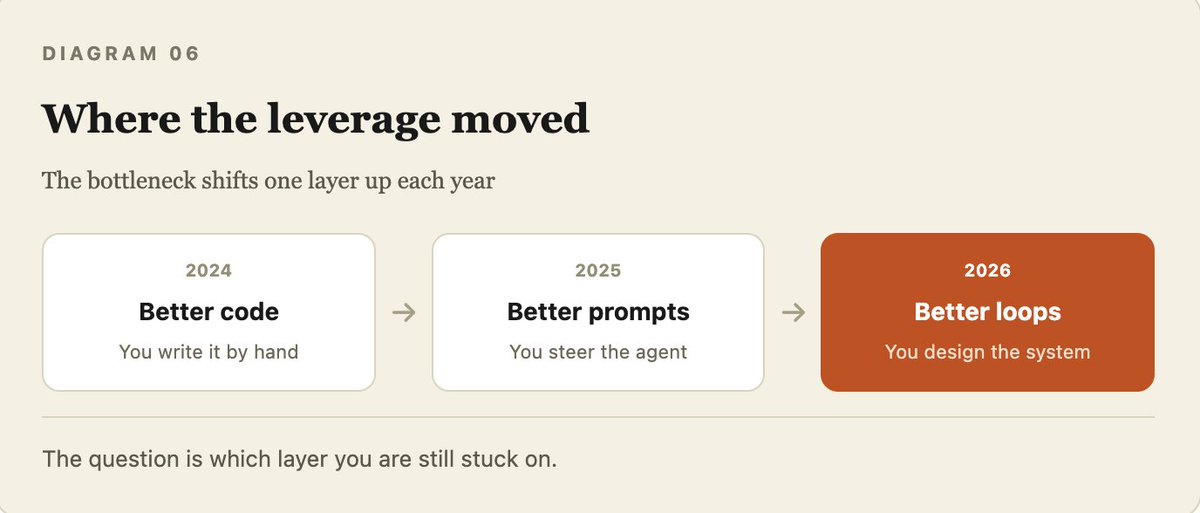
Conclusion
Most developers do not need a loop yet. Not until the task repeats, the verification is automated, the budget absorbs the waste, and the agent has real tools. If yours does not pass all four, a single well aimed prompt is still the right move.
If it does pass: build small. One heartbeat. One skill. One state file. One gate. Get one manual run reliable. Turn it into a skill. Wrap it in a loop. Schedule it. Order matters.
Write the goal, not the prompt. Separate the checker from the maker. Give it memory. Then get out of the way.
