An Android Device Farm with ADB + FFmpeg: Automated UI Testing Across 10–50 Devices

When your app has to work on a zoo of dozens of real phones, different vendors, Android versions, screen resolutions, manual testing quickly turns into a nightmare. Below is a Python pipeline that discovers every connected device on its own, installs the APK on all of them in parallel, runs instrumented tests, records a video of each run, and stitches those recordings into a single video report with FFmpeg.

The whole stack > Python + ADB + FFmpeg < is standard QA tooling. No magic, just automating the grind.
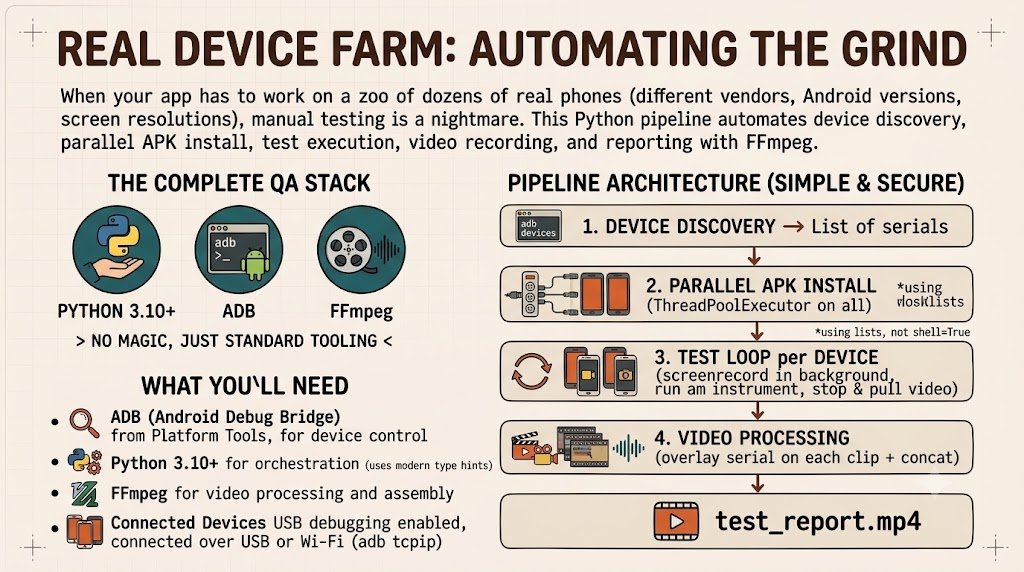
Pipeline architecture
adb devices  ──►  list of serials
     │
     ▼
APK install   (in parallel on all devices, ThreadPoolExecutor)
     │
     ▼
for each device:
     screenrecord (in background)  →  am instrument (run tests)  →  stop + pull video
     │
     ▼
FFmpeg: overlay serial on each clip + concat  ──►  test_report.mp4
What you'll need
One principle that runs through all the code: I pass arguments to subprocess as a list and without shell=True. It's safer (no injection through file names) and it doesn't break on spaces or special characters in paths.
1. Device discovery

adb devices also lists devices in the unauthorized / offline state. We keep only the ones actually in the device state.
import subprocess


def get_devices() -> list[str]:
    """Return the serials of all devices in the 'device' state."""
    out = subprocess.run(
        ["adb", "devices"],
        capture_output=True, text=True, check=True,
    ).stdout

    serials: list[str] = []
    for line in out.splitlines()[1:]:      # first line is the "List of devices" header
        line = line.strip()
        if line.endswith("\tdevice"):      # drop unauthorized / offline
            serials.append(line.split("\t")[0])
    return serials
2. Parallel APK install
Installing on 50 devices one by one is slow. We spread the work across a thread pool: each adb install is a separate process, so threads work great here (we're waiting on I/O, not burning CPU).
from concurrent.futures import ThreadPoolExecutor, as_completed


def install_apk(serial: str, apk_path: str) -> tuple[str, bool, str]:
    r = subprocess.run(
        ["adb", "-s", serial, "install", "-r", "-g", apk_path],
        capture_output=True, text=True,
    )
    ok = r.returncode == 0 and "Success" in r.stdout
    return serial, ok, (r.stdout + r.stderr).strip()


def install_on_all(apk_path: str, serials: list[str]) -> None:
    with ThreadPoolExecutor(max_workers=len(serials) or 1) as pool:
        futures = [pool.submit(install_apk, s, apk_path) for s in serials]
        for f in as_completed(futures):
            serial, ok, log = f.result()
            print(f"[{'OK' if ok else 'FAIL'}] {serial}")
            if not ok:
                print(f"    {log}")
Flags: -r -> reinstall while keeping data, -g -> grant all runtime permissions immediately (handy so tests don't trip over permission dialogs).
3. Running instrumented tests
am instrument runs Espresso/JUnit tests on the device. It prints OK on success and FAILURES!!! on failure to stdout -> that's how we determine the result.
def run_instrumented_tests(
    serial: str,
    package: str,
    runner: str = "androidx.test.runner.AndroidJUnitRunner",
) -> tuple[str, bool]:
    r = subprocess.run(
        ["adb", "-s", serial, "shell", "am", "instrument", "-w",
         f"{package}/{runner}"],
        capture_output=True, text=True,
    )
    ok = "FAILURES!!!" not in r.stdout and r.returncode == 0
    return serial, ok
package is the test package ID, usually com.example.app.test.
4. Recording the screen during a test
screenrecord records video right on the device. Limitations to keep in mind: a ~3-minute cap per file and no audio. We start recording in the background, run the test, then stop it cleanly and pull the file to the host.
The most reliable way to stop the recording is not by signaling the local adb, but with pkill on the device itself -> that way screenrecord finalizes the MP4 container correctly.
import time


def start_recording(serial: str, remote: str = "/sdcard/run.mp4") -> subprocess.Popen:
    return subprocess.Popen(
        ["adb", "-s", serial, "shell", "screenrecord", remote]
    )


def stop_recording(
    serial: str,
    proc: subprocess.Popen,
    remote: str = "/sdcard/run.mp4",
    local: str = "run.mp4",
) -> None:
    # SIGINT on the device makes screenrecord close the file properly
    subprocess.run(["adb", "-s", serial, "shell", "pkill", "-SIGINT", "screenrecord"])
    proc.wait(timeout=10)
    time.sleep(1)  # give the device a moment to finalize the container
    subprocess.run(["adb", "-s", serial, "pull", remote, local], check=True)
5. Assembling the video report with FFmpeg
Different devices have different screen resolutions, so you can't just concatenate them with -c copy. We normalize each clip to a common format (1080×1920) and overlay the serial via drawtext along the way. After that all clips are identical and the final assembly is a fast concat with no re-encoding.
def label_clip(src: str, dst: str, label: str) -> None:
    """Scale to 1080x1920 and overlay a label (the device serial)."""
    vf = (
        "scale=1080:1920:force_original_aspect_ratio=decrease,"
        "pad=1080:1920:(ow-iw)/2:(oh-ih)/2,"
        f"drawtext=text='{label}':x=20:y=20:fontsize=42:"
        "fontcolor=white:box=1:boxcolor=black@0.6"
    )
    subprocess.run(
        ["ffmpeg", "-y", "-i", src, "-vf", vf,
         "-an", "-c:v", "libx264", "-preset", "veryfast", "-crf", "23", dst],
        check=True,
    )


def concat_report(clips: list[str], out: str = "test_report.mp4") -> None:
    with open("concat_list.txt", "w") as f:
        for c in clips:
            f.write(f"file '{c}'\n")
    subprocess.run(
        ["ffmpeg", "-y", "-f", "concat", "-safe", "0",
         "-i", "concat_list.txt", "-c", "copy", out],
        check=True,
    )
6. Putting it all together
def main() -> None:
    apk = "app-debug.apk"
    package = "com.example.app.test"
    runner = "androidx.test.runner.AndroidJUnitRunner"

    serials = get_devices()
    if not serials:
        print("No devices found. Check USB and the output of 'adb devices'.")
        return

    print(f"Devices found: {len(serials)}")
    install_on_all(apk, serials)

    labeled: list[str] = []
    for serial in serials:
        proc = start_recording(serial)
        _, ok = run_instrumented_tests(serial, package, runner)
        stop_recording(serial, proc, local=f"{serial}.mp4")
        print(f"[{'PASS' if ok else 'FAIL'}] tests on {serial}")

        out = f"{serial}_labeled.mp4"
        label_clip(f"{serial}.mp4", out, serial)
        labeled.append(out)

    concat_report(labeled, "test_report.mp4")
    print("Done: test_report.mp4")


if __name__ == "__main__":
    main()
Here the "record + test" loop runs sequentially across devices -> it's more readable that way. For a real farm you'd want to wrap this block in a ThreadPoolExecutor too, so all devices are tested at once; the logic is the same as the install in section 2.
Don't reinvent the wheel: ready-made tools

The economics: what it costs and what it saves
Test automation isn't about "making money out of thin air" -> it's about cutting the two most expensive line items: person-hours and cloud minutes. Below is an estimate across three typical scales. The numbers are illustrative and depend on region, device vendor, and provider pricing, check current rates before buying.
Your own farm -> one-time investment
| Item  | For 10 devices  | For 30 devices  | For 50 devices  |
| --- | --- | --- | --- |
| Used Android phones (~$60 each)   | ~$600   | ~$1,800  | ~$3,000  |
| Powered USB hubs   | ~$100  | ~$250  | ~$400   |
| Mini-PC / host  | ~$400   | ~$400  | ~$500   |
| Cables, rack, odds and ends   | ~$80   | ~$150   | ~$250   |
| One-time total   | ~$1,200   | ~$2,600   | ~$4,150  |
| Electricity per month   | pennies  | ~$10–20   | ~$20–40   |
This is capital expenditure: pay once, and the farm then runs for years at almost no cost.
Cloud -> you pay per minute
Firebase Test Lab, AWS Device Farm, BrowserStack, and the like charge per device-minute -> roughly $0.05–0.20 per device-minute. A single regression run on 30 devices at 5 minutes each is 150 device-minutes, i.e. ~$7.5–30 per run.
Now multiply by CI intensity:
| Run frequency   | Runs per month   | Cost (at ~$15/run)  |
| --- | --- | --- |
| 2× per day   | ~44   | ~$660/mo   |
| 10× per day  | ~220  | ~$3,300/mo   |
| On every push (active team)  | 500+   | $7,500+/mo  |
Break-even: a 30-device farm (~$2,600) pays for itself against the cloud in roughly 4 months at a modest 2 runs per day; with active CI, in under a month. After that the cloud bill keeps dripping every month, and the farm doesn't.
Manual labor -> what gets freed up
A manual run of a single regression scenario on 30 devices is on the order of a QA engineer's workday. Running regression twice a week adds up to ~8 person-days a month. At a QA cost of somewhere around $1,600–2,700/mo, that's a meaningful chunk of a salary that the pipeline frees up for meaningful work instead of the "connect–install–poke–record" grind ×30.
How this converts into money
There's no direct income "from the script" here -> there are three indirect but very real mechanisms:
The key difference from "engagement-farming schemes": there, the money comes from deceiving algorithms and ends in a ban. Here, it comes from saved hours and prevented losses. The first falls apart; the second is a sustainable business case you're not ashamed to show a client.
Wrap-up
The result is a reproducible pipeline: one command, and the app is exercised across the entire device fleet, with a video report at the end that shows the behavior on each specific device.
