21 ways to distribute lead magnets and build your email list

you built a lead magnet. now, how do you grow your email list?
typical "download my free thing! link in bio doesn't work.
results in low engagement, few opt-ins, feels pushy.
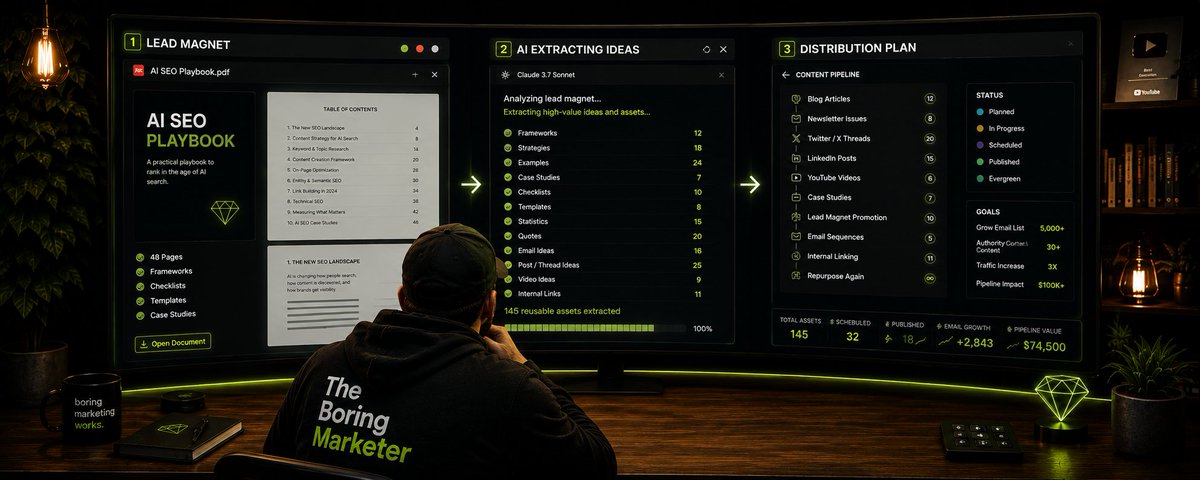
better approach: atomize your lead magnet into 10-20 social posts. distribute the value first. let the content do the selling.
this artcile shows 21 strategies across 7 lead magnet types.
need inspiration first? here is how you can think of lead magnets beyond just ebook.
the philosophy: content atomization + value-first distribution
content atomization = breaking one asset into many channel-specific pieces
value-first distribution = giving value before asking for opt-in
combined:
- your lead magnet becomes 10-20 social posts
- each post delivers value independently
- the full resource is the natural next step, not a bribe
- no selling, just sharing
the 80/20 rule:
- 80% of content = educates, solves, helps
- 20% of content = promotes, sells, converts
for more systems + frameworks like this. subscribe tothe vibe marketer newsletter.
category 1: frameworks + checklists
examples: step-by-step guides, decision frameworks, process checklists, mental models, angle frameworks
strategy 1: one-item-per-post method
break the framework/checklist into individual pieces. share one per post.
how it works:
2. create 6 individual posts (one item per post)
3. each post explains that one item
4. after 5-7 posts, add soft cta: "this is from my [checklist name]. get all 6: [link]"
example: your checklist: "6-step content planning checklist"
atomized posts:
- post 1: "[checklist item 1: common problem + solution]"
- post 2: "[checklist item 2: method that drives outcome]"
- post 3: "[checklist item 3: process most people skip]"
- post 4: "[checklist item 4: principle that changes results]"
- post 5: "[checklist item 5: framework for better outcome]"
- post 6: "[checklist item 6: the thing most teams forget]"
- post 7 (cta): "these 6 steps are from my [checklist name].

get all 6: [link]"
format options:
- linkedin posts (text-heavy)
- twitter threads (condensed)
- instagram carousels (visual)
- tiktok/reels (60-sec explainers)
strategy 2: visual breakdown method
turn the framework into visual assets that stand alone.
how it works:
2. design infographic (full framework visualized)
3. record video walkthrough (explain framework in action)
4. share across platforms
5. link to downloadable version
example: your framework: "5-step content brief process"
visuals for socials:

linkedin carousel: 5 slides (one per step) + final slide with cta
pinterest infographic: full process visualized
instagram reel: "watch me fill out a content brief in 90 seconds"
blog post: "why our content brief has these 5 sections" (expanded with examples)
strategy 3: story-based rollout
share the framework through a case study or personal story.
how it works:
1. tell story of how you used the checklist
2. break story into 3-5 posts
3. each post reveals one part of the checklist
4. final post: full checklist + cta
example: your checklist: "6-step content planning checklist"
atomized posts:

- post 1: "[problem story: what went wrong before using checklist]"
- post 2: "the first 2 things we now do before creating content" (reveal items 1-2)
- post 3: "[specific habit/method that changed everything]" (reveal item 3)
- post 4: "[why problem was happening + solution]" (reveal items 4-5)
- post 5: "here's the complete 6-step checklist we use now. [outcome metric]." (reveal all 6 + link)
format options:
- linkedin posts (story-driven)
- twitter threads (serialized story)
- instagram carousels (story arc)
- blog post (expanded case study)
| **strategy** | **atomized format** | **distribution channel** | **timeline** |
|--------------|---------------------|--------------------------|--------------|
| **strategy 1: one-item-per-post** | 6 individual posts (one item per post) | linkedin, twitter | week 1-3 |
| strategy 1 | twitter thread (condensed version) | twitter | week 2 |
| strategy 1 | instagram carousel (visual version) | instagram | week 2-3 |
| strategy 1 | 60-sec explainer (one item) | reels, tiktok, shorts | week 2-4 |
| **strategy 2: visual breakdown** | carousel (7 slides: 6 steps + cta) | linkedin, instagram | week 2 |
| strategy 2 | infographic (full 6-step process) | pinterest, linkedin | week 3 |
| strategy 2 | video walkthrough (3-5 min) | youtube, linkedin | week 3 |
| strategy 2 | blog post (expanded with examples) | blog, newsletter | week 4 |
| **strategy 3: story-based rollout** | 5-post story series | linkedin, twitter | week 1-4 |
| strategy 3 | twitter thread (serialized story) | twitter | week 2-3 |
| strategy 3 | instagram carousel (story arc) | instagram | week 2-4 |
| strategy 3 | blog case study (expanded) | blog, newsletter | week 4 |
category 2: templates + libraries
examples: notion templates, canva templates, spreadsheet trackers, email templates, sop docs, caption libraries
strategy 1: before/after method
show the template in action. before (blank) vs. after (filled).
how it works:
2. fill it out (real example)
3. share side-by-side comparison
4. explain what you filled in and why
5. offer blank template for download
example: your template: "content brief template"
atomized posts:

- post 1: "[before/after comparison: blank vs filled template]"
- post 2: "[how to fill out section X: tutorial]"
- post 3: "[why we added section Y to our template]"
- post 4: "[case study: outcome after using this template]"

(cta): "get the content brief template: [link]"
format options:
- linkedin posts (with screenshots)
- instagram carousel (before/after slides)
- video walkthrough (reels, youtube)
- twitter thread (section-by-section breakdown)
strategy 2: section-by-section walkthrough
break template into sections. teach one section per post.
how it works:
1. identify 5-8 sections in your template or library
2. create tutorial for each section
3. share as posts, videos, carousels
4. final post: complete template/library + link
example: your library: "content prompt library"
atomized posts:

- post 1: "[section 1: type of prompts + why they work]"
- post 2: "[section 2: how to customize prompts for your niche]"
- post 3: "[section 3: prompt pattern that gets best results]"
- post 4: "[section 4: common mistakes when using prompts]"

(cta): "get the full prompt library with 50+ prompts: [link]"
format options:
- linkedin posts (educational)
- twitter threads (prompt breakdowns)
- instagram carousels (visual examples)
- youtube videos (walkthrough tutorials)
strategy 3: template remix method
show different use cases for the same template.
how it works:
2. share each as separate post
3. show versatility of template
4. offer blank version
example: your template: "content brief template"
atomized posts:
- post 1: "[how to use this template for blog posts]"
- post 2: "[same template adapted for video scripts]"
- post 3: "[using this template for social content]"
- post 4: "[template remix for email newsletters]"

(cta): "get the template and adapt it for any format: [link]"
format options:
- linkedin posts (use case examples)
- instagram carousel (remix variations)
- twitter thread (adaptation tips)
- blog post (deep dive on versatility)
| **strategy** | **atomized format** | **distribution channel** | **timeline** |
|--------------|---------------------|--------------------------|--------------|
| **strategy 1: before/after** | before/after comparison carousel | instagram, linkedin | week 1 |
| strategy 1 | section tutorial video (2-3 min) | youtube, reels | week 2 |
| strategy 1 | case study post | linkedin, blog | week 3 |
| strategy 1 | "how i use this" story | instagram stories, twitter | week 1-4 |
| **strategy 2: section walkthrough** | 5-post tutorial series | linkedin, twitter | week 1-3 |
| strategy 2 | carousel (one slide per section) | linkedin, instagram | week 2 |
| strategy 2 | video tutorial (screen recording) | youtube, linkedin | week 3 |
| strategy 2 | thread (prompt examples) | twitter | week 2-4 |
| **strategy 3: template remix** | 4-post use case series | linkedin, twitter | week 2-4 |
| strategy 3 | carousel (remix variations) | instagram, linkedin | week 3 |
| strategy 3 | blog post (versatility guide) | blog, newsletter | week 4 |
| strategy 3 | quote graphics (benefits) | instagram, pinterest | week 1-4 |
category 3: interactive tools (calculators, assessments, audits)
examples: roi calculators, savings calculators, assessment tools, audit scorecards, configurators
strategy 1: formula reveal method
share the formula/logic behind the calculator.
how it works:
2. share the formula
3. walk through example calculation
4. offer calculator tool
example: your tool: "content roi calculator"
atomized posts:
- post 1: "[the formula: how we calculate content roi]"
- post 2: "[the variable most teams forget when measuring roi]"
- post 3: "[example calculation: our content roi breakdown]"
- post 4: "[surprising insight from the calculation]"

 (cta): "calculate your content roi: [link]"
format options:
- linkedin posts (educational + formula breakdown)
- twitter threads (step-by-step calculation)
- instagram carousel (visual formula explanation)
- youtube video (full walkthrough)
strategy 2: input/output method
show what inputs are needed and what outputs they get.
how it works:
2. explain why each input matters
3. show sample output
4. link to calculator
example: your tool: "content performance assessment"
atomized posts:
- post 1: "[X things the assessment evaluates in your content]"
- post 2: "[why criterion #1 matters more than you think]"
- post 3: "[what your score means: interpreting the results]"
- post 4: "[the red flags that tank your content score]"

(cta): "audit your content: [link]"
format options:
- linkedin posts (criteria explanations)
- instagram carousel (scoring breakdown visual)
- video tutorial (how to use the assessment)
- twitter thread (criteria breakdown)
strategy 3: insight-first method
share surprising findings from the tool.
how it works:
1. run calculator for yourself
2. share unexpected insight
3. explain what it means
4. invite others to discover theirs
example: your tool: "content roi calculator"
atomized posts:
- post 1: "[surprising finding: we ran 100 calculations and found X pattern]"
- post 2: "[the #1 reason most content has negative roi]"
- post 3: "[what we learned when we calculated our own content roi]"
- post 4: "[the roi metric you should be tracking instead]"

 (cta): "discover your content roi: [link]"
format options:
- linkedin posts (data-driven insights)
- twitter threads (surprising findings)
- instagram carousel (insight + data visualization)
- blog post (deep dive on findings)
| **strategy** | **atomized format** | **distribution channel** | **timeline** |
|--------------|---------------------|--------------------------|--------------|
| **strategy 1: formula reveal** | formula breakdown post | linkedin, twitter | week 1 |
| strategy 1 | video: example calculation walkthrough | youtube, linkedin | week 2 |
| strategy 1 | carousel: formula visualized | instagram, linkedin | week 2 |
| strategy 1 | twitter thread: step-by-step | twitter | week 1-3 |
| **strategy 2: input/output** | 5-post input series | linkedin, twitter | week 1-3 |
| strategy 2 | carousel: inputs + outputs | instagram, linkedin | week 2 |
| strategy 2 | video: how to use calculator | youtube, reels | week 3 |
| strategy 2 | screen recording demo | twitter, linkedin | week 2-4 |
| **strategy 3: insight-first** | surprising findings post | linkedin, twitter | week 1 |
| strategy 3 | data visualization carousel | instagram, linkedin | week 2 |
| strategy 3 | twitter thread: insights series | twitter | week 1-4 |
| strategy 3 | blog: deep dive on findings | blog, newsletter | week 4 |
category 4: quizzes
examples: business fit quizzes, content strategy quizzes, diagnostic quizzes, format recommendation quizzes
strategy 1: result teasers method
share quiz results without giving away the quiz.
how it works:
2. describe the outcome/recommendation
3. ask: "which one are you?"
4. link to quiz
example: your quiz: "which content format will grow your business?""
quiz results: long-form seo, short-form social, video content, lead magnets
atomized posts:

- post 1: "[result type 1: who it's for + why it works]"
- post 2: "[result type 2: ideal business stage + expected outcome]"
- post 3: "[result type 3: the signal that this format is right for you]"
- post 4: "[result type 4: common mistake with this format]"

(cta): "find your ideal content format: [link]"
format options:
- linkedin posts (result breakdowns)
- instagram carousel (4 result types visualized)
- twitter thread (comparing all results)
- video (explaining each result type)
strategy 2: one question method
share individual quiz questions as social posts.
how it works:
2. post each as standalone content
3. spark conversation in comments
4. link to full quiz
example: your quiz: "which content format will grow your business?"
atomized posts:

- post 1: "[quiz question as poll: option A vs option B]"
- post 2: "[insight from question: why this matters for your strategy]"
- post 3: "[another quiz question: sparks discussion]"
- post 4: "[pattern from answers: what we learned]"

(cta): "take the full quiz to get your personalized recommendation: [link]"
format options:
- linkedin polls (engagement)
- instagram stories (poll stickers)
- twitter polls (quick engagement)
- carousel (question + insights)
strategy 3: behind-the-scenes method
explain the psychology behind quiz results.
how it works:
2. explain what each result means
3. reveal why questions were chosen
4. invite them to take it
example: your quiz: "which content format will grow your business?"
atomized posts:

- post 1: "[why we built this quiz: the problem it solves]"
- post 2: "[the 4 content format types + what makes each unique]"
- post 3: "[the logic behind question X: what it reveals]"
- post 4: "[surprising pattern: most businesses get this wrong]"

(cta): "discover your ideal format: [link]"
format options:
- linkedin posts (educational insights)
- twitter thread (quiz logic breakdown)
- instagram carousel (result types explained)
- blog post (deep dive on methodology)
| **strategy** | **atomized format** | **distribution channel** | **timeline** |
|--------------|---------------------|--------------------------|--------------|
| **strategy 1: result teasers** | 4 result type posts | linkedin, twitter | week 1-2 |
| strategy 1 | carousel: all results visualized | instagram, linkedin | week 1 |
| strategy 1 | video: explaining each result | youtube, reels | week 2 |
| strategy 1 | thread: comparing results | twitter | week 1-3 |
| **strategy 2: one question** | 5-10 poll posts | instagram stories, twitter | week 1-3 |
| strategy 2 | linkedin polls (engagement) | linkedin | week 2 |
| strategy 2 | carousel: question + insights | instagram, linkedin | week 2-3 |
| strategy 2 | thread: quiz questions + discussion | twitter | week 1-4 |
| **strategy 3: behind-the-scenes** | quiz logic breakdown post | linkedin, blog | week 2 |
| strategy 3 | carousel: methodology explained | instagram, linkedin | week 3 |
| strategy 3 | video: how quiz was built | youtube, linkedin | week 3 |
| strategy 3 | thread: surprising patterns | twitter | week 2-4 |
category 5: swipe files
examples: email swipe files, caption libraries, script templates, subject line collections, ad copy swipes, content hooks
strategy 1: one-swipe-per-post method
share individual swipes as standalone posts.
how it works:
2. post one per day/week
3. explain why each works
4. after 10 posts, offer full swipe file
example: your swipe file: "content hook swipe file"
atomized posts:

- post 1: "[hook example + why it works]"
- post 2: "[hook example + engagement data]"
- post 3: "[hook example + when to use it]"
- post 4: "[hook example + platform-specific tip]"
- post 5: "[hook example + common mistake to avoid]"

(cta): "get all 100 content hooks: [link]"
format options:
- linkedin posts (hook + breakdown)
- twitter threads (hook pattern series)
- instagram carousel (before/after hook)
- video (hook analysis)
strategy 2: before/after swipe method
show bad vs. good examples.
how it works:
2. show how to fix them using swipe file
3. share comparison
4. link to full swipe file
example: your swipe file: "content hook swipe file"
atomized posts:

- post 1: "[weak hook vs strong hook: side-by-side comparison]"
- post 2: "[this hook got 50 views. this one got 5,000. the difference?]"
- post 3: "[3 hook mistakes + how to fix them using the swipe file]"
- post 4: "[before/after: rewriting a boring hook]"

(cta): "get 100 proven hooks: [link]"
format options:
- linkedin posts (comparison + analysis)
- instagram carousel (before/after slides)
- twitter thread (hook transformations)
- video (live hook rewrite)
strategy 3: pattern extraction method
teach the pattern behind the swipes.
how it works:
2. explain why pattern works
3. show 3-5 examples
4. offer swipe file with 50+ examples
example: your swipe file: "content hook swipe file"
atomized posts:

- post 1: "[hook pattern: 'most people don't know' + 3 examples]"
- post 2: "[why question hooks outperform statement hooks]"
- post 3: "[the curiosity gap pattern: formula + examples]"
- post 4: "[5 hook patterns that work across all platforms]"

(cta): "get 100 hook templates with patterns: [link]"
format options:
- linkedin posts (pattern education)
- instagram carousel (pattern + examples)
- twitter thread (pattern breakdown)
- blog post (deep dive on hook psychology)
| **strategy** | **atomized format** | **distribution channel** | **timeline** |
|--------------|---------------------|--------------------------|--------------|
| **strategy 1: one-swipe-per-post** | 10-15 individual hook posts | linkedin, twitter | week 1-4 |
| strategy 1 | carousel: hook + breakdown | instagram, linkedin | week 1-3 |
| strategy 1 | video: hook analysis | youtube, reels | week 2-4 |
| strategy 1 | thread: hook series | twitter | week 1-4 |
| **strategy 2: before/after** | comparison posts | linkedin, twitter | week 1-3 |
| strategy 2 | carousel: weak vs strong hooks | instagram, linkedin | week 2 |
| strategy 2 | video: live hook rewrite | youtube, reels | week 3 |
| strategy 2 | thread: hook transformations | twitter | week 2-4 |
| **strategy 3: pattern extraction** | pattern breakdown posts | linkedin, blog | week 2 |
| strategy 3 | carousel: pattern + examples | instagram, linkedin | week 2-3 |
| strategy 3 | video: hook pattern tutorial | youtube, linkedin | week 3 |
| strategy 3 | thread: 5 hook patterns | twitter | week 1-4 |
category 6: data-based reports/studies
examples: industry benchmarks, trend reports, original research, survey data, competitive analysis
strategy 1: one-stat-per-post method
pull key statistics and share individually.
how it works:
2. post one stat per day
3. explain what it means
4. after 10 posts, offer full report
example: your report: "content performance benchmark report"
atomized posts:

- post 1: "[key stat + what it means for content strategy]"
- post 2: "[benchmark comparison: average vs top performers]"
- post 3: "[surprising finding from the data]"
- post 4: "[platform-specific benchmark + insight]"
- post 5: "[trend over time: what's changing]"

(cta): "get the full benchmark report: [link]"
format options:
- linkedin posts (stat + analysis)
- twitter threads (stat series)
- instagram carousel (data visualization)
- quote graphics (key findings)
strategy 2: insight extraction method
turn data into actionable insights.
how it works:
2. share insights, not just stats
3. add your interpretation
4. link to full report
example: your report: "content performance benchmark report"
atomized posts:

- post 1: "[why top performers outperform: data-backed insight]"
- post 2: "[the metric most teams ignore (but should track)]"
- post 3: "[what the data reveals about content ROI]"
- post 4: "[the surprising pattern in high-performing content]"

(cta): "see all insights in the full report: [link]"
format options:
- linkedin posts (insight-driven)
- twitter threads (insight series)
- instagram carousel (insight + data)
- blog post (deep analysis)
strategy 3: visual data method
turn data into charts, infographics, visual stories.
how it works:
2. share as standalone visuals
3. explain each chart
4. offer full report for context
example: your report: "content performance benchmark report"
atomized posts:

- post 1: "[chart: engagement rates by content format]"
- post 2: "[infographic: the content performance pyramid]"
- post 3: "[graph: ROI by distribution channel]"
- post 4: "[visual: top 5 performing content types]"

(cta): "download the full report with all charts: [link]"
format options:
- linkedin posts (chart + explanation)
- instagram carousel (data visualizations)
- pinterest infographics (full report summary)
- video (animated data walkthrough)
| **strategy** | **atomized format** | **distribution channel** | **timeline** |
|--------------|---------------------|--------------------------|--------------|
| **strategy 1: one-stat-per-post** | 10-15 stat posts | linkedin, twitter | week 1-4 |
| strategy 1 | carousel: key findings | instagram, linkedin | week 1-3 |
| strategy 1 | thread: stat series | twitter | week 1-4 |
| strategy 1 | quote graphics | instagram, pinterest | week 1-4 |
| **strategy 2: insight extraction** | insight-driven posts | linkedin, blog | week 1-3 |
| strategy 2 | carousel: insights + data | instagram, linkedin | week 2 |
| strategy 2 | thread: insight series | twitter | week 2-4 |
| strategy 2 | blog: deep analysis | blog, newsletter | week 3 |
| **strategy 3: visual data** | chart posts | linkedin, twitter | week 1-4 |
| strategy 3 | infographics | pinterest, linkedin | week 2-3 |
| strategy 3 | carousel: data visualizations | instagram, linkedin | week 2-4 |
| strategy 3 | video: animated data | youtube, reels | week 3 |
category 7: education-based (courses, workshops, webinars)
examples: email courses, mini courses, workshop replays, masterclasses, bootcamps
strategy 1: lesson-by-lesson rollout
share course lessons as individual posts.
how it works:
2. post one lesson per day
3. condense each lesson to 200-300 words
4. offer full course at end
example: your course: "7-day content strategy email course"
atomized posts:

- post 1: "[day 1 lesson: core concept summary]"
- post 2: "[day 2 lesson: key framework or method]"
- post 3: "[day 3 lesson: common mistake + solution]"
- post 4: "[day 4 lesson: actionable tactic]"
- post 5: "[day 5 lesson: case study or example]"
- post 6: "[day 6 lesson: advanced tip]"
- post 7: "[day 7 lesson: putting it all together]"

(cta): "get all 7 lessons in your inbox: [link]"
format options:
- linkedin posts (lesson summaries)
- twitter threads (condensed lessons)
- instagram carousel (key takeaways visual)
- video (lesson highlights)
strategy 2: behind-the-curriculum method
explain what the course teaches and why.
how it works:
2. explain why you chose each topic
3. tease key takeaways
4. link to course
example: your course: "7-day content strategy email course"
atomized posts:

- post 1: "[why we built this course: the problem it solves]"
- post 2: "[the 7 lessons and what you'll learn in each]"
- post 3: "[the #1 thing most people get wrong about content strategy]"
- post 4: "[what makes this course different from others]"

(cta): "start the 7-day course: [link]"
format options:
- linkedin posts (course breakdown)
- twitter thread (curriculum overview)
- instagram carousel (7 lessons visualized)
- blog post (why we created this course)
strategy 3: student results method
share testimonials, case studies, transformations.
how it works:
2. share as social proof
3. explain what they learned
4. link to course
example: your course: "7-day content strategy email course"
atomized posts:

- post 1: "[student result: metric improvement after taking course]"
- post 2: "[what they learned: specific takeaway that changed their approach]"
- post 3: "[common pattern: what most students struggle with before the course]"
- post 4: "[transformation story: before vs after]"

(cta): "join [number] others who've taken the course: [link]"
format options:
- linkedin posts (case studies)
- instagram carousel (transformation stories)
- twitter thread (student results series)
- video testimonials (student interviews)
| **strategy** | **atomized format** | **distribution channel** | **timeline** |
|--------------|---------------------|--------------------------|--------------|
| **strategy 1: lesson-by-lesson** | 7 lesson summary posts | linkedin, twitter | week 1-3 |
| strategy 1 | carousel: key takeaways per lesson | instagram, linkedin | week 2 |
| strategy 1 | thread: condensed lessons | twitter | week 1-4 |
| strategy 1 | video: lesson highlights | youtube, reels | week 2-4 |
| **strategy 2: behind-the-curriculum** | course structure breakdown | linkedin, blog | week 1 |
| strategy 2 | carousel: 7 lessons visualized | instagram, linkedin | week 1 |
| strategy 2 | thread: why each lesson matters | twitter | week 2-3 |
| strategy 2 | video: course walkthrough | youtube, linkedin | week 2 |
| **strategy 3: student results** | transformation posts | linkedin, twitter | week 2-4 |
| strategy 3 | carousel: before/after stories | instagram, linkedin | week 3 |
| strategy 3 | video: student testimonials | youtube, reels | week 3-4 |
| strategy 3 | blog: detailed case studies | blog, newsletter | week 4 |
what's next?
you have 21 strategies. pick one category, extract 10-15 pieces, and start distributing.
if you want to automate this: i built a skills packthat handles atomization, lead magnet creation...
if you want weekly systems like this: subscribe to the newsletter where 47,000+ marketers already inside...
