CODEX for dummies

codex is a cheat code. here's how to actually use it :

okay so i need to tell you about CODEX
not because it's all over your feed. but because once you understand what's actually happening under the hood, you're going to use it completely differently than you do right now.
most people open it, ask it to write some code, get a decent answer, and close the tab. that's like buying a car and only ever sitting in it with the engine off.
let me show you what it actually does.
set it up right the first time
before you start asking it to build stuff, spend 10 minutes on setup. It saves you so much pain later.
1. make an agents.md file. this is basically a note to the agent that it reads every time you start a new chat. tell it what you're working on, how you like things done, what good output looks like for you. Don't write it yourself just tell codex "here's what i'm building, write me an agents.md" and it'll draft one. read it, fix anything wrong, done.
2. use a .env file for any API keys.
codex knows to keep that file out of anything you push to GitHub.
always put sensitive stuff there.

3. use plan mode before you build anything.
plan mode means codex won't touch a single file. it just thinks out loud, asks you questions, and gives you a plan. only once you're happy with the plan do you let it start building. skip this step and you'll spend twice as long fixing things that went sideways.
> click on (+) icon in the chat
> toggle on plan mode

what it can actually do :
it has full access to your files :
say you run a small online store and you've been dumping all your order confirmations into a folder for months. Hundreds of emails, saved as PDFs, completely unorganized.
you can point codex at that folder and say "go through all of these, pull out the product names, quantities, and dates, and put it in a spreadsheet with a summary chart." it'll open every file, read through them, and hand you back a formatted spreadsheet. sitting right there in your folder when it's done.
there are two types of memory in Codex.
the first is memory you control. tell it "always use dark mode when you build UI for me" or "I prefer short paragraphs, never use bullet points in my docs" - it writes that down in your agents.md file and follows it from then on. You can update it anytime.
the second is memory it builds on its own. It quietly keeps track of patterns across your sessions - what you like, what you always change, how you tend to work. you can look at it but you shouldn't mess with it.
the more you use it inside a project, the less you have to explain yourself.
it connects to your tools :
codex works with the apps you're already using : gmail, notion, slack, github, figma, and a bunch more. you call them with an @ mention. type @notion and it goes into your workspace and pulls whatever you need. type @gmail and it reads your inbox.

same agent that reads your emails can also send them, by the way.
a real example for this : the job application problem
you're job hunting. you've got a solid cv but every job posting is different. some want someone technical, some want someone strategic, some are big on leadership, some just want you to know three specific tools. tailoring your cv every single time is exhausting. so most people don't. they send the same generic version to everyone and wonder why they're not hearing back.
here's how you'd actually use codex for this.
you give it your master cv. the full version with everything you've ever done. you give it a job description you want to apply to.
then you tell it: read my cv, read this job posting, rewrite the relevant sections so they speak directly to what this company is looking for, and save it as a new file named after the company.
it reads both. it figures out which parts of your experience are most relevant. it rewrites your summary, adjusts your bullet points, and brings the right skills to the top. all in your voice, not some generic ai tone, because it learned how you write from your original cv.
you go from spending 45 minutes per application to under 5.
but here's the part that actually changes things: you turn this into a skill.
after the first application, you tell codex :
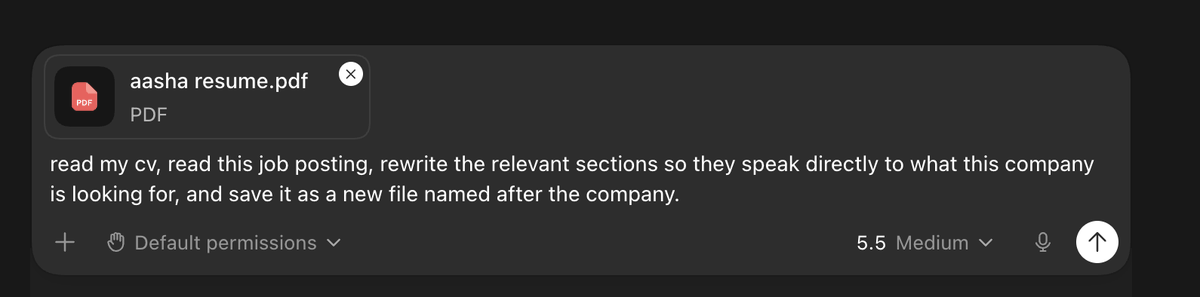
next application, you just type /tailor-cv, paste the job description, and it runs the whole thing automatically. same quality, same format, no re-explaining.
do that for 20 applications and you've saved yourself hours. more importantly, every single application is actually tailored. which means you're competing properly instead of hoping someone looks past a generic cv.
and if you want to go further: tell codex to connect to your gmail with @gmail, track which companies you've applied to, which ones replied, which ones went quiet, and put it all in a tracker that updates automatically. now you have a proper pipeline, not a mess of browser tabs and mental notes.
skills are the real game changer
a skill in codex is a saved workflow. you do something once, you like how it turned out, and you tell codex "turn this into a skill." it takes everything you just did and saves it as a recipe file.
next time you want to do that same thing, type / and pick your skill. whole workflow runs automatically.
skills can be global meaning they work in any project or scoped to just one folder. and every time you use a skill and want to tweak something, just tell the agent. it updates the recipe. the skill gets sharper every time you use it.
it can control your browser
codex can open your browser, click around, fill in forms, scroll through pages all by itself.
the most useful version of this is testing. you build something, you tell codex "open this in the browser and check that everything works," and it literally clicks through the whole thing. it catches stuff you'd miss from just reading the code buttons that don't do anything, links that open in the wrong tab, forms that look fine but break on submit.
but it goes beyond testing. need to log into a tool that doesn't have an api? codex can do it through the browser. need to pull data from a dashboard that won't let you export? codex can navigate there and get it.
if you build an app or a dashboard in codex, it starts on localhost - only you can see it. getting it live is easier than you think.
>connect codex to github
>have it push your project to a repo
>connect that repo to vercel
>hit deploy. five minutes.
after that first setup, every change codex makes gets pushed to github automatically and vercel updates the live site. you don't have to touch either of them again.
build one real thing. turn it into a skill. schedule the boring parts.
that's the whole game.
video on this coming soon :)