I think by this point a lot of people know what niche to pick and...

Leo Grundström@grundstromleo
95 views
Dec 24, 2025
~5 min read
Advertisement
1
I think by this point a lot of people know what niche to pick and what goes viral on youtube
but very few of them know how to turn their ideas into actual videos
here's the exact workflow I use to create youtube videos with AI🧵
but very few of them know how to turn their ideas into actual videos
here's the exact workflow I use to create youtube videos with AI🧵
2
1) production: turning ideas into finished videos
the 3 things you need for every video:
- a script
- a voiceover
- visuals (stock footage or AI images)
as a beginner you shouldn't have some crazy 3D animation or hire a $200/video editor
you should focus on posting consistently and getting more videos out there
once you're posting almost every day and you're at the $5K/mo mark, then you can start thinking about making "higher" quality videos
but for now, this is all you need
step 1: write the script with claude
claude writes better copy than chatgpt + can output way longer scripts without cutting off
here's how you do it:
go to a competitor's viral video (from your niche research) grab the transcript using a tool like youtubetotranscript paste it into claude
then tell claude: "I'm creating a youtube video for my [niche] channel. below is a transcript from a successful video in my niche. I want you to write a NEW script on the topic [your specific topic] that follows the same style, tone, pacing, and structure as the reference transcript below"
claude will write the script for you in just a few seconds
now you might be thinking this is violating copyright or plagiarism
but it's not
as long as you're not copying word-for-word, you're good
claude rewrites it in its own words using the same structure
just make sure to add this to your claude instructions: "never use one-to-one copies of sentences from the reference script"
that way you're good
the 3 things you need for every video:
- a script
- a voiceover
- visuals (stock footage or AI images)
as a beginner you shouldn't have some crazy 3D animation or hire a $200/video editor
you should focus on posting consistently and getting more videos out there
once you're posting almost every day and you're at the $5K/mo mark, then you can start thinking about making "higher" quality videos
but for now, this is all you need
step 1: write the script with claude
claude writes better copy than chatgpt + can output way longer scripts without cutting off
here's how you do it:
go to a competitor's viral video (from your niche research) grab the transcript using a tool like youtubetotranscript paste it into claude
then tell claude: "I'm creating a youtube video for my [niche] channel. below is a transcript from a successful video in my niche. I want you to write a NEW script on the topic [your specific topic] that follows the same style, tone, pacing, and structure as the reference transcript below"
claude will write the script for you in just a few seconds
now you might be thinking this is violating copyright or plagiarism
but it's not
as long as you're not copying word-for-word, you're good
claude rewrites it in its own words using the same structure
just make sure to add this to your claude instructions: "never use one-to-one copies of sentences from the reference script"
that way you're good
3
step 2: turn the script into a voiceover with elevenlabs
this is even simpler
go to elevenlabs, pick a voice that fits your niche paste in your script
(make sure you don't paste the WHOLE script and generate all at once, cuz elevenlabs isn't perfect yet and will make some mistakes)
always generate by chunks
click generate, download the mp3
done
takes like 10-20 minutes (since you're doing section by section)
this is even simpler
go to elevenlabs, pick a voice that fits your niche paste in your script
(make sure you don't paste the WHOLE script and generate all at once, cuz elevenlabs isn't perfect yet and will make some mistakes)
always generate by chunks
click generate, download the mp3
done
takes like 10-20 minutes (since you're doing section by section)
4
step 3: get your visuals from pixabay
pixabay has free stock footage for literally any niche
space videos, finance content, true crime... literally anything you might think of
just search your keyword, download clips in 1920x1080, and you're good
same thing with background music
pixabay has free ambient tracks
pixabay has free stock footage for literally any niche
space videos, finance content, true crime... literally anything you might think of
just search your keyword, download clips in 1920x1080, and you're good
same thing with background music
pixabay has free ambient tracks
5
step 4: put it all together in capcut
capcut is free and stupidly easy to use
- upload your stock footage clips
- add your voiceover
- add background music (turn it down to like -20 volume so it doesn't overpower the voice)
- add some simple transitions between clips
- optionally add captions using capcut's auto-caption feature
- export and you're done
the whole editing process takes like 30 minutes
capcut is free and stupidly easy to use
- upload your stock footage clips
- add your voiceover
- add background music (turn it down to like -20 volume so it doesn't overpower the voice)
- add some simple transitions between clips
- optionally add captions using capcut's auto-caption feature
- export and you're done
the whole editing process takes like 30 minutes
6
now you shouldn't be doing this yourself
once you know how it works, turn this into an SOP (standard operating procedure)
hire a VA for $5/hour on onlinejobs .ph give them the SOP they create all your videos for you you just strategize and quality check
that's how you scale to posting 4-6 times per week without burning out
my students who hit $5K+/month aren't sitting there editing videos
they're managing a system
once you know how it works, turn this into an SOP (standard operating procedure)
hire a VA for $5/hour on onlinejobs .ph give them the SOP they create all your videos for you you just strategize and quality check
that's how you scale to posting 4-6 times per week without burning out
my students who hit $5K+/month aren't sitting there editing videos
they're managing a system
7
Part 2: scaling and making real money
by now you've got the niche you know what goes viral and you can create videos with AI
now let's talk about actually making $5K, $10K, $20K+ per month
by now you've got the niche you know what goes viral and you can create videos with AI
now let's talk about actually making $5K, $10K, $20K+ per month
8
step 1: focus on ad revenue first
this is your foundation
ad revenue is predictable, scalable, and passive
you don't need to sell anything, negotiate with brands, or create any digital products (yet)
you just need to do one thing: post consistently
your strategy should look like this:
- post 4-6 videos per week
- get monetized (you need 1K subs + 4K watch hours)
- keep posting so youtube keeps pushing your content
that's it
repeat that process over and over until you're consistently getting 100K-500K+ views per month
this is your foundation
ad revenue is predictable, scalable, and passive
you don't need to sell anything, negotiate with brands, or create any digital products (yet)
you just need to do one thing: post consistently
your strategy should look like this:
- post 4-6 videos per week
- get monetized (you need 1K subs + 4K watch hours)
- keep posting so youtube keeps pushing your content
that's it
repeat that process over and over until you're consistently getting 100K-500K+ views per month
9
step 2: add digital products once you have momentum
once you're consistently posting and getting views, you can layer on additional revenue
for example if you're running an educational channel (finance, health, self-improvement, etc.) the easiest thing to add is digital products
why?
cuz youtube is already paying you to put other people's products in front of your audience (ads)
so why not show them YOUR products too?
plus with AI it's super easy to create these
one of my students matyas did exactly this
he was already making money from ad revenue then he added a simple digital product and made an extra $28K on top of his ad revenue
here's how he did it:
1) build trust first:
keep posting helpful content consistently. the more value you provide upfront, the more your audience trusts you. and when people trust you, they buy from you
2) create a simple digital product:
if you're making health content, create a simple ebook or guide about health. use AI + your knowledge. doesn't need to be complicated, just solve a specific problem your audience has
3) soft promote it in your videos:
mention it twice per video: once in the middle, once at the end. keep it natural, don't be pushy
if you do this consistently, you'll be making thousands on top of your ad revenue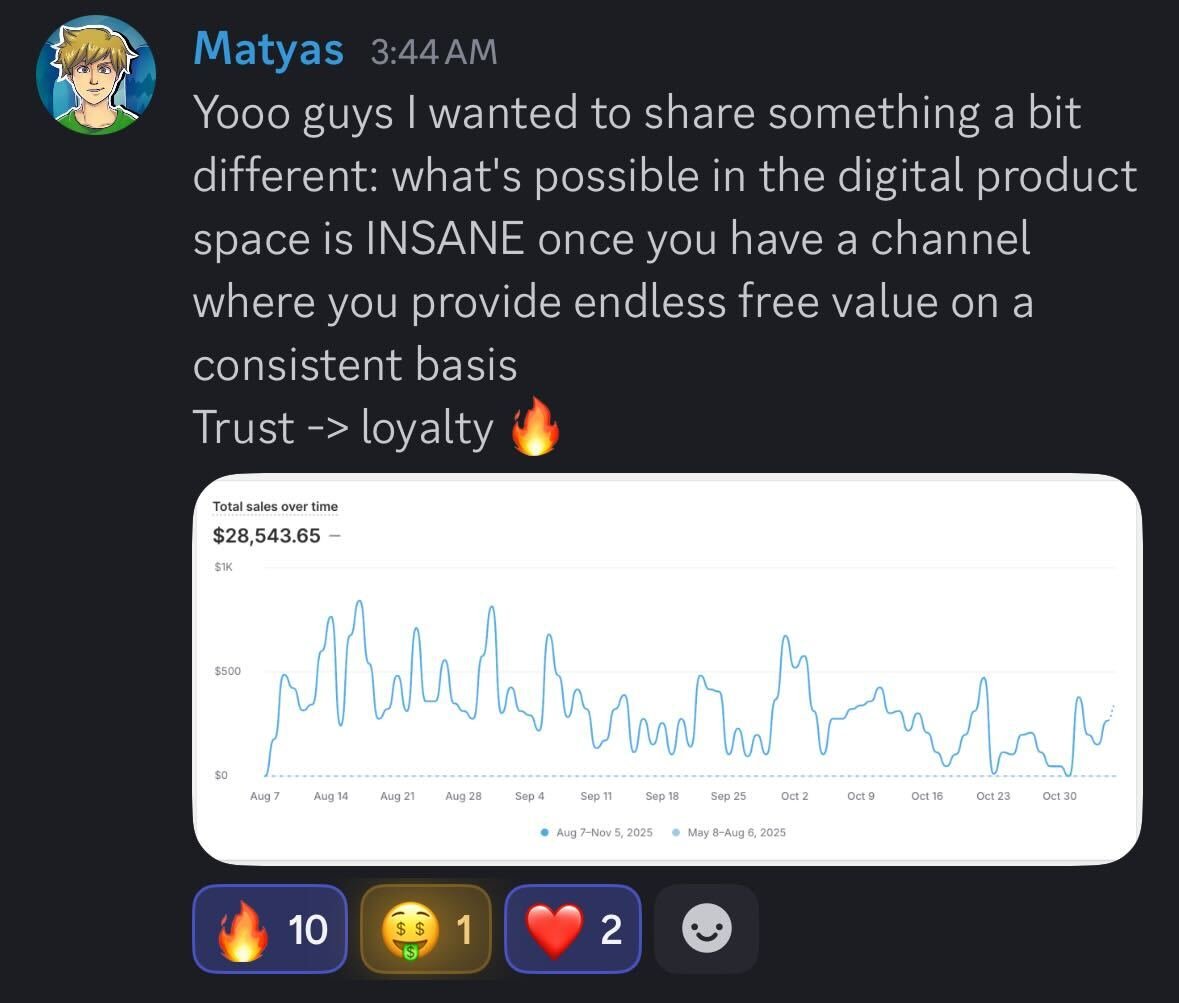
once you're consistently posting and getting views, you can layer on additional revenue
for example if you're running an educational channel (finance, health, self-improvement, etc.) the easiest thing to add is digital products
why?
cuz youtube is already paying you to put other people's products in front of your audience (ads)
so why not show them YOUR products too?
plus with AI it's super easy to create these
one of my students matyas did exactly this
he was already making money from ad revenue then he added a simple digital product and made an extra $28K on top of his ad revenue
here's how he did it:
1) build trust first:
keep posting helpful content consistently. the more value you provide upfront, the more your audience trusts you. and when people trust you, they buy from you
2) create a simple digital product:
if you're making health content, create a simple ebook or guide about health. use AI + your knowledge. doesn't need to be complicated, just solve a specific problem your audience has
3) soft promote it in your videos:
mention it twice per video: once in the middle, once at the end. keep it natural, don't be pushy
if you do this consistently, you'll be making thousands on top of your ad revenue
10
other ways to scale:
once you've mastered ad revenue + digital products, you can also add:
affiliate marketing - promote other people's products and get a commission
same as the digital product strategy, but this time the product isn't yours
don't overcomplicate this
most people try to monetize in 10 different ways before they even hit $1K/month
focus on ad revenue first get that to $5K/month then add digital products then layer on affiliates if you want
that's how channels scale from $5K to $10K to $50K+ per month
once you've mastered ad revenue + digital products, you can also add:
affiliate marketing - promote other people's products and get a commission
same as the digital product strategy, but this time the product isn't yours
don't overcomplicate this
most people try to monetize in 10 different ways before they even hit $1K/month
focus on ad revenue first get that to $5K/month then add digital products then layer on affiliates if you want
that's how channels scale from $5K to $10K to $50K+ per month
11
that's the full workflow on how to create content with AI and scale to $5K+/month
now if you're serious about learning this, I run a free community with over 30,000+ members where I host weekly group calls sharing everything I know about youtube automation
retweet this + reply "COMMUNITY" and I'll send you the link
(you gotta be following tho)
now if you're serious about learning this, I run a free community with over 30,000+ members where I host weekly group calls sharing everything I know about youtube automation
retweet this + reply "COMMUNITY" and I'll send you the link
(you gotta be following tho)
