🚨BREAKING: Google Chrome just leveled up with AI. Chrome's new AI...

Rimsha Bhardwaj@heyrimsha
38 views
Aug 26, 2025
~1 min read
Advertisement
1
🚨BREAKING: Google Chrome just leveled up with AI.
Chrome's new AI can instantly understand and describe anything displayed on your screen.
Here're 11 powerful Chrome features you'll wish you knew sooner:
Chrome's new AI can instantly understand and describe anything displayed on your screen.
Here're 11 powerful Chrome features you'll wish you knew sooner:
2
1. Google Lens in Chrome
You can add words to your Google Lens search.
Look up anything on the web without leaving your tab.
You can add words to your Google Lens search.
Look up anything on the web without leaving your tab.
0:17
3
2. You can view a map of an address with a single tap.
0:07
4
3. Select text from YouTube videos.
You can select text from a video lesson for a quick description in Chrome's sidebar.
You can select text from a video lesson for a quick description in Chrome's sidebar.
0:12
5
4. Tab Organizer
You can automatically group tabs by topic for efficient multitasking and simplified planning, researching, and shopping.
You can automatically group tabs by topic for efficient multitasking and simplified planning, researching, and shopping.
0:10
6
5. Create your own themes: Your Style, Your Chrome
Make themes easily by picking moods like "calm" or images like "northern lights," without needing to know AI.
Make themes easily by picking moods like "calm" or images like "northern lights," without needing to know AI.
0:13
7
6. Chrome Actions on mobile
Quick access buttons in search results allow you to call, get directions, and read reviews.
Quick access buttons in search results allow you to call, get directions, and read reviews.
0:20
8
7. Use tab groups across your devices
0:15
9
8. Gemini Shortcut
Get creative help anytime with Gemini in the address bar for planning, exploring, or drafting.
Get creative help anytime with Gemini in the address bar for planning, exploring, or drafting.
0:11
10
9. Spot risky files easily.
Chrome's new desktop downloads feature:
- Detailed warnings
- Suspicious file labels
- Automatic scans in Enhanced Protection
- Encrypted archive protections
Chrome's new desktop downloads feature:
- Detailed warnings
- Suspicious file labels
- Automatic scans in Enhanced Protection
- Encrypted archive protections
0:23
11
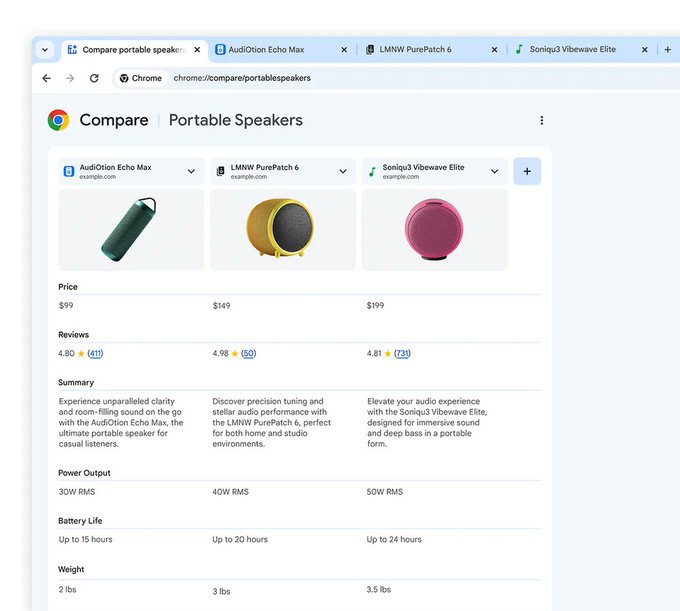
10. Instantly compare products across sites with Tab Compare.
12
11. Help Me Write
Say It Right lets you effortlessly create spot-on reviews, RSVPs, and inquiries, empowering you to write online with confidence.
Say It Right lets you effortlessly create spot-on reviews, RSVPs, and inquiries, empowering you to write online with confidence.
0:17
13
Get Started with AI in Chrome
1. Open Chrome on your computer.
2. Navigate to Settings > Experimental AI.
3. Enable "Try Experimental AI Features."
1. Open Chrome on your computer.
2. Navigate to Settings > Experimental AI.
3. Enable "Try Experimental AI Features."
0:18
14
Bonus:
Make sure to join The ProHuman, the biggest Artificial Intelligence community in the world.
Here is the free link:
x.com/i/communities/…
Make sure to join The ProHuman, the biggest Artificial Intelligence community in the world.
Here is the free link:
x.com/i/communities/…
15
I hope you've found this thread helpful.
Follow me @heyrimsha for more.
Like/Repost the quote below if you can:
Follow me @heyrimsha for more.
Like/Repost the quote below if you can:
Rimsha Bhardwaj@heyrimsha
🚨BREAKING: Google Chrome just leveled up with AI.
Chrome's new AI can instantly understand and describe anything displayed on your screen.
Here're 11 powerful Chrome features you'll wish you knew sooner:
Chrome's new AI can instantly understand and describe anything displayed on your screen.
Here're 11 powerful Chrome features you'll wish you knew sooner: