kept failing at building anything complex with AI until I tried this:

Dan ⚡️@d4m1n
14 views
May 13, 2025
~3 min read
Advertisement
1
kept failing at building anything complex with AI
until I tried this:
until I tried this:
2
if you like to watch a video instead, I got you
youtube.com/watch?v=dH4mc9… 🙌
Let me tell you how I did it:
youtube.com/watch?v=dH4mc9… 🙌
Let me tell you how I did it:
3
I built an entire app with this.
imgxai.com/imgxai
It's a free, bring you own key ChatGPT image gen UI with a ton of advanced options: multiple image generation, a queue system, parallel jobs and detailed controlled from aspect ratio to quality to masking.
imgxai.com/imgxai
It's a free, bring you own key ChatGPT image gen UI with a ton of advanced options: multiple image generation, a queue system, parallel jobs and detailed controlled from aspect ratio to quality to masking.
0:24
4
1. Write detailed requirements.
Spend 15-20m and think this through. The AI doesn't know what you want to build.
Be concise but lay out all details, including tech stack.
Spend 15-20m and think this through. The AI doesn't know what you want to build.
Be concise but lay out all details, including tech stack.
5
2. Create a PRD.txt / Product requirements document.
(Prompt in the blog post below)
Take the above and create requirements.
Double check these.
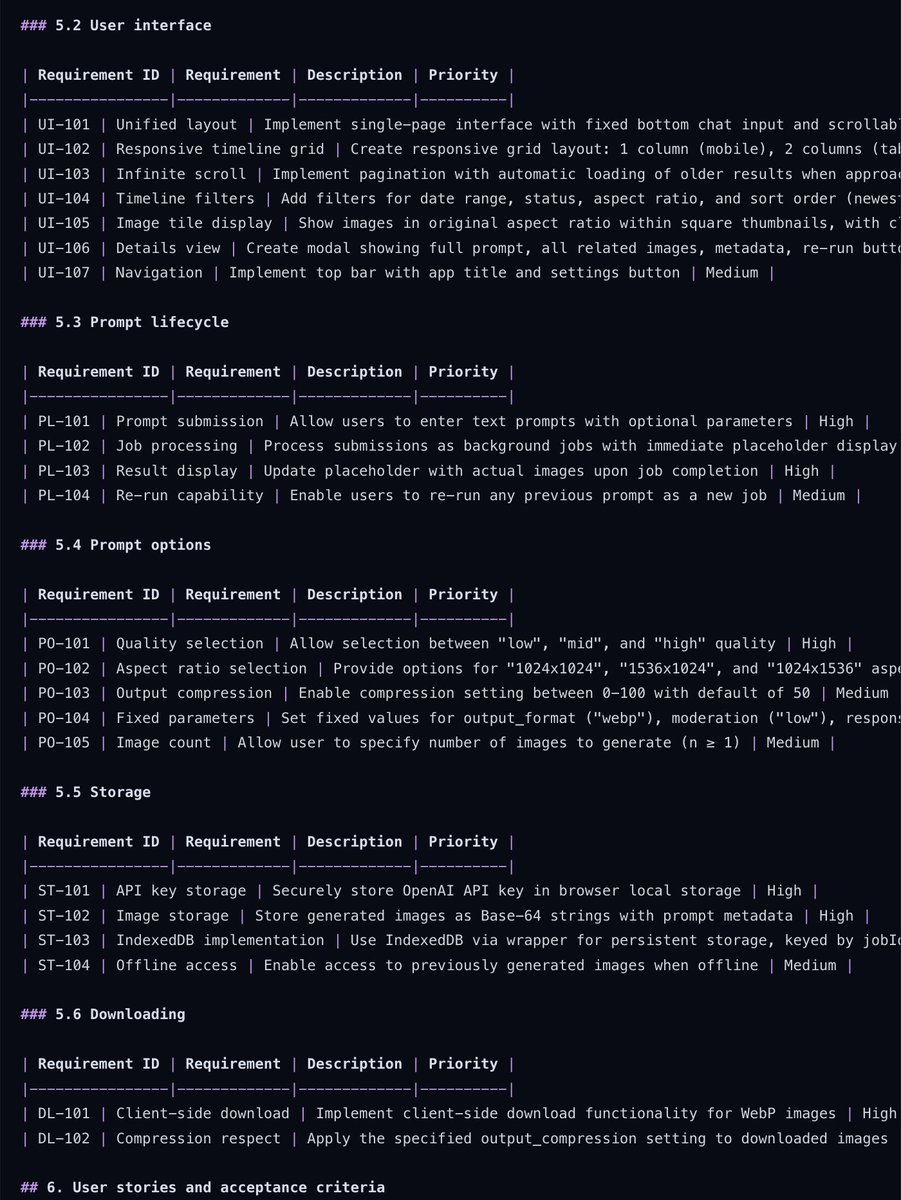


(Prompt in the blog post below)
Take the above and create requirements.
Double check these.
6
3. Use a task management system.
There are a few options:
1. Taskmaster AI task-master.dev
2. Roocode Boomerang Tasks docs.roocode.com/features/boome…
3. Shrimp Task Manager github.com/cjo4m06/mcp-sh…
4. Cline Task Tool docs.cline.bot/exploring-clin…
After trying them all, I prefer TaskMaster AI.
The MCP works great with Cursor, but you can also use the CLI directly.
There are a few options:
1. Taskmaster AI task-master.dev
2. Roocode Boomerang Tasks docs.roocode.com/features/boome…
3. Shrimp Task Manager github.com/cjo4m06/mcp-sh…
4. Cline Task Tool docs.cline.bot/exploring-clin…
After trying them all, I prefer TaskMaster AI.
The MCP works great with Cursor, but you can also use the CLI directly.
7
But biggest reason to use TaskMaster AI:
It uses Perplexity to do web searches & seems a lot better at figuring out complexity because of it.
From what I've seen, it also identifies dependencies correctly & is good at implementing tasks in logical order.
Back to building.
It uses Perplexity to do web searches & seems a lot better at figuring out complexity because of it.
From what I've seen, it also identifies dependencies correctly & is good at implementing tasks in logical order.
Back to building.
8
4. Use a simple build loop that *only* works with tasks, no matter what.
Here's the prompt loop:
"Show tasks"
"What's the next task I should work on? Please consider dependencies and priorities."
"Implement task 2 and all of its subtasks."
"I'd like to add a new task that ..."
Some more examples in the blog post below, but there isn't a lot to it. Just don't go outside of the task management system, things will start to go wrong when your app gets complex.
Here's the prompt loop:
"Show tasks"
"What's the next task I should work on? Please consider dependencies and priorities."
"Implement task 2 and all of its subtasks."
"I'd like to add a new task that ..."
Some more examples in the blog post below, but there isn't a lot to it. Just don't go outside of the task management system, things will start to go wrong when your app gets complex.
9
Tips:
- Always start from a bootstrapped codebase. Don't ever start from scratch. Ideally, bootstrap it with a component library, but also consider form validation and database etc.
- Treat bugs like tasks. Don't just say “fix it” — describe the bug, what you expected, and how it's failing. Then create a new task and let the AI go at it systematically. If you let it band-aid bugs, you're just kicking the problem down the road.
- When prompting the AI to work on the next task, ensure to provide additional context on e.g. UI preferences, API docs etc. You can also attach images!
- Always start a new chat when implementing the next task
- Be flexible: deprecate outdated tasks and add new ones as you go, but remember to ask it to analyze.
- Always start from a bootstrapped codebase. Don't ever start from scratch. Ideally, bootstrap it with a component library, but also consider form validation and database etc.
- Treat bugs like tasks. Don't just say “fix it” — describe the bug, what you expected, and how it's failing. Then create a new task and let the AI go at it systematically. If you let it band-aid bugs, you're just kicking the problem down the road.
- When prompting the AI to work on the next task, ensure to provide additional context on e.g. UI preferences, API docs etc. You can also attach images!
- Always start a new chat when implementing the next task
- Be flexible: deprecate outdated tasks and add new ones as you go, but remember to ask it to analyze.
10
11
It took me hours to build Imgx AI.
At best I could achieve this level in days instead, so I am quite impressed with what this can do even with current models.
This at a hands of a good developer is a fantastic combo!
What do you think of the app?
Isn't it kinda cool?
imgxai.com/imgx
At best I could achieve this level in days instead, so I am quite impressed with what this can do even with current models.
This at a hands of a good developer is a fantastic combo!
What do you think of the app?
Isn't it kinda cool?
imgxai.com/imgx
12
sorry I am such an idiot, the link is: imgxai.com/imgx 🤦♂️
13
Here's the absolute best thing you can for continued success:
Break down files that are large than 500 lines.
AI is not great at handling large files.
It'll remove things and mess up the UI.
So if you have a file that is larger than 500 lines, break it down into smaller modules before working on a new task.
Here's a prompt you can use:
"Break down this file into logical modules so it's easier to ready.
Create directories if needed and move utils and interfaces to separate files, maintaining a domain-driven file structure."
Break down files that are large than 500 lines.
AI is not great at handling large files.
It'll remove things and mess up the UI.
So if you have a file that is larger than 500 lines, break it down into smaller modules before working on a new task.
Here's a prompt you can use:
"Break down this file into logical modules so it's easier to ready.
Create directories if needed and move utils and interfaces to separate files, maintaining a domain-driven file structure."