Let's build an LLM agent in Python, step-by-step ↓🧵

Pau Labarta Bajo@paulabartabajo_
23 views
May 04, 2025
~3 min read
Advertisement
1
Let's build an LLM agent in Python, step-by-step ↓🧵
2
Why agents 🤖❓
Because Large Language Models alone are not enough to accurately answer complex tasks that require
-> External information that was not present in the training dataset used to fit the LLM paramaters
or
-> Many reasoning steps
Because Large Language Models alone are not enough to accurately answer complex tasks that require
-> External information that was not present in the training dataset used to fit the LLM paramaters
or
-> Many reasoning steps
3
For example, if you ask OpenAI gpt-3.5-turbo LLM to
"Create a plot with Python of the number of games won by the Golden State Warriors in each of the last 2 NBA seasons."
The response you get is
"Create a plot with Python of the number of games won by the Golden State Warriors in each of the last 2 NBA seasons."
The response you get is
4
→ a perfectly valid Python code snippet, because GPT-3.5 was trained on vast amounts of Python code available on the Internet, and hence can work as a great code generator tool.
→ BUT, the data plotted is wrong, as it is not from the last 2 seasons, but from 2019 and 2020.
→ BUT, the data plotted is wrong, as it is not from the last 2 seasons, but from 2019 and 2020.
5
To fix this you need to supercharge your LLM with
→ A tool to retrieve external data needed for the task
and
→ The reasoning capabilities to decide when and how to use the tool, to answer the user query.
And this is what agents are all about.
→ A tool to retrieve external data needed for the task
and
→ The reasoning capabilities to decide when and how to use the tool, to answer the user query.
And this is what agents are all about.
6
Let me show you how to build a ReAct (Reason and Act) agent in Python that can generate the plot we want.
All the source code is in this repository ↓↓↓
github.com/Paulescu/plot-…
All the source code is in this repository ↓↓↓
github.com/Paulescu/plot-…
7
Step 1. Pick your LLM
You can either use
→ a local LLM running on your laptop with @ollama, or
→ connect to an external API like @OpenAI or @cohere.
You can either use
→ a local LLM running on your laptop with @ollama, or
→ connect to an external API like @OpenAI or @cohere.
8
@ollama @OpenAI @cohere Step 2. Define your tools 🛠️
In this case we need:
1) An Internet search tool
In this case we need:
1) An Internet search tool
9
@ollama @OpenAI @cohere 2) A PythonREPL so the LLM can run Python code to debug its output

10
@ollama @OpenAI @cohere Step 3. Build the ReAct agent from the LLM you picked and the tools
This step is super-simple thanks to a library like @langchain, which provides an implementation of the ReAct agent logic.
react-lm.github.io
This step is super-simple thanks to a library like @langchain, which provides an implementation of the ReAct agent logic.
react-lm.github.io
11
@ollama @OpenAI @cohere @langchain We first define the agent logic, using the
> tools we created
> the base LLM we picked, and
> an initial prompt of that can help us steer the the agent in the right direction
> tools we created
> the base LLM we picked, and
> an initial prompt of that can help us steer the the agent in the right direction
12
@ollama @OpenAI @cohere @langchain From this agent logic, we define the AgentExecutor, which is the runtime for an agent, that
> calls the agent
> executes the actions it chooses
> passes the action outputs back to the agent
> and repeats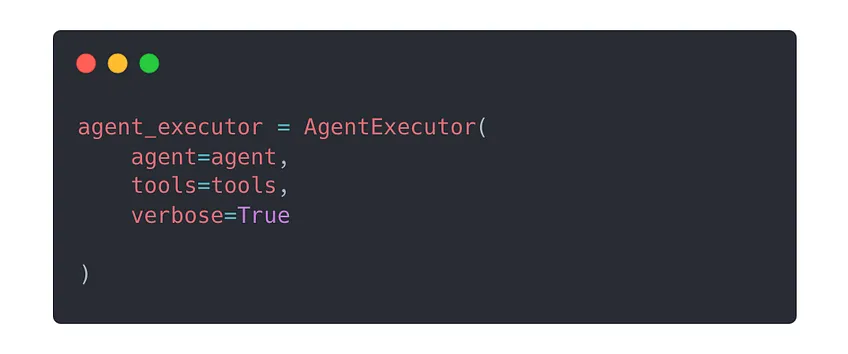
> calls the agent
> executes the actions it chooses
> passes the action outputs back to the agent
> and repeats
13
@ollama @OpenAI @cohere @langchain Step 4. Run the agent 🏃
We pass the input query
"Create a plot with Python of the number of games won by the Golden State Warriors in each of the last 2 NBA seasons."
to the agent_executor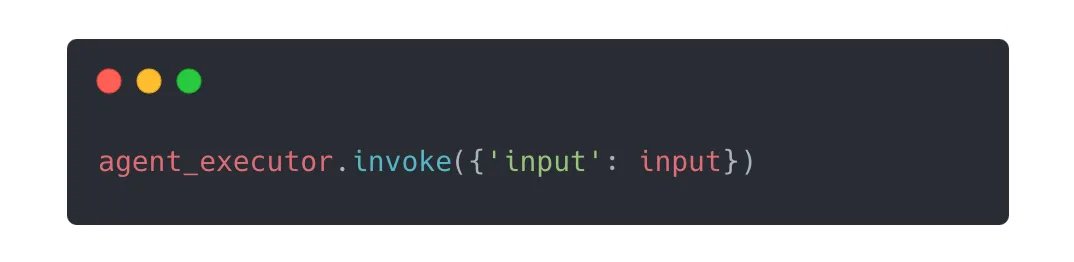
We pass the input query
"Create a plot with Python of the number of games won by the Golden State Warriors in each of the last 2 NBA seasons."
to the agent_executor
14
@ollama @OpenAI @cohere @langchain ...and the agent start reasoning and acting.
Until it produces the correct plot!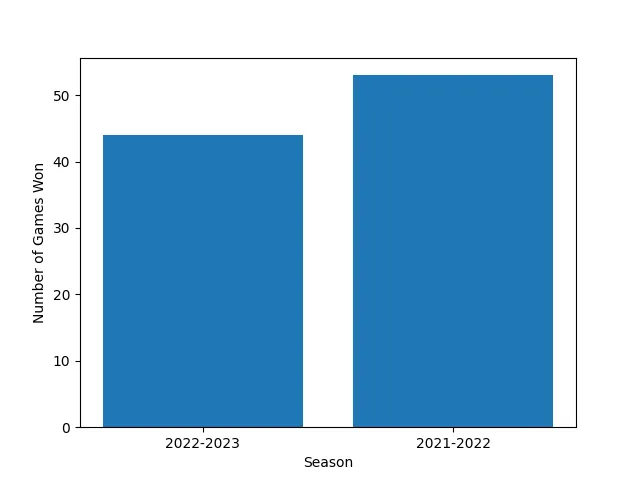
Until it produces the correct plot!
15
@ollama @OpenAI @cohere @langchain As you start experimenting with different input prompts, you will find scenarios in which the agent is not able to solve the task.
Moving from agent prototypes to production-ready agents is all about polishing rough edges, and ensuring the agent has access to the right tools.
Moving from agent prototypes to production-ready agents is all about polishing rough edges, and ensuring the agent has access to the right tools.
16
@ollama @OpenAI @cohere @langchain But this is something we will leave for another day.
17
Join 22k+ ML builders to the 𝗥𝗲𝗮𝗹-𝗪𝗼𝗿𝗹𝗱 𝗠𝗟 𝗡𝗲𝘄𝘀𝗹𝗲𝘁𝘁𝗲𝗿, and learn to build Real-World ML Products.
𝗘𝘃𝗲𝗿𝘆 𝗦𝗮𝘁𝘂𝗿𝗱𝗮𝘆 you will get an email with hands-on content to build real-world ML apps.
↓↓↓
paulabartabajo.substack.com
𝗘𝘃𝗲𝗿𝘆 𝗦𝗮𝘁𝘂𝗿𝗱𝗮𝘆 you will get an email with hands-on content to build real-world ML apps.
↓↓↓
paulabartabajo.substack.com

