If you’re coding fast with tools like @cursor_ai and @lovable, your...

Prajwal Tomar@PrajwalTomar_
38 views
Apr 03, 2025
~2 min read
Advertisement
1
If you’re coding fast with tools like @cursor_ai and @lovable, your terminal should move just as quickly.
That’s where Agent Prompts in @warpdotdev come in.
Here’s why they’ve quietly become one of my favorite features: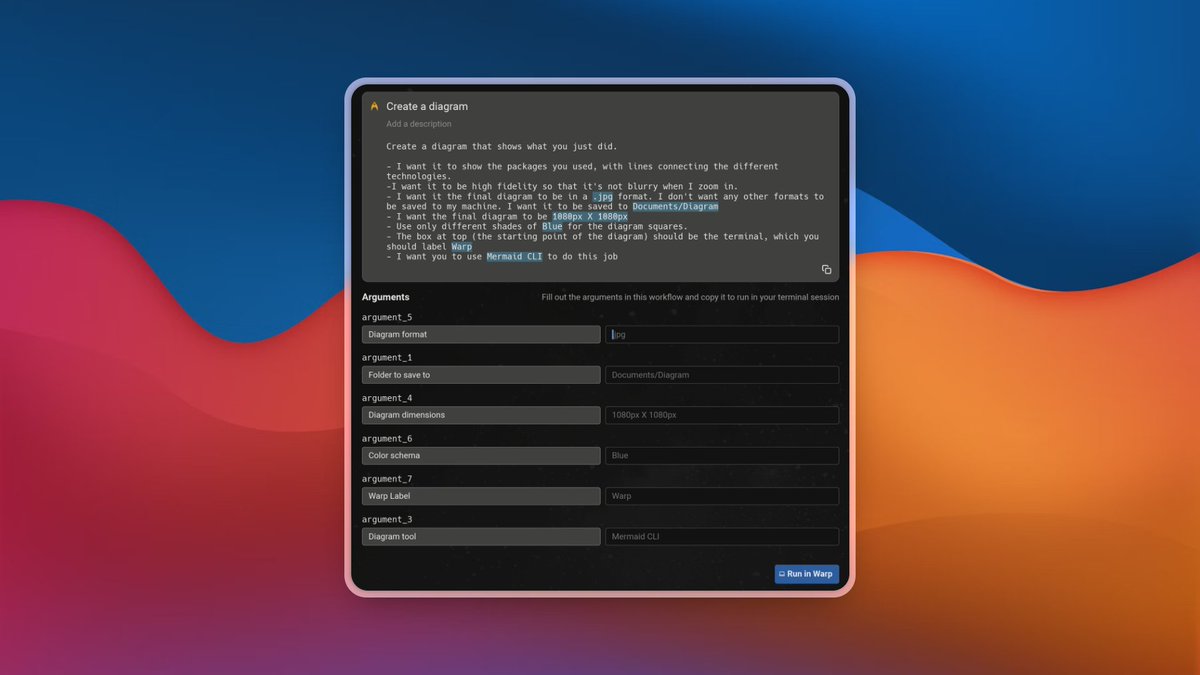
That’s where Agent Prompts in @warpdotdev come in.
Here’s why they’ve quietly become one of my favorite features:
2
1/ Most terminal tasks are repetitive
Every dev has 5–10 CLI commands they run all the time:
- Setup and boilerplate
- DB connections
- Local deployments
- Shell scripts
- Server reboots
Agent Prompts turn those into reusable, fill-in-the-blank workflows.
Clean. Fast. Contextual.
Every dev has 5–10 CLI commands they run all the time:
- Setup and boilerplate
- DB connections
- Local deployments
- Shell scripts
- Server reboots
Agent Prompts turn those into reusable, fill-in-the-blank workflows.
Clean. Fast. Contextual.
3
2/ Dynamic inputs change the game
No more hardcoding secrets or paths.
Agent Prompts support variables like:
- Supabase password
- Output folder path
- Git branch name
- CLI flags or arguments
Just fill in the blanks and run.
No more hardcoding secrets or paths.
Agent Prompts support variables like:
- Supabase password
- Output folder path
- Git branch name
- CLI flags or arguments
Just fill in the blanks and run.
4
3/ Example: Connect to Supabase
Here’s one I use all the time:
“Connect me to my Supabase DB using psql. Ask for my password.”
Saved once. Reused forever.
I never have to retype a connection string or check docs again.
Here’s one I use all the time:
“Connect me to my Supabase DB using psql. Ask for my password.”
Saved once. Reused forever.
I never have to retype a connection string or check docs again.
5
4/ Your terminal becomes a toolbox
Over time, you build your own stack of Agent Prompts:
- Caption YouTube videos
- Deploy a static site
- Review a Git diff with AI
- Generate Mermaid diagrams
Each prompt = 1 less thing to search.
Over time, you build your own stack of Agent Prompts:
- Caption YouTube videos
- Deploy a static site
- Review a Git diff with AI
- Generate Mermaid diagrams
Each prompt = 1 less thing to search.
6
5/ Great for teams and onboarding
Every Agent Prompt has a shareable URL.
You can:
- Share it with your team
- Add it to client docs
- Drop it in onboarding Notion pages
No back-and-forth. Just fill and run.
Every Agent Prompt has a shareable URL.
You can:
- Share it with your team
- Add it to client docs
- Drop it in onboarding Notion pages
No back-and-forth. Just fill and run.
7
6/ Why I use it as a builder
I don’t want to memorize bash syntax or reuse Notion checklists.
I just want to:
- Build
- Ship
- Repeat
Agent Prompts let me create repeatable systems without ever leaving my terminal.
I don’t want to memorize bash syntax or reuse Notion checklists.
I just want to:
- Build
- Ship
- Repeat
Agent Prompts let me create repeatable systems without ever leaving my terminal.
8
7/ Want to get started?
Warp has already curated a bunch of useful Agent Prompts for you to try out.
👉 dothings.warp.dev
Some favorites:
- Review code changes
- Clip long videos
- Connect to your DB
- Create PRs from open changes
Warp has already curated a bunch of useful Agent Prompts for you to try out.
👉 dothings.warp.dev
Some favorites:
- Review code changes
- Clip long videos
- Connect to your DB
- Create PRs from open changes
9
8/ Wrap-up
If you’re coding with Cursor or shipping MVPs fast with Supabase:
- Add Agent Prompts to your workflow
- Reuse your commands
- Work like your terminal knows you
- This is the smart way to automate your dev flow.
Let me know if you want my full Agent Prompt pack next.
If you’re coding with Cursor or shipping MVPs fast with Supabase:
- Add Agent Prompts to your workflow
- Reuse your commands
- Work like your terminal knows you
- This is the smart way to automate your dev flow.
Let me know if you want my full Agent Prompt pack next.
