AI just built my backend from scratch. Database, schema, storage....

Prajwal Tomar@PrajwalTomar_
42 views
Mar 30, 2025
~3 min read
Advertisement
1
AI just built my backend from scratch.
Database, schema, storage. No manual setup.
Here's how I used Cursor Agent with MCP to automate my backend: ↓
Database, schema, storage. No manual setup.
Here's how I used Cursor Agent with MCP to automate my backend: ↓
2
1/ Problem is, most devs struggle with backend setup when building fast.
You either:
- Write schema manually
- Fight with migrations
- Or get 100s or errors
But now AI can do it for you if you give it the right instructions.
That’s how I build backend of my MVPs:
You either:
- Write schema manually
- Fight with migrations
- Or get 100s or errors
But now AI can do it for you if you give it the right instructions.
That’s how I build backend of my MVPs:
3
2/ The key: MCP (Model Context Protocol)
MCP lets Cursor talk directly to your database.
With it, Cursor can:
- Read your schema
- Update tables
- Sync migrations
- Handle storage
No manual copy-pasting. Cursor Agent understands Supabase brilliantly.
MCP lets Cursor talk directly to your database.
With it, Cursor can:
- Read your schema
- Update tables
- Sync migrations
- Handle storage
No manual copy-pasting. Cursor Agent understands Supabase brilliantly.
4
3/ But to make it work flawlessly we need to solve a core isssue:
We need to provide Cursor, detailed context about our backend structure. If we don’t do that AI models start to hallucinate, assume things and mess up the codebase.
Best way to provide context about your project is by creating a “knowledge base” for AI models.
We need to provide Cursor, detailed context about our backend structure. If we don’t do that AI models start to hallucinate, assume things and mess up the codebase.
Best way to provide context about your project is by creating a “knowledge base” for AI models.
5
4/ Your Knowledge base includes:
- Project Requirements Doc
- Tech Stack & APIs Doc
- App flow Doc.
- Backend Structure (schema, database tables etc)
- Frontend Guidelines
I use @CodeGuidedev to create my project docs.
In 20 minutes I get my docs done. Works with all AI coding models.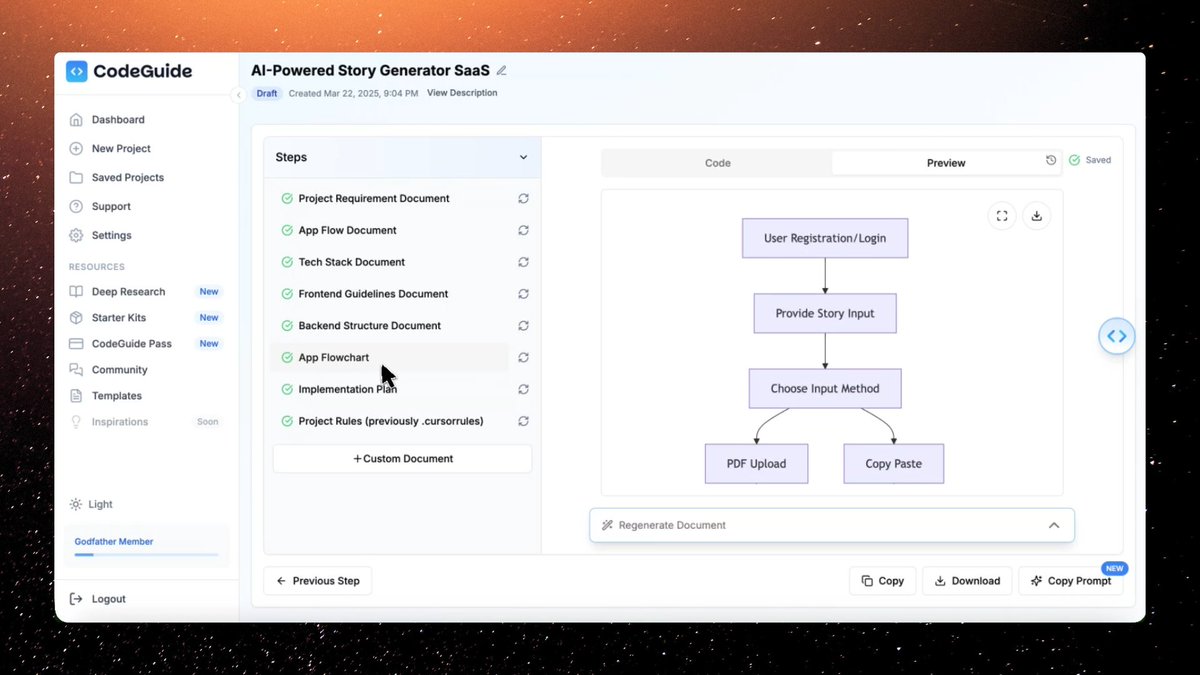
- Project Requirements Doc
- Tech Stack & APIs Doc
- App flow Doc.
- Backend Structure (schema, database tables etc)
- Frontend Guidelines
I use @CodeGuidedev to create my project docs.
In 20 minutes I get my docs done. Works with all AI coding models.
6
5/ I attach project docs under Project rules now.
This approach made Cursor more consistent and it scans the docs on each request.
Add your docs under .cursor/rules in .mdc format.
I just click on “copy prompt” in CodeGuide and paste the paste in Cursor Agent and It attaches docs automatically.
This approach made Cursor more consistent and it scans the docs on each request.
Add your docs under .cursor/rules in .mdc format.
I just click on “copy prompt” in CodeGuide and paste the paste in Cursor Agent and It attaches docs automatically.
7
6/ Once docs were ready, I set up MCP:
- Got my Supabase DB URL
- Pasted it in Cursor MCP settings
- Chose "Command Server"
- Saved and tested with:“What tables are in this database?”
It instantly fetched my schema.
- Got my Supabase DB URL
- Pasted it in Cursor MCP settings
- Chose "Command Server"
- Saved and tested with:“What tables are in this database?”
It instantly fetched my schema.
8
7/ Then I gave Cursor a prompt:
“Create a Postgres table called 'projects' with id, title, description, and created_at.”
It:
- Wrote the migration
- Updated Supabase
- Pushed changes
- Synced storage buckets
All without me writing a line of SQL.
“Create a Postgres table called 'projects' with id, title, description, and created_at.”
It:
- Wrote the migration
- Updated Supabase
- Pushed changes
- Synced storage buckets
All without me writing a line of SQL.
9
8/ The best part?
I could now query data, update schema, and configure auth, just by chatting with Cursor.
No copy-paste.
No external tools.
No YAML files or sql dumps.
I could now query data, update schema, and configure auth, just by chatting with Cursor.
No copy-paste.
No external tools.
No YAML files or sql dumps.
10
9/ Final result:
I built a functional MVP with:
- Supabase as backend
- Cursor for frontend + logic
- MCP to sync both
- CodeGuide to set it all up
From zero to working product in hours.
I built a functional MVP with:
- Supabase as backend
- Cursor for frontend + logic
- MCP to sync both
- CodeGuide to set it all up
From zero to working product in hours.
11
10/ Few Tips:
If you’re building fast with AI tools like Cursor or Supabase
don’t skip the docs.
The better you plan, the less errors you’ll face.
Use multiple AI models: Sonnet 3.7 for debugging and Sonnet 3.5 to execute code.
Setup MCP: MCP makes communication easy between Supabase and Cursor.
If you’re building fast with AI tools like Cursor or Supabase
don’t skip the docs.
The better you plan, the less errors you’ll face.
Use multiple AI models: Sonnet 3.7 for debugging and Sonnet 3.5 to execute code.
Setup MCP: MCP makes communication easy between Supabase and Cursor.
12
11/ This is my new workflow:
- Plan with @CodeGuidedev
- Wire up MCP
- Build with @cursor_ai
- Ship faster than ever
AI can now build your backend. You just need to show it how.
Let me know if you want the docs, MCP setup steps, or the demo repo.
- Plan with @CodeGuidedev
- Wire up MCP
- Build with @cursor_ai
- Ship faster than ever
AI can now build your backend. You just need to show it how.
Let me know if you want the docs, MCP setup steps, or the demo repo.
