How to Set Up Cursor the Right Way Cursor Rules are outdated....

Prajwal Tomar@PrajwalTomar_
55 views
Mar 10, 2025
~4 min read
Advertisement
1
How to Set Up Cursor the Right Way
Cursor Rules are outdated. Project Rules is the correct way now. Here’s why it matters and how to set it up properly:
Cursor Rules are outdated. Project Rules is the correct way now. Here’s why it matters and how to set it up properly:
2
1. Why .cursorrules Wasn’t Enough
Cursor originally used a single .cursorrules file at the root of a project, but this approach had serious problems:
Limited control
A single rules file applied to the entire project, even when irrelevant.
Context overload
Cursor’s AI had to process every rule at once, often leading to ignored or misunderstood instructions.
Lack of scalability
As projects grew, .cursorrules became bloated and difficult to manage.
Inconsistent AI responses
The AI often skipped or misapplied rules because the file lacked structure and precision.
Instead of improving AI-generated code, .cursorrules often led to unpredictable results.
Cursor originally used a single .cursorrules file at the root of a project, but this approach had serious problems:
Limited control
A single rules file applied to the entire project, even when irrelevant.
Context overload
Cursor’s AI had to process every rule at once, often leading to ignored or misunderstood instructions.
Lack of scalability
As projects grew, .cursorrules became bloated and difficult to manage.
Inconsistent AI responses
The AI often skipped or misapplied rules because the file lacked structure and precision.
Instead of improving AI-generated code, .cursorrules often led to unpredictable results.
3
2. Introducing Cursor’s Project Rules (.mdc files)
Cursor solved these issues by introducing Project Rules, stored as modular .mdc files inside .cursor/rules/.
This allows for precise rule application per file type, module, or feature instead of one massive, overloaded rules file.
Why Project Rules Are Better:
Granular control
Rules are split into smaller, targeted files, ensuring AI follows the right instructions for each part of the project.
Better AI-generated code
Since Cursor loads only relevant rules, responses are more accurate and consistent.
Easier rule management
Rules are modular, easier to edit, and can be updated independently without affecting unrelated parts of the project.
This means fewer ignored rules, better AI responses, and a cleaner development workflow.
Cursor solved these issues by introducing Project Rules, stored as modular .mdc files inside .cursor/rules/.
This allows for precise rule application per file type, module, or feature instead of one massive, overloaded rules file.
Why Project Rules Are Better:
Granular control
Rules are split into smaller, targeted files, ensuring AI follows the right instructions for each part of the project.
Better AI-generated code
Since Cursor loads only relevant rules, responses are more accurate and consistent.
Easier rule management
Rules are modular, easier to edit, and can be updated independently without affecting unrelated parts of the project.
This means fewer ignored rules, better AI responses, and a cleaner development workflow.
4
3. Step-by-Step Example: Setting Up Project Rules
Here’s how to set up Project Rules effectively for a cleaner, more efficient AI-powered development workflow.
Step 1: General Rules (general.mdc)
This rule applies to all files across the project.
File: general.mdc
Scope: * (all files)
Contents:
- Use TypeScript for all development.
- Prioritize readability and maintainability in all code.
- Ensure function and variable names are clear and descriptive.
- Use concise, meaningful comments for complex logic.
Here’s how to set up Project Rules effectively for a cleaner, more efficient AI-powered development workflow.
Step 1: General Rules (general.mdc)
This rule applies to all files across the project.
File: general.mdc
Scope: * (all files)
Contents:
- Use TypeScript for all development.
- Prioritize readability and maintainability in all code.
- Ensure function and variable names are clear and descriptive.
- Use concise, meaningful comments for complex logic.
5
Step 2: Frontend Rules (frontend.mdc)
These rules apply only to frontend files (.tsx).
File: frontend.mdc
Scope: *.tsx (React components)
Contents:
- Use functional React components instead of class components.
- Apply Tailwind CSS for styling; avoid inline styles.
- Components should be modular and reusable.
- Maintain a consistent and clear component structure.
These rules apply only to frontend files (.tsx).
File: frontend.mdc
Scope: *.tsx (React components)
Contents:
- Use functional React components instead of class components.
- Apply Tailwind CSS for styling; avoid inline styles.
- Components should be modular and reusable.
- Maintain a consistent and clear component structure.
6
Step 3: Backend Rules (backend.mdc)
These rules apply only to backend logic (.ts API and database files).
File: backend.mdc
Scope: api/**/*.ts (all backend API files)
Contents:
- Always validate API inputs before processing requests.
- Use async/await consistently; avoid callbacks.
- Follow RESTful API conventions for clear endpoint structures.
- Optimize database queries for performance and scalability.
- Log errors properly but avoid excessive debugging logs in production.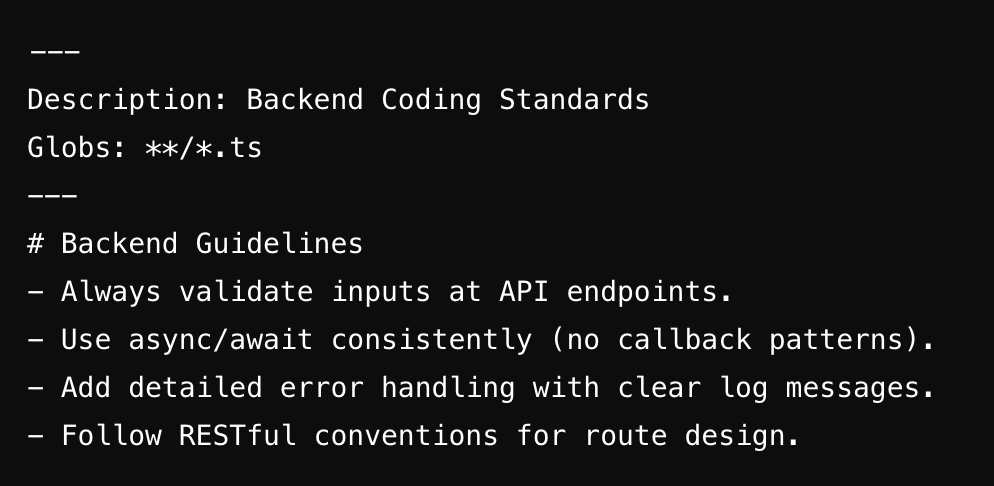
These rules apply only to backend logic (.ts API and database files).
File: backend.mdc
Scope: api/**/*.ts (all backend API files)
Contents:
- Always validate API inputs before processing requests.
- Use async/await consistently; avoid callbacks.
- Follow RESTful API conventions for clear endpoint structures.
- Optimize database queries for performance and scalability.
- Log errors properly but avoid excessive debugging logs in production.
7
4. How Project Rules Improved My Agency’s Code Quality
Switching to Project Rules had an immediate impact on our workflow.
Fewer AI mistakes
Cursor follows specific, scoped rules, reducing incorrect suggestions.
No more repetitive corrections
AI now remembers the coding standards without needing constant reminders.
Consistent coding standards across all projects
Every developer in the team follows the same structured rules without additional effort.
Faster development cycles
AI-generated code requires less revision, allowing us to ship MVPs faster.
The result? Less debugging, cleaner code, and more reliable AI assistance.
Switching to Project Rules had an immediate impact on our workflow.
Fewer AI mistakes
Cursor follows specific, scoped rules, reducing incorrect suggestions.
No more repetitive corrections
AI now remembers the coding standards without needing constant reminders.
Consistent coding standards across all projects
Every developer in the team follows the same structured rules without additional effort.
Faster development cycles
AI-generated code requires less revision, allowing us to ship MVPs faster.
The result? Less debugging, cleaner code, and more reliable AI assistance.
8
5. Best Practices for Structuring Project Rules
To make the most of Project Rules, follow these best practices:
Keep rules modular and specific
- Separate frontend, backend, and database rules instead of using one large file.
Use precise scope targeting
- *.tsx → Apply only to React frontend components.
- api/**/*.ts → Apply only to backend API logic.
- **/*.sql → Apply only to database queries.
Regularly update and refine rules
- If a rule is too broad, break it into smaller, more specific rules.
- Review and adjust rules as the project evolves.
Use Global Rules for universal coding standards
- Global standards (clean code, readability, comments, etc.) go in general.mdc.
- Project Rules apply to specific code sections (frontend, backend, etc.).
To make the most of Project Rules, follow these best practices:
Keep rules modular and specific
- Separate frontend, backend, and database rules instead of using one large file.
Use precise scope targeting
- *.tsx → Apply only to React frontend components.
- api/**/*.ts → Apply only to backend API logic.
- **/*.sql → Apply only to database queries.
Regularly update and refine rules
- If a rule is too broad, break it into smaller, more specific rules.
- Review and adjust rules as the project evolves.
Use Global Rules for universal coding standards
- Global standards (clean code, readability, comments, etc.) go in general.mdc.
- Project Rules apply to specific code sections (frontend, backend, etc.).
9
6. Final Takeaway: Project Rules Are a Game-Changer
Cursor’s Project Rules provide a massive improvement over .cursorrules:
- AI-generated code is more accurate and follows best practices.
- Rules are easier to manage, update, and scale across projects.
- Less time spent fixing AI mistakes and rewriting poorly generated code.
- Consistent, structured coding across all projects and teams.
Cursor isn’t just an AI-powered IDE, it’s a tool that adapts to your coding standards when set up correctly.
If you’re still using .cursorrules, you’re limiting Cursor’s potential.
Start using Project Rules today and take full control of AI-generated code.
Any questions? Let’s discuss.
Cursor’s Project Rules provide a massive improvement over .cursorrules:
- AI-generated code is more accurate and follows best practices.
- Rules are easier to manage, update, and scale across projects.
- Less time spent fixing AI mistakes and rewriting poorly generated code.
- Consistent, structured coding across all projects and teams.
Cursor isn’t just an AI-powered IDE, it’s a tool that adapts to your coding standards when set up correctly.
If you’re still using .cursorrules, you’re limiting Cursor’s potential.
Start using Project Rules today and take full control of AI-generated code.
Any questions? Let’s discuss.
