Here's the ULTIMATE guide for building apps using Grok + Bolt 😱...

Jay ⛽️@jelanifuel
16 views
Mar 05, 2025
~6 min read
Advertisement
1
Here's the ULTIMATE guide for building apps using Grok + Bolt 😱
After you read this you’ll be able to build ANYTHING your heart desires.
This includes:
✅ Wireframes & App Flow
✅ PRD with Technical Specs
✅ Fully Functional @boltdotnew Apps
Use this workflow + prompts (see below) to ship your idea 10x faster than ever before 🚀
Steps down below 🦾
After you read this you’ll be able to build ANYTHING your heart desires.
This includes:
✅ Wireframes & App Flow
✅ PRD with Technical Specs
✅ Fully Functional @boltdotnew Apps
Use this workflow + prompts (see below) to ship your idea 10x faster than ever before 🚀
Steps down below 🦾
2
2/ Step 1: Brain Dump Your App
Keep your head in the clouds and brain dump everything you want your app to do.
Use Superwhisper (AI diction app) to assist you.
For Example if I were creating an AI copy generator app my brain dump could look something like this:
"Main Idea: The idea is the ability to allow people to create copy that is specific to direct response marketing.
So users can signup/login and access a dashboard of different types of copy generators.
Main Features: Each copy generator will have a category it belongs to (IE: Webinar, Ad, YouTube, Facebook, etc)
When a user selects a category, they will be presented with sub categories of different types of copy generators.
When a user clicks on a copy generator then the user will enter some data about their offer, audience, etc and the user will be able to click a button and then the ad generator will start to create the copy.
Once copy is created users should be able to copy the copy or download it or save it. Which means we need a database to support this functionality.
This also means that users should be able to save the offer/audience data to reuse it for future copy.
So we need to have pages that support all this function including:
Authentication:
Login, Signup, Forgot password
Dashboard/Main Menu
Categories
Sub categories
Copy Generator
Saved Ads
Saved Audiences
This app would work on a metered credit system."
Keep your head in the clouds and brain dump everything you want your app to do.
Use Superwhisper (AI diction app) to assist you.
For Example if I were creating an AI copy generator app my brain dump could look something like this:
"Main Idea: The idea is the ability to allow people to create copy that is specific to direct response marketing.
So users can signup/login and access a dashboard of different types of copy generators.
Main Features: Each copy generator will have a category it belongs to (IE: Webinar, Ad, YouTube, Facebook, etc)
When a user selects a category, they will be presented with sub categories of different types of copy generators.
When a user clicks on a copy generator then the user will enter some data about their offer, audience, etc and the user will be able to click a button and then the ad generator will start to create the copy.
Once copy is created users should be able to copy the copy or download it or save it. Which means we need a database to support this functionality.
This also means that users should be able to save the offer/audience data to reuse it for future copy.
So we need to have pages that support all this function including:
Authentication:
Login, Signup, Forgot password
Dashboard/Main Menu
Categories
Sub categories
Copy Generator
Saved Ads
Saved Audiences
This app would work on a metered credit system."
3
3/ Step 2: Craft a PRD with Grok 📝
Tell Grok how your app should work by giving it your brain dump.
Use this prompt:
Prompt: “Can you create a PRD (Product Resource Document) from these notes on an app I want to build”
It’ll spit out a Product Resource Document with technical details.
Use this as context for Bolt so the AI knows EXACTLY what you’re aiming for.
Then after you get the PRD you will want to ask Grok to break it down into parts.
Use this prompt:
Prompt: "If you had to break this into parts what would you do?"
You do this because you don’t want to one shot your app.
You always want to start with short prompts, not giant ones.
This helps with keeping the AI from making unnecessary decisions or iterations.
Finally, we want to map out the user journey.
Use this prompt in Grok:
“Can you map out the user journey and if I were to wireframe this out, how would each part of the app work together for the user.”
This will give us all the pages required for the next step.
Tell Grok how your app should work by giving it your brain dump.
Use this prompt:
Prompt: “Can you create a PRD (Product Resource Document) from these notes on an app I want to build”
It’ll spit out a Product Resource Document with technical details.
Use this as context for Bolt so the AI knows EXACTLY what you’re aiming for.
Then after you get the PRD you will want to ask Grok to break it down into parts.
Use this prompt:
Prompt: "If you had to break this into parts what would you do?"
You do this because you don’t want to one shot your app.
You always want to start with short prompts, not giant ones.
This helps with keeping the AI from making unnecessary decisions or iterations.
Finally, we want to map out the user journey.
Use this prompt in Grok:
“Can you map out the user journey and if I were to wireframe this out, how would each part of the app work together for the user.”
This will give us all the pages required for the next step.
4
3/ Step 3: Sketch it out with Excalidraw ✏️
Now that we have the PRD and the broken out parts we can start wire framing.
For wireframe use Excalidraw.
Map out every page - landing, login, dashboard, whatever and sketch how users flow between them. Add notes like “button here triggers X” or “this page needs a dropdown.”
This will give us better guidance for when it’s time to build in Bolt.
Quick tip: You can go to Grok and provide the PRD and ask it to create a mermaid permutations based on the PRD.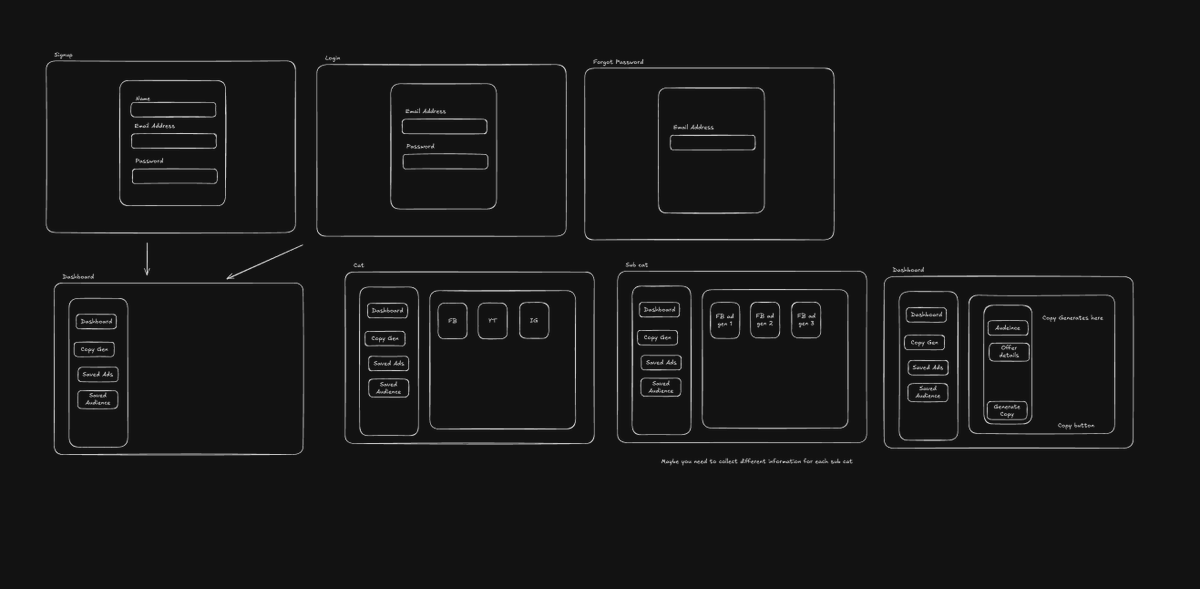
Now that we have the PRD and the broken out parts we can start wire framing.
For wireframe use Excalidraw.
Map out every page - landing, login, dashboard, whatever and sketch how users flow between them. Add notes like “button here triggers X” or “this page needs a dropdown.”
This will give us better guidance for when it’s time to build in Bolt.
Quick tip: You can go to Grok and provide the PRD and ask it to create a mermaid permutations based on the PRD.
5
4/ Step 4: Keep Bolt’s Code Clean 🧹
AI can go off the rails if you don’t provide the proper instructions OR you don’t know what you’re doing.
Everything we did before this point will help that from happening.
But Before building in bolt go to the system prompt and use these two prompts.
System Prompt 1: “React components must not exceed 300 lines. Use a modular component approach for maintainability. Break features into reusable pieces so fixes don’t break everything.” - h/t @CodeWithTylerX
Why 300? It’s a sweet spot—readable but functional. Bolt's new 3.7 Sonnet model is sharper than 3.5, so it’s less likely to overdo it out the gate. Still, I’ve seen AI tools pad code with fluff (like useless loops) if you don’t enforce rules.
Without this, you’re debugging trash you didn’t even write.
System Prompt 2:
“When you create a new file, make sure to add a comment at the top of the file with the changes you made. When you update/make changes to a file, make sure to rewrite the comment at the top of the file with the changes you made. If there is no comment, then add one."
Now you can take the wireframes + context and start building in bolt.
➡️ Take the wireframes and tell bolt to build the pages your app requires.
➡️ And take the PRD to provide context to how you want the functions of your app to work.
Why This Works 🔥
Preplanning with Excalidraw wireframes + a ChatGPT o1 PRD is like giving Bolt a GPS.
Without it, you’re in error-loop hell—AI misfires, token costs skyrocket, and you’re debugging for days.
I’ve been there: once built a chatbot with no plan, and my app was going nowhere fast.
With this workflow, I cut that to 500 lines, clean and functional.
You’ll save time, sanity, and cash.
AI can go off the rails if you don’t provide the proper instructions OR you don’t know what you’re doing.
Everything we did before this point will help that from happening.
But Before building in bolt go to the system prompt and use these two prompts.
System Prompt 1: “React components must not exceed 300 lines. Use a modular component approach for maintainability. Break features into reusable pieces so fixes don’t break everything.” - h/t @CodeWithTylerX
Why 300? It’s a sweet spot—readable but functional. Bolt's new 3.7 Sonnet model is sharper than 3.5, so it’s less likely to overdo it out the gate. Still, I’ve seen AI tools pad code with fluff (like useless loops) if you don’t enforce rules.
Without this, you’re debugging trash you didn’t even write.
System Prompt 2:
“When you create a new file, make sure to add a comment at the top of the file with the changes you made. When you update/make changes to a file, make sure to rewrite the comment at the top of the file with the changes you made. If there is no comment, then add one."
Now you can take the wireframes + context and start building in bolt.
➡️ Take the wireframes and tell bolt to build the pages your app requires.
➡️ And take the PRD to provide context to how you want the functions of your app to work.
Why This Works 🔥
Preplanning with Excalidraw wireframes + a ChatGPT o1 PRD is like giving Bolt a GPS.
Without it, you’re in error-loop hell—AI misfires, token costs skyrocket, and you’re debugging for days.
I’ve been there: once built a chatbot with no plan, and my app was going nowhere fast.
With this workflow, I cut that to 500 lines, clean and functional.
You’ll save time, sanity, and cash.
6
6/ TL;DR – Bolt + Preplanning = Gold 🏆
➡️Wireframes in Excalidraw for visuals
➡️PRD via ChatGPT o1 for tech specs
➡️Clean, modular code with smart prompts
This combo shipped my last MVP in a weekend.
And if you follow this guide you'll be able to do the same.
➡️Wireframes in Excalidraw for visuals
➡️PRD via ChatGPT o1 for tech specs
➡️Clean, modular code with smart prompts
This combo shipped my last MVP in a weekend.
And if you follow this guide you'll be able to do the same.
7
Some extra tips:
- Use v0 or MagicPatterns to create designs if you are not good with UI.
- Or just literally go to dribbble and find stuff you like and then take the screenshots into Bolt.
- Be Specific in Prompts: Clearly state the frameworks (e.g., Astro, Tailwind) and features you want to ensure accurate results.
- Use the Enhance Prompt Feature: Refine your prompts using the 'enhance' icon for better initial outputs.
- Scaffold Basics First: Start with the basic structure before adding complex features to build a solid foundation.
- Batch Simple Instructions: Combine multiple simple tasks into one prompt to save time and manage API credits efficiently.
Use Chrome for Better Performance: Switch to Chrome if you encounter issues, as it may offer a smoother experience compared to other browsers.
Use superchargebolt Chrome Extension for extra added functionality created by @skipsterdev
This one is a must have.
- Use v0 or MagicPatterns to create designs if you are not good with UI.
- Or just literally go to dribbble and find stuff you like and then take the screenshots into Bolt.
- Be Specific in Prompts: Clearly state the frameworks (e.g., Astro, Tailwind) and features you want to ensure accurate results.
- Use the Enhance Prompt Feature: Refine your prompts using the 'enhance' icon for better initial outputs.
- Scaffold Basics First: Start with the basic structure before adding complex features to build a solid foundation.
- Batch Simple Instructions: Combine multiple simple tasks into one prompt to save time and manage API credits efficiently.
Use Chrome for Better Performance: Switch to Chrome if you encounter issues, as it may offer a smoother experience compared to other browsers.
Use superchargebolt Chrome Extension for extra added functionality created by @skipsterdev
This one is a must have.
8
One final note. When you want to debug an issue, tell bolt "Do not modify the code, just answer this question..."
Then provide the question.
For example:
"Don't modify the code, just answer this question. Why do you believe this is not working and what file(s) do you think is contributing to the error?"
Then you can take the context and file that bolt provides drop it in Grok or o1 and have it give you an analysis on what could be wrong.
Then you can drop that analysis back in bolt for it to fix.
Then provide the question.
For example:
"Don't modify the code, just answer this question. Why do you believe this is not working and what file(s) do you think is contributing to the error?"
Then you can take the context and file that bolt provides drop it in Grok or o1 and have it give you an analysis on what could be wrong.
Then you can drop that analysis back in bolt for it to fix.
