New Cursor Agent is WILD. It understands project context, follows...

Prajwal Tomar@PrajwalTomar_
40 views
Feb 22, 2025
~2 min read
Advertisement
1
New Cursor Agent is WILD.
It understands project context, follows structured plan, and builds features autonomously.
Last night, I used it to ship an MVP in just 3 hours.
Here’s the exact workflow:
It understands project context, follows structured plan, and builds features autonomously.
Last night, I used it to ship an MVP in just 3 hours.
Here’s the exact workflow:
2
1/ Understanding Cursor’s Three Modes
Cursor has three different modes, each with a distinct purpose:
- Chat Mode: Helps debug, explain errors, and understand code structure.
- Normal Mode: Classic Cursor composer for making edits in specific files.
- Agent Mode: Fully autonomous, works across the entire project, and executes tasks with minimal supervision.
Cursor has three different modes, each with a distinct purpose:
- Chat Mode: Helps debug, explain errors, and understand code structure.
- Normal Mode: Classic Cursor composer for making edits in specific files.
- Agent Mode: Fully autonomous, works across the entire project, and executes tasks with minimal supervision.
3
2/ The Problem With Agent Mode
Cursor Agent is powerful, but without a context wall, it can easily break the project’s structure.
To solve this, I used @CodeGuideDev to generate structured project documentation before letting the agent take over.
This included:
- PRD
- App flow doc
- Tech stack doc
- Frontend guidelines
- Backend structure
- cursorrules file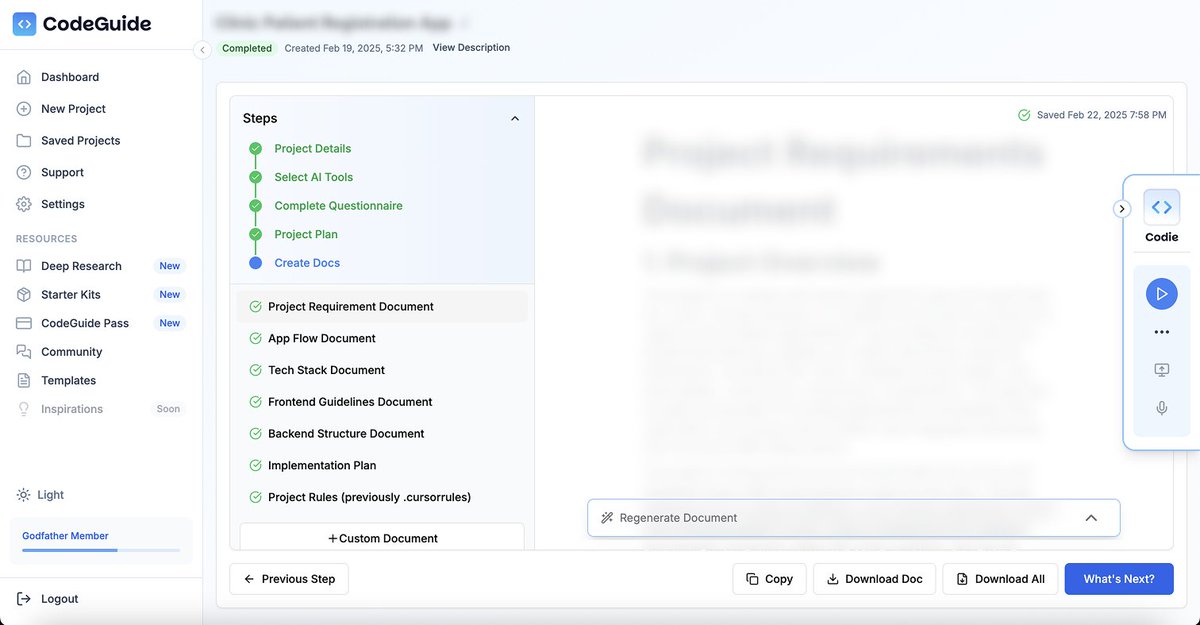
Cursor Agent is powerful, but without a context wall, it can easily break the project’s structure.
To solve this, I used @CodeGuideDev to generate structured project documentation before letting the agent take over.
This included:
- PRD
- App flow doc
- Tech stack doc
- Frontend guidelines
- Backend structure
- cursorrules file
4
3/ The Missing Piece: Implementation Plan
This time, @CodeGuidedev generated an additional file:
Implementation-plan(.)md
It wasn’t just a list of tasks. It provided a step-by-step execution roadmap, breaking down the entire development process into 50+ structured steps.
This was the missing link to making Cursor Agent actually useful.
This time, @CodeGuidedev generated an additional file:
Implementation-plan(.)md
It wasn’t just a list of tasks. It provided a step-by-step execution roadmap, breaking down the entire development process into 50+ structured steps.
This was the missing link to making Cursor Agent actually useful.
5
4/ Setting Up the Context Wall
I placed the Implementation Plan inside an /instructions folder and updated Cursor’s context.
Prompted Cursor with:
"Before you code anything, go through all files in @instructions and summarize your understanding of my project from a developer's perspective."
Cursor picked up the context perfectly. No hallucinations. No random code.
I placed the Implementation Plan inside an /instructions folder and updated Cursor’s context.
Prompted Cursor with:
"Before you code anything, go through all files in @instructions and summarize your understanding of my project from a developer's perspective."
Cursor picked up the context perfectly. No hallucinations. No random code.
6
5/ Guiding Cursor Agent Step-by-Step
I instructed Cursor to follow the Implementation Plan file.
"Follow the implementation-plan(.)md file and start from step 1."
One more trick:
"After completing each step, update the file by marking it as DONE and provide a bullet-point summary of what you did."
Now, the agent stayed context-aware throughout the development process.
I instructed Cursor to follow the Implementation Plan file.
"Follow the implementation-plan(.)md file and start from step 1."
One more trick:
"After completing each step, update the file by marking it as DONE and provide a bullet-point summary of what you did."
Now, the agent stayed context-aware throughout the development process.
7
6/ Executing the MVP in Three Hours
I just steered Cursor Agent to complete all steps (from step 1 to 50)
3 hours later, the MVP was fully functional, built using only 2 tools (CodeGuide and Cursor Agent)
This is a great start for autonomous coding workflow.
I just steered Cursor Agent to complete all steps (from step 1 to 50)
3 hours later, the MVP was fully functional, built using only 2 tools (CodeGuide and Cursor Agent)
This is a great start for autonomous coding workflow.
8
7/ The AI-Powered Development Workflow
This workflow is significantly more efficient than traditional development.
- @ChatGPTapp Voice for brainstorming MVP features
- @CodeGuideDev to generate structured coding documentation
- @cursor_ai Agent to execute the development with context
- @vercel for seamless deployment
This process is 10x faster than traditional development.
This workflow is significantly more efficient than traditional development.
- @ChatGPTapp Voice for brainstorming MVP features
- @CodeGuideDev to generate structured coding documentation
- @cursor_ai Agent to execute the development with context
- @vercel for seamless deployment
This process is 10x faster than traditional development.
9
8/ Next Steps
Next, I’ll be experimenting with Cursor Rules to refine how the agent handles more complex tasks.
If you are building MVPs with AI, this workflow is a game changer.
Will share more insights soon. Stay tuned.
Next, I’ll be experimenting with Cursor Rules to refine how the agent handles more complex tasks.
If you are building MVPs with AI, this workflow is a game changer.
Will share more insights soon. Stay tuned.
10
If you want to learn how to design and build PWAs, this thread is for you.

Prajwal Tomar@PrajwalTomar_
How I designed and built a PWA using AI
The client wanted a mobile app, but I recommended a PWA for faster development and lower costs.
Here is how I designed, built, and launched it using AI.
The client wanted a mobile app, but I recommended a PWA for faster development and lower costs.
Here is how I designed, built, and launched it using AI.
