AI Coding Crash Course: How I Build MVPs Fast with AI I left my 9-5...

Prajwal Tomar@PrajwalTomar_
53 views
Feb 22, 2025
~3 min read
Advertisement
1
AI Coding Crash Course: How I Build MVPs Fast with AI
I left my 9-5 job in November to focus on my MVP agency.
Today, I just completed my 15th client MVP.
Here is everything I have learned about AI coding, a crash course for developers looking to build FASTER.
I left my 9-5 job in November to focus on my MVP agency.
Today, I just completed my 15th client MVP.
Here is everything I have learned about AI coding, a crash course for developers looking to build FASTER.
2
1. AI coding is 70% planning, 30% implementation
Most developers jump straight into coding with AI, but without proper context, models make assumptions and mess up the project.
A structured approach is the key to getting reliable results.
Here is how I do it.
Most developers jump straight into coding with AI, but without proper context, models make assumptions and mess up the project.
A structured approach is the key to getting reliable results.
Here is how I do it.
3
2. Start with ChatGPT Voice for Idea & Features
Before writing a single line of code, I brainstorm the entire project using ChatGPT Voice.
I break down:
- The core idea
- Essential features
- App flow (pages, navigation, user actions)
Once I am satisfied, I ask ChatGPT to draft a structured project outline.
This ensures I have a clear direction before moving forward.
Before writing a single line of code, I brainstorm the entire project using ChatGPT Voice.
I break down:
- The core idea
- Essential features
- App flow (pages, navigation, user actions)
Once I am satisfied, I ask ChatGPT to draft a structured project outline.
This ensures I have a clear direction before moving forward.
4
3. Generate Project Documentation with @CodeGuideDev
With a clear plan in place, I move to CodeGuide to generate all necessary project docs.
I used to spend hours on this step, but after testing multiple tools, @codeguidedev has been the best for AI-assisted coding documentation. It is actually built for AI coding models like Claude Sonnet 3.5.
Documents I generate from CodeGuide:
- PRD (Product Requirements Document)
- Tech Stack Overview
- File Structure
- Frontend & Backend Guidelines
- .cursorrules file for Cursor
These Docs are must because they provide detailed context to AI coding tools.
CodeGuide also provides a 50-step implementation plan, which is actually quite useful.
With a clear plan in place, I move to CodeGuide to generate all necessary project docs.
I used to spend hours on this step, but after testing multiple tools, @codeguidedev has been the best for AI-assisted coding documentation. It is actually built for AI coding models like Claude Sonnet 3.5.
Documents I generate from CodeGuide:
- PRD (Product Requirements Document)
- Tech Stack Overview
- File Structure
- Frontend & Backend Guidelines
- .cursorrules file for Cursor
These Docs are must because they provide detailed context to AI coding tools.
CodeGuide also provides a 50-step implementation plan, which is actually quite useful.
5
4. Designing UI Screens with @lovable
Once my docs are ready, I design the frontend using Lovable.
It is fast, simple, and creates clean, modern UI assets without the usual design bottlenecks.
I copy the PRD content from CodeGuide and paste it into Lovable to provide the full project overview.
Then I start assembling the UI.
I design my UI screens page-by-page so I know how the pages will connect to each other.
Once my docs are ready, I design the frontend using Lovable.
It is fast, simple, and creates clean, modern UI assets without the usual design bottlenecks.
I copy the PRD content from CodeGuide and paste it into Lovable to provide the full project overview.
Then I start assembling the UI.
I design my UI screens page-by-page so I know how the pages will connect to each other.
6
5. Assembling the Codebase in @cursor_ai
Now comes the actual coding phase.
First, I create an Instructions folder in the root directory and add all the generated docs from CodeGuide.
Before writing code, I ask Cursor:
"Go through all files in the Instructions folder and summarize what you understand about my project."
This step sets proper context for the AI, preventing random assumptions.
Next, I run:
"Follow the @ implementation-plan .md file and start coding from Step 1."
Each step builds on the previous one, keeping the project structured.
A useful tip: I also ask Cursor to update the Implementation Plan file after every successful step to keep the progress updated.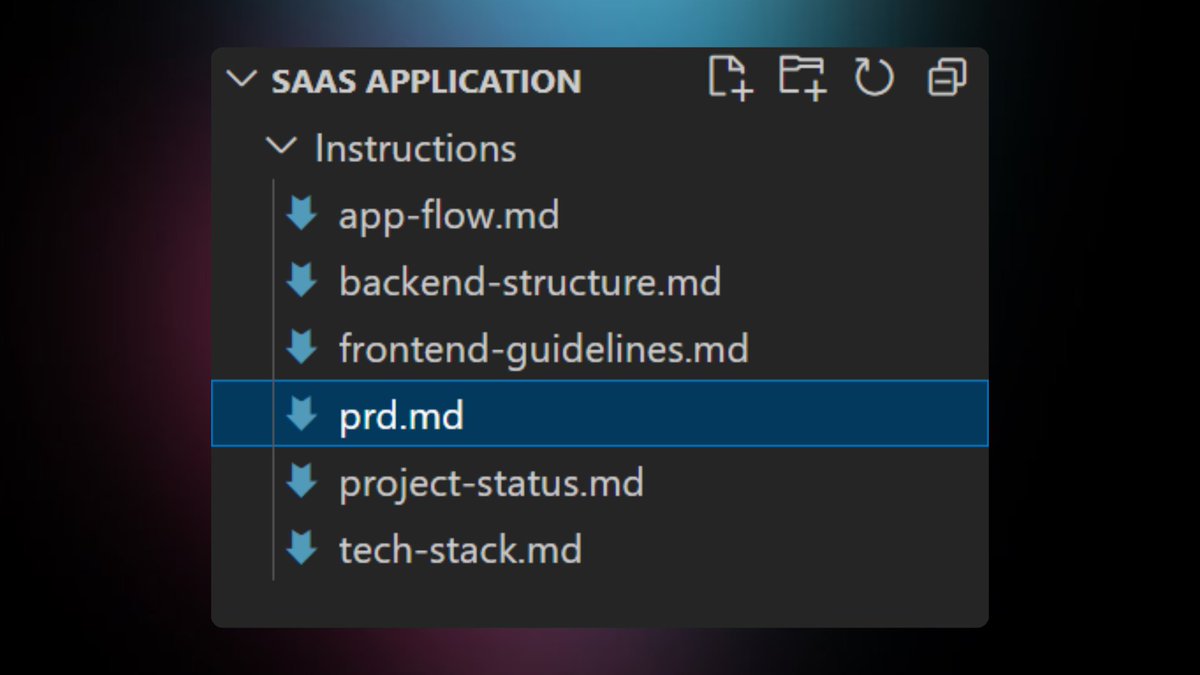
Now comes the actual coding phase.
First, I create an Instructions folder in the root directory and add all the generated docs from CodeGuide.
Before writing code, I ask Cursor:
"Go through all files in the Instructions folder and summarize what you understand about my project."
This step sets proper context for the AI, preventing random assumptions.
Next, I run:
"Follow the @ implementation-plan .md file and start coding from Step 1."
Each step builds on the previous one, keeping the project structured.
A useful tip: I also ask Cursor to update the Implementation Plan file after every successful step to keep the progress updated.
7
6. My AI-Optimized Tech Stack
For AI-assisted coding, I use a stack that works well with AI tools:
- Next.js (App Router) with TypeScript
- TailwindCSS + shadcn for styling
- Supabase for database & storage
- Vercel for fast deployment
For AI-assisted coding, I use a stack that works well with AI tools:
- Next.js (App Router) with TypeScript
- TailwindCSS + shadcn for styling
- Supabase for database & storage
- Vercel for fast deployment
8
7. Final Steps: Deployment & Scaling
Once the codebase is ready, I deploy everything on Vercel for a fast, seamless launch.
The process:
- Brainstorm your idea with ChatGPT Voice
- Generate project docs with @CodeGuidedev
- Design UI screens with @lovable
- Assemble the codebase in @cursor_ai
- Use @supabase for the backend
- Deploy the MVP on @vercel
With the right tools and structured workflows, AI coding becomes an advantage rather than a challenge.
Once the codebase is ready, I deploy everything on Vercel for a fast, seamless launch.
The process:
- Brainstorm your idea with ChatGPT Voice
- Generate project docs with @CodeGuidedev
- Design UI screens with @lovable
- Assemble the codebase in @cursor_ai
- Use @supabase for the backend
- Deploy the MVP on @vercel
With the right tools and structured workflows, AI coding becomes an advantage rather than a challenge.
9
Final Thoughts
AI coding is not about replacing developers. It is about working smarter.
With the right tools, you can reduce development time significantly without sacrificing quality.
If you are using AI for development, how do you structure your workflow? Let’s discuss.
AI coding is not about replacing developers. It is about working smarter.
With the right tools, you can reduce development time significantly without sacrificing quality.
If you are using AI for development, how do you structure your workflow? Let’s discuss.
