For any young filmmaker that wants to start shooting with your...

Rebel Films@IdiagiErnest
11 views
Feb 02, 2025
~2 min read
Advertisement
1
For any young filmmaker that wants to start shooting with your phone these are what you need.
1. An external camera app .
I recommend using Black magic camera app if you have an iPhone or Mcpro24fps if you have an android.
BM is free but Mcpro24fps is not. These apps gives you
2
functions that you can only find on your cinema cameras like Exposure settings, focus settings, false colour and ISO. It also gives you the ability to shoot in log profiles.
To learn how to use this app please search YouTube.
3
Secondly you need something that will enable you to get smooth stable footage . You need a gimbal. You can find a cheap one on AliExpress. Been using the one below for 3 years now. Pls consider your phone weight before purchasing a gimbal as some can only carry limited load.

4
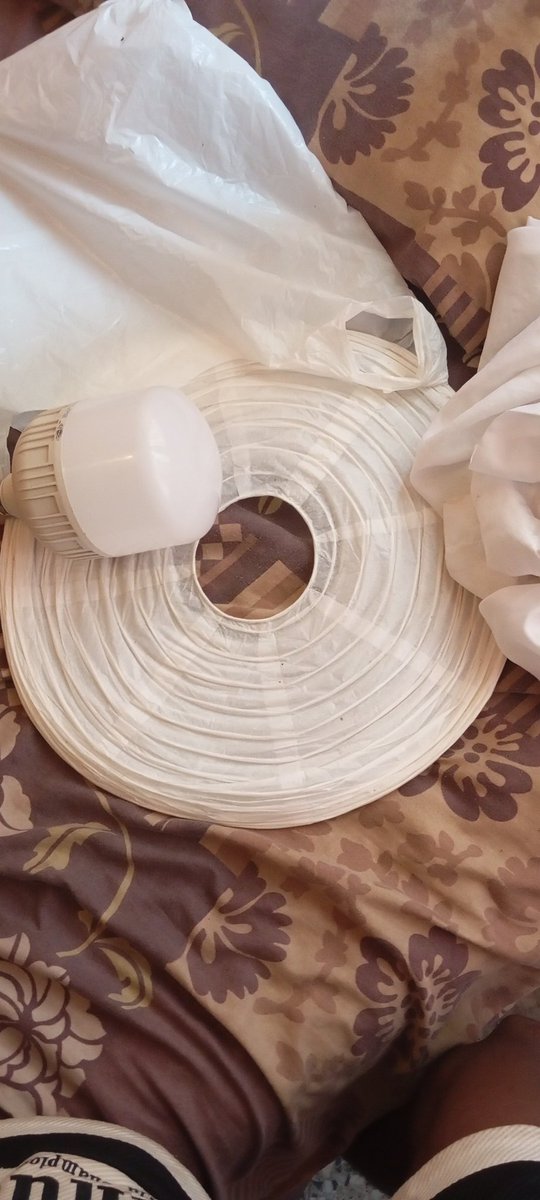
Third, you need light and these are mad expensive but it doesn't have to be . You can get that soft light by using any household bulb and a Chinese lantern. If you need it to be softer , wrap the bulb in a white cloth.

5
You also need an ND filter . Some phone cameras are very sensitive and when you want to use it for daylight shots it can be a problem. This filter enables you to shoot in sunny settings. Take it from me , it's very important you have it. And also get a clip for it .

6
A clip enables you to mount your ND filter on your phone.
7
Last but not the least you need a power bank. You can find yourself on a location that lacks power supply. A power bank ensures your phone and gimbal is fully charged.
If you have any questions, asked them under this thread.
Go out there and start creating.
8

Doctor What aka Kevin Neece@DoctorWhat1983
@IdiagiErnest If you are using an iPhone it helps to shoot the scenes in no more than ten minute segments so it is easier to transfer the footage off of your phone onto your computer. I learned that the hard way.