I’ve built 13 MVPs in last 90 days with AI code The Biggest thing I...

Prajwal Tomar@PrajwalTomar_
41 views
Feb 01, 2025
~3 min read
Advertisement
1
I’ve built 13 MVPs in last 90 days with AI code
The Biggest thing I learned about AI coding is… it needs “Detailed Plan”
Most people jump straight into coding. That’s a mistake.
Documentation is 80% work in AI coding, 20% is to implement.
Here’s how I build my MVPs:
🧵👇
The Biggest thing I learned about AI coding is… it needs “Detailed Plan”
Most people jump straight into coding. That’s a mistake.
Documentation is 80% work in AI coding, 20% is to implement.
Here’s how I build my MVPs:
🧵👇
2
1/ Plan Before You Code
AI tools are powerful, but they need guidance to perform well. A clear roadmap reduces hallucinations, debugging errors, and unnecessary revisions.
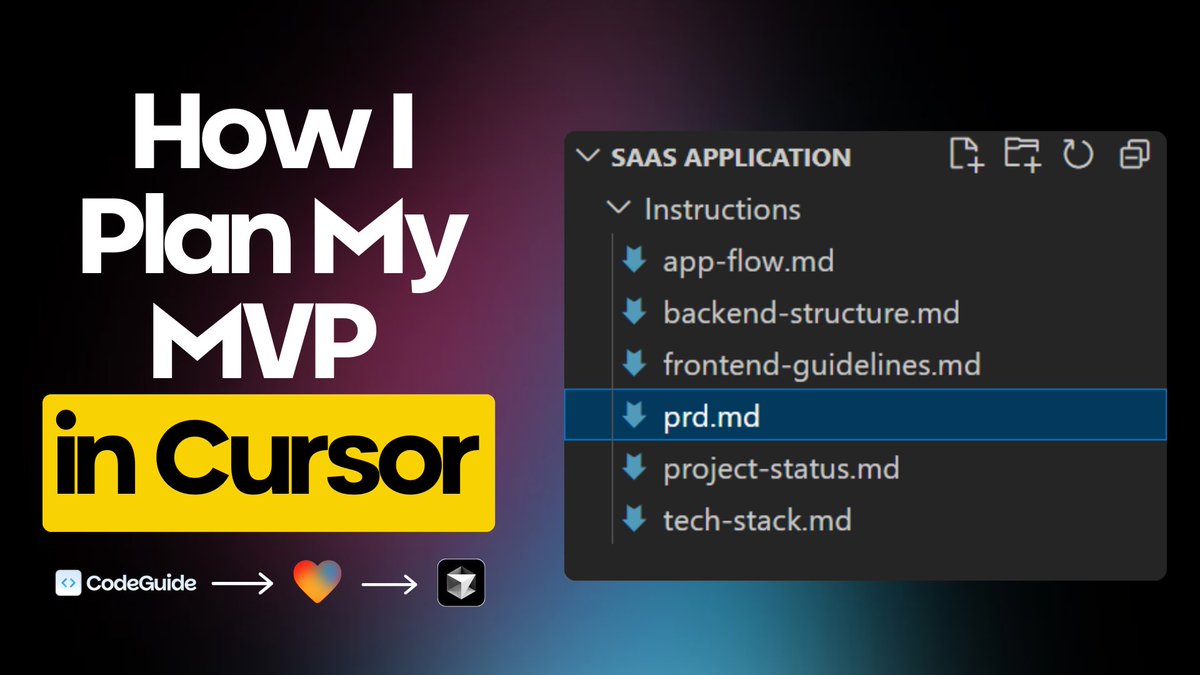
Before I even open Cursor, I have these essential docs ready:
- Project Requirements Doc – Defines MVP scope, features, and objectives
- Tech Stack Doc – Outlines frameworks and technologies
- App Flow Doc – Maps the entire user journey
- Frontend Guidelines Doc – Ensures UI consistency
- Backend Structure Doc – Sets up API routes, DB schemas, and core logic
I used to manually create these, which took forever. Now, I use @codeguidedev to generate everything in minutes.
This saves a lot of time per project, reduces hallucinations, and makes development much smoother.
AI tools are powerful, but they need guidance to perform well. A clear roadmap reduces hallucinations, debugging errors, and unnecessary revisions.
Before I even open Cursor, I have these essential docs ready:
- Project Requirements Doc – Defines MVP scope, features, and objectives
- Tech Stack Doc – Outlines frameworks and technologies
- App Flow Doc – Maps the entire user journey
- Frontend Guidelines Doc – Ensures UI consistency
- Backend Structure Doc – Sets up API routes, DB schemas, and core logic
I used to manually create these, which took forever. Now, I use @codeguidedev to generate everything in minutes.
This saves a lot of time per project, reduces hallucinations, and makes development much smoother.
3
2/ Structuring the MVP
Before, I would manually generate features, break them down, and structure the MVP using ChatGPT.
Now, CodeGuide does it all automatically.
It creates a detailed PRD that includes:
- A breakdown of all core features
- In-scope vs out-of-scope features
- User flows and recommended tech stack
And it’s built specifically for AI coding tools like Cursor.
This step alone has saved me hours in planning and made development much more structured.
Before, I would manually generate features, break them down, and structure the MVP using ChatGPT.
Now, CodeGuide does it all automatically.
It creates a detailed PRD that includes:
- A breakdown of all core features
- In-scope vs out-of-scope features
- User flows and recommended tech stack
And it’s built specifically for AI coding tools like Cursor.
This step alone has saved me hours in planning and made development much more structured.
4
3/ Building 70-80% of the MVP in @lovable First
Instead of jumping straight into @cursor_ai , I build 70-80% of the MVP in Lovable first.
Why?
- Lovable has a seamless Supabase integration, making it incredibly easy to set up the backend without custom coding.
- It allows me to quickly generate and refine the UI, ensuring the design is polished.
Here’s my process:
- Paste all the documents from CodeGuide into Lovable.
- Generate the UI, starting with the landing page.
- Refine the UI until it’s polished and functional.
- Use Lovable’s Supabase integration to connect the backend, covering most of the core functionality.
By the time I switch to Cursor, the MVP is already structured, making AI-assisted coding far more efficient.
Instead of jumping straight into @cursor_ai , I build 70-80% of the MVP in Lovable first.
Why?
- Lovable has a seamless Supabase integration, making it incredibly easy to set up the backend without custom coding.
- It allows me to quickly generate and refine the UI, ensuring the design is polished.
Here’s my process:
- Paste all the documents from CodeGuide into Lovable.
- Generate the UI, starting with the landing page.
- Refine the UI until it’s polished and functional.
- Use Lovable’s Supabase integration to connect the backend, covering most of the core functionality.
By the time I switch to Cursor, the MVP is already structured, making AI-assisted coding far more efficient.
5
4/ Perfecting the Landing Page First
The landing page sets the foundation for the entire MVP. If it’s well-structured, building the rest of the product becomes much smoother.
I focus on:
- Layout & spacing for a clean, professional look
- Component consistency to maintain design flow
- User experience to ensure seamless navigation
Once the landing page is solid, I move on to the rest of the screens, aiming to build 70-80% of the MVP in Lovable before switching to Cursor.
This approach saves time and keeps development structured.
The landing page sets the foundation for the entire MVP. If it’s well-structured, building the rest of the product becomes much smoother.
I focus on:
- Layout & spacing for a clean, professional look
- Component consistency to maintain design flow
- User experience to ensure seamless navigation
Once the landing page is solid, I move on to the rest of the screens, aiming to build 70-80% of the MVP in Lovable before switching to Cursor.
This approach saves time and keeps development structured.
6
5/ Using Cursor the Right Way
Most people tell Cursor to “just build” their MVP. That rarely works well.
Instead, I:
- Import the MVP into cursor from lovable via GitHub integration.
- Paste all the documents from CodeGuide into Cursor as .md files to prevent hallucinations.
- Let Cursor handle backend logic, API connections, and refining the UI further.
Cursor works best when you guide it properly. That’s why having a well-documented structure matters so much.
Most people tell Cursor to “just build” their MVP. That rarely works well.
Instead, I:
- Import the MVP into cursor from lovable via GitHub integration.
- Paste all the documents from CodeGuide into Cursor as .md files to prevent hallucinations.
- Let Cursor handle backend logic, API connections, and refining the UI further.
Cursor works best when you guide it properly. That’s why having a well-documented structure matters so much.
7
6/ The AI Tools That Make It All Work
I use a mix of AI coding tools to speed up development:
- Cursor AI → Core development
- V0 / Lovable → Initial MVP development
- CodeGuide → Automating PRDs, technical docs & reducing hallucinations
The right tools = Faster development with fewer errors.
I use a mix of AI coding tools to speed up development:
- Cursor AI → Core development
- V0 / Lovable → Initial MVP development
- CodeGuide → Automating PRDs, technical docs & reducing hallucinations
The right tools = Faster development with fewer errors.
8
7/ Key Takeaways
- Plan everything first. A clear roadmap prevents scope creep & confusion.
- Use structured docs before opening Cursor. AI performs best with clarity.
- Build UI first, then move to development.
Combine tools smartly: @cursor_ai + @codeguidedev + @lovable = ultimate speed.
AI isn’t here to replace developers. It’s here to make us FASTER.
If you’re struggling with AI coding, start by organizing your project better, it changes everything.
- Plan everything first. A clear roadmap prevents scope creep & confusion.
- Use structured docs before opening Cursor. AI performs best with clarity.
- Build UI first, then move to development.
Combine tools smartly: @cursor_ai + @codeguidedev + @lovable = ultimate speed.
AI isn’t here to replace developers. It’s here to make us FASTER.
If you’re struggling with AI coding, start by organizing your project better, it changes everything.
