Cursor beginners usually struggle with when to use which AI mode in...

Moritz Kremb@moritzkremb
26 views
Jan 20, 2025
~2 min read
Advertisement
1
Cursor beginners usually struggle with when to use which AI mode in Cursor:
· AI Chat
· Composer
· Agent
Here's a full guide 🧵
· AI Chat
· Composer
· Agent
Here's a full guide 🧵
2
First some background:
- There are 3 different AI modes in Cursor relevant for beginners: Chat, Composer, Agent (I won't talk about other Cursor AI features like Tab and CMD+K, since those are more for pros).
- AI Chat was released first, then Composer, then Agent
- Toggle the AI pane on the right to open Chat. Use CMD+I to open Composer. Toggle for Agent.
- There are 3 different AI modes in Cursor relevant for beginners: Chat, Composer, Agent (I won't talk about other Cursor AI features like Tab and CMD+K, since those are more for pros).
- AI Chat was released first, then Composer, then Agent
- Toggle the AI pane on the right to open Chat. Use CMD+I to open Composer. Toggle for Agent.
3
1) AI Chat
I think of the AI Chat as an assistant. It's more hands-off and does not directly modify your code.
It's good for:
- EXPLANATIONS: Explain which parts of your code does what, or what steps to take to implement a new feature
- Code ITERATIONS: Whenever you're editing code and want to be very precise in what you're editing (which is most of the times tbh)
I think of the AI Chat as an assistant. It's more hands-off and does not directly modify your code.
It's good for:
- EXPLANATIONS: Explain which parts of your code does what, or what steps to take to implement a new feature
- Code ITERATIONS: Whenever you're editing code and want to be very precise in what you're editing (which is most of the times tbh)
4
2) Composer
The main difference to the AI Chat, is that Composer can create files and modifies code straight away
Use it when:
- You're STARTING a project, to create the files and get started quickly
- You know exactly what you want and need SPEED (be careful not to implement too much at once)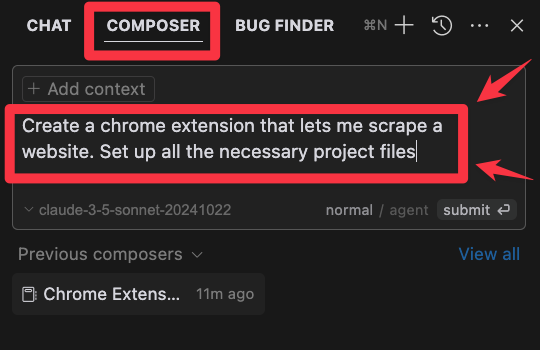
The main difference to the AI Chat, is that Composer can create files and modifies code straight away
Use it when:
- You're STARTING a project, to create the files and get started quickly
- You know exactly what you want and need SPEED (be careful not to implement too much at once)
5
3) Agent:
The main difference to Composer is that Agent has better contextual awareness and can execute terminal commands.
This means:
- Same use cases as Composer (setup & speed)
- Tbh Agent is just a better version of Composer, so imo there's no more big reason to use Composer now
The main difference to Composer is that Agent has better contextual awareness and can execute terminal commands.
This means:
- Same use cases as Composer (setup & speed)
- Tbh Agent is just a better version of Composer, so imo there's no more big reason to use Composer now
6
Conclusion:
- When you're building and iterating on a project, it makes a lot of sense to use Chat, so that you can be precise and produce code that works
- When you need speed and a lot of contextual awareness, use Agent.
- When you're building and iterating on a project, it makes a lot of sense to use Chat, so that you can be precise and produce code that works
- When you need speed and a lot of contextual awareness, use Agent.
7
P.S. - I write a newsletter to help you learn how to code with AI.
I share:
◆ tips & tricks
◆ tools & prompts
◆ full tutorials
Join 20,000+ subscribers here:
thepromptwarrior.com/subscribe
I share:
◆ tips & tricks
◆ tools & prompts
◆ full tutorials
Join 20,000+ subscribers here:
thepromptwarrior.com/subscribe
