@NotionHQ just released a life-changing AI feature: AI DATABASE...

Madison Payton@MadisonRPayton
12 views
Apr 06, 2024
~3 min read
Advertisement
1
@NotionHQ just released a life-changing AI feature:
AI DATABASE PROPERTIES
Here are 4 ingenious ways to use them:
AI DATABASE PROPERTIES
Here are 4 ingenious ways to use them:
2
BUT WAIT!
In order to get the most value from this feature, you need to understand what it is first.
Notion’s AI Database Properties help you generate text based on your database fields.
Which means it’s going beyond keyword recognition and into the Brave New World Of:
In order to get the most value from this feature, you need to understand what it is first.
Notion’s AI Database Properties help you generate text based on your database fields.
Which means it’s going beyond keyword recognition and into the Brave New World Of:
3
Property Referencing.
Notion’s AI used to do this in a spotty fashion.
If you asked it to reference properties, it would do it ~sometimes~.
Now, it knows what you’re talking about.
Which means you can build stuff like this:
Notion’s AI used to do this in a spotty fashion.
If you asked it to reference properties, it would do it ~sometimes~.
Now, it knows what you’re talking about.
Which means you can build stuff like this:
4
THE BRANDING GURU
I spent all of 10 minutes building this, and it spit out useable, helpful info for me.
But how did I do it?
Simple, with 4 key fields:
1 - The Prompt
2 - The Desired Output
3 - The Tone
4 - The Example (optional)
And this is what happened 👇
I spent all of 10 minutes building this, and it spit out useable, helpful info for me.
But how did I do it?
Simple, with 4 key fields:
1 - The Prompt
2 - The Desired Output
3 - The Tone
4 - The Example (optional)
And this is what happened 👇
0:23
5
It built out my…
→ Newsletter headline + CTA
→ Brand voice + style guide
→ Ideal Customer Profile/Avatar
→ Homepage copy
All of which would’ve taken me at least 2+ hours to come up with from scratch.
Procrastination?
Gone for good.
BUT…
There are more ways to use this!
→ Newsletter headline + CTA
→ Brand voice + style guide
→ Ideal Customer Profile/Avatar
→ Homepage copy
All of which would’ve taken me at least 2+ hours to come up with from scratch.
Procrastination?
Gone for good.
BUT…
There are more ways to use this!
6
Here are 3 more ways you could use this setup to help you streamline your business:
1 - THE BOOK SUMMARIZER
2 - THE PROJECT PLANNER
3 - THE THREAD OUTLINER
Let’s break them down 💃
1 - THE BOOK SUMMARIZER
2 - THE PROJECT PLANNER
3 - THE THREAD OUTLINER
Let’s break them down 💃
7
#1 - THE BOOK SUMMARIZER
Create a database with these fields:
→ Book (page title)
→ Author (text field)
→ Goal (text field)
→ Should I Read? (AI)
→ Summary (AI)
As you find new books to read, use AI to decide if they’re worth it.
If you decide to read one, do this 👇
Create a database with these fields:
→ Book (page title)
→ Author (text field)
→ Goal (text field)
→ Should I Read? (AI)
→ Summary (AI)
As you find new books to read, use AI to decide if they’re worth it.
If you decide to read one, do this 👇
0:29
8
1 / Dump all of your quotes and notes onto the book’s database page.
2 / Ask Notion AI to summarize for you (be specific on the output you want)
And voila!
You now have an easily referenceable book summary generator database.
But what if you could build…
2 / Ask Notion AI to summarize for you (be specific on the output you want)
And voila!
You now have an easily referenceable book summary generator database.
But what if you could build…
9
#2 - THE PROJECT PLANNER
Make a database with these fields:
→ Project (page title)
→ Requirements (text field)
→ Deadline (date field)
→ Task brainstorm (text field)
→ Project Outline (AI)
Now, dump all of your project info into the fields and ask AI to plan your project.
Make a database with these fields:
→ Project (page title)
→ Requirements (text field)
→ Deadline (date field)
→ Task brainstorm (text field)
→ Project Outline (AI)
Now, dump all of your project info into the fields and ask AI to plan your project.
0:35
10
The more specific you get with your prompt, the better the output.
If you need a list of dates and deadlines, ask for it.
Also specify if you need action items or anything else.
It’s pretty good at the output!
And BOOM 💥 you just saved yourself 1+ hrs.
If you need a list of dates and deadlines, ask for it.
Also specify if you need action items or anything else.
It’s pretty good at the output!
And BOOM 💥 you just saved yourself 1+ hrs.
11
MINI BONUS TIP 😲
Add a custom AI block to the project page template.
Prompt it to give you a to-do list based on the project plan it created above.
Badda-boom, you have a project checklist!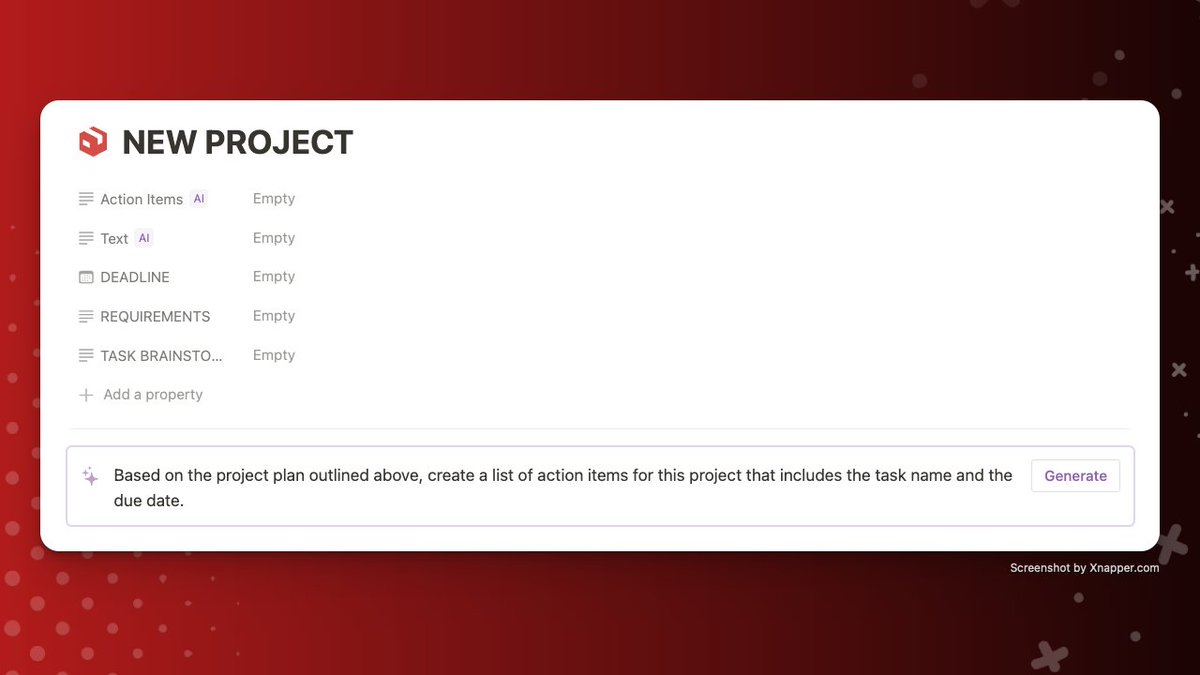
Add a custom AI block to the project page template.
Prompt it to give you a to-do list based on the project plan it created above.
Badda-boom, you have a project checklist!
12
#3 - THE THREAD OUTLINER
Create a database with these fields:
→ Thread concept (page title)
→ Length (number field)
→ Tone (multi-select field)
→ Audience (text field)
→ Outline (AI)
Now this is tricky, but with the right prompt, it can work wonders! 👇
Create a database with these fields:
→ Thread concept (page title)
→ Length (number field)
→ Tone (multi-select field)
→ Audience (text field)
→ Outline (AI)
Now this is tricky, but with the right prompt, it can work wonders! 👇
0:34
13
🚨 FULL DISCLOSURE
I still haven't dialed in Notion AI for threads.
It can do pretty much ANYTHING else (like write me a newsletter in the proper format in <1 minute, more on that soon 🤫)
But for some reason it struggles with threads, so I mostly use it for brainstorming.
I still haven't dialed in Notion AI for threads.
It can do pretty much ANYTHING else (like write me a newsletter in the proper format in <1 minute, more on that soon 🤫)
But for some reason it struggles with threads, so I mostly use it for brainstorming.
14
The key to getting the AI database properties to work for you?
BE CREATIVE ✨
There are SO many ways this can help you as a solopreneur.
Here are 4 examples:
1 - Financial analyzer
2 - Book chapter analyzer
3 - Content strategy generator
4 - Content template generator
So…
BE CREATIVE ✨
There are SO many ways this can help you as a solopreneur.
Here are 4 examples:
1 - Financial analyzer
2 - Book chapter analyzer
3 - Content strategy generator
4 - Content template generator
So…
15
Thanks for making it this far!
If you liked this thread give me a follow @ASimpleNotion and show it some love by giving the first tweet in the thread an RT.
Click here for a shortcut:
If you liked this thread give me a follow @ASimpleNotion and show it some love by giving the first tweet in the thread an RT.
Click here for a shortcut: