AI automation has quietly become the highest-ROI skill in the...

AI automation has quietly become the highest-ROI skill in the entire AI space right now

The problem is that most people entering this field get stuck the same way
Some open a Python tutorial on day one, hit a wall in week two, and never touch a no-code tool
Some get lost in 8-hour YouTube tutorials without ever building a single workflow for a real business
Others jump straight into "AI agents" without understanding how a basic workflow or an API actually works
The result is always the same: a folder of half-finished demos and zero paying clients
Here's the truth almost nobody tells beginners:
"You don't need to become a software developer to become an AI Automation Builder!!!"
"You don't need to learn machine learning"
"You don't need to fine-tune a model"
You need to learn how to connect AI to the tools companies ALREADY use and automate the boring, repetitive work they are currently paying humans to do
That means learning how to:
This guide was created to give you a practical 6-month roadmap
The article is 10,000+ WORDS, so reading it may take a few hours
But its real value is that for every skill you need to learn, there are resources and clear explanations of what to do next
That way, within six months you can reach the level of a hireable AI Automation Builder, and start earning from it already within the first 1-2 months
[ Now let's start reading the article ] ⬇️
Read this first: non-technical path vs developer path
This roadmap works for two different kinds of people, and you need to pick which one you are BEFORE you start
Non-technical path (DEFAULT — most of you are here)
You have never coded, or you know a little but you don't want to become a developer. Your superpower is going to be no-code tools (n8n specifically), connected to AI through simple nodes. You can build and sell real automations without ever writing a line of Python if you don't want to. This is the fastest, most realistic path to your first paying client
Developer path (OPTIONAL add-on)
You already code, or you really want to learn. You will follow the same roadmap but ALSO pick up Python, LangGraph, and custom backend pieces. This unlocks bigger contracts and more complex work later, but it is completely optional
Every month below is written for the non-technical path first. At the end of each section, there's an optional "developer path" box with the extra stuff to learn if you want to go that direction. Skip it without guilt if you don't
One rule: pick a lane and stop switching. People who bounce between "I'll learn no-code" and "I'll learn Python" for 6 months end up with neither
What an AI Automation Builder actually does?
A lot of people hear "AI automation" and imagine shiny AI agents that replace entire teams
In reality, most of the work is much more boring and much more profitable
You take expensive, repetitive business processes and rebuild them as AI-powered workflows that run 24/7 without humans babysitting them
That usually includes:
So in practice, an AI Automation Builder sits somewhere between:
This is why the role is exploding right now
Every SMB, agency, and SaaS company in 2026 has 20 repetitive workflows they are paying humans too much to run
They don't need researchers. They don't need fine-tuners. They need someone who can walk in, find the bleeding, and stop it with a workflow that pays for itself in the first month
That's also why this roadmap focuses less on building products and more on shipping business outcomes
If you can wire AI into a real CRM, a real inbox, and a real content pipeline, you're already more employable than 90% of people calling themselves "AI engineers" on LinkedIn
Also, until we started, let me give to you a little motivation to learn it:
Still 310M companies which haven't applied and added any kind of automation!!!
Into the world, here's in general 360M (only 50M companies added partial automation to their business processes)
And THE MOST IMPORTANT THING, in total ONLY 1M people into the world might provide this service on decent level
Lol, 8B+ ppl live on this planet, THAT'S ABSOLUTELY NOTHING. WE'RE SO EARLY!!!
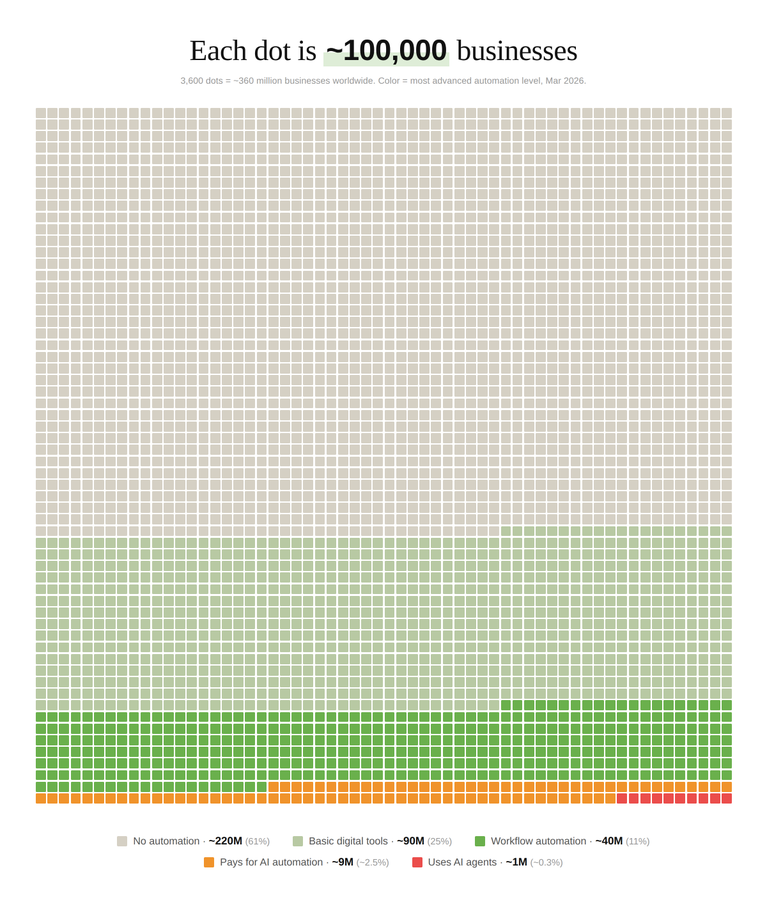
Also, catch potential rates which you can appoint to any of these automations:
- $500-5k/mo to build automated workflows for businesses
- $1-3k/mo to automate lead generation systems
- $500-2k/mo for AI-powered content pipelines
- $1-4k/mo to automate customer support with AI agents
- $500-2k/mo for automated reporting & data dashboards
- $500-2k/mo for AI-powered cold outreach systems
- $1-3k/mo to set up internal automation assistants
- $500-1.5k for AI workflow training for teams
- $300-1k for 1:1 automation consulting
*It's average prices which I could find across different freelance and outsource platforms + my frens who are doing it professionally shared with me
That means they can be much higher (depends on the company size and how many employees they would love to fire lol)
LET'S BEGIN!!!
⏩--------------------------------------------------------------------⏪
Month 1: Build your first workflow in n8n
Your goal this month: Build your first real automation in n8n, understand how APIs and webhooks work at a conceptual level, and learn enough about prompting to make an LLM do what you want
You are NOT learning Python this month (unless you're on the developer path). You're learning the one tool that is going to pay your bills for the next 6 months, and the vocabulary you need to read docs without panicking
What to learn:
1. Pick ONE no-code platform and go deep (start HERE)
This is the most important decision of Month 1. Pick ONE tool. Go deep. You can learn the others later in a weekend once you understand the underlying concepts
Which one to pick:
My recommendation: go with n8n. Everything in this article assumes n8n unless stated otherwise
Resources:
1. n8n Official Docs (free)
Link: https://docs.n8n.io/
Start with "Quickstart" and work through every core concept. The docs are genuinely excellent
2. n8n Academy (free)
Official free courses covering beginner to advanced workflow patterns, including AI integration. This is the single best resource in the entire 1st month
3. Productive Dude (YouTube, free)
n8n-focused, extremely practical, beginner-friendly videos
4. Nick Saraev (YouTube, free)
Focused specifically on making money with automation. High signal
5. Make Academy (free, if you picked Make)
What to focus on:
Practice: Automate something in your own life. Seriously. Auto-save email attachments to Google Drive. Scrape a product price daily into a Google Sheet. Send yourself a Telegram message when a specific keyword appears in your inbox. Build the muscle with low stakes before you build for clients
2. APIs, webhooks, and JSON (the vocabulary, not the code)
Every automation you ever build connects two systems through APIs. You don't need to CODE APIs. You need to UNDERSTAND them enough to read a doc, know what a webhook is, and know what JSON looks like when you stare at it
Resources:
1. What is a Webhook? (Zapier blog, free)
The best beginner explanation of webhooks, written for non-developers
2. HTTP basics — MDN Web Docs (free)
Clearest free explanation of how the web talks to itself
3. Postman Learning Center (free)
Postman is the universal tool for testing APIs. Go through "Getting Started" before touching any real API. You click buttons. No code
4. REST API Tutorial (free)
Link: https://restfulapi.net/
Short, practical, no unnecessary theory
What to focus on:
Practice: Use Postman to call a free public API (try https://api.github.com/users/torvalds). See the JSON come back. Now recreate the exact same call inside an n8n HTTP Request node. Compare. This one exercise unlocks 50% of the mystery of APIs for non-technical people
3. Reading API docs without panicking
Every real automation eventually requires reading an API doc. This is the skill that separates people who ship from people who wait forever for a YouTube tutorial that covers their exact use case (spoiler: it doesn't exist)
Resources:
1. How to Read API Documentation — Postman Blog (free)
Short, practical breakdown of how API docs are structured
2. Stripe API Docs (free, best-in-class example)
Study this even if you never use Stripe. It's the gold standard for API documentation design
What to focus on:
Practice: Pick any tool you already use (Notion, Airtable, Slack, HubSpot) and make ONE successful API call from Postman. Just one. Pull a list of something. Then stop
4. Basic prompt engineering
You don't need to become a prompt wizard. You need to understand the fundamentals: system vs user prompts, specificity, examples, and how to force structured output so the rest of your workflow can use it
Resources:
1. Anthropic's Interactive Prompt Engineering Tutorial (free, GitHub)
The best hands-on intro to prompting, broken into chapters with exercises
2. OpenAI Prompt Engineering Guide (free)
3. Learn Prompting (free, comprehensive)
A full free course from basics to advanced
4. Advanced Prompt Engineering Article from @EXM7777 (free)
Link: https://x.com/EXM7777/status/2011800604709175808
What to focus on:
5. What LLMs are actually good at (and where they fail)
This one saves you from embarrassing yourself in front of a client. Knowing when NOT to use AI is just as valuable as knowing when to use it
Resources:
1. Andrej Karpathy YouTube talks (free)
Clearest thinking on where LLMs add real value
2. Simon Willison's Blog (free)
The most practical voice in applied AI. Read his recent posts
What to memorize:
6. (Developer path only) Just enough Python to unblock yourself
Skip this section if you're on the non-technical path
If you want the dev path, learn just enough Python to read docs, write small scripts, and glue things together when a no-code tool hits a wall. Not to become a senior dev
Resources:
1. Python for Everybody (Coursera, free to audit)
2. freeCodeCamp Python Course (YouTube, free)
3. Automate the Boring Stuff with Python (free online book)
Specifically for people who want to automate tasks, not build apps
What to focus on: variables, loops, conditionals, functions, lists, dicts, JSON, reading files, requests library, try/except, running scripts from terminal
Month 1 Milestone:
By the end of this month you should be able to:
If you hit all of these, you're already ahead of 80% of people trying to "break into AI" right now
⏩--------------------------------------------------------------------⏪
Month 2: Embed AI into your workflows
Your goal this month: Stop using ChatGPT manually. Start making AI run automatically inside your n8n workflows, reacting to real triggers, making decisions, and writing to real systems (without you pressing a button)
By the end of Month 2 you should have 3-5 real workflows that use AI inside them, and you should already have a clear idea of what your FIRST paid gig will look like
This is the month where you stop being a no-code user and start being an AI Automation Builder
What to learn:
1. n8n's AI nodes (the default path)
n8n has built-in nodes for OpenAI, Anthropic, and a full AI Agent node. For 90% of what you'll ever need to ship, you don't need to touch Python at all. You drop an AI node into your workflow like any other step
Resources:
1. n8n AI Nodes & LangChain Docs (official, free)
Walk through the full AI section of their docs. The n8n team has done an insane amount of work making AI usable from a no-code canvas
2. n8n Academy: AI Workflows Course (free)
There's a dedicated AI track. Do it
3. n8n AI Templates (free)
100+ real, importable templates. Better than any tutorial (import one, run it, see exactly how it's wired)
What to focus on:
Practice project: Build a workflow that watches a Google Form, sends new responses to an LLM for classification (urgent / normal / spam), and writes the classified response into different Airtable tables based on the category. No code. Pure n8n
2. The core skeleton: Trigger → AI Decision → Action → Output
Almost every AI automation you will ever build fits this skeleton:
Trigger (something happens) → AI decision (classify, extract, generate) → Action (write to a system) → Output (notify / log / confirm)
Master this one skeleton and you can already build 80% of real-world automations without ever touching an "agent"
Resources:
1. Anthropic: Building Effective Agents (free)
Read the "Workflow patterns" section. Covers prompt chaining, routing, and parallelization with clear diagrams. Ignore the agent-framework stuff for now
2. n8n AI Templates (free)
Pick 3 templates that match this skeleton and dissect them
What to focus on:
Practice project: Build a workflow that reads incoming emails (Gmail trigger), uses AI to classify into {support, sales, personal, spam}, and routes each category to a different action. Create a ticket, create a CRM lead, forward, or archive. No agents. Just a clean chain
3. Error handling and fallback logic (the "clients will actually pay you" part)
Your workflows will fail in production. APIs go down. Rate limits get hit. The LLM returns malformed JSON. Clients don't pay you to build things that work 90% of the time. They pay you for things that work 99.9% and gracefully handle the other 0.1%
Resources:
1. n8n: Error Handling & Error Workflows (free)
How to build a global error handler that catches any failure in any workflow. This is n8n's single best feature for production
2. n8n: Retry on Fail (free, same page)
Built into every node. Learn it early
3. Nate Herk: Workflow for Unlimited Error Handling (free)
Link: https://www.youtube.com/watch?v=bTF3tACqPRU
He has literally explained 95% of potential errors and failures which might appear
What to focus on:
4. Cost awareness: tokens, pricing, and when AI is overkill
Shipping AI automations without understanding token costs is how you end up with a $3,000 surprise bill on a client project. This skill pays for itself in the first month. VERY IMPORTANT (I lost $400 because of it)
Resources:
1. OpenAI Pricing (free)
2. Anthropic Pricing (free)
3. OpenAI Tokenizer (interactive, free)
Paste any text, see exactly how many tokens it is. Use it constantly
What to memorize:
Practice: Calculate the monthly cost of a workflow that processes 1,000 emails/day, where each email takes 1 classification call on a cheap model and 1 draft generation on a mid-tier model. Get comfortable doing this math (it's what clients trust you for)
5. (Developer path only) Calling OpenAI and Anthropic from Python
Skip this if you're on the non-technical track
If you want the dev track, learn how to make the same LLM calls from Python that you already make from n8n. This becomes useful when you need to do something n8n can't or when a client wants a fully custom backend
Resources:
1. OpenAI API Quickstart (official, free)
2. Anthropic API Quickstart (official, free)
3. OpenAI Cookbook (official, free)
Runnable notebooks for every common pattern
What to focus on: API keys in env vars (never in code), chat completions, system vs user prompts, temperature=0 for automations, model selection, function / tool calling
Month 2 Milestone:
By the end of this month you should be able to:
⏩--------------------------------------------------------------------⏪
EARLY MONETIZATION: Your first $500 gig (Month 2-3)
This is the section missing from every "become an AI X in 6 months" article on the internet
Most guides send you to freelance work in Month 6. That's way too late. You can and SHOULD start earning in Month 2 or Month 3, the second you have ONE solid workflow you can replicate
You don't need a portfolio of 10 case studies to get your first gig. You need ONE working workflow, a 3-minute Loom walkthrough, and the willingness to be awkward in sales conversations for about 2 weeks
Where to find your first paying client:
1. Upwork (fastest, best for beginners)
Link: https://www.upwork.com/
Create a profile specifically called "AI Automation Builder" or "n8n Automation Specialist." Apply to jobs tagged "Zapier," "Make," "n8n," "automation," "AI workflow." Price yourself at $30-50/hour for the first 2-3 jobs. Don't argue the rate, just build reviews
2. Fiverr (productized offers)
Link: https://www.fiverr.com/
Create 2-3 fixed-price offers like "I will build you an AI lead qualification workflow in n8n for $200." Fiverr rewards specificity. Hide the word "AI automation" in your tags everywhere
3. Contra (better rates, less competition)
Link: https://contra.com/
Contra is freelance without the race-to-the-bottom pricing. Good for $500-2,000 projects
4. n8n Template Marketplace (inbound leads for free)
Link: https://n8n.io/creators/
Publish a free template in the n8n community. People who import it will DM you asking for help customizing. This is the cheapest lead-gen channel in the entire space
5. Your own X and LinkedIn
Post EVERY workflow you build. Screenshot the canvas, record a 2-min Loom, write a short caption about the problem it solves. By Month 3 you'll have inbound DMs. I promise
What to sell for your first gig:
Don't sell "automation consulting." Don't sell "AI strategy." Don't sell hours. Sell ONE of these:
All four of these can be built in n8n in a weekend. All four are things businesses will happily pay for
What to deliver with every gig (this is what gets you 5-star reviews)
Do all four of those and you will get 5-star reviews from people who have never worked with an automation builder before. That social proof is what unlocks the $1,000+ jobs in Months 4-5
The mental rule
Take the gig BEFORE you feel ready. Every single one of my friends making real money in this space took their first gig while they still felt like a fraud. The only way out is through one conversation at a time
⏩--------------------------------------------------------------------⏪
Month 3: Build 1-2 repeatable service workflows
Your goal this month: Build 1-2 polished, repeatable automations that solve a real business problem and that you can resell to multiple clients with light customization
Important warning: do NOT try to build all 6 use cases in this list in one month. That's how beginners burn out. Pick 1-2 and go deep. You only need ONE sellable service to start earning, and two to have real leverage
By the end of this month you should have 1-2 workflows that you can demo in 3 minutes and price on a sales page
How to pick your 1-2 use cases???
Ask yourself:
Pick based on those. Don't overthink it. Below are the 6 most in-demand use cases in the space, you'll pick 1-2 NOW and come back for the rest later
Use case 1: Lead generation automation (highest demand)
Lead gen is the #1 most requested AI automation in 2026. Every B2B company wants more qualified leads and fewer SDRs
Resources:
1. Apify (free tier)
Link: https://apify.com/
Best platform for scrapers. Thousands of pre-built actors for LinkedIn, Google Maps, Crunchbase
2. Clay (paid, free trial)
Link: https://www.clay.com/
The industry-standard enrichment platform. Learn it, clients will ask
3. Apollo.io API (free tier)
Link: https://docs.apollo.io/
4. Hunter.io API (free tier)
Email finding and verification
5. Phantombuster (paid, free trial)
Pre-built scrapers for LinkedIn, Twitter, Instagram
Build this one workflow: A pipeline that takes a list of company domains → scrapes website + LinkedIn → enriches with contact info → uses AI to score each against an ICP you define → writes top-scoring leads to a CRM or Google Sheet. Sellable as "Lead Qualification Pipeline — $1,500 one-time + $500/mo"
OR, you can don't even build this, since I've already did it instead of you
Currently, I am building my own product which calls "Close AI". We specializes on building of our own AI SDR (leads generation automation solution for any request)
And we're actively onboarding affiliates to our team who could redirect clients and earn up to 40% per deal (and we already replaced 40 employees in one huge digital company)
We made it on the next level and wrote our own LLM model which is studied on huge datasets of a lot of BD chats, Sales calls etc.
If you're interested to get a solution which nobody has on the market and sell it:
Fill out this Whitelist Form: https://forms.gle/Pj4uSHCNzWLKprzUA
Use case 2: AI-powered cold outreach
This is where AI automation really shines. Generic cold emails are dead. Clients now expect personalized outreach at 1,000+ contacts/week and only automation makes that possible
Resources:
1. Instantly.ai (paid, free trial)
Link: https://instantly.ai/
One of the most popular cold email platforms, full API
2. Smartlead.ai (paid, free trial)
Link: https://smartlead.ai/
Direct competitor with similar API
3. Lemlist API (paid, free trial)
4. Clay's Cold Email Playbooks (free blog)
Build this one workflow: A lead enters from an Airtable view → n8n pulls their 3 recent LinkedIn posts + company website → an LLM writes a genuinely personalized opener referencing specifics → Instantly or Smartlead sends it → replies come back and get classified by AI (interested / not now / not interested / unsubscribe) → interested leads auto-create a task in the CRM. Sellable as "Personalized Outreach System — $2,000 setup + $1,000/mo"
Use case 3: CRM automation
Every sales team has the same problem: reps don't update the CRM. Automation removes the human dependency and keeps every record clean
Resources:
1. HubSpot API (free tier)
The most common CRM you'll integrate with
2. Pipedrive API (free tier)
3. Attio API (free tier)
New-school CRM that AI-native startups love
Build this one workflow: Every time a meeting happens → transcript goes to an LLM → key fields extracted (next steps, pain points, decision maker, timeline) → HubSpot deal auto-updates → follow-up task assigned to the right person. Sellable as "CRM Autopilot — $1,500 setup + $750/mo"
Use case 4: Content pipelines
Highest margin of all, because output is infinite and clients measure value in pieces shipped
Resources:
1. Blotato API (paid, free trial)
Link: https://www.blotato.com/
Posts to every major platform from one API call
2. Buffer API (paid)
3. Notion API (free)
Where most content briefs live
Build this one workflow: A topic enters from a Notion database → AI generates 6 platform-specific variants (X, LinkedIn, Instagram, TikTok, newsletter, thread) → workflow waits for human approval in Slack → auto-schedules via Buffer at optimal times. Sellable as "AI Content Engine — $2,500 setup + $1,000/mo"
Use case 5: Meeting automation
Every founder and every sales team spends hours in meetings and hours AFTER meetings writing things down. This entire post-meeting process can be fully automated
Resources:
1. Fireflies.ai API (paid, free trial)
2. Otter.ai API (paid)
Link: https://otter.ai/api
3. AssemblyAI (free tier)
4. OpenAI Whisper (open source, free)
Build this one workflow: Zoom meeting ends → Fireflies transcript arrives via webhook → LLM extracts action items, blockers, next meeting date → action items go into Linear or Asana → CRM deal auto-updates → personalized follow-up email draft gets sent to the rep's inbox to review. Sellable as "Meeting Autopilot — $1,200 setup + $600/mo"
Use case 6: Internal knowledge bots
Every company has sprawling internal knowledge that nobody can find. This is the highest-value RAG use case and it sells well
Resources:
1. n8n RAG Templates (free)
Pre-built n8n workflows for document ingestion and Q&A. Start here, you can build a working knowledge bot without writing any code
2. Supabase Vector (free tier)
Postgres + pgvector as a managed vector database. Perfect for small-to-mid client projects
3. LlamaIndex (developer track only)
If you want to go deeper and build a fully custom RAG pipeline
4. LangChain RAG Tutorial (developer track only)
Build this one workflow: Documents get pulled from Notion or Google Drive → chunked and embedded → stored in Supabase Vector → an internal Slack bot answers questions by retrieving relevant chunks and citing them. Sellable as "Internal Knowledge Bot — $2,500 setup + $500/mo"
Month 3 Milestone
By the end of this month you should be able to:
If you have one paying client by the end of Month 3 (even for $300, means you're already winning)
⏩--------------------------------------------------------------------⏪
Month 4: Add AI agents to your toolbox (carefully)
Your goal this month: Understand what "AI agents" actually are, know when to use them and (more importantly) when NOT to, and add agent-powered workflows to your service offering for the use cases where they genuinely make sense
Warning: most of the "AI agent" content online is hype. You're going to stay grounded. 70% of the time an agent is the wrong choice. You're going to learn when it's the RIGHT choice and that knowledge will make you worth more than 90% of people selling agent services today
What to learn:
1. What agents actually are (and aren't)
An agent is NOT magic. It's a loop: the LLM thinks, picks a tool, the tool runs, the result goes back into the prompt, repeat until the task is done. That's it
Every agent framework (n8n AI Agent node, LangGraph, CrewAI, AutoGen, Lindy, Relevance AI) just wraps this same loop differently
Resources:
1. Anthropic: Building Effective Agents (free — MANDATORY reading)
The single best piece of writing on agents in production. Read this before you build anything agent-related. Not negotiable
2. OpenAI: A Practical Guide to Building Agents (free PDF)
Covers agent patterns, guardrails, and safety
What to focus on:
2. Build your first agent (inside n8n)
For the non-technical path, this is where you go. n8n's AI Agent node handles the loop, the tool calling, and the state management for you. You drag a node, give it a goal, connect it to "tool" sub-workflows, and watch it go
Resources:
1. n8n AI Agent Node Docs (official, free)
The full reference for n8n's agent node. Read the whole thing
2. n8n AI Agent Templates (free)
Import 3 agent templates, run them, and reverse-engineer how they're wired. Worth a hundred tutorials
What to focus on:
Practice project: Build a support agent inside n8n that handles Tier 1 customer tickets. It should:
3. When to use agents vs. simple chains
The most valuable thing you'll learn this month is when NOT to use agents
The decision framework:
Resources:
1. Anthropic: "When to use agents" (free)
2. Simon Willison: Designing Agentic Loops (free)
Memorize this: A fixed chain of 3 LLM calls will always be faster, cheaper, and more debuggable than an agent that makes 3 calls. Reserve agents for genuinely open-ended tasks like research, multi-step customer support, or flexible sales outreach
4. Human-in-the-loop checkpoints
Most serious business automations need a human approval step somewhere, especially when the agent is about to do something irreversible (send an email, post publicly, update a deal stage, charge a card)
Resources:
1. n8n: Wait Node (free)
n8n's built-in way to pause a workflow until a webhook or time trigger arrives. This is your approval gate
2. Slack Block Kit Builder (free)
How to build interactive approval buttons in Slack messages
What to focus on:
5. Making agents reliable (the part nobody shows in demos)
Demo agents work. Production agents need actual reliability engineering
What to focus on:
6. (Developer path only) Python agent frameworks
Skip this if you're on the non-technical track
If you want the dev track, these unlock custom agent work that clients pay more for:
1. LangGraph (free course)
The most widely used agent orchestration framework
2. CrewAI (free, open source)
Link: https://docs.crewai.com/
Multi-agent framework with role-based collaboration
3. AutoGen (Microsoft, free, open source)
Month 4 Milestone
By the end of this month you should be able to:
⏩--------------------------------------------------------------------⏪
Month 5: Make your automations production-ready
Your goal this month: Take everything you built in Months 1-4 and make it survive real clients, real traffic, and real 2am outages
By the end you should be able to deploy, monitor, and hand off an automation to a non-technical client (and confidently promise them uptime and response time)
What to learn:
1. Deployment (use Railway's 1-click n8n first)
Good news: you don't need to learn Docker or DevOps this month. Railway has a 1-click n8n deploy. You click a button, add a custom domain, and you have a production n8n instance in 5 minutes
Do that. Don't overthink it. Docker, reverse proxies, and Kubernetes come LATER, when you have 5+ clients and actually need them
Resources:
1. Railway (free tier, recommended)
Link: https://railway.app/
The fastest way to self-host n8n. Search for "n8n" in their templates and click deploy
2. Render (free tier)
Another great one-click option
3. n8n Cloud (hosted, paid)
Link: https://n8n.io/cloud/
The zero-hassle option if a client doesn't want any infra at all. More expensive but no ops work on your end
What to focus on:
(Developer path later): Self-hosting n8n with Docker Compose, managed Postgres, and a Caddy reverse proxy. Skip this until you have at least 3-5 clients
2. Logging and monitoring (know when it breaks before your client does)
If you can't see what's happening inside your automation, you can't fix what's broken. And you'll only find out about the breakage when the client emails you at midnight
Resources:
1. n8n Built-in Execution Logs (free)
n8n's built-in logging is actually very good for most use cases. Master this first before adding anything else
2. Better Stack (free tier)
Link: https://betterstack.com/
Uptime monitoring. Get paged when your n8n instance goes down
3. Langfuse (free tier)
Link: https://langfuse.com/
LLM-specific observability. Traces every prompt, response, token count, and latency. Overkill for Month 5 but good to know exists
What to focus on:
3. Prompt versioning (don't change prompts randomly in live workflows)
Your prompts are code. They need version control. Random prompt changes in live workflows are how you silently break things
Resources:
1. The boring option (recommended for beginners):
store every prompt in a Notion database or Google Doc, label each version with a date, and always know which version is live
2. Langfuse Prompt Management (free tier)
Centralized prompt storage with versioning and a built-in playground
What to focus on:
4. Security basics
The fastest way to lose a client is to expose their API keys or let someone else access their data
Resources:
1. OWASP Top 10 for LLM Apps (free)
LLM-specific security risks including prompt injection. One hour read
2. n8n Credentials Docs (free)
How n8n stores API keys securely. Never paste a key into a node parameter (always use the credentials system)
What to focus on:
5. Documentation and client handoff (the secret to 5x your rates)
The difference between a $500 project and a $5,000 project is often just documentation. If you hand off a beautifully documented workflow with a Loom walkthrough, clients feel taken care of. If you hand off an unlabeled n8n canvas, they feel lost
Resources:
1. Loom (free tier)
Link: https://www.loom.com/
Record walkthrough videos for every workflow. 3-5 minutes each. Clients love these
2. n8n Sticky Notes (free)
Use these extensively inside every workflow to explain what each section does
3. Notion Templates for Client Handoffs (free)
Search for "client handoff" and steal shamelessly
What to focus on:
6. Basic SLAs
Once you charge retainers, clients will ask what you're promising and what happens when you miss it. You don't need enterprise contracts. You need clarity
What to focus on:
Month 5 Milestone
By the end of this month you should be able to:
⏩--------------------------------------------------------------------⏪
Month 6: Pick your direction and scale
By this point you have: 1-2 workflows that actually work, at least 1 paying client (hopefully more), a deployed production setup, and the beginnings of a portfolio. Month 6 is about picking which direction you scale in
Three real paths. Pick ONE and go all in
Direction 1: Freelance Automation Builder
Best if you want clients fast and income in 30-60 days
This is the fastest path to real income. You sell workflow builds and retainers directly to SMBs, agencies, coaches, and SaaS founders. Low overhead, high margins, cash in weeks
Focus on:
What to learn this month:
1. Productizing your services
Stop selling hours. Start selling outcomes. "Lead Gen Pipeline Setup — $1,500" converts 10x better than "Custom automation work, hourly rate"
Resources:
1. Productized Services Guide (Pieter Levels, free)
2. Sahil Lavingia's blog (free)
What to focus on:
2. Cold outreach and client acquisition
You have to sell. There's no way around it. Good news: you already built the exact tools you'll use for your own outreach during Month 3
Resources:
1. Instantly Blog (free)
2. Nick Saraev (YouTube, free)
Specifically focused on automation agency outreach and sales
What to focus on:
3. Case studies and social proof
One well-documented case study will bring you more clients than 500 outreach emails. Build your first one the moment you ship your first project
What to focus on:
Direction 2: In-House Automation Builder
Best if you want stability and a salary
This direction is for people who want the safety of a full-time role inside one company, building internal automation systems that save the business time and money
Focus on:
What to learn this month:
1. Internal tool building
Resources:
1. Retool (free tier)
Link: https://retool.com/
The standard for building internal tools fast
2. Streamlit (open source, free)
Link: https://streamlit.io/
The fastest way to build Python-powered internal tools
3. Budibase (open source, free)
Link: https://budibase.com/
Open source Retool alternative
What to focus on:
2. Measuring ROI properly
In-house builders get promoted based on measurable business impact. If you can't prove your automations saved X hours or $Y, you're invisible
What to focus on:
3. Career positioning
What to focus on:
Direction 3: AI Automation Agency
Best if you want to scale beyond trading time for money
This is the highest-ceiling path but also the hardest. You build a team, a repeatable service, and a real business (not just a freelance income)
Focus on:
What to learn this month:
1. Building a repeatable service
An agency only works if the same service can be delivered by multiple people the same way. This is what separates agencies from freelancers
Resources:
1. The E-Myth Revisited (book)
The classic on systematizing a services business. Mandatory reading before you hire anyone
2. Built to Sell (book)
Specifically about making your agency independent of you
What to focus on:
2. Niching down
Generalist agencies die. Niche agencies thrive. Pick one industry and own it
What to focus on:
3. Hiring and delegating
Resources:
1. OnlineJobs.ph (paid, international)
2. Upwork (free, global)
Link: https://www.upwork.com/
What to focus on:
Practice project for Direction 3
Pick one industry (e.g. real estate). Build 3 workflows that solve the 3 biggest repetitive problems in that industry (lead qualification, listing description generation, appointment reminders). Package them as "Real Estate AI Automation Suite" with fixed pricing and a clear deliverables list. This is a sellable product you can take to market on day one
⏩--------------------------------------------------------------------⏪
CONCLUSION
What you can expect after these 6 months???
I'm going to be honest with you, without any "money's mountains"
This roadmap will not make you the next Zapier CEO in 6 months
But it will make you someone who can build, ship, and deploy real AI automations that solve real business problems
And right now, that is exactly what the market is paying for
AI automation demand is not slowing down. LinkedIn's 2026 Jobs on the Rise report puts "AI automation specialist" in the top 5 fastest-growing roles
McKinsey estimates that 60-70% of employee time in most office roles is automatable with current AI + workflow tools
Only about 2% of SMBs have implemented any meaningful AI automation so far, which means 98% of the market is still completely untouched
These are not hype numbers. These are real numbers based on real data (took from Claude kek)
If you go full-time in the US or EU:
1: Junior AI Automation Builders start at $75,000-$110,000
2: Mid-level (2-4 years) sits at $125,000-$180,000
3: Senior builders and automation architects go $180,000-$280,000+
The mid-level band is growing the fastest because companies desperately need people who can ship reliable production automations without supervision
If freelance is more your thing:
4: AI workflow builds go for $500-5,000 per project
5: Monthly retainers start at $500-2,000/mo for basic maintenance and land at $3,000-8,000/mo for active development
6: Hourly rates for specialist automation work are $100-250/hour depending on niche
I personally know freelancers pulling $15,000/month solo just building n8n workflows for SMBs. The work exists and the market is still desperately underserved
And if you go the consulting or agency route:
7: $500-5,000 to set up a single AI automation for a business
8: $1,000-5,000/month for managed automation services
9: $3,000-15,000 to build a full custom agent system
10: $10,000-50,000 for enterprise-grade automation packages
The ceiling is genuinely uncapped. I've seen 2-person automation agencies doing $80k/mo in recurring revenue serving 15-20 clients
These are real numbers from real people doing real work right now in 2026
Now here is what I actually want you to take away from all of this:
Pick one workflow from each month and build it. Not read about it. Not watch a tutorial. Build it, break it, fix it, deploy it, put it on GitHub or in a portfolio site. The builders who get hired are the ones who show what they've built, not what they've studied
Start sharing what you learn. Write about it on X, LinkedIn, anywhere. Teaching is the fastest way to learn and it builds your reputation at the same time. The best clients I've seen come from people who were visible, not from people who applied to 500 job listings
And please don't wait until you feel ready. You will never feel ready. The gap between "I'm learning" and "I'm building" is where most people get stuck forever
Start applying, start freelancing, start offering services the moment you have ONE working automation. Even if it's rough. The market doesn't reward perfection. It rewards people who can ship
6 months is enough to change everything if you actually put in the work
And I really believe each of you reading this can do it
Just never stop building and never stop learning
Hope this was useful for you my fam ❤️