Thread Truncated (Cap Enforced)
Only the first 20 tweets are unrolled into slides to ensure reliable PDF exporting and high server performance.
Canvas & Ratio
Choose your destination platform format
Layout Template
Choose a content structure for your slides
Preset Themes
Typography & Sizing
Brand Kit Customization
AGENCYConfigure brand assets for headers & footers
Outro Slide CTA
Customize your closing call-to-action slide
Background Pattern
Build Your Carousel
Drag and drop any post card below onto a slide, or use the quick buttons to insert content/images instantly!

Most people open Obsidian, write a few notes in the default folder, and never touch a single setting again.

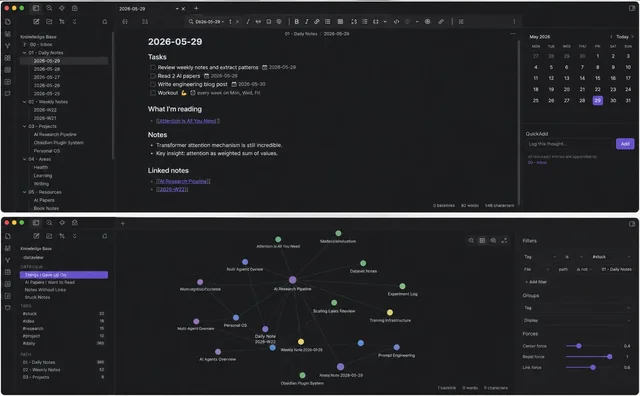
That's not a criticism. The default experience is genuinely fine for casual note-taking. But there's a second version of Obsidian running underneath the one most people use, one with live databases, automated processing, AI integration, and structural patterns that turn a folder of Markdown files into something closer to a personal operating system.
This guide covers fifty of them. Organized into ten categories. Five setups per category. None of this requires you to be technical. All of it requires about ten minutes of setup per item, and a willingness to actually open the plugin settings instead of accepting the defaults.
---
## Category 1: Dataview Workflows That Turn Notes Into Live Databases
Dataview is the single highest-leverage plugin in the entire Obsidian ecosystem, and most users install it, write one basic query, and never go further.
<b>1. The project dashboard query.</b> A single Dataview block that lists every note tagged #project, sorted by priority, with status pulled from frontmatter. One query replaces a manually maintained tracking spreadsheet.
<pre><code lang="">TABLE status, priority, deadline FROM #project WHERE status != "complete" SORT priority DESC</code></pre>
<b>2. The orphan note finder.</b> A query that surfaces every note with zero incoming links, the notes that exist in your vault but that nothing else connects to. Run this monthly and you catch the ideas that got captured and then forgotten.
<b>3. The decision log query.</b> Every decision note, pulled into one table with the date, the assumption it rested on, and the review date. This turns scattered decision notes into an actual auditable history.
<b>4. The content pipeline tracker.</b> For anyone producing regular content, a query showing every draft by stage: idea, outline, draft, published. Replaces a separate content calendar tool entirely.
<b>5. The "stale projects" alert.</b> A query filtered to show only project notes that haven't been modified in 14+ days. The thing that surfaces what you've quietly abandoned before it becomes a six-month-old embarrassment.
---
## Category 2: Templater Automation Most People Never Configure
Templater ships in most "ultimate Obsidian setup" guides as a basic templating tool. Almost nobody uses its actual automation capabilities.
<b>6. Auto-populating daily notes.</b> A template that pulls in yesterday's unfinished tasks automatically using a Templater script, so open items carry forward without you copying anything by hand.
<b>7. Dynamic folder routing.</b> A Templater prompt that asks which project a new note belongs to, then automatically creates the note inside the correct project folder instead of dropping everything into one flat inbox.
<b>8. Auto-generated meeting notes.</b> A template that pulls today's date, prompts for attendees, and pre-fills a structured agenda format, cutting meeting note creation down to filling in three fields.
<b>9. The smart title generator.</b> Templater scripts that auto-generate a filename based on note type and date, so you stop manually typing "2026-06-22-meeting-notes-client-call" every single time.