
last week two Anthropic engineers spent 24 minutes on camera walking through Claude Code features.
that reaction is the whole story. most people drive Claude Code like a chatbot with file access. type a prompt, watch it edit, move on. that's maybe 20% of the tool.
the other 80% is a steering layer Anthropic shipped quietly. on june 18 they published the full map of it: seven separate ways to instruct the model, plus a stack of commands almost nobody opens. it sat there while everyone argued about which model is smartest.
this isn't "ai writes your code faster." this is the difference between typing at a model and actually running one. and that difference is the whole skill: the people who learn every secret in here stop being users and start being operators. that's also the part that turns into money later, but money is downstream. master the tool first.
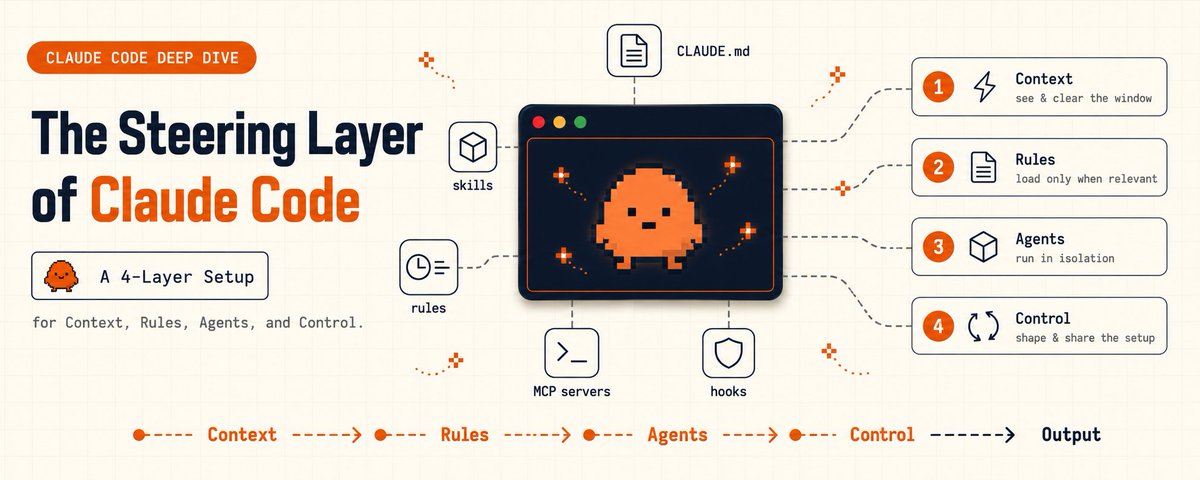
this article is every secret, grouped into four layers, with the exact files and commands.
---
## the setup most people missed
for most of 2026 the public conversation about Claude Code was about the model. which one, how smart, how fast.
almost nobody talked about steering. yet the model is the easy part. it ships smart by default. what separates a clumsy session from a clean one is everything that loads around the prompt, every session, without you typing a word.
Anthropic's own june 18 post laid out seven ways to instruct Claude Code: CLAUDE.md files, rules, skills, subagents, hooks, output styles, and appending the system prompt. each one differs in when it loads, whether it survives a long session, and how much authority it carries. on top of those sit a handful of slash commands that control what the model sees.
here's the mental model that matters: you are not chatting with a model. you are configuring one. the prompt is what you say today. the steering layer is the standing setup that shows up every time, whether you remember to ask or not.
four layers hold every secret. here's all of them.
---
## 1 / 4 | context: the commands that decide what the model sees
the single most common complaint is "Claude Code got dumber in a long session." it almost never did. its context window filled up with junk and the thing you cared about got crowded out. the fix is a command most people have never run.
→ see exactly what is loaded right now:
/contextit breaks down everything in the window: CLAUDE.md, every rule, invoked skills, file reads, tool definitions. nine times out of ten you'll find a 600-line CLAUDE.md and three log dumps eating the space your actual task needed.
then the four commands that control it:
Generated by Thread Navigator
Press ⌘ + S to quick-export