How To Unlock The 80% Of Claude Code Most People Never Touch
last week two Anthropic engineers spent 24 minutes on camera walking through Claude Code features.
https://x.com/i/status/2068985979839373502
that reaction is the whole story. most people drive Claude Code like a chatbot with file access. type a prompt, watch it edit, move on. that's maybe 20% of the tool.
the other 80% is a steering layer Anthropic shipped quietly. on june 18 they published the full map of it: seven separate ways to instruct the model, plus a stack of commands almost nobody opens. it sat there while everyone argued about which model is smartest.
this isn't "ai writes your code faster." this is the difference between typing at a model and actually running one. and that difference is the whole skill: the people who learn every secret in here stop being users and start being operators. that's also the part that turns into money later, but money is downstream. master the tool first.
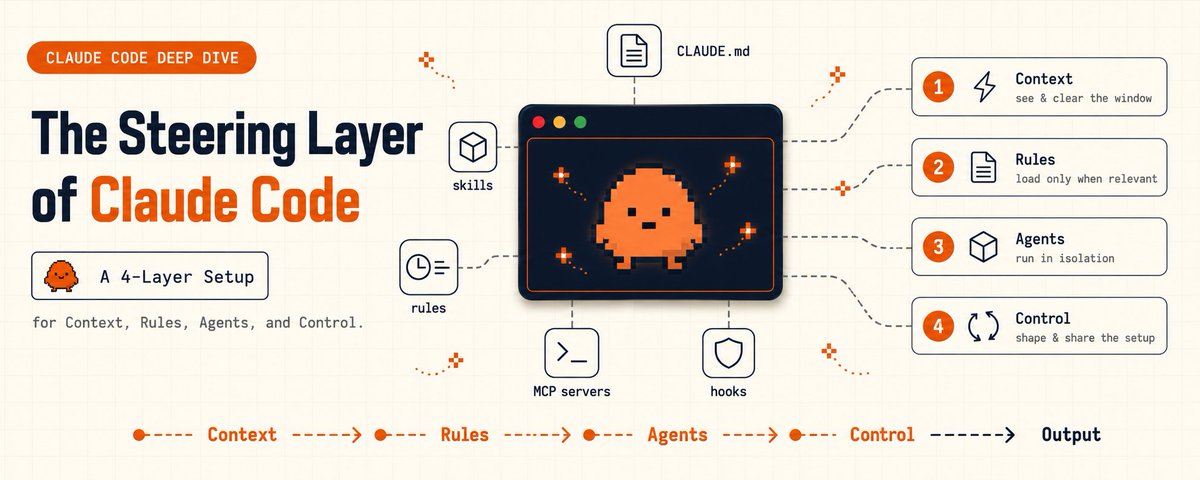
this article is every secret, grouped into four layers, with the exact files and commands.
the setup most people missed
for most of 2026 the public conversation about Claude Code was about the model. which one, how smart, how fast.
almost nobody talked about steering. yet the model is the easy part. it ships smart by default. what separates a clumsy session from a clean one is everything that loads around the prompt, every session, without you typing a word.
Anthropic's own june 18 post laid out seven ways to instruct Claude Code: CLAUDE.md files, rules, skills, subagents, hooks, output styles, and appending the system prompt. each one differs in when it loads, whether it survives a long session, and how much authority it carries. on top of those sit a handful of slash commands that control what the model sees.
here's the mental model that matters: you are not chatting with a model. you are configuring one. the prompt is what you say today. the steering layer is the standing setup that shows up every time, whether you remember to ask or not.
four layers hold every secret. here's all of them.
1 / 4 | context: the commands that decide what the model sees
the single most common complaint is "Claude Code got dumber in a long session." it almost never did. its context window filled up with junk and the thing you cared about got crowded out. the fix is a command most people have never run.
→ see exactly what is loaded right now:
/contextit breaks down everything in the window: CLAUDE.md, every rule, invoked skills, file reads, tool definitions. nine times out of ten you'll find a 600-line CLAUDE.md and three log dumps eating the space your actual task needed.
then the four commands that control it:
/clear      → wipe context between unrelated tasks, so old work stops bleeding into new
/compact    → summarise a long session before it degrades
/rewind     → roll back the conversation and the code changes separately
/insights   → read your own usage history and surface patterns worth automating
/rewind is the quiet hero. you can undo a wrong turn three messages deep while keeping the file changes you wanted, or keep the discussion and revert the edits. you no longer nuke everything to back out of one mistake.
/insights reads what you actually do all day, so the prompt you retype every morning becomes obvious as a command waiting to be made.
the secret here: context is not free and it is not infinite. the operators run /context on instinct and /clear between tasks. everyone else wonders why the model "forgot."
2 / 4 | rules and memory: stop dumping everything into CLAUDE.md
CLAUDE.md is where most people put their conventions, then never think about it again. the trap: every line loads into every session whether it's relevant or not. it burns context and dilutes the rules that actually matter.
Anthropic's own guidance is to keep CLAUDE.md under 200 lines, give it an owner, and review changes to it like code. treat it as an index, not an encyclopedia. two more secrets make it far better.
first, subdirectory CLAUDE.md files. a CLAUDE.md inside app/api/ loads only when Claude reads a file in that folder, not at session start. in a monorepo, claudeMdExcludes lets you skip other teams' files entirely.
second, and this is the big one, path-scoped rules. markdown files in .claude/rules/ that load only when Claude touches matching files.
→ a rule that only loads where it applies:
---
paths:
  - "src/api/**"
  - "**/*.handler.ts"
---
All API handlers must validate input with Zod before processing.
Reject any handler that reads req.body without a schema.
that rule stays out of context during a docs-only session and snaps in the moment an API file opens. it's the difference between a convention you hope the model remembers and one that enforces itself exactly where it should.
repeatable procedures go one level up, into skills: a folder in .claude/skills/ with a SKILL.md. only the name and description load at startup, the full body loads when you invoke it with a command like /deploy or when the task matches. deploy runbooks, release checklists, review processes, each one a skill that loads only when needed.
the secret here: an unscoped rule is mechanically identical to pasting text into CLAUDE.md, always loaded, always costing context. scope it, and it becomes free until it's relevant.
3 / 4 | the team: subagents and hooks
this is where one window becomes many.
a subagent is a separate Claude session with its own fresh context window. you hand it a side task and only its final summary returns to your main thread. all the noisy work in between never touches your conversation. two are built in already: Explore (read-only codebase search) and Plan (designs an approach without writing code). you define your own in .claude/agents/.
→ a worker that runs your tests and reports back clean:
---
name: test-runner
description: Runs the test suite, parses failures, returns a structured report. Use after any code change.
tools: Bash, Read, Grep
model: haiku
maxTurns: 10
---

You run tests and report results. Execute the project's test command,
then return:
1. pass/fail count
2. each failing test with the assertion that broke
3. the single most likely file to fix
No preamble. Markdown only.
it runs on Haiku and its 8,000-line test log never lands in your main context. you get the answer, not the noise. subagents can even nest several levels deep, so one can call another.
then hooks. a hook is a script that fires on a lifecycle event, runs as code, not as a polite request to the model. "always run prettier after editing" in CLAUDE.md is a wish the model usually grants. a hook makes it law.
→ a guardrail that physically blocks a dangerous command:
// .claude/settings.json
{
  "hooks": {
    "PreToolUse": [{
      "matcher": "Bash",
      "command": "grep -q 'git push --force' && exit 2 || exit 0"
    }]
  }
}
a PreToolUse hook inspects the call and exits code 2 to deny it. that is a real guardrail, enforced by code, not hoped for in a prompt. the same mechanism posts to Slack on completion, runs your linter after every edit, or backs up the chat before compaction.
the secret here: a skill runs inside your main thread so you can watch and steer it. a subagent runs in isolation and hands back only the result. use the first when you want to see every step, the second when the steps would just clutter your window.
4 / 4 | control: output styles, the append flag, and plugins
the last layer is about shaping behavior without breaking it, and packaging the whole setup.
output styles change how Claude responds. it ships with built-in ones before you ever write a custom: Explanatory teaches as it codes, Learning makes it more collaborative. but here's the trap that catches people: a custom output style replaces the default system prompt, including the instructions that make Claude act like an engineer at all. unless you set keep-coding-instructions: true, you just downgraded your coding agent to a generic assistant. reach for the built-ins first.
when you only want to add a standard, not replace the role, use the flag instead:
claude --append-system-prompt "we use tabs, not spaces. respond concise."it adds to the system prompt rather than overwriting it, and applies only to that run. no permanent side effects.
and once the whole setup works, you don't copy-paste it into every repo. bundle the rules, skills, agents, hooks, and styles into a plugin and ship one coherent config across all your projects or your whole team.
the secret here: the default Claude Code system prompt is doing more than you think. the appended flag adds to it. a custom output style quietly throws most of it away. know which one you're reaching for.
CONCLUSION
the model was never the hard part. it ships smart. the operators pull ahead on everything around it: /context and /clear to keep the window clean, path-scoped rules and skills so conventions load only when they matter, subagents and hooks to run work in isolation and enforce guardrails in code, output styles and plugins to shape and share the whole setup.
learn every one of these and you stop being someone who types at Claude and become someone who runs it. that mastery is the thing that actually compounds, in your work and, yes, eventually in what you can charge for it. but that comes later. the leverage starts the moment you open the layer most people never do.
pick two today. run /context to see your bloat, then write one path-scoped rule to fix it. that's your first ten minutes.
p.s. the most underused one isn't even a feature, it's /clear. the first time i started clearing context between tasks the answers got sharper, not worse. i'd been making the model carry around work it didn't need for months.
bookmark this before it gets buried. If this was useful, share it with one person who needs it.