Agent Harness Engineering vs Loop Engineering vs Graph Engineering

@LunarResearcher
Lunar@LunarResearcher
58 views Aug 07, 2026 ~8 min read
Advertisement

A Practical Guide To The 3 Layers People Keep Mixing Together

Media image
Media image

Most people talk about AI agents like it’s one thing.

It isn’t.

When an agent moves beyond a toy demo and starts touching files, APIs, documents, customers, or production code, you are no longer just “prompting a model.”

You are designing a system.

And in that system, three ideas keep getting mixed together:

  • Agent harness engineering
  • Loop engineering
  • Graph engineering
  • They all sit around the same model.
    They all affect reliability.
    And yes, they can all contain loops.

    But they solve different problems.

    If you mix them up, you end up debugging the wrong layer.


    The 30-Second Answer

    Here’s the clean version:

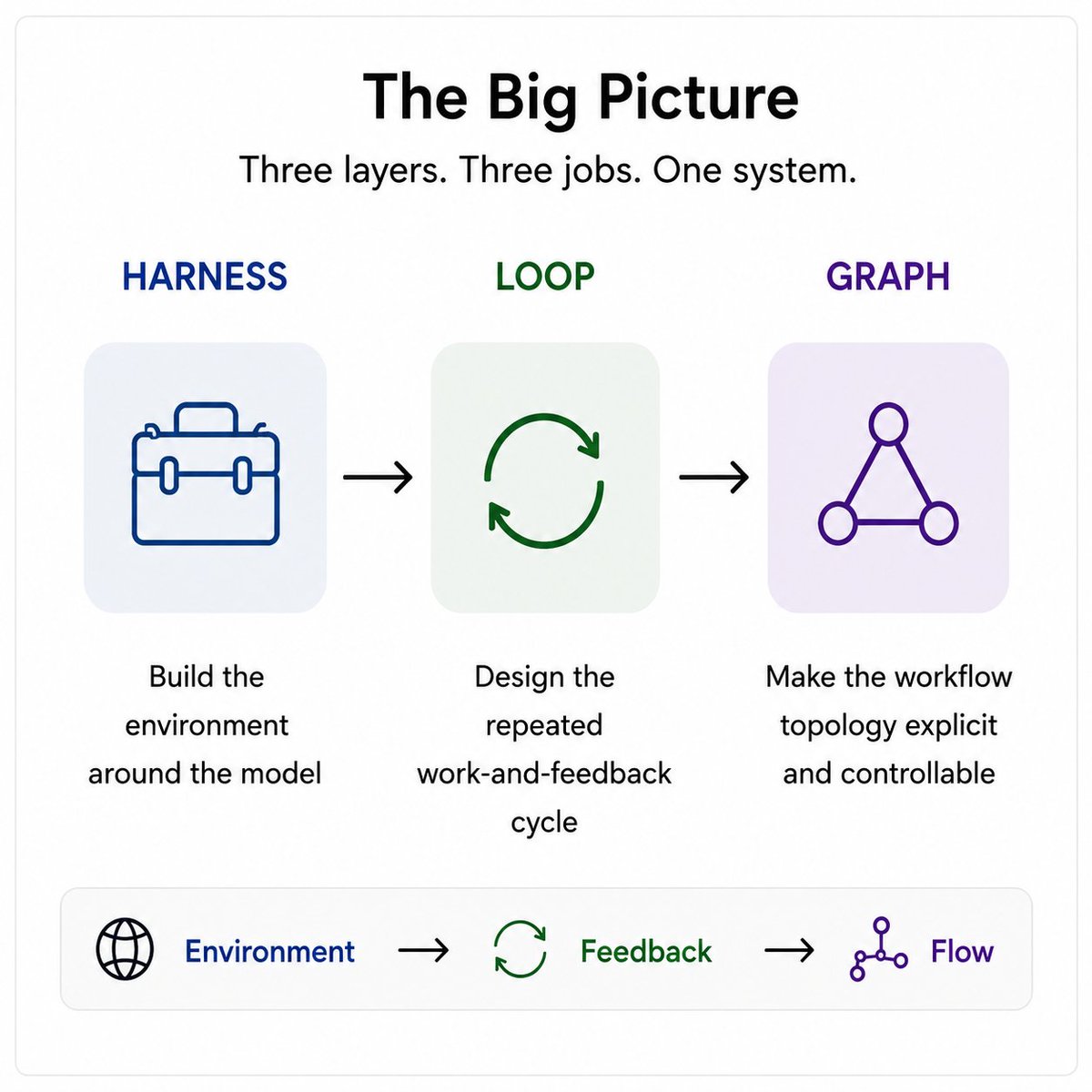
  • Harness engineering builds the environment around the model
  • Loop engineering designs the repeated work-and-feedback cycle
  • Graph engineering makes the workflow topology explicit
  • Media image

    A good mental model is:

    Environment → Feedback → Flow

  • The harness gives the model tools, memory, control, and a workspace
  • The loop decides how work gets retried, checked, and improved
  • The graph defines what step is allowed to happen next
  • That is the difference.


    Why These Terms Matter Now

    A raw model cannot do real work by itself.

    It cannot:

  • maintain project state across sessions
  • safely call tools
  • inspect a browser
  • enforce permissions
  • retry failed work
  • validate output quality
  • route tasks across specialists
  • stop at the right moment
  • All of that comes from the system around it.

    As agentic software matures, a practical stack is emerging:

  • The harness gives the model operating conditions
  • The loops make the work repeatable and verifiable
  • The graph makes complex workflows explicit and controllable
  • Once you see these as separate layers, a lot of AI architecture confusion disappears.


    What A Serious Harness Usually Includes

  • Context Injection
  • What the model sees before it acts:

  • instructions
  • retrieved knowledge
  • conversation state
  • memory
  • policies
  • task-specific rules
  • Action Surfaces
  • What the model can do:

  • API calls
  • browser actions
  • shell commands
  • code execution
  • MCP tools
  • databases
  • custom functions
  • Persistence
  • What survives across time:

  • files
  • checkpoints
  • session state
  • progress logs
  • git history
  • long-term memory
  • Execution Control
  • How the run is managed:

  • retries
  • timeouts
  • budgets
  • model selection
  • subagent spawning
  • approval gates
  • Safety And Governance
  • What keeps the system safe:

  • least-privilege permissions
  • isolation
  • allowlists
  • secret handling
  • human approval
  • Observability
  • What lets you debug it:

  • traces
  • tool inputs and outputs
  • state transitions
  • latency
  • cost
  • eval results

  • Why Harness Engineering Matters

    Two teams can use the same model and get completely different outcomes.

    Why?

    Because one team gives the model:

  • clean tools
  • stable state
  • structured memory
  • clear permissions
  • observable execution
  • And the other gives it:

  • a vague prompt
  • messy tools
  • noisy context
  • no memory
  • no verification
  • The model may be the same.

    The working conditions are not.

    Harness engineering matters whenever the agent:

  • cannot access the right capability
  • loses context between sessions
  • acts inconsistently across environments
  • cannot be audited
  • has too much permission
  • cannot recover cleanly after interruption
  • If the model cannot operate reliably, the first place to look is the harness.


    2. Loop Engineering

    What It Is

    Every tool-using agent already has a tiny built-in loop:

  • call the model
  • observe the result
  • run tools
  • feed the observations back
  • repeat until done
  • Loop engineering begins when you intentionally design additional cycles around that behavior.

    Not just “ask again.”

    Not just “retry.”

    But a real work-and-feedback system.


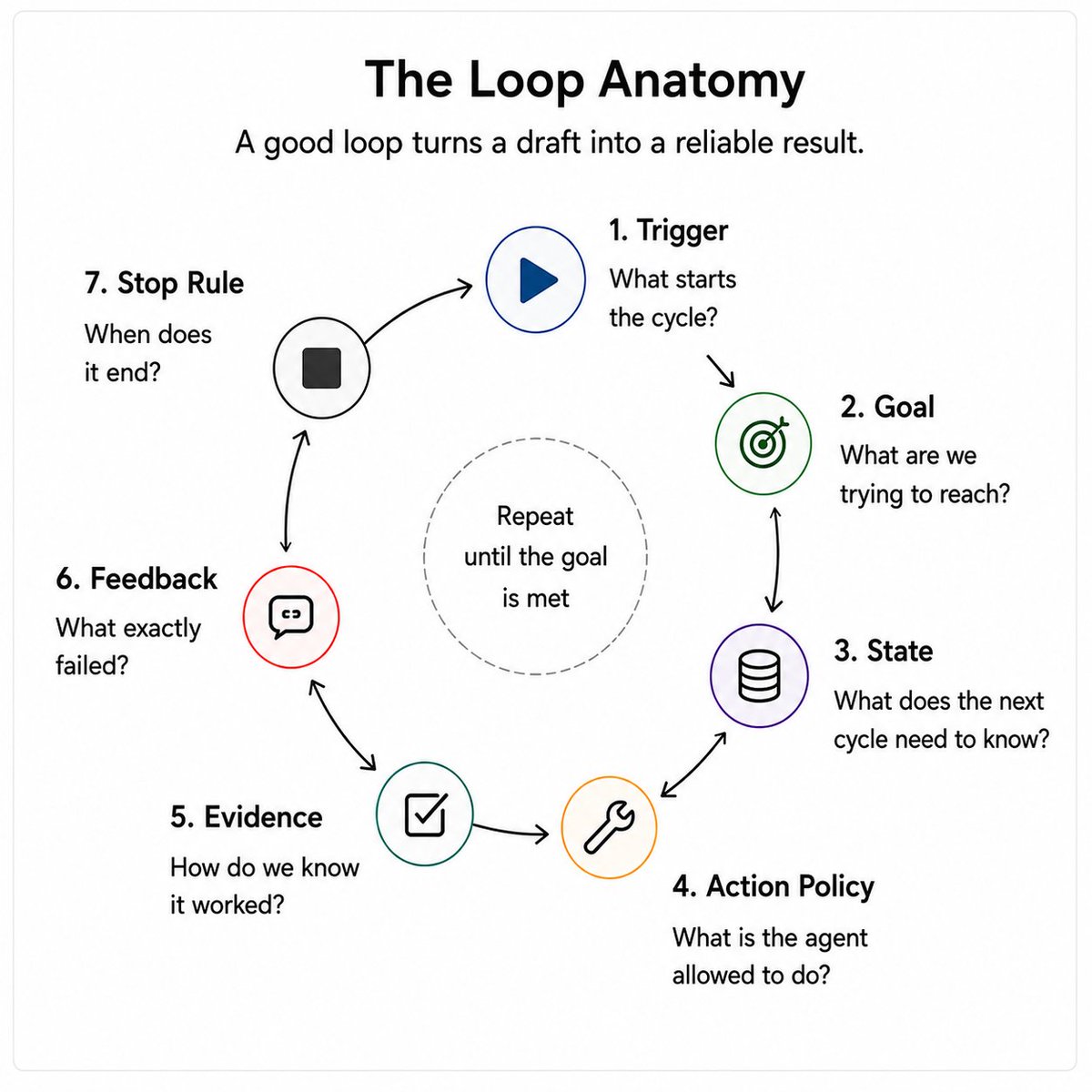
    Anatomy Of A Good Loop
    Media image

    Trigger

    What starts a new cycle?

  • user request
  • failed test
  • new document
  • scheduled run
  • webhook
  • evaluator feedback
  • Goal

    What specific condition are we trying to reach?

    Not “keep improving.”

    A real target.

    State

    What does the next cycle need to know?

  • current draft
  • previous attempt
  • tool results
  • errors
  • progress status
  • Action Policy

    What is the agent allowed to do?

  • edit
  • delegate
  • call tools
  • spend tokens
  • write files
  • open PRs
  • Evidence

    How do we know whether it worked?

  • tests
  • schema validation
  • citations
  • diffs
  • metrics
  • reviewer approval
  • Feedback

    What exactly failed?

    The feedback should be compact and actionable.

    Stop Rule

    When does it end?

  • success
  • timeout
  • budget exhausted
  • max retries hit
  • irrecoverable failure
  • escalation to a human

  • The Most Important Principle In Loop Engineering

    Do not loop on confidence.
    Loop on evidence.

    “The agent says it is done” is not a stop condition.

    A real stop condition looks more like:

  • the tests pass
  • the schema validates
  • the citations resolve
  • the reviewer approves
  • the policy check is clean
  • That is loop engineering.


    Why Loop Engineering Is Not Just Prompt Engineering

    A prompt tells the model what to do during a call.

    A loop defines what the system does after the call.

    That includes:

  • how it checks results
  • how it reacts to failure
  • how it persists progress
  • how it decides to continue
  • how it terminates
  • Prompting improves a response.

    A loop improves a process.

    That is a very different engineering problem.


    3. Graph Engineering

    What It Is
    Media image

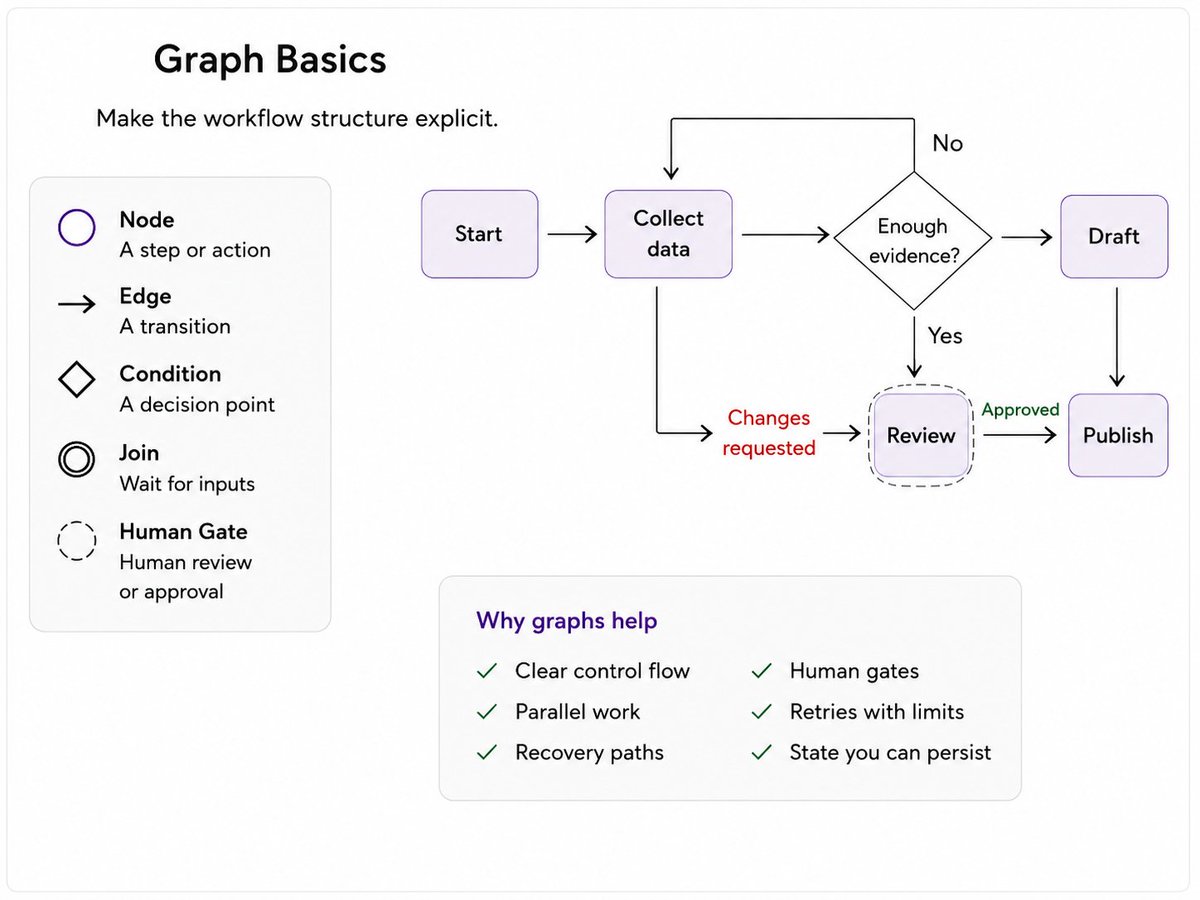
    Graph engineering makes workflow structure explicit.

    It answers a different question:

    Not just “what should the agent do?”
    But “what is allowed to happen next?”

    In graph engineering:

  • steps are nodes
  • transitions are edges
  • branching is explicit
  • parallel work is explicit
  • joins are explicit
  • retries are explicit
  • human interrupts are explicit
  • The graph becomes the control map for the system.


    What Graph Engineers Actually Design

    Node Boundaries

    What belongs in:

  • a deterministic function
  • an LLM call
  • a specialist agent
  • a human review step
  • State Schema

    What each node can read or write.

    Routing Conditions

    What evidence moves the job:

  • forward
  • backward
  • sideways
  • to escalation
  • Concurrency

    What can run in parallel, and what must wait.

    Cycles And Exits

    Where retries are allowed, how many are allowed, and how they stop.

    Durability

    Where checkpoints happen and how the workflow resumes after interruption.


    When Graphs Are Worth It

    Graphs are valuable when the process includes:

  • meaningful branching
  • approvals
  • specialist handoffs
  • parallel work
  • recovery paths
  • multi-step workflows with explicit control points
  • They are less useful when the job is simply:

    “Give one agent a few tools and let it work.”

    In that case, a solid harness plus a few loops may be enough.

    A graph adds clarity, but it also adds structure.

    Too much structure too early can make the system brittle.


    How The 3 Layers Work Together

    Let’s say you are building a research-and-publishing agent.

    It has to:

  • scope a topic
  • gather sources
  • screen citations
  • draft a report
  • pass legal review
  • publish only after approval
  • Here’s how the layers map:

    Harness

    Provides:

  • browser access
  • search tools
  • file workspace
  • memory
  • citations
  • approvals
  • traces
  • model routing
  • Loop

    Handles:

  • retrying source retrieval when evidence is weak
  • fixing citation failures
  • running grader checks
  • refreshing work when the market changes
  • Graph

    Controls the path:

  • scoping
  • research
  • screening
  • synthesis
  • drafting
  • review
  • publication
  • With a human gate before release.

    That is why the 3 layers are not interchangeable.

    They work together, but they are not the same thing.

    Media image

    Diagnose The Failure Before You Pick The Fix

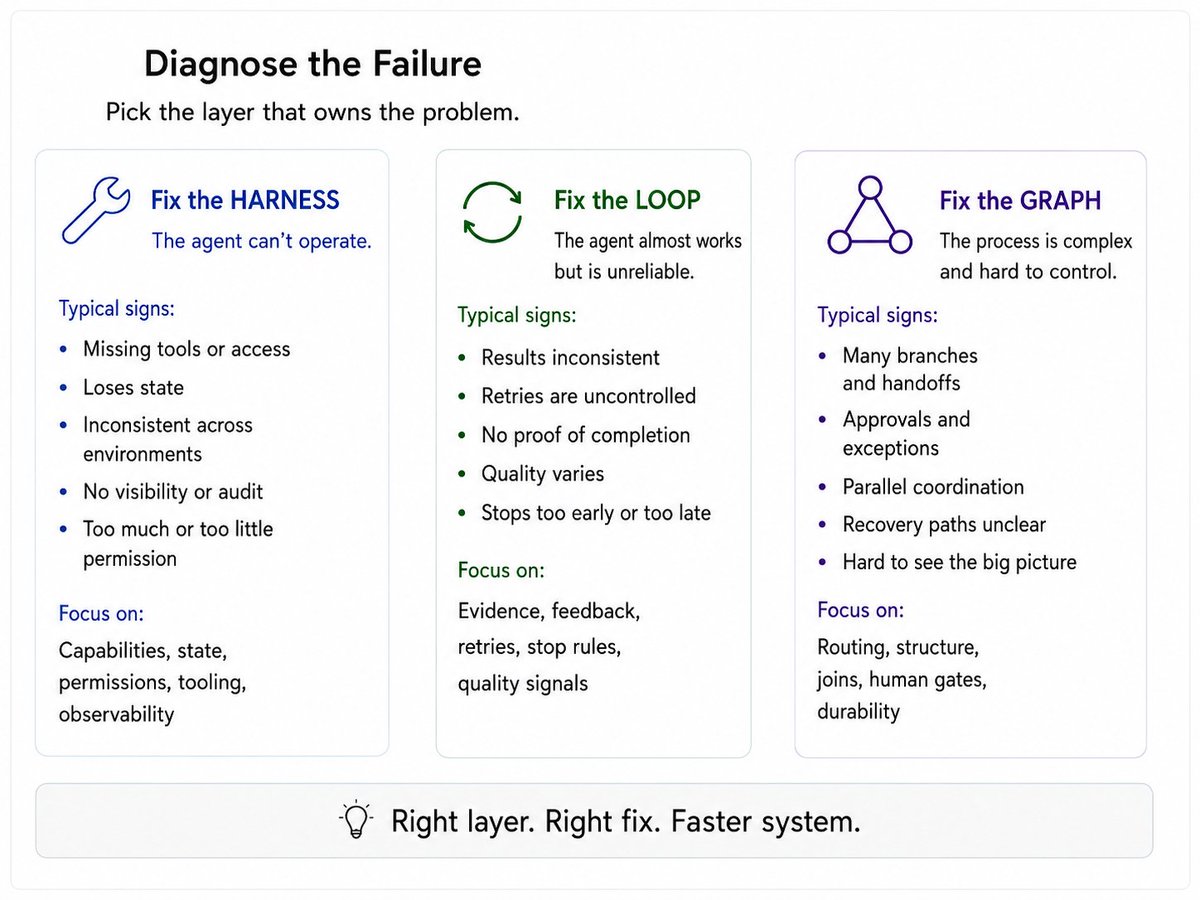
    Here’s the practical rule:

    If the agent cannot operate, fix the harness

    Examples:

  • missing tool access
  • stale state
  • weak memory
  • bad permissions
  • no observability
  • If the agent almost works but is unreliable, fix the loop

    Examples:

  • first draft is close but weak
  • success is inconsistent
  • retries are uncontrolled
  • there is no proof of completion
  • If the process itself is complex, fix the graph

    Examples:
  • many specialists
  • approvals
  • branching logic
  • parallel paths
  • structured handoffs
  • Media image

    Common Mistakes

    1. Building The Graph Too Early

    Teams often diagram a huge workflow before seeing how the work actually behaves.

    Better approach:

  • start with a simpler harness
  • collect traces
  • find the stable patterns
  • formalize only what deserves control

  • 2. Letting The Same Model Write And Grade Without Safeguards

    Self-review can help, but it shares the same blind spots.

    Prefer:

  • deterministic checks where possible
  • separate reviewer context
  • external evaluators
  • human approval for high-impact actions

  • 3. Using “Keep Trying” As A Loop

    That is not a loop design.

    That is an uncontrolled cost leak.

    Every loop needs:

  • a measurable goal
  • real evidence
  • retry limits
  • escalation rules

  • 4. Treating The Harness Like A Junk Drawer

    More tools do not automatically mean better agents.

    Too many tools create:

  • selection mistakes
  • noisy context
  • weak reliability
  • wider risk surface
  • A good harness is not crowded.
    It is precise.


    5. Blaming The Model For Orchestration Failures

    A model cannot compensate for:

  • broken APIs
  • stale state
  • missing exit conditions
  • vague tool schemas
  • invisible failure modes
  • Fix the layer that owns the failure.


    A Simple Production Checklist

    Harness

  • Are tools narrow and documented?
  • Is state durable?
  • Are permissions least-privilege?
  • Can operators pause, inspect, and resume?
  • Are traces visible?
  • Loop

  • What evidence proves success?
  • What feedback is returned on failure?
  • How many retries are allowed?
  • What is the stop rule?
  • What happens when the budget runs out?
  • Graph

  • Which paths must be deterministic?
  • What can run in parallel?
  • Where are the human gates?
  • What state is shared?
  • Where do recovery paths begin?
  • Evaluation

  • Can you replay real traces?
  • Can you compare versions?
  • Can you attribute improvement to a real change?
  • Operations

  • Are you tracking cost?
  • latency?
  • failure rate?
  • intervention rate?
  • task success in production?

  • The Simplest Way To Remember The Difference

    If you only remember one thing, remember this:

  • Harness engineering makes the model operational
  • Loop engineering makes the work iterative and verifiable
  • Graph engineering makes the execution path explicit and controllable
  • None replaces the others.

    A perfect graph will not save a weak harness.
    A strong harness will still waste money without good loops.
    And clean loops become hard to manage when branching and approvals stay hidden in ad hoc code.

    Reliable agent systems show up when all 3 layers are designed intentionally.

    That is the actual architecture stack.


    Final Takeaway

    People keep talking about AI agents like the breakthrough is the model.

    In production, that is rarely the real differentiator.

    The differentiator is the system around the model:

  • the harness that lets it work
  • the loops that let it improve
  • the graph that lets it operate under control
  • That is how toy agents become real systems.


    If you read this far:

  • BOOKMARK THIS.
  • Follow @LunarResearcher
  • Follow my Substack
  • Follow my Private Telegram Channel
  • Actions
    What You Can Do
    • Export as PDF or Markdown
    • Batch Export to Notion
    • Bookmark & Highlight
    • LinkedIn & Instagram Carousel Maker
    Create Free Account

    Includes 7-day Premium trial

    Advertisement