The Ultimate Paywall & Onboarding Playbook

Two years ago while building Cal AI, we did the opposite of what every app growth blog and guru on the internet said to do:

Reduce “friction” by shortening your onboarding by cutting steps to get users into the app as fast as possible.
We made our onboarding flow LONGER, and went on to make millions a month.
Over the life of Cal AI, we ran over 100 paywall A/B tests each with countless variants.
Many of these experiments were on the onboarding paywall alone.
I’m always getting DMs and comments about our influencer program, but almost nobody asks about the machine that actually collected the money:
Paywall and onboarding optimization.
The influencers got people to the app store, and the onboarding and paywall took care of the rest
Here's the full playbook:
1. Get the order of operations right
Most founders build in this order:
That's entirely backwards.
At Cal AI we built:
Focus first on the paywall, because that's how you make your money.
Focus on the onboarding second, because that's how you get people to the paywall.
We didn't seriously optimize the in-app experience until we were already crushing it.
Because who cares if you have 100% retention and 100% customer satisfaction if you have no customers?
2. Your paywall is a lie detector
There are two versions of product-market fit.
Version one: people are willing to download your app.
Version two: people are willing to PAY for your app.
Only one of these is a business.
I talk to founders every week who are "growing fast" with a free app, acquiring users for $20 and only making $5 off each of them.
I’m not good at math, but that's a money pit, not a real business.
The industry data backs this up hard.
RevenueCat's latest report across tens of thousands of subscription apps found hard-paywall apps convert trials to paid at 10.7% versus 2.1% for freemium (that's a 5x difference).
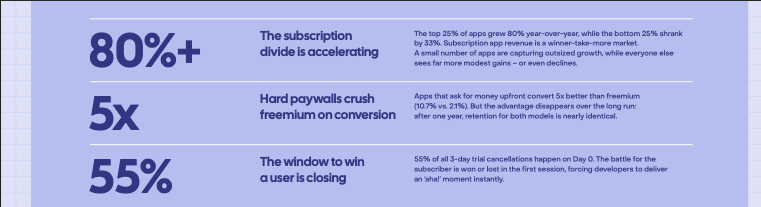
By day 60, hard paywall apps generate about 8x more revenue per install ($3.09 vs $0.38).
And at 12 months, retention between hard paywall and freemium apps is basically identical (27% vs 28%).
Charging up front doesn't just make more money.
It tells you the truth about your product faster than any customer survey ever will.
3. The sacred rule we broke (and why it worked)
Back to the long onboarding.
The reason "reduce friction" is bad advice for the onboarding-to-paywall flow is because friction isn’t always a bad thing.
Friction is bad when someone is trying to USE your product.
Friction is an asset when someone is deciding whether to BUY your product.
Every additional step we added to Cal AI's onboarding was another opportunity to do three things:
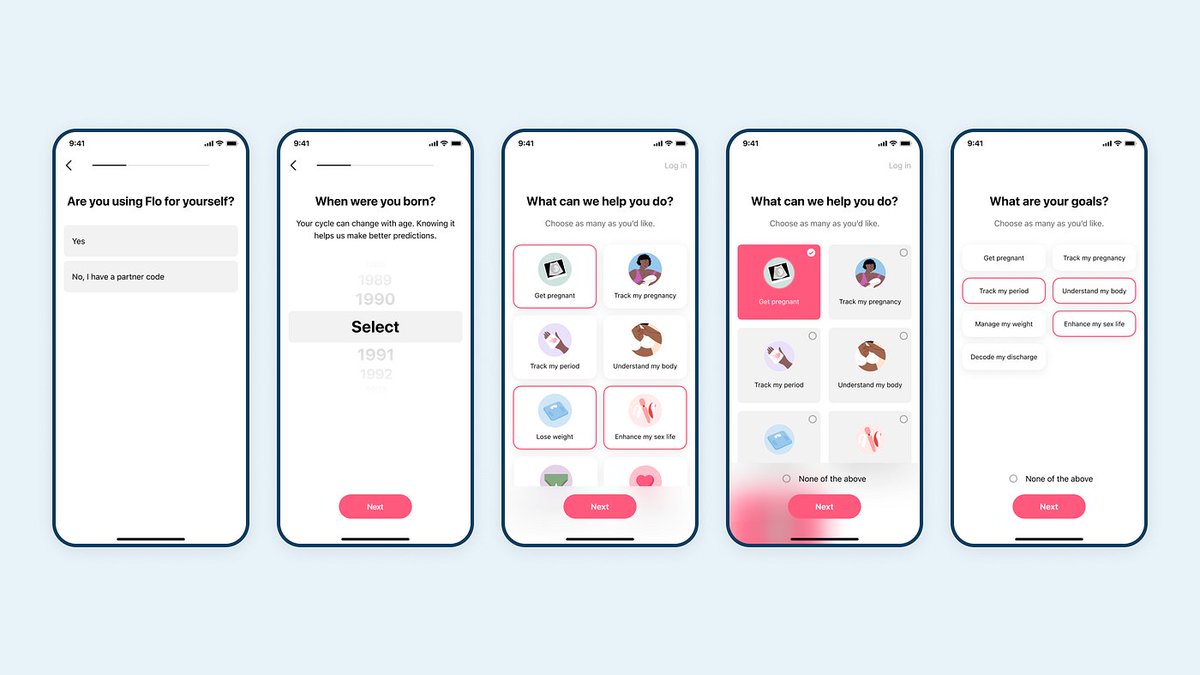
By the time a Cal AI user hit the paywall, they'd told us their goals, their body type, their habits, and their ideal timeline for change.
They'd watched the app build a plan for THEM.
That's a big reason why it converted.
4. Match your onboarding length to pain, not to "best practices"
This is the framework nobody gave me, so I'm giving it to you.
The right onboarding length isn't a design decision.
It's a function of how much pain your app solves.
Low-pain apps (productivity tools, utilities, nice-to-haves):
Run a SHORTER onboarding.
There's no deep wound to press on.
Your user is mildly curious, not desperate.
Every extra screen taxes someone who was barely motivated to begin with.
Your only jobs: get them through fast, show them the value the app brings to THEM immediately, and give them one clear reason not to leave.
High-pain apps (weight, money, addiction, dating - anything they've failed at before):
Run a LONGER onboarding.
Your user has tried to solve this before and lost. In this situation, the onboarding does the job of agitation and connection:
Cal AI is a high-pain app.
Traditional calorie tracking is tedious, frustrating, and most people have quit it at least once.
Our onboarding made that pain vivid, then presented scanning a photo as the escape from it.
The emotional target we aimed everything at: you can get the body you've always wanted, and it's as easy as taking a picture.
Pain agitated, solution connected, paywall friction removed.
Trying to copy Cal AI's 30-screen onboarding for your low-pain app is the easiest way to end up in the app store graveyard.
5. The anatomy of an onboarding that converts
Steal this sequence. It's the skeleton under basically every top-grossing consumer app right now:
And finally, the Paywall: Their goal restated in the offer with 2-3 pricing options max, anchored with the annual option. Make the value of paying obvious and the cost of leaving concrete.
One rule to follow across the board: every screen either teaches you something about the user, or teaches the user something about their problem.
Anything else gets cut.
6. Free trials are a poor man's conversion tool
If you can't convince someone to pay for your product right away, a free trial won't save you.
You have one of these problems:
84% of 3-day trial cancellations happen by the end of day one, meaning people decide almost immediately whether or not they’re going to continue using your product.
The trial isn't buying you consideration time, it's mostly giving you false signals about whether this app is viable in the first place.
And if you're running paid ads, a 7-day trial makes performance increasingly hard to attribute.
You pay Meta today and find out in a week whether the cohort was any good.
The longer the trial, the more polluted the data.
My rule: never run a free trial until you've proven people will pay for your app out of the gate.
Earn the right to use trials as an optimization, don't use them as a crutch for a product that can't close consumers from the product itself.
7. The benchmarks to memorize
These are the numbers I used to diagnose Cal AI's funnel every single week:
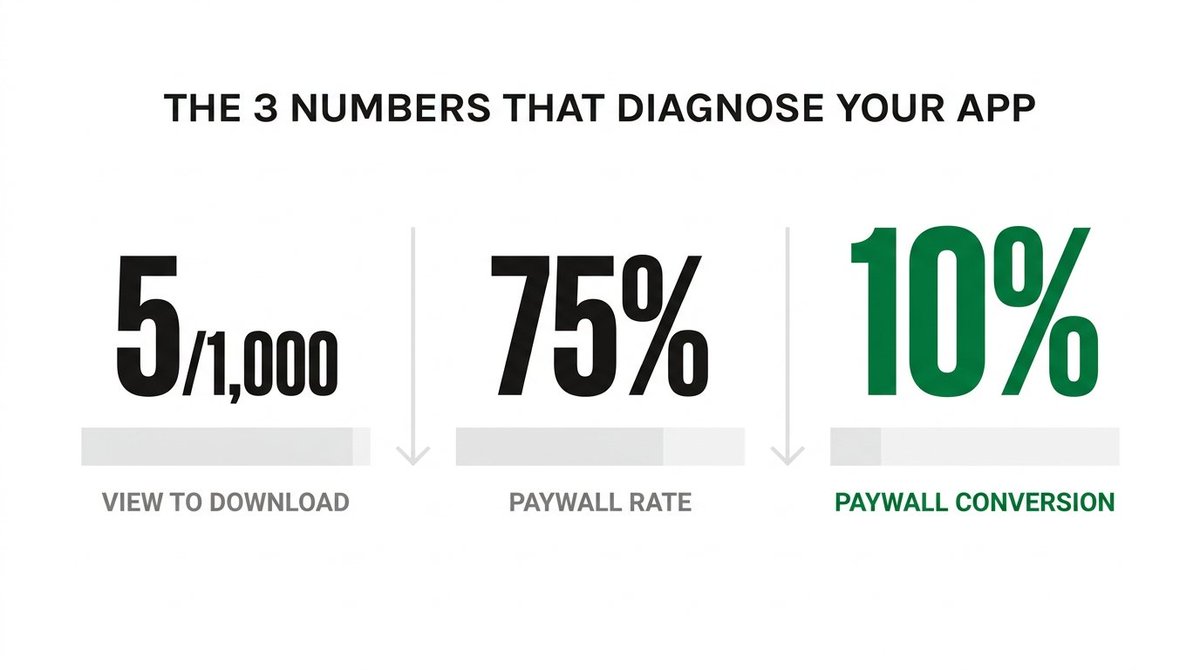
View-to-download ratio: 5 downloads per 1,000 views.
Below that, your marketing isn't communicating enough value, or people just don't want the product.
Paywall rate: 75%+.
Three out of four people who open the app should reach your paywall. If they don't, your onboarding flow needs tweaking.
Paywall conversion: 10%.
One in ten people who see the paywall should pay.
Hit all three consistently and you're on the right track. Miss one, and you know exactly which part of the machine to fix:
Bad view-to-download = content/positioning problem.
Bad paywall rate = onboarding problem.
Bad paywall conversion = offer problem.
Most founders can't tell you which of the three is broken.
Not being able to identify leaks in your funnel and how to fix them is one of the biggest killers of consumer apps.
8. Price for mindshare, not margin
Everyone thought we were insane for undercharging with Cal AI.
But cheap enough becomes an impulse buy, an impulse buy becomes a habit, and habit becomes the default and obvious choice.
You can fix margins later. You cannot fix being the app nobody chose.
Two more pricing rules to steal:
Skip lifetime deals. You can run into legal headaches, they complicate when it comes time to being acquired, and they rarely generate meaningfully more revenue than a well-priced annual.
Mind the cashflow gap. It's hard to get CAC on Meta under $30, and for a lot of apps $30 IS the annual price.
"We're breaking even" usually means you're lying to yourself: you pay Meta today and collect that subscriber's value over months.
Just keep that in mind, cash flow is always king.
9. Test more (no, more than that)
The majority of my consulting calls involve me telling founders to test 10x more of everything.
My co-founder Zach said it best:
"We treat paywalls the same way we treat the product: ship something, measure it, and improve it tomorrow. If you're spending weeks debating what your paywall should look like, you've already lost. Just test it."
Your first paywall will be wrong, just accept that.
The founders who win are willing to test and fail fast and fix their mistakes faster.
10. Stop paying rent on your own revenue
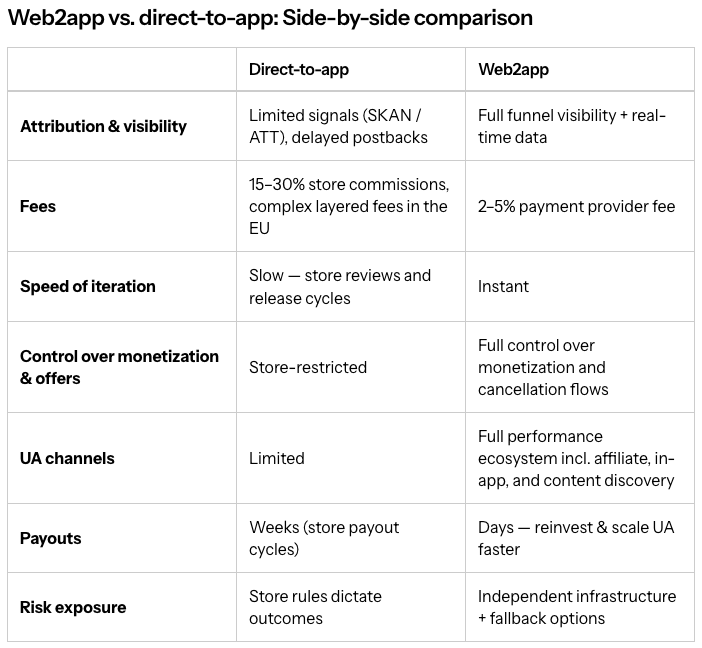
Apple takes their cut of every app store transaction, and they keep tightening the rules: free trial toggles on paywalls, discount offers after the onboarding paywall, and rating requests during onboarding have all been hit.
When you don't own the distribution channel, you're always at the mercy of whoever does.
That's why the next wave of big consumer apps runs web2app funnels: acquire customers on a website you control, convert through any payment processor, keep roughly 95% of revenue, and test dozens of funnel variations in a day.
Glam AI reportedly rode web2app funnels to $70M ARR.
Flo tests trial-upgrade offers on the web that Apple would never allow in-app.
You don't have to move everything to web funnels tomorrow.
But if 100% of your revenue flows through a channel where someone else writes the rules, you don't fully own your business.
The whole playbook, TL;DR edition:
There's no magic bullet in here. Just a machine most founders never bother to build.
If you enjoyed this breakdown, you'll love my newsletter.
Join 1,500+ weekly readers of the Operator's Notebook below (it's free):
operatorsnotebook.beehiiv.com
Link to the RevenueCat report:
revenuecat.com/pdf/state-of-s…