Don't build your app yet. Here's how to know if anyone wants it

I recently talked with a mobile app founder making over $40k/month.
His app looks great. Clearly weeks of real work, not some slop vibe-coded in a weekend. So I asked him the obvious question: “how did you know it was worth all that effort before you built it?”
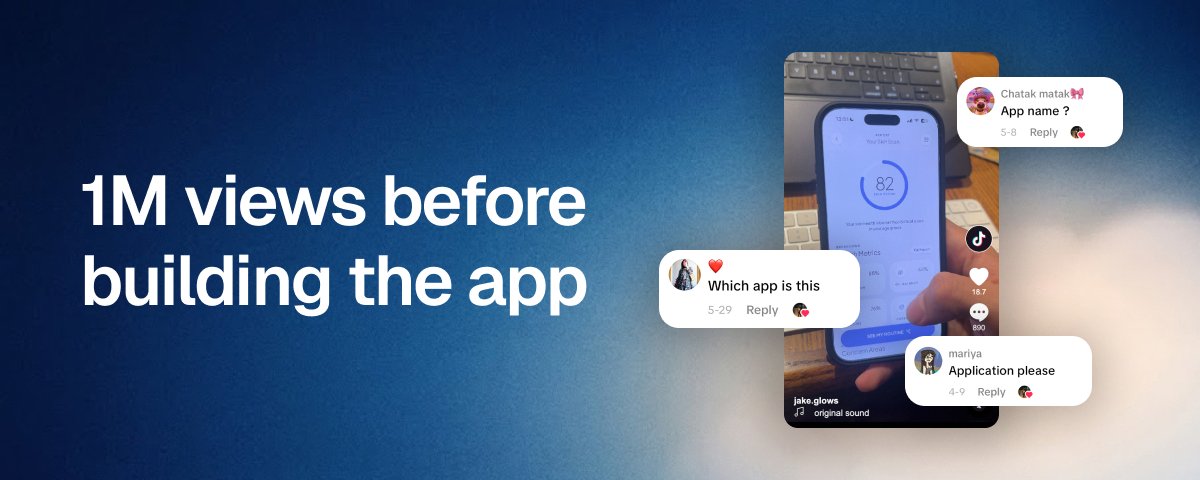
Turns out, he got 1M+ views on TikTok before writing a single line of code.
He just created some mockups, a demo and started posting videos on TikTok immediately. A few blew up and people flooded the comments asking where to get the app. That’s the proof he needed. Then he built it.
Believe it or not, I still see people that spend weeks building their first app, wait for App Store approval, and only then start to make content to see if anyone even wants it (I’ve been there).
Here’s what they’re missing: you don’t need a working app to find out if people want it. You just need a demo and good content.
“But what if I go viral without an app?? aren’t those views wasted?!”
Going viral once is not enough. You need to keep stacking views either way. And now you even have a format that you can repeat once your app is live.
So if you’re about to spend weeks building your first app with no idea if anyone actually wants it, please stop and make some content first. Here’s exactly how I’d do it 👇
1. Find the feature that sells your app
You’re not going to demo a whole app. You just need one feature: the one that makes the best content.
The mindset shift is: don’t build the app and then figure out the content. Start with content, see what actually resonates and build the app around that.
So, what is that feature you can show in 3-5 seconds that makes people instantly get what your app does?
This changes from app to app of course, but very often the pattern is as simple as input -> reveal. The user gives some input and the app reveals a result. E.g.:
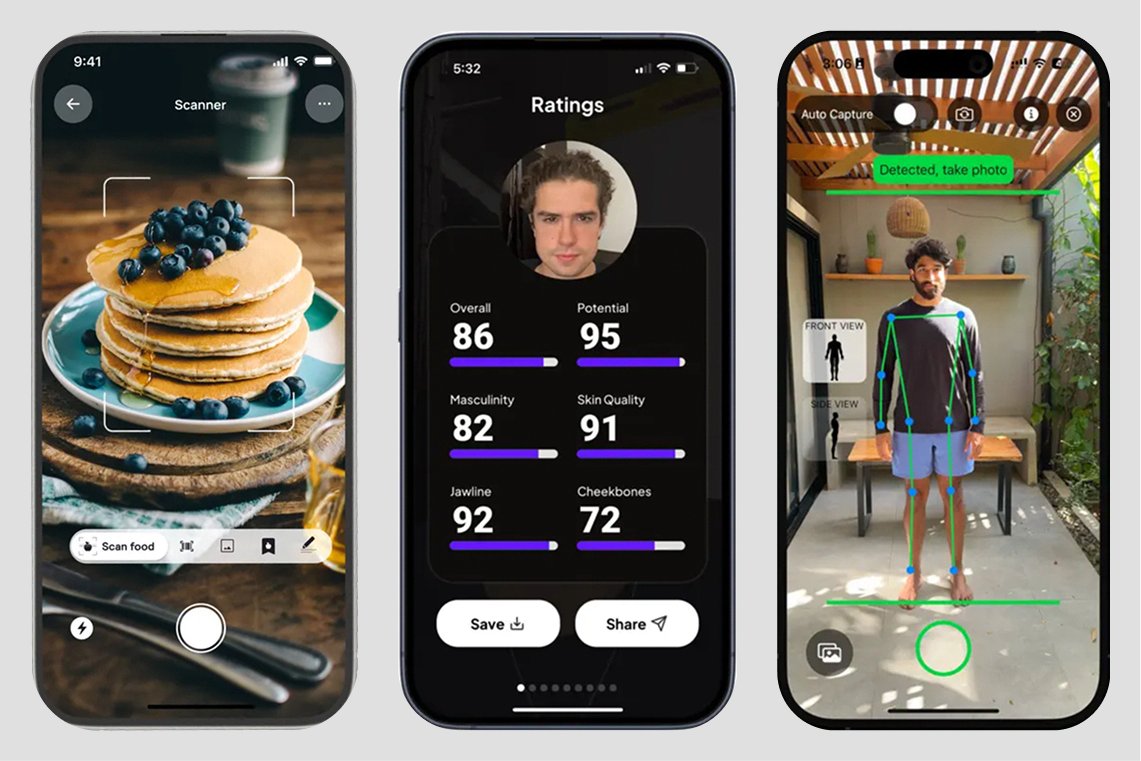
You get the point. If your app has a similar flow, use that. Otherwise think about the most visual part of your app that would make people understand it in 5 seconds.
2. Mock it up with AI
Once you know your feature, you need a mockup to show in your demos.
It’s probably just 2-3 screens. That’s all you need to focus on. Forget the rest of your app for now.
Here’s where most people overcomplicate it. Your mockup doesn’t need to be perfect. But it needs to be good enough to pass as a real app and not look cheap. Clarity wins over a perfect UI. And you don’t need a designer to get there, just AI pointed in the right direction.
My setup is Claude Code with the Sleek skill: Claude does the work, Sleek gives the design foundations and UX patterns that make it actually look like a real app instead of a generic AI screen.
Here’s the exact prompt that you can use to get a working demo in literally 10 minutes. Make sure to replace the placeholder with your app idea.
Claude will give you a QR Code. Scan it with your phone to open the prototype:
Here’s an example demo I built for a skincare analysis app:
Notice that this isn’t even a real mobile app, it’s just an HTML prototype and that’s the point. It just needs to show how the feature works (even with fake data). I like this because it’s very fast to create, easy to iterate on, and needs almost no setup. You can also turn this into a React Native project if that’s better for you (just ask Claude).
3. Make the content (reaction + demo)
You’ve got a working prototype. Now the content.
The easiest format that still works: reaction + demo. You film yourself acting surprised/excited with a strong hook as text overlay, then after a couple seconds you cut to a demo of the app.
Three pieces:
Then add a viral song on top (usually what TikTok suggests works).
Here’s an example:
You want to test fast. The game is volume. Bulk-record reactions, mix in different hooks and post a bunch of variations every day on TikTok, Instagram Reels and Youtube Shorts (you might need multiple accounts and some phone setup, plenty of guides cover that, it’s beyond this article).
4. Post and read signals
Remember that views alone don’t validate anything. A video can blow up for many reasons that have nothing to do with your app.
What you’re looking for is in the comments: “what’s the app called?”, “where can I try this?”, “is this real?”. Those are real signals. Of course it doesn’t guarantee these people will pay (that’s the ultimate validation), but it tells you someone is genuinely interested in the app.

There are no absolute numbers here. You’re not trying to hit a specific number of views or comments. It can take a while to see signals. If nothing is landing, just test more. Try more hooks, change the demo, test a different feature.
You don’t have to hit a million views or thousands of comments to start building. It’s more about the mindset: start making content as early as possible, observe what resonates, and let that shape what you build. Build while you learn, instead of building everything on a guess and figuring it out after.
By the way, the prototype isn’t a throwaway. It’s exactly where you want to start building your actual app. Just ask Claude to turn it into a React Native app and take it on from there.