A Field Guide to Fable: Finding Your Unknowns
Working with Claude Fable 5 keeps re-teaching me an old lesson: the map is not the territory.

The map, a representation of the work to be done, is my prompts and skills and context, it’s what I give Claude. The territory is where the work needs to happen, the codebase, the real world, its actual constraints.

The difference between the map and the territory is what I call unknowns. When Claude runs into an unknown, it needs to make a decision based on its best guess of what I want. The more work being done, the more unknowns Claude might run into
Fable is the first model where I find the quality of the work is bottlenecked by my ability to clarify its unknowns.
Importantly, just planning ahead isn’t always enough. You can find unknowns deep in implementation, or your unknowns may point you to the fact that you should actually be solving the problem in a different way altogether.
I’ve found that working with Fable is an iterative process of discovering my unknowns before, during, and after implementation.
I've made some example artifacts for finding unknowns here, but be sure to come back to build the intuition for when to use them.
Knowing your unknowns
What are your unknowns? When I come to Claude with a problem I tend to break it down in 4 ways:
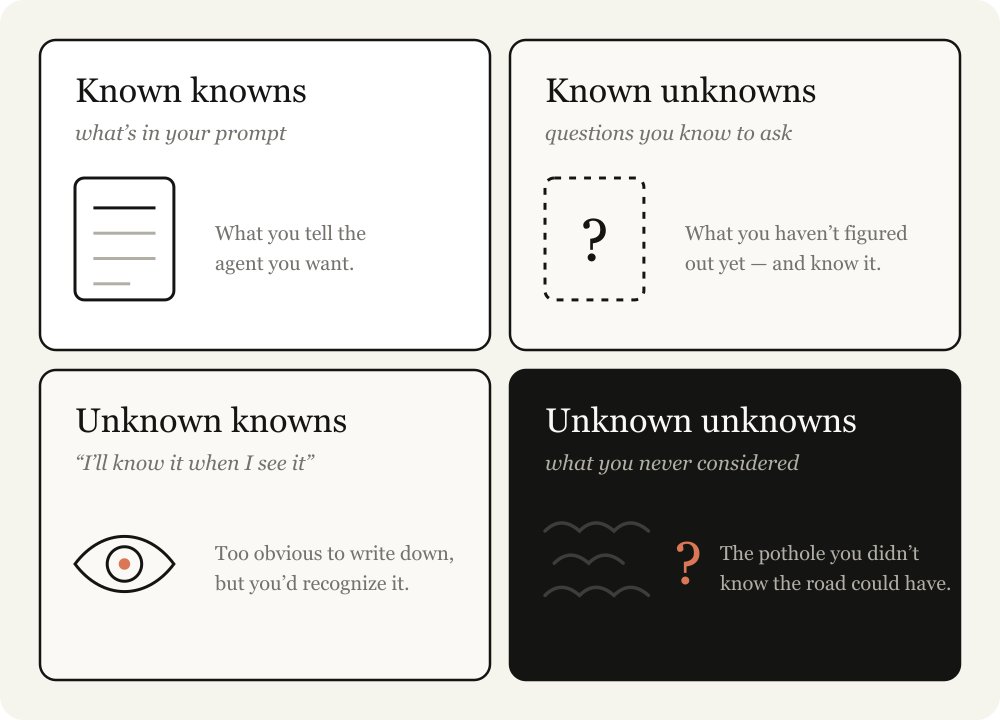
The best agentic coders are good have relatively few unknowns. Watching someone like Boris or Jarred prompt, it is obvious to me that they know what they want in-detail. They are deeply in-sync with both the codebase and the model behaviors.
But they also assume unknowns. In many ways, reducing and planning for your unknowns is the skill of agentic coding. But luckily, this is a skill you can improve at, by working with Claude.
Help Claude help you
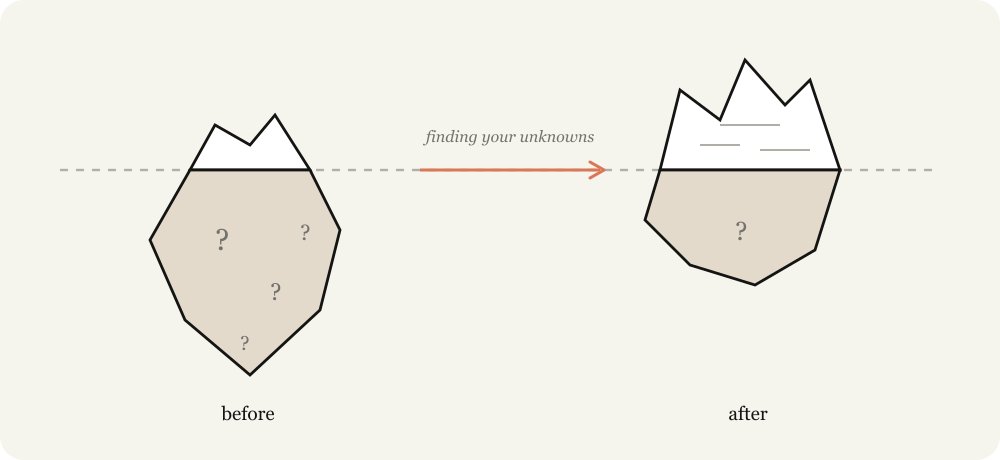
Instructing Claude is a delicate balance. If you are too specific, Claude will follow your instructions even when a pivot may be more appropriate. If you are too vague, Claude will often make choices and assumptions based on industry best practices that may not be a fit for your task.
When you don’t account for your unknowns you fail both ways. You don't know when the path will be filled with obstacles and you don’t know when the path will be clear, but you still want Claude to veer.
Claude can help you discover your unknowns faster. It can search through your codebase and the internet extremely quickly and it knows much more about the average topic than you. It can also iterate from failure faster.
The most important part of this process is to give Claude context about your starting point. For example, tell it where you are in your thought process; disclose your experience with the problem and codebase; and let it work with you like a thought partner.
I've previously written about using HTML with Claude, in almost all of these cases, a HTML artifact is the best way to visualize and represent it.
In this article I detail some of the patterns I use to uncover these unknowns. I don't use every technique each time, but it's a useful collection of techniques to have.

Pre-implementation
Blind Spot Pass
When starting work, one of the most useful things you can do is understand your blindspots. For example, if you’re writing a feature in a new part of the codebase or using Claude to help you with unfamiliar work like iterating on a design, you’re likely to have a lot of unknown unknowns.
You may not know what questions to ask, what good looks like, what historical work has been done or what potholes to avoid.
To do this, you can ask Claude to help you find your unknown unknowns and explain them to you. I like to use the literal words “blindspot pass” and “unknown unknowns”. Giving it context on who you are and what you know is usually important for
Example Prompts:
Brainstorms and prototypes
When I’m working in an area with a lot of unknown knowns, involving criteria I only know to define when I see it, I like to ask Claude to brainstorm and prototype with me.
It’s extremely valuable to identify and verbalize unknown knowns early during prototyping, because finding them out during implementation can be (relatively) expensive. Small changes in a feature or spec can cause drastically different implementations in code and it can be more difficult for your agent to revert previous changes.
For example, you may just want to see how a button added to a frame looks without having to wire up a backend route or maintaining additional state in the frontend.
Visual design is something that for me is difficult to articulate, but I know what I want when I see it. In these cases, I’ll ask for several design approaches to an artifact.
I also start almost every coding session with an exploration or brainstorming phase. This helps me start with intent to define the project’s scope. Claude often finds high-value approaches I would have missed and sometimes misses the forest through the trees. Brainstorming prevents me from setting too narrow or too wide a scope.
Example prompts:
Interviews
Once I’ve done sufficient brainstorming, I likely still have unknowns.
In this case, I ask Claude to interview me about any unknowns or ambiguities. When asking Claude to interview you, try and give it context about your problem to guide its questions. Here are some examples.
Example prompts:
References
Sometimes you can’t describe what you want in detail. For example, you might not have the language or it might be so complicated that it would take you quite a while.
In this case, the best answer is a reference. While you can include diagrams, documentation or pictures, the absolute best reference is source code.
If you have a library that implements something in a certain way or a design component you really like, just point Fable at the folder and tell it what to look for, even if it’s in a different language.
This is also the way Claude Design works. You don't have to hand it a file (although you can do that too). You can point it at a module on a website you like, and it reads the underlying code, not just the screenshot. This provides much richer detail around the markup, structure, and how the component is actually built.
Example prompts:
Implementation Plans
When I think I’m ready to implement, I tend to ask Claude to put together an implementation plan for me to review that focuses on the parts that might be most likely to change, for example to review data models, type interfaces or UX flows. This allows Claude to surface things I might actually need to alter.
Example Prompts:
During implementation
Implementation notes
Once I am satisfied with my plan, I make a new session and pass any artifacts to the prompt. For example, I might pass in a spec file and a prototype and ask an agent to implement it.
But the truth is that no matter how much planning you do, there are always unknown unknowns lurking. The agent may find during its work that it needs to take a different tack due to an edge case it found in the code.
I ask Claude Code to keep a temporary ‘implementation-notes.md’ (or .html) file where it keeps track of decisions it makes so we can learn from our next attempt.
Example prompts:
Post implementation
Pitches and explainers

One of the most important parts of shipping something is getting buy-in and approvals. Building pitch and explainer artifacts in the final document helps:
Example prompts:
Quizzes
After a long working session, Claude might have accomplished a lot more than I realized. Reading the code diffs can only give me a light understanding of what happened, since much of the behavior will depend on existing code paths.
Asking Claude to quiz me about the change after giving me a bunch of context helps me understand what happens. I only merge after I pass the quiz perfectly.
Example prompts:
How this comes together: launching Fable
The launch video for Fable was edited entirely by Claude Code. This was a new domain for me and I’m by no means an expert.
So I started with what I did know. I knew that Claude could use code to edit videos and transcribe them, but I wasn’t sure if it was accurate enough. I then asked Claude to explain to me how transcription like Whisper worked, and whether I would be able to accurately cut out things like ums or large pauses using ffmpeg.
I wanted Claude to create a UI that was timed with the words I was saying, but wasn’t sure if it would be able to so I asked Claude to create a prototype video using Remotion and a transcription to see if it would work.
Finally, the video itself looked a bit muted, which I knew was the result of color grading but I didn’t really know what color grading was. My first pass attempt was to try and get Claude to do a few variations to pick, but I realized that I didn’t know what “good” looked like when it came to color grading. So instead, I asked Claude to teach me about color grading to discover my unknowns.
You can watch a more in-depth explanation on that here.
Matching the Map and Territory
The better models get, the more you can achieve with the right approach. When a long-horizon task comes back wrong, it's likely you need to spend more time defining your unknowns or creating an implementation plan that allows for Claude to improvise through them.
Every explainer, brainstorm, interview, prototype, and reference is a cheap way to find out what you didn't know before it gets expensive to fix.
So start your next project by asking Claude to help you find your unknowns.