Building Real Businesses Around Claude AI Agents in 2026
The Claude Agent Playbook
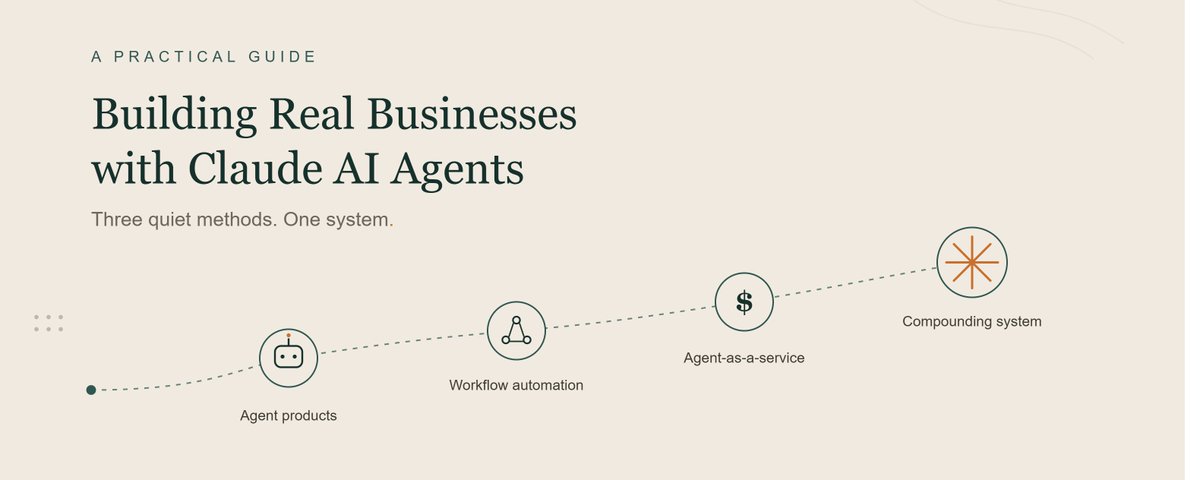
Subtitle: Most people use Claude to write emails faster. A smaller group is using it to run entire client workflows without touching them. This is the difference between a tool and a business.
Why AI Agents Matter in 2026
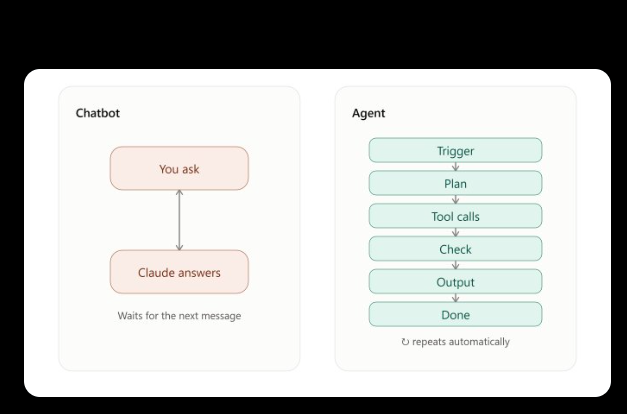
A chatbot answers a question and waits for the next one. An agent is different: it holds a goal, works through a sequence of steps, calls tools when it needs data or has to take an action, checks its own output, and only comes back to a human when something genuinely needs a decision.
That distinction sounds small. It isn't. It's the difference between "Claude helped me draft this" and "Claude ran this end-to-end while I did something else." The second version is what businesses will pay a monthly fee for — because it replaces hours of labor, not minutes of typing.
By 2026, the tooling to build agents — connectors, scheduled tasks, tool use, memory, multi-step orchestration — has moved from "engineering project" to "weekend build." That shift is the opportunity this guide is about. The bottleneck used to be technical skill. Now it's mostly clarity: knowing which workflow to automate, how to package it, and how to sell it.
Key takeaways from this guide:
Introduction: You Are Probably Using Claude Wrong
Most people treat Claude like a very fast intern who forgets everything overnight. They open a chat, ask for a draft, copy it out, and close the tab. That's a real use case, and it has real value — but it caps out fast, because the human is still the one doing the orchestration: deciding what to ask, when to ask it, and what to do with the answer.
An agent removes the human from that loop for the parts that don't need judgment, and only surfaces the parts that do. Instead of a person prompting Claude five times a day to check on something, an agent is already checking, on a schedule, using real data, and only pinging a human when a threshold is crossed or a decision is required.
This reframes what you're selling. You are no longer selling "AI-written content" or "a custom document." You're selling a standing capability — something that keeps working after the invoice is paid. That's what turns a one-off gig into a retainer, and a retainer into a business.
Three ways to build a business on top of that idea, covered in order of how fast you can start and how much client interaction each requires:
| Method  | What you sell |  Client contact | Time to first dollar  |   Ceiling|
| --- | --- | --- | --- | --- |
| 1. Agent Services  | A working agent solving one business problem  | High (custom builds)  |  Fast |   Medium — capped by your hours unless you productize|
|  2. Agent Templates |  A packaged, reusable agent config/prompt system |  None (self-serve) |  Medium |  High — scales with distribution, not your time |
|  3. Automation Agency |  Ongoing agent infrastructure + support |  High (retainers) | Slow  |  Highest — recurring revenue, compounding |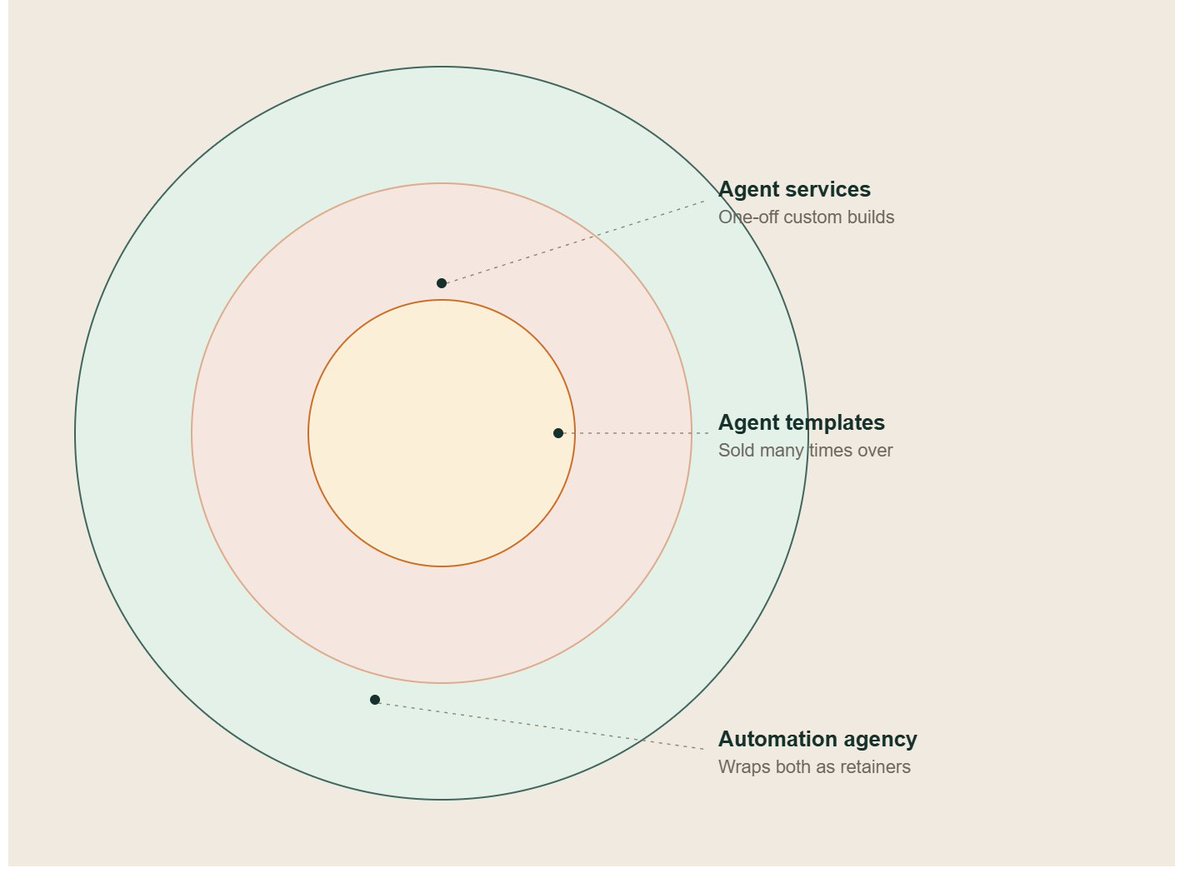
Method 1: Build AI Agent Services for Businesses
The explanation
This is the fastest way to make your first dollar, because you're not waiting for an audience or a distribution channel — you're solving one business's specific, painful, recurring problem, and charging for the outcome.
The pattern almost every good first client fits: a task that is (a) repetitive, (b) rule-based enough that a human doesn't need deep judgment for most instances, but (c) currently done manually because nobody's had time to automate it, usually because it touches two or three different tools that don't talk to each other.
Examples of that pattern, not as a checklist to copy verbatim but to calibrate the size of problem you're looking for:
None of these need "AI" in the client's mind. They need "the thing that used to take three hours a week to stop taking three hours a week." That's the pitch — never lead with the technology.
Client workflow
A repeatable process for taking a business from "problem" to "paying for a working agent":
Prompt examples
You are a workflow analyst who specializes in identifying automatable
business processes. I run a [TYPE OF BUSINESS]. Here is a description
of a task my team does manually: [DESCRIBE TASK].

1. Break this task into discrete steps.
2. For each step, classify it as: fully rule-based (safe to automate),
   partially judgment-based (automate with a human checkpoint), or
   requires human judgment (do not automate).
3. Identify what data sources or tools each step touches.
4. Flag the single riskiest step if automated incorrectly, and what
   the failure would cost.
5. Propose a minimal first version of an agent that handles only the
   fully rule-based steps, with a clear handoff point to a human for
   everything else.

Be specific and skeptical — do not assume automation is a good idea
for every step just because it's possible.
You are a senior workflow architect. I am building a Claude-powered
agent for a client in the [INDUSTRY] industry to handle: [TASK].
Design the agent's operating logic as a numbered decision flow:
1. The trigger that starts each run (schedule, incoming email, form
submission, etc.)
2. The inputs it needs and where they come from.
3. Step-by-step logic, written as if-this-then-that rules wherever
possible.
4. The exact conditions under which it should stop and escalate to
a human, rather than guess.
5. What a successful output looks like, in the client's own format
(email, spreadsheet row, dashboard update, etc.)
6. A short "known limitations" section to set expectations with the
client before launch.
Write this so a non-technical business owner could read it and
understand exactly what the agent will and won't do.Mistakes to avoid
Scaling strategy
The natural ceiling of Method 1 is your own time — each new client is a custom build. Three ways past that:

Method 2: Create and Sell AI Agent Templates
The explanation
Instead of building a custom agent for one client, you build a well-documented, reusable agent configuration — a specific prompt architecture, a set of instructions, a workflow map, sometimes paired with a lightweight script or automation recipe — and sell it as a product to many buyers who have the same underlying problem.
This flips the economics of Method 1. You trade custom-fit precision for distribution. One good template, sold 200 times, outperforms one custom build sold once.
Good template categories share a trait: the underlying workflow is common across many small businesses or solo operators, even if the exact company details differ. Examples:
Platforms and how they differ
| Platform  |  Best for |  Notes |
| --- | --- | --- |
| Gumroad  | Fast launch, direct audience, digital downloads  |  Low friction to list; you own the customer relationship |
|  Etsy | Buyers already searching with commercial intent  |  Works well when the template is framed as a "kit" or "system," not raw code |
|  Shopify |  Building a dedicated storefront brand around agent products |  More setup, more control, better for a multi-product catalog |
|  Own website |  Long-term brand building, email capture, upsells |  Highest effort, highest margin, no platform fee |
A sensible sequencing: validate on Gumroad or Etsy first because setup is fast and audiences already browse there with intent to buy, then migrate to your own site once you have proof of demand and want to keep 100% of margin and own the customer relationship for future launches.
Pricing strategy
Charm pricing (ending in 7 or 9, e.g. a template priced at $19 or $27 rather than $20 or $25) is a well-documented conversion pattern in digital product sales — worth testing rather than assuming.
A workable tiered structure:
Prompt examples
You are a product packaging strategist for digital AI templates.
I have built an agent template that does: [DESCRIBE WHAT THE AGENT
DOES]. The target buyer is: [WHO].

1. Write 5 product title options, each framed around the outcome
   the buyer gets, not the technology used.
2. Write a product description with: a one-line hook, 3 bullet
   benefits (outcome-focused, not feature-focused), what's included,
   and what the buyer needs to have ready before using it (e.g. a
   Claude account, an API key, specific data).
3. Suggest 3 pricing tiers with a name and one line justifying the
   price gap between each.
4. Write 3 FAQ entries addressing the most likely buyer objections
   (e.g. "do I need to know how to code").

Keep the tone confident and specific. No hype words.
You are a technical writer specializing in clear setup documentation
for non-technical buyers. Here is an agent template: [PASTE THE
PROMPT/CONFIGURATION].
Write a setup guide with:
1. A "what this does" summary in 2 sentences.
2. A numbered setup checklist, assuming the reader has never used
Claude's tools or connectors before.
3. A "customize this for your business" section explaining exactly
which variables or sections they should edit and why.
4. A troubleshooting section covering the 3 most likely points of
confusion.
Write for someone who is comfortable with basic software but has
never built or configured an AI agent.Mistakes to avoid

Method 3: Build an AI Automation Agency
The explanation
This is Method 1 and Method 2 combined into a standing business: you sell ongoing agent infrastructure and support to a roster of clients, rather than one-off builds. It's the slowest to set up properly and the highest ceiling, because revenue compounds through retainers instead of resetting to zero every month.
Lead generation
The agencies that get traction usually pick a narrow niche (one industry, one problem type) rather than "AI automation for any business," because a specific pitch is easier to say yes to and easier to refer. Realistic, low-cost lead sources:
Sales
The sales motion that converts best in this space is a working demo, not a deck. A short discovery call to scope the problem, followed by a small working prototype built against the client's real (or representative) data, does more to close a retainer than any amount of explaining "how AI agents work."
Delivery
Delivery at agency scale needs a repeatable internal process, or quality degrades as client count grows:
Automation (running the agency itself with agents)
The agencies that scale past a handful of clients usually turn their own internal operations into agents too — client onboarding checklists, status update emails, monitoring alerts. This isn't optional at scale; it's what lets one or two people support a growing client roster without delivery quality dropping.
Retainers
Retainer pricing typically bundles three things: hosting/maintenance of the agent, monitoring and failure response, and a small allotment of monthly tweaks or additions. Structuring it this way (rather than a flat "AI subscription" fee) makes the value legible to a client evaluating whether to keep paying: they're not paying for "AI," they're paying for a system that keeps working and someone accountable when it doesn't.
Prompt examples
You are an agency operations consultant. I run a small AI automation
agency serving [NICHE]. I currently have [NUMBER] clients and spend
[X] hours a week on manual delivery tasks: [LIST TASKS].

1. Identify which of these tasks could themselves be handled by an
   agent, ranked by time saved vs. risk of the task going wrong
   unsupervised.
2. For the top 2, sketch a simple internal agent workflow (trigger,
   steps, human checkpoint).
3. Flag anything on this list that should NOT be automated because
   client trust depends on a human touch at that step.

Be specific about tradeoffs, not just upside.
You are a retainer-pricing consultant for service businesses. I
deliver [DESCRIBE AGENCY SERVICE] to clients in [NICHE].
1. Propose 3 retainer tiers (name, monthly price range logic, and
what's included in each — hosting, monitoring, monthly tweak
allotment, response time SLA).
2. Write one paragraph explaining, in client-facing language, why a
retainer model makes sense compared to a one-time fee.
3. Draft 3 objections a prospect might raise about ongoing fees and
a short, honest response to each.
Keep it grounded — no invented statistics, just clear reasoning.You are an onboarding systems designer. Build a new-client intake
process for an AI automation agency serving [NICHE].
1. A 10-question intake form covering systems used, data formats,
current manual process, and escalation contacts.
2. A first-week checklist for the agency team.
3. A client-facing "what to expect" one-pager covering timeline,
what the agent will and won't do at launch, and how to report an
issue.
Write the client-facing piece in plain, reassuring language — no
jargon.
Case Studies (Illustrative)
These are constructed scenarios meant to show how each method might look in practice for different industries. They are not real businesses, and the figures are illustrative planning ranges, not claims or promises.
A freelance bookkeeper serving small retail clients builds a single agent that reconciles daily Stripe payouts against Shopify order data and flags mismatches. She charges a modest one-time setup fee per client plus a small monthly retainer for monitoring. Illustrative scale: 12 clients on retainer would produce a steady, modest monthly recurring base — meaningful for a solo operator, built entirely from one narrow, well-scoped workflow.
A former recruiter packages her resume-screening logic into a template sold on Gumroad, aimed at small agencies and solo recruiters. She prices it in three tiers, with the top tier including a single setup call. Illustrative scale: a modest number of monthly sales at a mid-range price point, sold consistently over many months rather than as one launch spike, is what makes this durable — most digital product income in this category comes from a long tail of ongoing sales, not a single burst.
A two-person team builds a maintenance-request triage agent for one property management company, then realizes the same problem exists across the whole industry. They niche down and turn it into an agency serving multiple property managers with a shared core agent, customized per client. Illustrative scale: even a small number of clients on a meaningful monthly retainer, once delivery is systematized, produces recurring revenue that isn't tied to billable hours.
A content strategist builds a template that turns one long-form piece into a platform-specific batch of outputs, sells it on her own site to an existing newsletter audience, and uses the free version of a shorter, less complete template as a lead magnet to build that list in the first place. This case illustrates Method 2 folding back into an email-funnel style lead generation loop, similar in spirit to (but distinct in mechanics from) list-building tactics used elsewhere in digital products.
Two former operations managers start an agency exclusively serving independent law firms, automating intake and document assembly. They start with Method 1-style custom builds for their first three clients, extract the common logic into a reusable internal template (Method 2 logic used internally, not sold), and grow into a retainer-based agency. Illustrative scale: a boutique agency with a double-digit client roster, each on a meaningful monthly retainer, is a realistic multi-year target for a small, focused team — not a fast outcome, but a durable one.
The Prompt Library (20 Production-Ready Prompts)
Beyond the prompts embedded in each method above, here is a standalone reference library. Copy, adapt the bracketed fields, and reuse.
1. Workflow discovery
You are a business process consultant. Interview me about my
business by asking one question at a time about repetitive tasks
my team does. After 5 questions, summarize the 3 most automatable
tasks you heard, ranked by time saved.
2. Agent scope document
Turn this rough task description into a formal agent scope document
with: trigger, inputs, steps, outputs, escalation conditions, and
success criteria: [DESCRIBE TASK]
3. Edge-case stress test
Here is my agent's operating logic: [PASTE LOGIC]. List 10 real-world
edge cases that could break it, ranked by likelihood, and suggest a
handling rule for each.
4. Client-facing explainer
Rewrite this technical agent description in plain language a
non-technical business owner would understand, without oversimplifying
what it actually does or doesn't do: [PASTE DESCRIPTION]
5. Escalation protocol
Design an escalation protocol for an agent handling [TASK]. Specify
exactly what conditions trigger a human handoff, who gets notified,
and what information they need to resolve it quickly.
6. Monitoring report template
Design a daily monitoring email template for a client whose agent
handles [TASK]. Include: tasks completed, tasks escalated, any
errors, and one plain-language summary line.
7. Discovery call script
Write a 20-minute discovery call script for pitching AI agent
services to [TARGET INDUSTRY]. Include an opener that doesn't
mention "AI" in the first two questions, 5 diagnostic questions, and
a close that proposes a small paid prototype.
8. Proposal generator
Turn these call notes into a one-page client proposal: [PASTE NOTES].
Include: problem summary, proposed solution, what's included, timeline,
and pricing structure (without a specific number, use a placeholder).
9. Template product description
Write a product listing for an agent template that does [TASK],
aimed at [BUYER]. Include a hook, 3 outcome-based bullets, what's
included, and a soft FAQ addressing "do I need coding experience."
10. Setup documentation
Write a non-technical setup guide for this agent configuration:
[PASTE CONFIG]. Assume the reader has never used Claude's tools
before.
11. Pricing tier designer
Design 3 pricing tiers for [PRODUCT/SERVICE], with a name and one
line justifying the price gap between each tier.
12. Case study writer
Turn this real (or illustrative) project into a case study: [PASTE
DETAILS]. Structure: problem, approach, what the agent does today,
and what changed for the client. Clearly label if this is illustrative
rather than a real completed project.
13. Niche selection analyst
I'm choosing a niche for an AI agent agency. Here are 5 candidate
industries: [LIST]. For each, assess: how repetitive their core
workflows are, how fragmented their current tools likely are, and
how easy they'd be to reach with direct outreach.
14. Internal ops agent designer
I run an agency delivering [SERVICE]. List which of my internal
operations tasks (onboarding, reporting, scheduling, invoicing)
could themselves be turned into agents, ranked by ease of automation
vs. risk if something goes wrong unsupervised.
15. Retainer objection handler
Write 3 common objections a prospect might raise about paying a
monthly retainer for an AI agent, and a short, honest response to
each that doesn't oversell.
16. Competitive positioning
Here are 3 competitors offering something similar to my agent
service: [DESCRIBE]. Help me identify a specific, defensible angle
that isn't just "we're better" or "we're cheaper."
17. Referral request template
Write a short, non-pushy message I can send to a satisfied client
asking for a referral to one other business in their network who
might have a similar problem.
18. Failure post-mortem
My agent failed in this way: [DESCRIBE FAILURE]. Help me write a
short, honest incident summary for the client, what caused it, and
what's changing so it doesn't happen again.
19. Onboarding checklist
Design a first-week onboarding checklist for a new agent-services
client in [INDUSTRY], covering data access, expectations-setting,
and the first monitoring check-in.
20. Niche rebuild prompt
Here is a 3-part AI agent business model: (1) custom agent services
for businesses, (2) packaged agent templates sold as digital
products, (3) an automation agency combining both. Rebuild this
model specifically for the [YOUR NICHE] niche: name 3 concrete
workflow ideas per method, and flag the single biggest risk in this
niche along with one way to reduce it.
Frequently Asked Questions
1. Do I need to know how to code to build an agent?No, for most of what's described here. Well-structured prompts, connectors, and no-code automation tools cover the majority of small business use cases. Coding helps for custom integrations but isn't a prerequisite to start.
2. How is an "agent" different from just a really good prompt?A prompt produces one output for one input. An agent is a standing process: it triggers on its own (schedule or event), can call tools or check external data, and follows escalation logic — it doesn't require a human to prompt it each time.
3. Which of the three methods should I start with?Method 1 (services) if you want revenue fastest and don't mind client contact. Method 2 (templates) if you'd rather build an audience-driven product business with no client calls. Method 3 (agency) is usually a destination you grow into, not a starting point.
4. How much should I charge for a custom agent build?Anchor to the value of the time or risk removed for the client, not your hours. A task costing a client several hours a week has a much higher ceiling than a task costing 20 minutes.
5. What if the agent makes a mistake with a client's data?This is why escalation logic and monitoring aren't optional. Design every agent to fail toward "ask a human" rather than "guess and proceed" on anything consequential.
6. Do I need a business entity or contracts to start?For paid client work, yes — a simple services agreement protecting both sides, and appropriate business registration for your location, are worth setting up early rather than after your first dispute.
7. Can I sell the same agent template to competitors in the same industry?Generally yes for template products, since you're selling a reusable configuration, not exclusive work — but be transparent about this in your listing so buyers aren't surprised.
8. How do I find my first client for Method 1?Direct outreach to a narrow list, referencing a specific task you'd automate for them, tends to outperform broad pitches. Warm networks and referrals from any existing service relationships are usually the fastest path.
9. What's a realistic timeline to see meaningful revenue?Highly variable by niche and effort. Method 1 can produce a first paid project within weeks. Method 2 and Method 3 typically take longer to compound, since they depend on distribution or client roster growth.
10. Should I niche down or stay generalist?Niche down. A specific pitch to a specific industry is easier to say yes to, easier to price, and easier to templatize for the next client.
11. What tools do I need beyond Claude itself?Depends on the workflow: a way to trigger the agent (schedule or webhook), access to the relevant data sources, and a simple monitoring or logging setup. Many small business workflows can start with lightweight no-code automation tools before anything custom is needed.
12. How do I price a retainer vs. a one-time fee?One-time fees suit clients who want ownership and no ongoing relationship. Retainers suit ongoing hosting, monitoring, and small tweaks — and they're the better fit for you financially, since they compound.
13. What happens if a client wants to cancel?Have a clear offboarding process: data handover, a grace period, and clarity on what happens to the agent configuration after cancellation. This protects your reputation for future referrals.
14. Is this saturated already?The framing "AI agents" is new enough that most small businesses haven't been pitched well yet. The bottleneck isn't saturation — it's that most outreach leads with the technology instead of the specific problem solved.
15. Do I need a portfolio before I can sell agent services?A single well-documented illustrative build (even for your own use case) is usually enough to start conversations. Case studies compound from there.
16. Can I run Method 1 and Method 2 at the same time?Yes, and they reinforce each other — Method 1 client work often reveals reusable patterns worth templatizing for Method 2, and Method 2 buyers who need setup help are warm leads for Method 1 or Method 3.
17. What's the biggest risk in this business model?Overpromising reliability. Agents fail on edge cases; the businesses that keep clients are the ones honest about limitations upfront and fast to respond when something breaks.
18. How technical does my documentation need to be for template buyers?Assume zero prior agent-building experience. The setup guide, not the prompt itself, is often what buyers are really paying for.
19. Should I use my real name or build a separate brand?Either works. A separate brand is easier to eventually sell or scale beyond just you; a personal brand builds trust faster in service-based methods.
20. What's the single most common reason these businesses fail to get traction?Publishing or pitching once and waiting, instead of treating the first version as a starting point to iterate from. Consistency across many attempts — more outreach, more listings, more case studies — is what separates a real business from a stalled experiment.
Common Mistakes That Kill Momentum
30-Day Launch Roadmap
Week 1 — Choose and validate
Week 2 — Build the first prototype
Week 3 — First outreach and first sale attempt
Week 4 — Package and decide your next method
Conclusion
None of the three methods in this guide are shortcuts. Method 1 trades time for fast revenue. Method 2 trades a slower start for a business that scales without your hours. Method 3 asks for patience up front in exchange for a business that compounds.
What they share is the underlying shift this whole guide is built on: stop asking Claude one question at a time, and start building things that keep working after you close the tab. That's the actual unlock in "AI agents" — not a smarter chatbot, but fewer places where a human has to show up just to keep something moving.
The fastest way to find out which of these three methods fits you isn't more reading. It's picking one narrow workflow, in one niche, and building a single working prototype this week. Everything in this guide compounds from that first concrete build — not from planning a perfect version of all three at once.
The people making money with Claude in 2026 aren't smarter than you. They just started before you finished deciding.