How to Create the Right Skill for Your AI Agent

Your AI agent doesn't need another prompt. It needs a skill.

A prompt is a one-time instruction. You type it, the agent follows it, and by the next session, the entire conversation is gone. You start from zero every time.
A skill is a reusable workflow file that sits in your project. You write it once. The agent loads it every time the task comes up and follows the same defined process, on repeat.
The numbers back this up. SkillsBench, the first peer-reviewed benchmark for agent skills (published February 2026, 84 tasks across 11 domains), found that curated skills raised average agent pass rates by 16.2 percentage points. Self-generated skills, where the agent tried to write its own, showed no reliable improvement at all.
The quality of the skill is the variable. As agents get more capable, the people who know how to write good skills pull further ahead of the people who type instructions into a chat window and hope for the best.
The skill format itself is no longer a single-vendor feature. Anthropic released the Agent Skills specification as an open standard in December 2025 at agentskills.io. Within three months, OpenAI's Codex, Google's Gemini CLI, GitHub Copilot, Cursor, VS Code, and dozens of other tools adopted the same format.
As of mid-2026, over 40 products support the SKILL.md standard. Write a skill once, and it works across every major coding agent without modification.
This guide covers everything: what a skill is, how to write one from scratch, how to avoid the security traps in community-shared skills, and what changes about your daily work once you start building them.
Save this. You'll reference it all week.
What a Skill Actually Is
A skill is a folder. Inside it is a file called SKILL.md. That file has two parts: a short header with the skill's name and description (written in YAML), and a body with the actual instructions the agent should follow (written in plain Markdown).
my-skill/
├── SKILL.md          # Required: metadata + instructions
├── scripts/          # Optional: executable code
├── references/       # Optional: documentation
└── assets/           # Optional: templates, resources
The SKILL.md file is the only required component. Everything else is optional and loads only when the agent needs it.

How Skills Load (Progressive Disclosure)
Your agent doesn't read every installed skill at the start of every session. That would flood its context window and make it dumber. Instead, skills load in three tiers:
Tier 1: Name and description only. When a session starts, the agent reads just the name and one-line description of each installed skill. This costs 30 to 50 tokens per skill. Enough to know what's available without burning through context.
Tier 2: Full instructions. When the agent decides a skill is relevant to the current task, it pulls the full SKILL.md body into context. Now it has the complete workflow.
Tier 3: Reference files. If the instructions reference external files (scripts, templates, documentation), the agent loads those only when it reaches the step that needs them.
This three-tier system is why you can install dozens of skills without slowing down your agent. It loads the minimum it needs when it needs it.

Skill vs. Prompt vs. Config File
These three get confused all the time. The distinction is straightforward.
A prompt is a one-time instruction you type into the chat. "Review this code for bugs." It disappears after the session.
A config file (like CLAUDE.md, AGENTS.md, or .cursorrules) is a set of instructions that are always pushed to the agent at the start of every session. "Always use TypeScript. Follow our naming conventions. Never push to main."
These are always-on rules that apply to everything the agent does.
A skill sits between the two. It's not always-on (that would waste context), and it's not one-time (that would waste your effort writing it). It's pulled in on demand when the task matches.
The agent reads the description and decides: "This task fits that skill." Then it loads the full instructions and follows the defined workflow.
The technical term for this difference is push vs. pull. Config files push instructions to the agent whether it needs them or not. Skills let the agent pull instructions when it recognizes the right moment.
Two Types of Skills
User-invoked skills are ones you trigger yourself. You type /grill-me or /tdd, and the agent starts the workflow. These are for orchestration, for starting a defined process at a defined moment.
Model-invoked skills are ones the agent can reach for on its own when the task fits. You don't type a command.
The agent reads the skill's description, recognizes a match, and pulls it in. These are for discipline, for embedding good practices that fire without being asked.
Both types use the same SKILL.md format. The difference is in how they're triggered, not how they're built.
Cross-Platform by Default
Before the Agent Skills standard, every tool had its own customization format. Cursor used .cursorrules. Claude Code used /commands. Copilot used instruction files.
If you switched tools, your customizations didn't transfer.
The SKILL.md open standard changed this. A skill written for Claude Code works in Codex, Gemini CLI, Cursor, Copilot, and VS Code without modification. The list of compatible tools now exceeds 40 products, from terminal agents to full IDEs to cloud-based autonomous systems.
You write the skill once. It runs everywhere.
Start With the Problem, Not the Tool
Don't sit down to "write a skill." Sit down to fix a failure mode.
AI agents fail in predictable ways. Every developer who has spent a month with a coding agent has run into the same four problems. Understanding which one is costing you the most tells you which skill to build first.
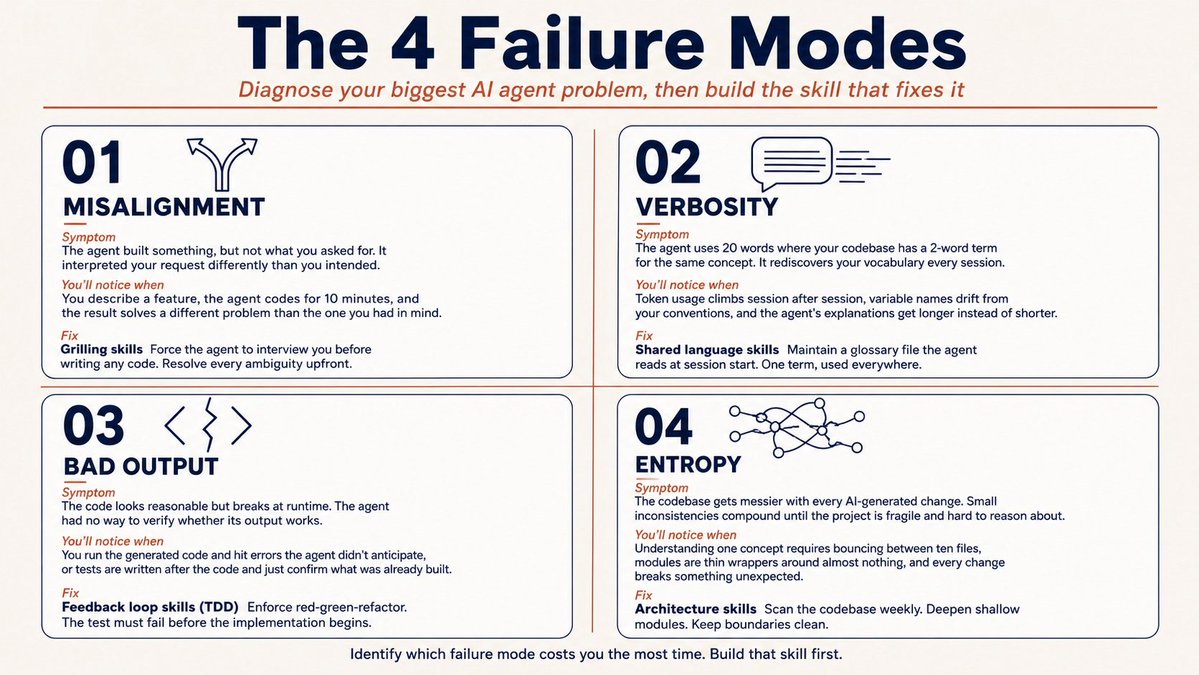
Failure Mode 1: The Agent Didn't Do What You Wanted
This is the most common one. You describe what you want. The agent accepts the task and starts building.
You come back and realize it understood something different from what you meant.
The root cause is misalignment. You and the agent didn't reach a shared understanding of the problem before jumping to code.
Frederick P. Brooks described this in The Design of Design as the "design tree." Every design has branches of decisions that need to be resolved before you can commit to building. Skip those branches, and you're building on assumptions.
The fix is a grilling skill. A skill that tells the agent: "Before you write any code, interview me. Ask me detailed questions about every aspect of this plan. Walk down each branch of the decision tree. Don't stop until we both agree on what we're building."
The most popular version of this pattern is only three sentences long. It runs in Claude Code, Codex, and Gemini CLI. Users report sessions of 16 to 50 questions before the agent starts coding.
That sounds slow. But the one-shot success rate after a proper grilling session is far higher than the alternative: start coding and fix the misalignment after the damage is done.
Failure Mode 2: The Agent Is Way Too Verbose
Agents get dropped into your project and figure out the local jargon as they go. Your codebase calls something a "materialization cascade," but the agent doesn't know that term, so it writes "the process by which a lesson inside a section of a course is made real, given a spot in the file system." That's 24 words for a 2-word concept.
This problem compounds. Every session, the agent rediscovers your vocabulary from scratch. It burns tokens, restating what it already figured out last time, and the long-winded descriptions crowd out the useful work.
The fix is a shared language skill. A skill that maintains a glossary file (often called CONTEXT.md) in your project. The agent reads it at the start of each session.
Variables, functions, and files get named consistently. The agent spends fewer tokens on thinking because it has access to a tighter language.
Eric Evans called this "ubiquitous language" in Domain-Driven Design back in 2003. The concept is older than AI agents. The skill automates it.
Failure Mode 3: The Code Doesn't Work
Your agent writes code that looks reasonable but breaks at runtime. It had no feedback on whether its output runs. Without a test, a type check, or a browser to look at, the agent is coding blind.
The fix is a feedback loop skill. The most effective version is a TDD (test-driven development) skill that enforces a red-green-refactor cycle: the agent writes a failing test first, then writes the minimum code to make it pass, then cleans up.
The test must fail before the implementation begins. This is a structural gate, not a suggestion.
Why does this matter? Because agents skip to writing code first and backfill tests after. That defeats the purpose.
A well-written TDD skill prevents this by making the sequence non-negotiable: red first, then green, then refactor. The skill turns a nudge into a rule.
Failure Mode 4: The Codebase Turns to Mud
AI agents accelerate coding speed. That's the selling point. But they also accelerate software entropy.
Every change that doesn't account for the codebase's overall structure introduces small inconsistencies. Those compound. After a few weeks of unsupervised AI-generated code, your project becomes a fragile mess of tiny, intertwined files that no one, human or agent, can reason about.
John Ousterhout described this in A Philosophy of Software Design as the difference between deep modules and shallow modules. A deep module has a simple interface hiding a lot of functionality. A shallow module is a thin wrapper around almost nothing.
Agents tend to produce shallow modules because they're easy to generate. But shallow codebases are hard to test, hard to change, and hard for other agents to work in.
The fix is an architecture skill that scans the codebase on a regular schedule and looks for places to deepen modules: where does understanding one concept require bouncing between ten files?
Where have pure functions been extracted only for testability, while real bugs hide in how they're called? Where do tightly coupled modules leak across boundaries?
Running a skill like this once a week keeps the codebase in shape for both humans and agents.
Write Your First SKILL.md
You've identified your biggest failure mode. Now build the skill that fixes it.
The Header (YAML Frontmatter)
Every SKILL.md starts with a YAML block between triple dashes. Two fields are required: name and description.
---
name: code-review-checklist
description: >
  Run a structured code review on the current changeset.
  Trigger when reviewing PRs or before merging any branch.
  Do not use for architecture-level reviews. Use the
  architecture skill instead.
---
The description field is the most important piece of text in the entire skill. The agent reads it to decide whether to load the skill for the current task.
Front-load the keywords and trigger conditions. Be explicit about when the skill should NOT fire. Vague descriptions lead to false matches, which waste context and confuse the agent.
The Body (Markdown Instructions)
Below the header, write the workflow the agent should follow. Plain Markdown. No special syntax required.
# Code Review Checklist

When reviewing a changeset:

1. Read the diff in full before commenting.
2. Check for test coverage on every new function.
3. Flag any function longer than 40 lines.
4. Verify naming follows CONTEXT.md conventions.
5. If a module's public interface changed, confirm
   the changelog entry exists.
6. Summarize findings in a structured comment:
   pass/fail per check, with line references.
That's a complete skill in one file and six steps. The agent now runs this exact checklist every time it reviews code, across every compatible tool you use.

Keep It Short
The most impactful skill in the most popular skills repository on GitHub is three sentences long. It tells the agent to interview the user about their plan, walk down each branch of the design tree, and explore the codebase for answers before asking the user.
Those three sentences have been installed over 250,000 times.
A skill doesn't need to be long. It needs to choose the right words at the right moment.
If you find yourself writing a skill that exceeds two printed pages, you're probably combining two skills into one. Split them. One skill, one job.
Start Stateless, Go Stateful Later
A stateless skill doesn't save anything between sessions. It runs, does its job, and leaves no trace.
Every invocation starts fresh. Your first skill should be stateless because there's less to get wrong.
A stateful skill saves files to disk (a glossary, a progress tracker, a context document) that persist across sessions. These are more powerful but more complex.
The shared language skill described earlier is stateful because it maintains CONTEXT.md. A teaching skill can be stateful because it tracks what the learner has covered.
Build stateless skills first. Add a state when you've felt the limitation of starting fresh every session.
Don't Download Poison
There are over 1.9 million public skills indexed on community hubs like SkillsMP, scraped from GitHub repos around the world. Most of them are fine. Some of them are not.
In February 2026, security researchers at prplbx.com identified 341 malicious skills on public directories. These skills contained hidden payloads: data exfiltration, credential theft, and prompt injection that redirected the agent to execute unauthorized commands. A follow-up audit by Snyk (the "ToxicSkills" report) tested a broader sample and found prompt injection vulnerabilities in 36% of skills examined.

Quality Is Not Guaranteed Either
Beyond security, there's the quality problem. The SkillsBench research team audited over 47,150 public skills before selecting curated ones for their benchmark. Most public skills fell short: vague descriptions that trigger on the wrong tasks, instructions too generic to produce consistent output, and no clear workflow structure.
When SkillsBench compared agent performance using curated skills versus self-generated ones, the models that tried to write their own skills showed zero reliable improvement. The quality of the skill matters more than the fact that one exists.
The gap between a curated, well-structured skill and a random one pulled from a community directory is the gap between a trained process and a guess. If you're going to use community skills, pick them from established sources with visible install counts and active maintainers. Or write your own.
The Audit-Before-Adopt Rule
Before installing any community skill:
This is the same hygiene you'd apply to npm packages or VS Code extensions. Skills are code that runs inside your agent. Treat them accordingly.
What Changes When You Build Skills
The shift feels small at first. You write a SKILL.md, install it, and your agent follows a checklist it used to skip.
That's useful. But the compounding effect is what matters.
You Stop Repeating Yourself
Before skills, every session started with you re-explaining your preferences. "Use TypeScript. Follow our naming conventions. Write tests first. Don't use any-types."
With skills, those instructions live in files. You write them once, the agent pulls them in every time. Your first message of every session can be the task itself, not the setup ritual.
Your Agent Becomes Predictable
An agent without skills is a capable improviser. It can handle most tasks, but its approach varies from session to session.
Sometimes it writes tests first. Sometimes it doesn't. Sometimes it asks clarifying questions. Sometimes it just starts building.
An agent with skills follows defined processes. The TDD skill ensures tests come before code. The grilling skill ensures alignment before implementation.
The architecture skill ensures the codebase doesn't rot. You stop hoping the agent makes good choices and start knowing it will follow good process.
Your Tools Become Interchangeable
Because skills follow the open SKILL.md standard, your workflows transfer when you switch agents. Move from Claude Code to Codex, or add Cursor alongside Gemini CLI, and your skills come with you.
Your process is portable. Your investment in writing good skills pays off regardless of which tool you settle on.
You Start Encoding How You Work
This is the deeper shift. A skill isn't just an instruction for the agent. It's a formalized version of how you think about a task.
The act of writing a skill forces you to articulate your process: what steps do you follow? In what order? What are the decision points?
Most engineers carry this knowledge as instinct. Writing it down as a skill makes it transferable to agents, to teammates, and to your future self.

Start Here
Pick the failure mode that costs you the most time. Write one SKILL.md that addresses it. Keep it under 30 lines. Install it. Run it for a week. Then write the next one.
The people who treat AI agents as chat windows will keep pasting the same instructions every morning. The people who treat them as team members with an encoded process will compound their productivity, session after session, skill after skill.
Skills are portable across tools, composable across workflows, and they compound over time. That's the difference between using AI and building with it.
Resources:
→ Agent Skills specification: agentskills.io
→ SKILL.md format reference and examples: github.com/agentskills/agentskills
→ Browse community skills: skills.sh
→ Security audit findings: search "ToxicSkills Snyk 2026" for the full report
→ SkillsBench research paper: arxiv.org/abs/2602.12670 (84 tasks, 11 domains, peer-reviewed)
Follow @free_ai_guides for daily AI tips, guides, and resources.