Revenue Engineering: How to turn AI loops into revenue
The best engineers in the world have stopped prompting AI and started building loops.

While everyone else is focused on getting better answers from ChatGPT, they're designing systems that think, act, learn, and improve on their own.
So why has almost nobody applied this approach to the parts of a business that actually generate revenue?
Beats me. But it's a massive opportunity.
Here's why.
So what's a "loop"?
A loop is a small program that prompts the agent for you. It reads what the agent produced, decides whether the job is done, and if it isn't, it prompts again. You stop being the thing inside the work typing all day. You become the author of the loop, and the model becomes a subroutine running inside it.
People argue about whether this is anything new. Is it a Ralph loop? A /goal command? A glorified cron job?
The honest answer is that it's the evolution of a cron job, and it's probably the step right before agents that improve themselves.
Basically: you stop being the hands and start being the architect.
This isn't just my idea
It's coming from the people who built the tools you're using every day.
Boris Cherny, the creator of Claude Code, said it about as plainly as it gets: "I don't prompt Claude anymore. What I mostly use now is loops. I create loops, they do the rest of the job."
Peter Steinberger, the creator of OpenClaw, said the same thing, and that post did 7.9 million views: stop prompting your coding agents, start designing the loops that prompt them for you.
https://x.com/i/status/2063697162748260627
Then Matt Van Horn wrote the breakdown that finally put a definition on it, a post that pulled 3.4 million views. He ran a "last 30 days" skill across the whole argument, because nobody could agree on what a loop even was. The cleanest version that came out of it is the one above: you author the loop, the model becomes the subroutine.
https://x.com/i/status/2063865685558903149
When the people who built these tools tell you the way you're using them is already outdated, it's worth a look.
So here's how to build one for the parts of your business that bring in money.
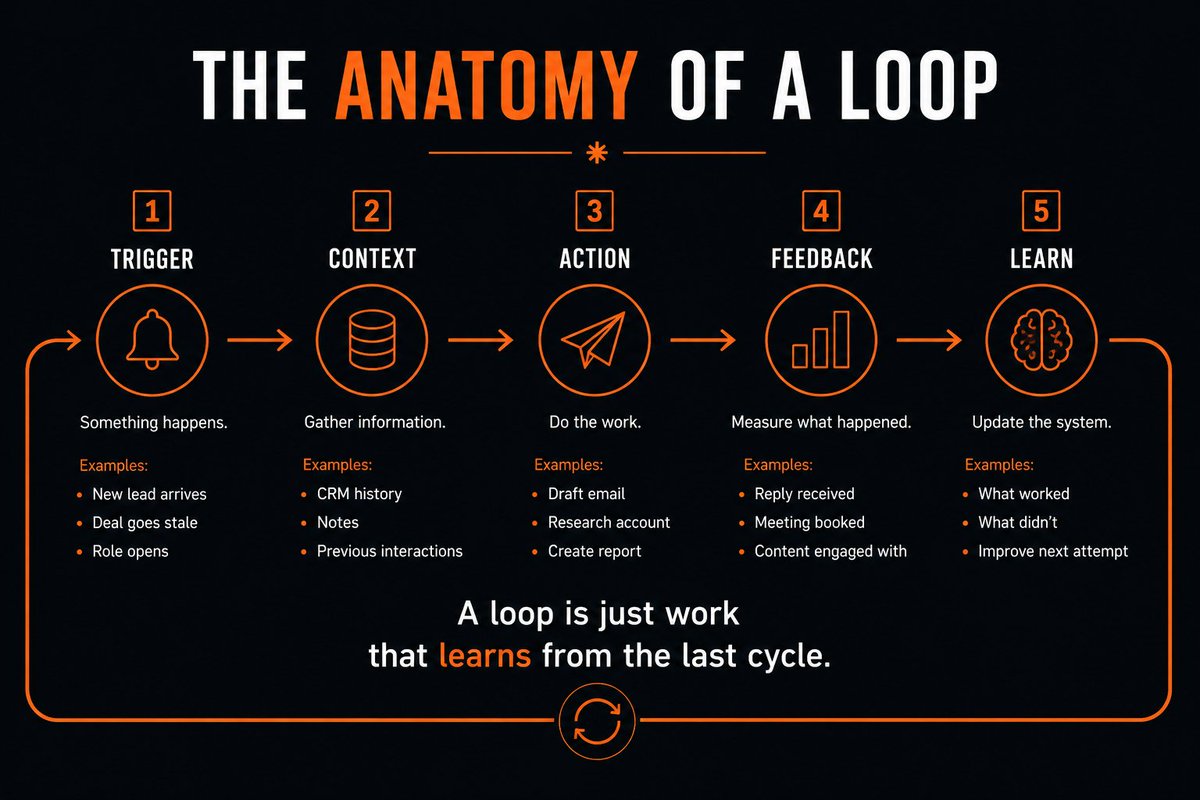
How to build a business loop
Every loop, in any department of a business , has the same five parts:
Trigger
 |
 v
Signal + context
 |
 v
Action
 |
 v
Eval gate
 |
 v
Stop condition
 |
 loops back, smarter each time
Miss one and the loop breaks. Here's each part, pointed at a stale sales deal.
1. The trigger
Something has to signal that work needs to happen. A deal goes quiet for two weeks. A lead fills out a form. A role opens. For our stale deal, the trigger is simple: no reply in fourteen days. Without a trigger, you're back to manually kicking off every task, which is the exact thing you're trying to escape.
2. Signal and context
Before the agent acts, it pulls the right information. For the stale deal, that's the history of the account, the last few touches, what was said on the last call, and what the CRM shows right now. Skip this and the agent acts blind, and a blind agent writes generic, forgettable output that makes your follow-up worse, not better.
3. The action
Now the agent does something. It drafts the revival email, built from the context it just pulled. This is the part people think of as "the AI," and on its own it's just a one-off prompt. The draft only matters because it sits inside the other four parts. Alone, it's a guess. Inside a loop, it's a step.
4. The eval gate
This is the part the hype skips and the practitioners obsess over. An eval is a definition of what good looks like. Is the draft accurate? Is it safe to send? Is it worth shipping at all? A human or an automated check answers that before anything goes out. Without an eval gate, you're guessing whether the output is any good, which puts you right back to babysitting it all day.
5. The stop condition
Every loop needs to know when to quit. It could be shipped, approved, or killed after seven days with no reply. Pick the rule. Without a kill criteria, the work never resolves, the thread piles up, and the loop runs forever with no payoff.
Put those five together and the stale deal runs itself. The silence triggers it, it pulls the account history, drafts the email, waits for your approval, tracks the reply, and stops when the deal closes or you call it dead. Then it does the next one, and the next.

How to run a loop that holds up
A loop that runs for hours without you needs a few things set up right.
Put it in auto mode so it isn't stopping to ask permission at every step. Use a nudge like /loop or /go so it keeps working until the job's done instead of quitting early. Run it in the cloud so it keeps going after you close your laptop. You can reach for dynamic workflows that orchestrate hundreds of sub-agents, but you rarely need to, and they burn tokens fast, so leave that alone until you have a reason.
The loop has to be able to check its own work, end to end. A loop you can't trust to verify itself is just a faster way to make a mess, and you'll spend more cleaning up than you ever saved.
What makes this a "business" loop
Start with the work you already repeat by hand. In a business, a few of them look like this.
Sales is the obvious one. We walked through the stale deal above, but the same shape revives deals you lost a long time ago. Point it at accounts that went cold sixty days back, even three or four years back, and let it work through them on a schedule. None of that is hard. It's just repetitive, which is exactly what a loop is for.
Speed to lead is another. A new lead comes in, and the loop scores it for fit, assigns an owner, drafts the first outreach, and tracks your time to first response. The faster that loop runs, the more leads you catch while they're still warm.
Content runs the same way. The loop pulls the topics worth covering, maybe using that same last-30-days skill to see what's been said, drafts for each channel, routes it for a peer review, publishes, captures the engagement, and feeds what worked back into the next round. Run that for a few months and your content sharpens on its own, because every cycle learns from the last.
Recruiting and ops are no different. A role opens, the loop sources candidates, scores them for fit, hands the shortlist to a human, reaches out, tracks responses, and tunes the message based on what's landing. Same five parts, different department.

Most of your "loops" are already broken
Open your Slack or your Telegram and look at the threads you have going with your AI agent. A lot of them are broken loops, and they're costing you.
Each open thread is a trigger with no action behind it. You're not pulling signals, so the agent is acting blind. There's no eval gate, so you're guessing whether the output is any good. There's no kill criteria, so the thread just sits there. That's not an agent working for you. That's a to-do list you have to kick every single day, and it's where work goes to die.
I'll put myself on blast here. I run my own agent inside Slack, and when I look at it honestly, it's a wall of open threads I've half-forgotten. Every one of them was a trigger that never got an action behind it. That's why I've been building a Hermes execution OS to keep those loops moving instead of letting them rot, and we're still testing it.
Even the people deep in this have broken loops lying around. Yours are worth finding.
How to find your broken loops
Run a loop audit. It's a handful of questions you can answer about any workflow.
Which workflows eat the most time or cost the most money?
Where does work sit idle for days?
What data should the agent pull before it acts?
Who decides if the output is good enough, you or a check the agent runs on itself?
When does it stop?
And the one that matters most: does the next run get better because of the last one?
If a workflow can't answer those, it's a broken loop. It's leaking time and money whether you see it or not, and it's the first thing you should fix.
The honest part
Loops can also be expensive, quite expensive.
One working engineer put it best: every AI agent he shipped this year is a for-loop, a model call, and a try-catch around the output, running over and over, and the only thing agentic about it is the bill at the end of the month.
He's not wrong. The thing that grows is the token spend.
So don't loop everything. Just loop the work that's worth the tokens: the revenue work, the work that sits idle, the tasks you redo by hand every week.
And put extra care into the eval gate and the stop condition, because
a loop with no quality check and no brakes just burns money faster than a human ever could.
Here's the honest part. Plenty of people are talking about loops right now. Almost nobody has cracked the compounding. The teams that win won't be the ones running the most loops. They'll be the ones whose loops get sharper every single run.
Where this leaves you
Loops are different from every other AI trick you've tried. It doesn't pay you once. It pays you every time it runs, and each run comes back a little sharper than the last. That's compounding, the same force that turns small money into a fortune, pointed straight at your revenue.
Build a few of these around sales, recruiting, and ops, and your business starts moving while you're not looking. Deals you'd written off revive themselves. Leads get caught while they're still warm. The work that used to rot in a Slack thread starts closing on its own.
You don't need to be an engineer or hire a bigger team to start. You need one loop, pointed at one workflow that matters, running this week. The first one's the hardest. After that, you're just stacking.
The edge here goes to whoever starts first, not whoever's biggest.
That can be you, and you can start today.
That's revenue engineering.
Psst... before you scroll on, bookmark this and save it.
Then drop this whole piece into your own agent and ask it one question: which of my workflows is the most broken loop, and what would the five parts look like if I fixed it?
If you're a business that wants AI systems built for you, check out https://www.singlebrain.com
For marketing help, go to https://www.singlegrain.com
For more like this, level up your marketing with 14,000+ marketers and founders in my Leveling Up newsletter, free: https://levelingup.beehiiv.com/subscribe
If you want to join our team, beat AI first ;)