99% of people still use plain text to prompt AI.
That’s why their results are random, messy, or wrong.
Use JSON, Markdown, or XML - and the model does exactly what you want.
Here’s a quick guide (with examples): 🧵

1/ AI is a picky assistant.
Give it a vague prompt, and it might give you:
• A list
• A paragraph
• A random poem
But give it structure with JSON?
You get predictable results. Fast.
Give it a vague prompt, and it might give you:
• A list
• A paragraph
• A random poem
But give it structure with JSON?
You get predictable results. Fast.
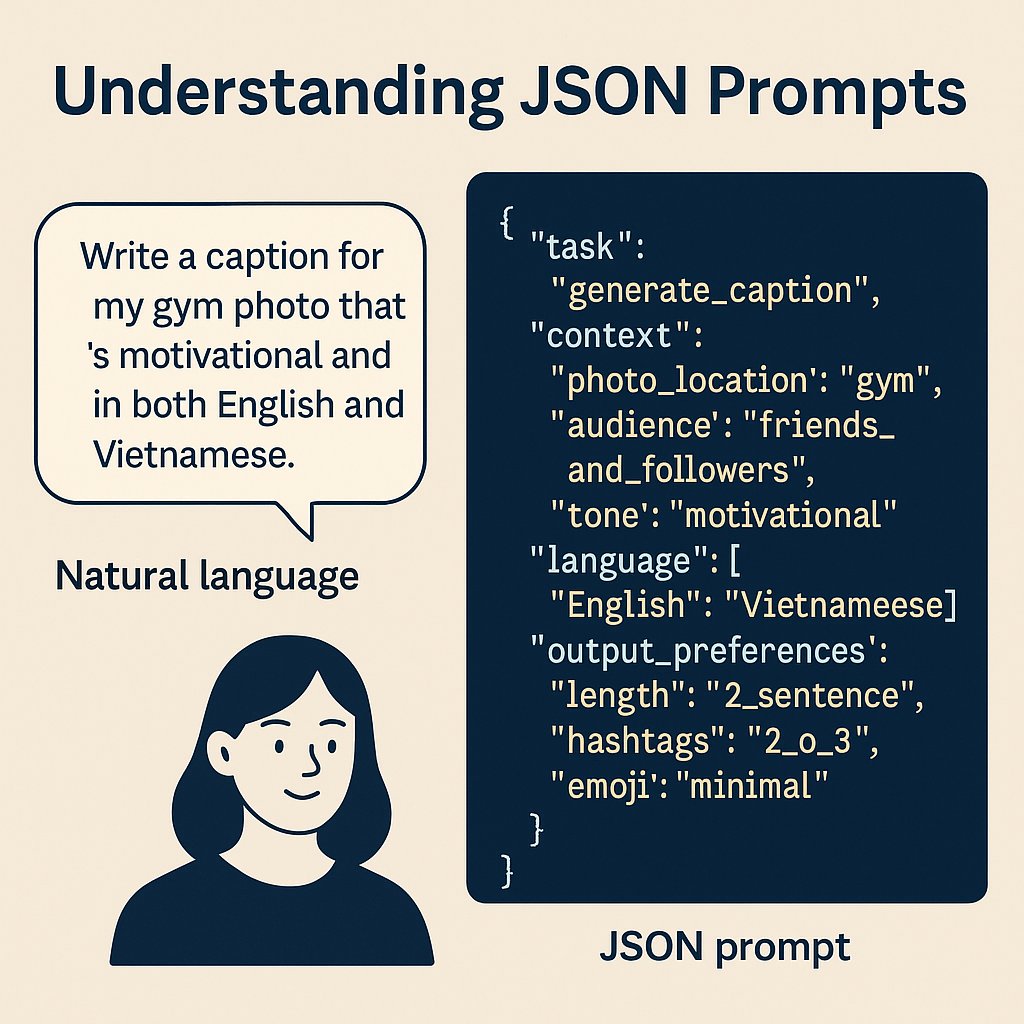
2/ Why JSON works:
AIs are trained on millions of JSON examples.
It’s like speaking their native language.
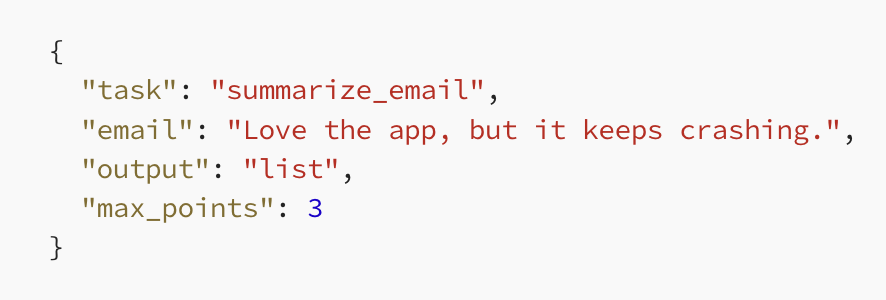
Instead of this:
"Summarize this email"
Try this:
{
"task": "summarize",
"email": "[INPUT FULL EMAIL]",
"format": "list"
}
AIs are trained on millions of JSON examples.
It’s like speaking their native language.
Instead of this:
"Summarize this email"
Try this:
{
"task": "summarize",
"email": "[INPUT FULL EMAIL]",
"format": "list"
}
3/ Markdown prompting = clear sections
Use Markdown when you want the model to organize output in human-readable chunks.
Prompt:
# SUMMARY
Summarize this text.
# KEY POINTS
List the 3 most important ideas.
AI knows what goes where..
cleaner formatting = better output.
Use Markdown when you want the model to organize output in human-readable chunks.
Prompt:
# SUMMARY
Summarize this text.
# KEY POINTS
List the 3 most important ideas.
AI knows what goes where..
cleaner formatting = better output.

4/ XML is for metadata-heavy or nested tasks.
Perfect for multi-step workflows or tagging.
Example:
<task>
<goal>Summarize</goal>
<input>This app is amazing but buggy</input>
<output format="bullets" limit="3"/>
</task>
AI returns exactly what’s asked.. no guessing.
Perfect for multi-step workflows or tagging.
Example:
<task>
<goal>Summarize</goal>
<input>This app is amazing but buggy</input>
<output format="bullets" limit="3"/>
</task>
AI returns exactly what’s asked.. no guessing.

5/ Best use cases for each:
• JSON = structured outputs (data extraction, API-ready, image/video prompts)
• Markdown = human-readable replies (chatbots, notes, simple formatting)
• XML = long, layered instructions (great with Claude, workflows, nesting)
Use the format that fits your task - not just what looks nice.
• JSON = structured outputs (data extraction, API-ready, image/video prompts)
• Markdown = human-readable replies (chatbots, notes, simple formatting)
• XML = long, layered instructions (great with Claude, workflows, nesting)
Use the format that fits your task - not just what looks nice.
6/ The golden prompt structure (with Markdown):
# ROLE
You are a data analyst.
# CONTEXT
You’re analyzing customer complaints.
# RESPONSE GUIDELINES
Use short bullet points.
Only include product issues.
# INFORMATION ABOUT ME
I run a support team and need summaries.
# RESPONSE FORMAT
• [Issue 1]
• [Issue 2]
• [Issue 3]
AI reads it like a to-do list. And follows it.
# ROLE
You are a data analyst.
# CONTEXT
You’re analyzing customer complaints.
# RESPONSE GUIDELINES
Use short bullet points.
Only include product issues.
# INFORMATION ABOUT ME
I run a support team and need summaries.
# RESPONSE FORMAT
• [Issue 1]
• [Issue 2]
• [Issue 3]
AI reads it like a to-do list. And follows it.
7/ JSON Prompt Example
Here's a prompt to qualify a sales lead..
Prompt:
{
"role": "B2B sales assistant",
"context": "You are reviewing an inbound message from a potential customer.",
"message": "Hey, I'm Alex from CloudNova. We're exploring AI for streamlining our customer support workflows. Can you help?",
"response_guidelines": "Extract only relevant lead info. Be precise.",
"response_format": {
"name": "name",
"company": "company",
"interest_area": "interest_area",
"buying_intent": ["low", "medium", "high"]
}
}
Here's a prompt to qualify a sales lead..
Prompt:
{
"role": "B2B sales assistant",
"context": "You are reviewing an inbound message from a potential customer.",
"message": "Hey, I'm Alex from CloudNova. We're exploring AI for streamlining our customer support workflows. Can you help?",
"response_guidelines": "Extract only relevant lead info. Be precise.",
"response_format": {
"name": "name",
"company": "company",
"interest_area": "interest_area",
"buying_intent": ["low", "medium", "high"]
}
}
8/ XML Prompt Example
Prompt:
B2B sales assistant
You are reviewing an inbound message from a potential customer.
Hey, I'm Alex from CloudNova. We're exploring AI for streamlining our customer support workflows. Can you help?
Extract only relevant lead info. Be precise.
Name:
Company:
Interest area:
low | medium | high
Prompt:
9/ Markdown Prompt Example
Prompt:
# ROLE
B2B sales assistant
# CONTEXT
You are reviewing an inbound message from a potential customer.
# MESSAGE
Hey, I'm Alex from CloudNova. We're exploring AI for streamlining our customer support workflows. Can you help?
# RESPONSE GUIDELINES
Extract only relevant lead info. Be precise.
# RESPONSE FORMAT
• Name:
• Company:
• Interest Area:
• Buying Intent: (low / medium / high)
Prompt:
# ROLE
B2B sales assistant
# CONTEXT
You are reviewing an inbound message from a potential customer.
# MESSAGE
Hey, I'm Alex from CloudNova. We're exploring AI for streamlining our customer support workflows. Can you help?
# RESPONSE GUIDELINES
Extract only relevant lead info. Be precise.
# RESPONSE FORMAT
• Name:
• Company:
• Interest Area:
• Buying Intent: (low / medium / high)
10/ So… which one should you use?
There’s no “best” format. It depends on:
• Your task
• Your model
• Your preference
But there is one rule:
Structured prompts > freeform chaos
There’s no “best” format. It depends on:
• Your task
• Your model
• Your preference
But there is one rule:
Structured prompts > freeform chaos
11/ Use JSON when:
• You need predictable, structured outputs
• You're doing image/video generation (esp. with GPT-4o)
• You're inserting prompts into API workflows
It gives you control over the output.
• You need predictable, structured outputs
• You're doing image/video generation (esp. with GPT-4o)
• You're inserting prompts into API workflows
It gives you control over the output.
12/ Use Markdown or XML when:
• You're chatting with an AI and want readable text
• You have long or complex instructions (Claude works best with XML)
• You want to separate roles, context, and examples clearly
• You’re building chatbot flows or documents
They’re great for readability and control.
• You're chatting with an AI and want readable text
• You have long or complex instructions (Claude works best with XML)
• You want to separate roles, context, and examples clearly
• You’re building chatbot flows or documents
They’re great for readability and control.
13/ Final word:
Don’t stress over the format.
What matters is this:
Structure your prompt with clear sections and labels.
That’s what helps the AI respond correctly - every time.
Don’t stress over the format.
What matters is this:
Structure your prompt with clear sections and labels.
That’s what helps the AI respond correctly - every time.
Are you choosing a cup of coffee or investing in your business success?
→ Only $15/month for all of my AI prompts
→ Just $3.99/month for a specific ChatGPT pack
→ Only $9.99/month for a ChatGPT bundle
Join the AI revolution today:
godofprompt.ai/pricing
→ Only $15/month for all of my AI prompts
→ Just $3.99/month for a specific ChatGPT pack
→ Only $9.99/month for a ChatGPT bundle
Join the AI revolution today:
godofprompt.ai/pricing
Generated by Thread Navigator
Press ⌘ + S to quick-export
auto_awesome
Image exported!
Pro export renders embedded tweets & media at 2x Retina resolution.
Upgrade — $5 for 30 days