Canvas & Ratio
Choose your destination platform format
Layout Template
Choose a content structure for your slides
Preset Themes
Typography & Sizing
Brand Kit Customization
AGENCYConfigure brand assets for headers & footers
Outro Slide CTA
Customize your closing call-to-action slide
Background Pattern
Build Your Carousel
Drag and drop any post card below onto a slide, or use the quick buttons to insert content/images instantly!

Qwen3.6 35B A3B model. 55+ tokens/sec. $300 GPU. No, this isn't a server card. It's an RTX 4060 Ti 8GB. Previously I posted that I 41 t/s on this gpu and that post blew up and went viral. I went back and made it 34% faster. And now the speed doesn't drop with context depth at all. New benchmarks + what changed 🧵
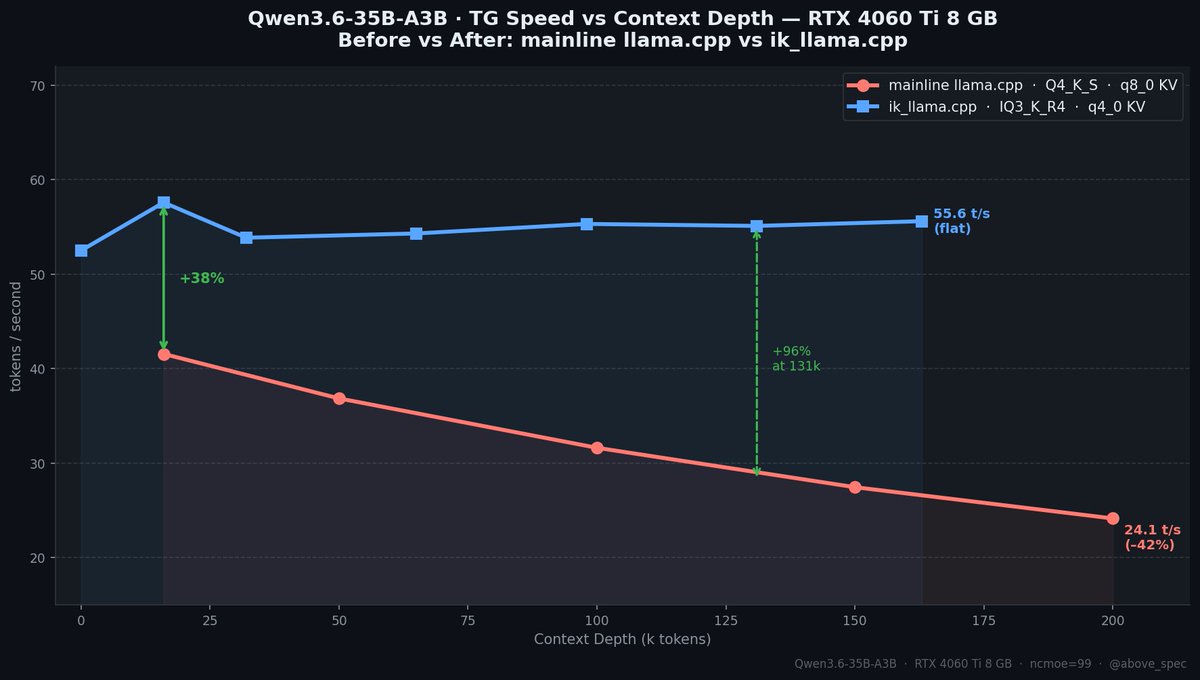
Before (mainline llama.cpp, Q4_K_S, q8_0 KV): • 41 t/s at 16k context • 24 t/s at 200k context ← −42% over depth After (ik_llama.cpp, IQ3_K_R4, q4_0 KV): • 55 t/s at 16k context • 55 t/s at 163k context ← completely flat Same GPU. Same model. Same CPU offload trick. | depth | mainline | ik_llama.cpp | gain | |------:|---------:|-------------:|-----:| | 16k | 41.6 t/s | 57.6 t/s | +38% | | 65k | ~34 t/s | 54.3 t/s | +60% | | 131k | ~28 t/s | 55.1 t/s | +97% | | 163k | ~26 t/s | 55.6 t/s | +114% | Results are slightly noise, as I was running lots of tabs on Chrome in parallel and was having a few windows of Claude Code open as well!
Two things: **1. IQ3_K_R4 quant (ik_llama.cpp format)** The R4 format reorders expert FFN weights specifically for the CPU+GPU split — better L3 cache locality per token. 3.4 bpw. Smaller than Q4_K_S. Yet faster. **2. q4_0 KV cache** (was q8_0) Halves KV memory per token. The original bottleneck at 200k was GPU scanning a huge q8_0 KV cache. Switch to q4_0 and that bottleneck disappears.
With -ncmoe 99, every token streams ~11 GB of expert weights through DDR5. That's constant. Context depth doesn't change it. Previously, q8_0 KV scanning was eating ~40% throughput at 200k. It was competing for the same GPU pipeline. q4_0 KV is half the data. FlashAttention handles it in microseconds. CPU experts become the only bottleneck — and they don't care how long your context is.
There's a knob: how many of the 41 expert layers to keep on GPU. | config | avg TG | max context | peak VRAM | |--------|-------:|------------:|----------:| | ncmoe=99 (all on CPU) | ~55 t/s | **~196k tokens ✓** | 4.4 GB | | ncmoe=30 (11 on GPU) | ~60 t/s | ~163k tokens | 7.5 GB | ncmoe=99 is the safe default — 196k context fits with 3+ GB VRAM to spare. You can fit full 262k context here! ncmoe=30 gets you +8% speed but eats 7.5 GB at 163k — no room for more context. 8GB is tight. Pick your priority: speed or context.

32Gb of RAM is enough! Expert weights (~11 GB) live in system RAM via mmap. VRAM holds attention layers + KV cache only (~4.5 GB at 196k). | component | RAM usage | |-----------|----------:| | Expert weights (paged in) | ~11 GB | | OS + desktop + process | ~4–5 GB | | **Total** | **~15–16 GB** | Fits 32GB machines comfortably.
Recipe: ```bash # Engine: ik_llama.cpp (ikawrakow/ik_llama.cpp) # Model: IQ3_K_R4 — re-quantized from Q8_0 llama-server \ --model Qwen3.6-35B-A3B-IQ3_K_R4.gguf \ -ngl 99 --n-cpu-moe 99 -fa 1 \ -ctk q4_0 -ctv q4_0 \ -c 131072 -t 12 ``` Model on HuggingFace: <a target="_blank" href="https://huggingface.co/abovespec/Qwen3.6-35B-A3B-IQ3_K_R4-GGUF/" color="blue">huggingface.co/abovespec/Qwen…</a> IQ3_K_R4 only works with ik_llama.cpp — not mainline llama.cpp. Hardware used: RTX 4060 Ti 8GB · Ryzen 9 7900X · 96GB DDR5
There's a knob: how many of the 41 expert layers to keep on GPU. | config | avg TG | max context | peak VRAM | |--------|-------:|------------:|----------:| | ncmoe=99 (all on CPU) | ~55 t/s | ~196k tokens | 4.5 GB | | ncmoe=30 (11 on GPU) | ~60 t/s | ~163k tokens | 7.5 GB | More experts on GPU = faster but less context headroom. 8GB is tight. ncmoe=99 is the safe default.
What GPU are you running local LLMs on? 8GB cards are way more capable than people think in 2026. Drop your setup below 👇
My original thread where I got 41 tps is here: <a target="_blank" href="https://x.com/above_spec/status/2050003701033529347" color="blue">x.com/above_spec/sta…</a>