Thread Truncated (Cap Enforced)
Only the first 20 tweets are unrolled into slides to ensure reliable PDF exporting and high server performance.
Canvas & Ratio
Choose your destination platform format
Layout Template
Choose a content structure for your slides
Preset Themes
Typography & Sizing
Brand Kit Customization
AGENCYConfigure brand assets for headers & footers
Outro Slide CTA
Customize your closing call-to-action slide
Background Pattern
Build Your Carousel
Drag and drop any post card below onto a slide, or use the quick buttons to insert content/images instantly!

The coolest thing about Hermes is that it learns things about you — your preference, your way of doing things, your workflows. It synthesizes all of that and create skills out of them (usually proactively, without you having to do anything).

Its own memory config + external memory provider allow Hermes to remember things, retain context from past sessions, or search its knowledge base for things you need.
Self-learning + self-remembering make Hermes very useful, the agent gets better every time it interacts with you, take in knowledge, and form its own worldview.
But at the same time, you gotta be careful because the number of skills and cron jobs can expand fast. If you change your config/setups when you have 30 skills, it can be a mess to adjust the config & debug errors which are prone to occur.
I’ve made so many of these mistakes, wasted $150-200 tokens in the past 2 weeks debugging, testing skills out, and making sure my Hermes has the right setups.
Disclaimer: my key approach in using AI right now is to accelerate/augment learning + improve productivity. So... the use cases that I’m experimenting with are all done to let me consume information/insights faster which will give me more time to complete tasks that are much higher value
(e.g. Hermes feeds me X insights so i don’t have to spend 30 mins scrolling the feed and i can use that time to talk to founders instead)
Here are my fav use cases/skills + my learnings (what to do & what not to do)
## <b>1. Fetch & Analyze X insights</b>
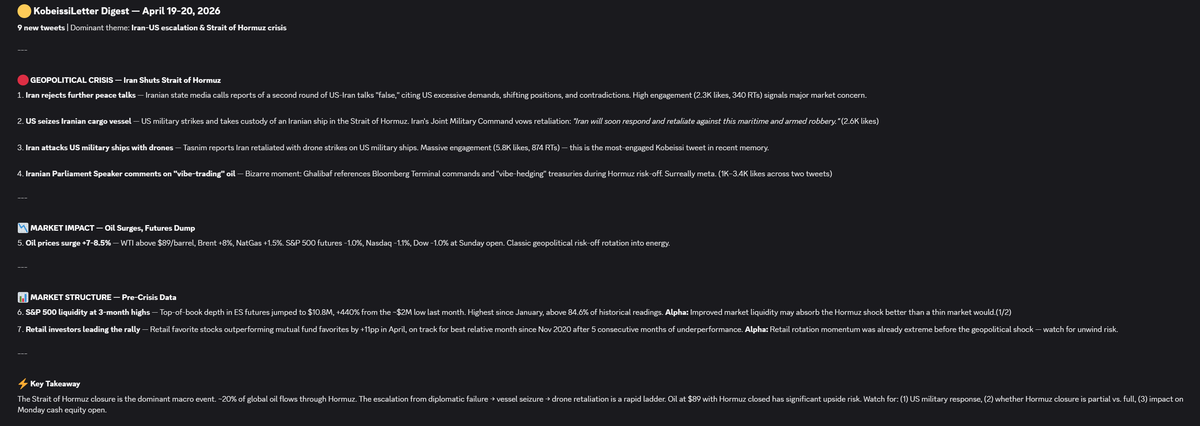
I run multiple cron jobs in the morning everyday following X accounts that offer lots of insights into macro, geopolitics, tech, and AI.
Bird CLI is a great free tool to use to do things on X. I let my Hermes install Bird CLI and use EditThisCookie (v3) Chrome Extensions to get Cookies and feed it to the agent. It’s a highly capable tool and that’s precisely how I made my first mistake with this.
Bird doesn’t just have a permission to read but also to tweet. My Hermes hallucinated a bunch of times when it tried to fetch content on X (it’d just say “test” or post random numbers on my timeline). Because of this, I tried asking it to create a safe wrapper around the tool to only allow read. That didn’t work lol. It could still post on my timeline. I deleted Bird CLI entirely and opted for official X API instead.
Despite having to pay $0.5 each day for X API credits, I can sleep much more soundly now cuz X API has clear permission settings.
This is how Hermes report to my every morning (Kobeissi is one of the best account to track real-time geopolitics & macro)
---
## <b>2. Breaks down X bookmarks</b>
I bookmark 10-20 bookmarks everyday. Before AI, I’d probably just revisit 1-2 bookmarks if they’re really interesting. The rest just sits there, stale, I forgot about it and didn’t get to consume any of those insights.
Now, Hermes looks into my bookmarks, pick 15 and rank them with priority based on my preference/investments/interests. It then summarizes them and proposes next steps. Pretty handy.
The only blocker is X API v2 — it’s not able to read X articles (for some reasons). It’d just fetch t(.)co links. Because of this, for the X article portion of the cron job, I opted for Browser Harness that just came out yesterday.