Canvas & Ratio
Choose your destination platform format
Layout Template
Choose a content structure for your slides
Preset Themes
Typography & Sizing
Brand Kit Customization
AGENCYConfigure brand assets for headers & footers
Outro Slide CTA
Customize your closing call-to-action slide
Background Pattern
Build Your Carousel
Drag and drop any post card below onto a slide, or use the quick buttons to insert content/images instantly!

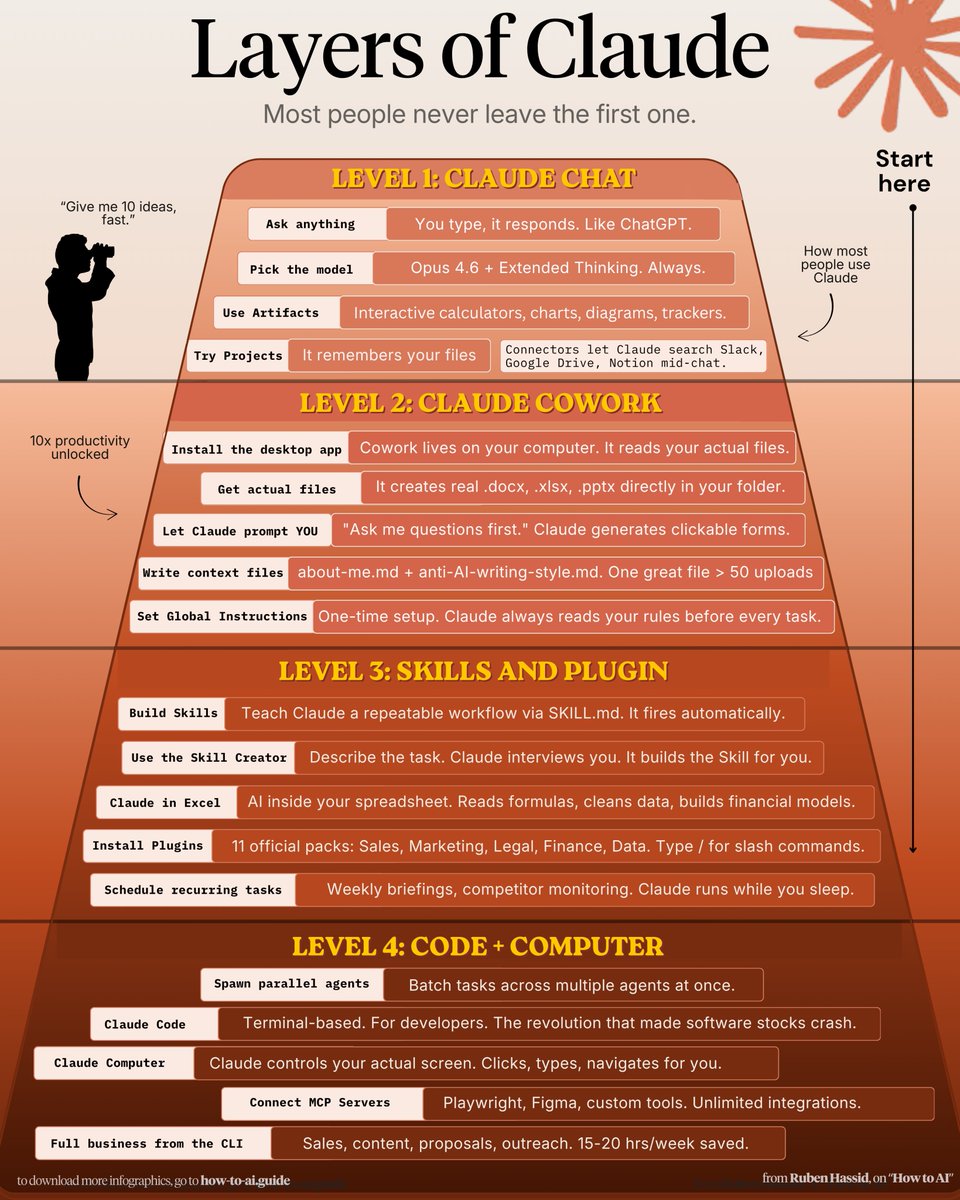
How to climb all 4 layers of Claude in one weekend: (even if you just signed up yesterday) ✦ Level 1: Claude Chat (Saturday morning) Go to claude .com/download. Install the app. Pay the $20. Select Opus 4.6 + Extended Thinking. Connect Slack, Drive, Notion through Connectors. Stop writing long prompts. Prompt this instead: "I want to [TASK] for [SUCCESS CRITERIA]. Use AskUserQuestion before you start." Most people stay here forever. You're leaving 90% of Claude untouched. Claude Basics: <a target="_blank" href="http://how-to-claude.ai" color="blue">how-to-claude.ai</a>. —— ✦ Level 2: Claude Cowork (Saturday afternoon) Go to 'Cowork'. Create a folder "Claude-Cowork." 4 subfolders. About me, template, project & outputs Create about-me .md: what you do, how you do. Create anti-ai-style .md: words you'd never say. Set Global Instructions (Settings → Cowork → Edit): "Always read my files first, never edit my originals, deliver everything to CLAUDE OUTPUTS." You just killed prompting. From now on, your prompt is 2 lines + your folder. Move on to Cowork: <a target="_blank" href="http://claude-co.work" color="blue">claude-co.work</a> —— ✦ Level 3: Skills + Plugins (Sunday morning) Open Cowork. Type: "Use the skill-creator to help me build a skill for [your most repeated task]." Claude interviews you. Answer and be specific. It generates a SKILL .md. Test it: "When would you use this skill?" If the description is vague, fix it. Upload: Settings → Capabilities → Skills → Upload. Now it fires automatically. No slash command. Install Plugins: Cowork > Customize > Browse plugin Skills with about-me .md. Skill handles the process. Voice file handles tone. Two layers simultaneously. Set up Claude Skills: <a target="_blank" href="https://x.com/rubenhassid/status/2039310366958891221" color="blue">x.com/rubenhassid/st…</a> —— ✦ Level 4: Code + Computer (Sunday afternoon) Click the Code tab. Create a folder. Connect GitHub (free account → Settings → Connectors). Prompt: "Create a GitHub repo named [project]. Code everything. Don't ask for permissions." Download VS Code. Install the Claude extension. Turn on "Skip Permissions" to go 100x faster. After your session, paste this: "Create a CLAUDE .md file with everything you learned about this project." Now Claude remembers your fonts, colors, and structure forever. Claude code guide: <a target="_blank" href="http://claudecode.free" color="blue">claudecode.free</a> Claude Computer: Settings → Desktop app → turn on Browser use + Computer use. Connect your phone with Dispatch. Text a task. Schedule a recurring task: left sidebar → Scheduled → write the prompt → pick the frequency. Claude Computer: <a target="_blank" href="https://x.com/rubenhassid/status/2036758735490584730" color="blue">x.com/rubenhassid/st…</a> This is where you stop working inside Claude. Claude starts working on your computer. —— Saturday, you were prompting like it's ChatGPT. Sunday, Claude is running your screen, building your website, & sending you text updates. That's all 4 layers. In one weekend. <a target="_blank" href="https://twitter.com/rubenhassid/status/2042105069550932138" color="blue">x.com/rubenhassid/st…</a>