Canvas & Ratio
Choose your destination platform format
Layout Template
Choose a content structure for your slides
Preset Themes
Typography & Sizing
Brand Kit Customization
AGENCYConfigure brand assets for headers & footers
Outro Slide CTA
Customize your closing call-to-action slide
Background Pattern
Build Your Carousel
Drag and drop any post card below onto a slide, or use the quick buttons to insert content/images instantly!

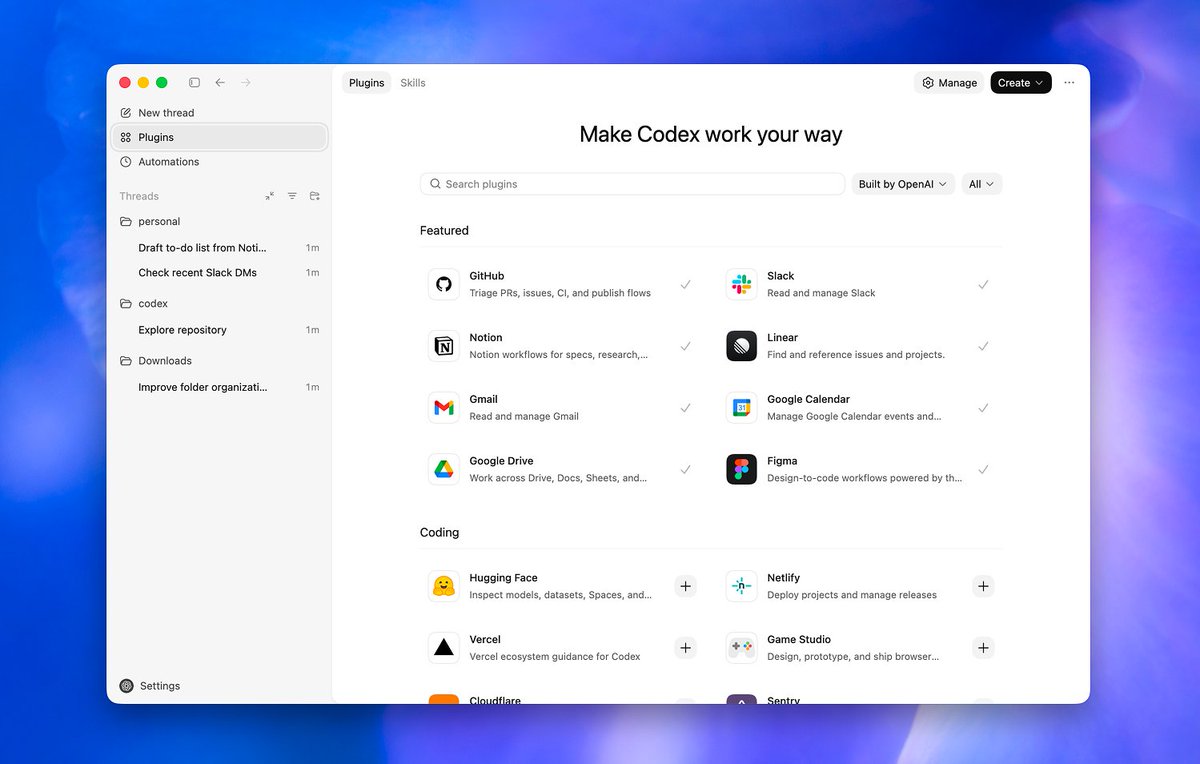
We're rolling out plugins in Codex. Codex now works seamlessly out of the box with the most important tools builders already use, like @SlackHQ, @Figma, @NotionHQ, @gmail, and more. <a target="_blank" href="http://developers.openai.com/codex/plugins" color="blue">developers.openai.com/codex/plugins</a>

With plugins, Codex can now support more real work, including the planning, research, and coordination that happens before you write code and the workflows that follow. As an example, the @googledrive plugin lets Codex work across Google Drive, Docs, Sheets, and Slides with bundled workflows in one loop.

Under the hood, plugins bundle apps and skills for seamless authentication to your tools, plus skills so Codex is instantly great at using them. Plugins are available in the Codex app, Codex CLI, and IDE extensions.

This is just the beginning. We're shipping more plugins for more use cases over time, and growing the skills library alongside them. Build your own plugins and share them with your team: <a target="_blank" href="https://developers.openai.com/codex/plugins#use-plugins-locally" color="blue">developers.openai.com/codex/plugins#…</a>