Thread Truncated (Cap Enforced)
Only the first 20 tweets are unrolled into slides to ensure reliable PDF exporting and high server performance.
Canvas & Ratio
Choose your destination platform format
Layout Template
Choose a content structure for your slides
Preset Themes
Typography & Sizing
Brand Kit Customization
AGENCYConfigure brand assets for headers & footers
Outro Slide CTA
Customize your closing call-to-action slide
Background Pattern
Build Your Carousel
Drag and drop any post card below onto a slide, or use the quick buttons to insert content/images instantly!

<b>A complete guide to CLAUDE.md, custom commands, skills, agents, and permissions, and how to set them up properly.</b>

---
Most Claude Code users treat the <b>.claude folder</b> like a black box. They know it exists. They've seen it appear in their project root. But they've never opened it, let alone understood what every file inside it does.
That's a missed opportunity.
<b>The .claude folder is the control center for how Claude behaves in your project.</b> It holds your instructions, your custom commands, your permission rules, and even Claude's memory across sessions. Once you understand what lives where and why, you can configure Claude Code to behave exactly the way your team needs it to.
This guide walks through the entire anatomy of the folder, from the files you'll use daily to the ones you'll set once and forget.
# Two folders, not one
Before diving in, one thing worth knowing upfront: there are actually two .claude directories, not one.
The first lives inside your project and the second lives in your home directory:
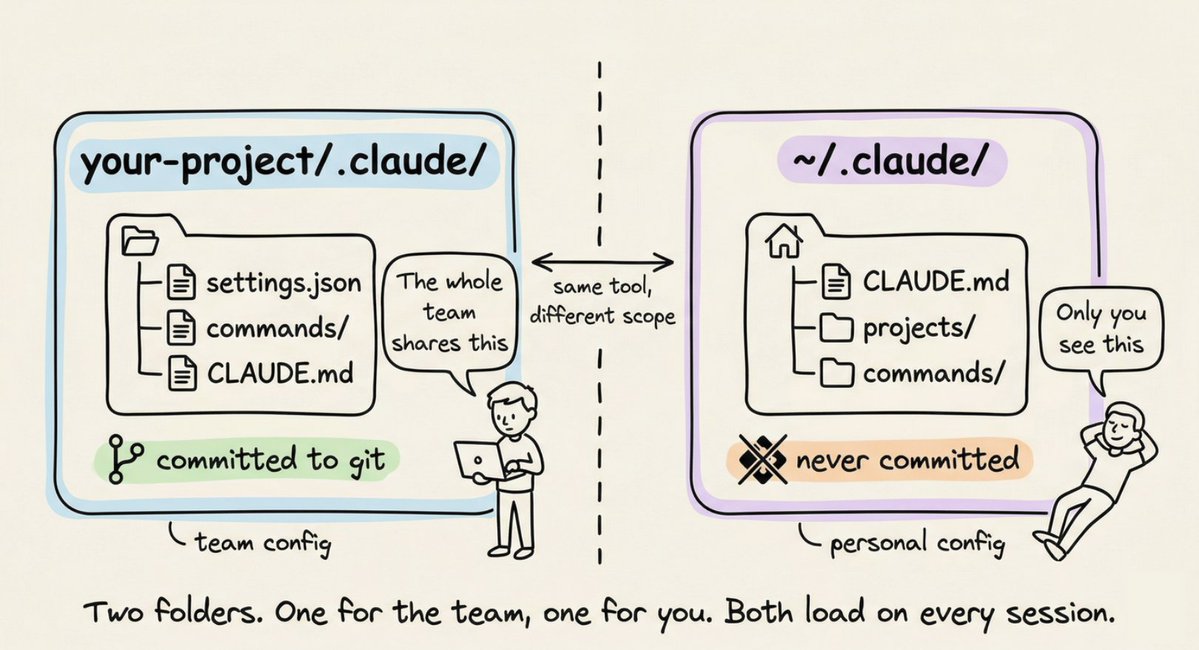
<b>The project-level folder holds team configuration.</b> You commit it to git. Everyone on the team gets the same rules, the same custom commands, the same permission policies.
The global <b>~/.claude/</b> folder holds your personal preferences and machine-local state like session history and auto-memory.
# CLAUDE.md: Claude's instruction manual
This is the most important file in the entire system. When you start a Claude Code session, the first thing it reads is <b>CLAUDE.md</b>. It loads it straight into the system prompt and keeps it in mind for the entire conversation.
Simply put: <b>whatever you write in CLAUDE.md, Claude will follow.</b>
If you tell Claude to always write tests before implementation, it will. If you say "never use console.log for error handling, always use the custom logger module," it will respect that every time.
A <b>CLAUDE.md</b> at your project root is the most common setup. But you can also have one in<b> ~/.claude/CLAUDE.md</b> for global preferences that apply across all projects, and even one inside subdirectories for folder-specific rules. Claude reads all of them and combines them.
What actually belongs in CLAUDE.md
Most people either write too much or too little. Here's what works.
## <b>Write:</b>