Thread Truncated (Cap Enforced)
Only the first 20 tweets are unrolled into slides to ensure reliable PDF exporting and high server performance.
Canvas & Ratio
Choose your destination platform format
Layout Template
Choose a content structure for your slides
Preset Themes
Typography & Sizing
Brand Kit Customization
AGENCYConfigure brand assets for headers & footers
Outro Slide CTA
Customize your closing call-to-action slide
Background Pattern
Build Your Carousel
Drag and drop any post card below onto a slide, or use the quick buttons to insert content/images instantly!

One of the hardest parts of building an agent harness is constructing its action space.
Claude acts through Tool Calling, but there are a number of ways tools can be constructed in the Claude API with primitives like bash, skills and recently code execution (read more about programmatic tool calling on the Claude API in <a target="_blank" href="https://x.com/RLanceMartin/status/2027450018513490419" color="blue">@RLanceMartin's new article</a>).
Given all these options, how do you design the tools of your agent? Do you need just one tool like code execution or bash? What if you had 50 tools, one for each use case your agent might run into?
To put myself in the mind of the model I like to imagine being given a difficult math problem. What tools would you want in order to solve it? It would depend on your own skills!
Paper would be the minimum, but you’d be limited by manual calculations. A calculator would be better, but you would need to know how to operate the more advanced options. The fastest and most powerful option would be a computer, but you would have to know how to use it to write and execute code.
This is a useful framework for designing your agent. You want to give it tools that are shaped to its own abilities. But how do you know what those abilities are? You pay attention, read its outputs, experiment. You learn to see like an agent.
Here are some lessons we’ve learned from paying attention to Claude while building Claude Code.
# Improving Elicitation & the AskUserQuestion tool

When building the AskUserQuestion tool, our goal was to improve Claude’s ability to ask questions (often called elicitation).
While Claude could just ask questions in plain text, we found answering those questions felt like they took an unnecessary amount of time. How could we lower this friction and increase the bandwidth of communication between the user and Claude?
## Attempt #1 - Editing the ExitPlanTool
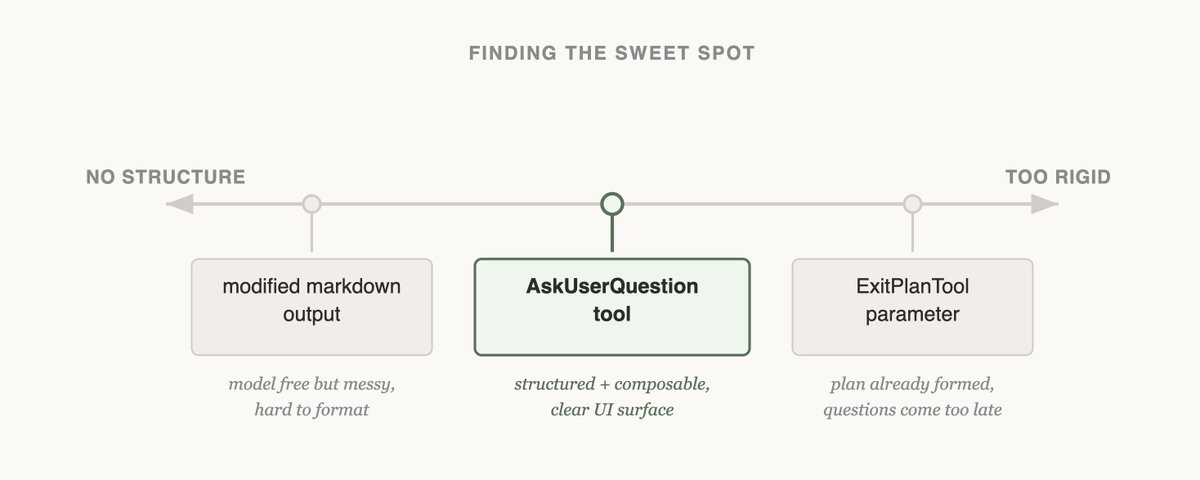
The first thing we tried was adding a parameter to the ExitPlanTool to have an array of questions alongside the plan. This was the easiest thing to implement, but it confused Claude because we were simultaneously asking for a plan and a set of questions about the plan. What if the user’s answers conflicted with what the plan said? Would Claude need to call the ExitPlanTool twice? We needed another approach.
(you can read more about why we made an ExitPlanTool in <a target="_blank" href="https://x.com/trq212/status/2024574133011673516" color="blue">our post on prompt caching</a>)
## Attempt #2 - Changing Output Format
Next we tried modifying Claude’s output instructions to serve a slightly modified markdown format that it could use to ask questions. For example, we could ask it to output a list of bullet point questions with alternatives in brackets. We could then parse and format that question as UI for the user.
While this was the most general change we could make and Claude even seemed to be okay at outputting this, it was not guaranteed. Claude would append extra sentences, omit options, or use a different format altogether.
## Attempt #3 - The AskUserQuestion Tool
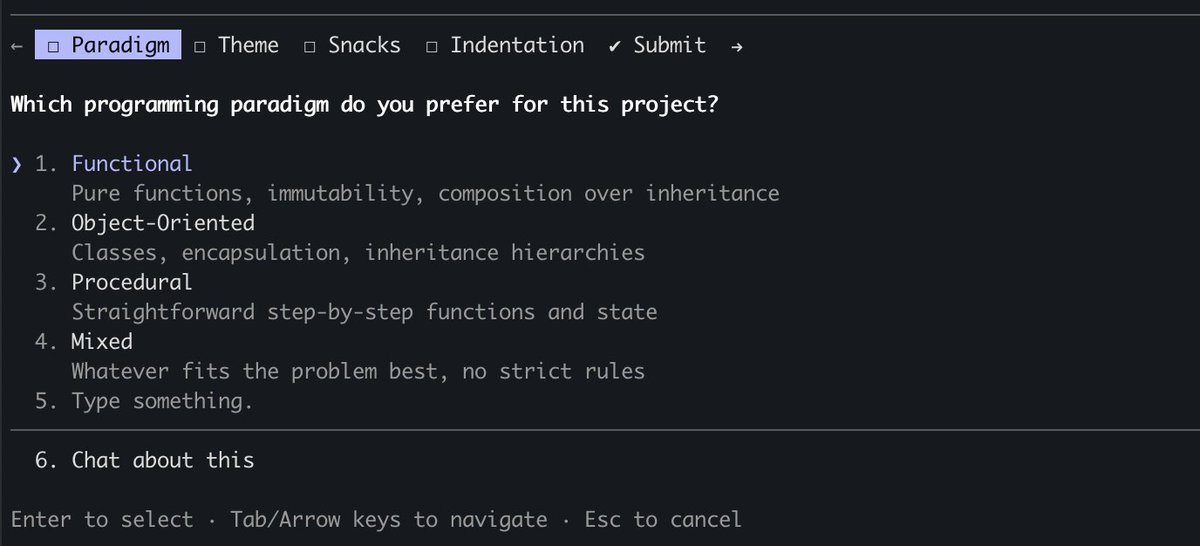
Finally, we landed on creating a tool that Claude could call at any point, but it was particularly prompted to do so during plan mode. When the tool triggered we would show a modal to display the questions and block the agent's loop until the user answered.