Canvas & Ratio
Choose your destination platform format
Layout Template
Choose a content structure for your slides
Preset Themes
Typography & Sizing
Brand Kit Customization
AGENCYConfigure brand assets for headers & footers
Outro Slide CTA
Customize your closing call-to-action slide
Background Pattern
Build Your Carousel
Drag and drop any post card below onto a slide, or use the quick buttons to insert content/images instantly!

i'm sick of seeing Google Ads bros telling people to just "do keyword research" instead of actually showing them how. so I'm gonna drop our entire keyword research process today for $0. here’s how to find and scale profitable keywords fast:
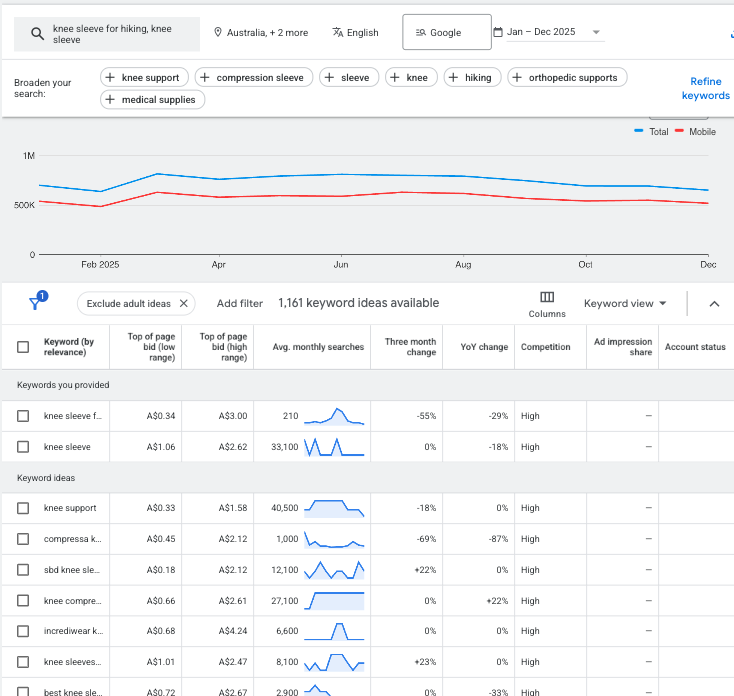
In this thread, I’ll show you: - Which keywords to target - Which tools to use - When to use exact, phrase, broad match - How to organize them inside campaigns Let’s dive in…
1. The Fundamentals First, understand that not all searches are created equal: There are 4 distinct types of keywords, each with different conversion potential: - Informational - Navigational - Commercial - Transactional
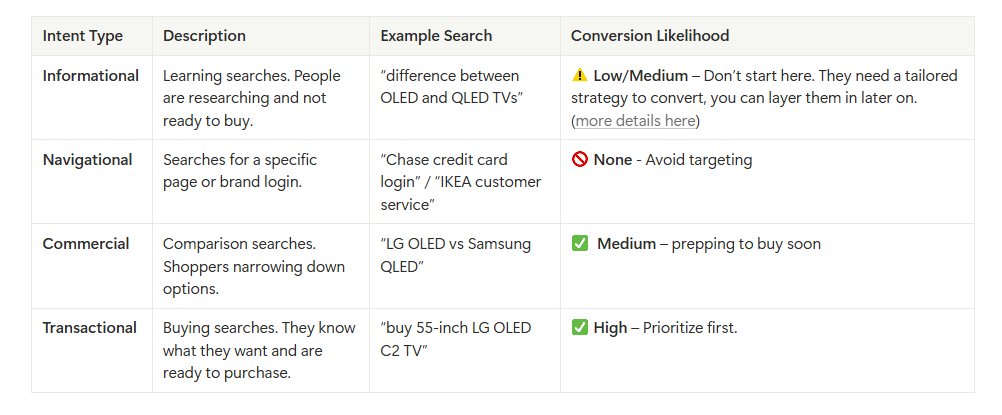
Start with commercial and transactional keywords. They signal buying intent and usually drive the strongest ROI. Once you’re profitable, layer in informational keywords They can help you reach cold traffic and get more buyers into your funnel.
2. Match Types Google has completely shifted how match types work. Before, an exact match for "furniture store" would only show for exactly that search. Today, it can trigger for close variants and related terms. That’s why you need to be deliberate with which types you use.
Use exact match for high-intent, precise terms. Stick to 5–10 per ad group. Skip phrase match for new campaigns. It’s become redundant. Use broad match to discover related searches and conversational queries. Start with 1-2 phrases with 3-5 words minimum. Never single words.
3. Discover High-Value Keywords Now, let’s get into the actual process: - Go to Tools → Keyword Planner → Discover new keywords - Enter seed term. Add website URL for context - Filter by “average monthly searches > 30” This eliminates low-volume keywords.
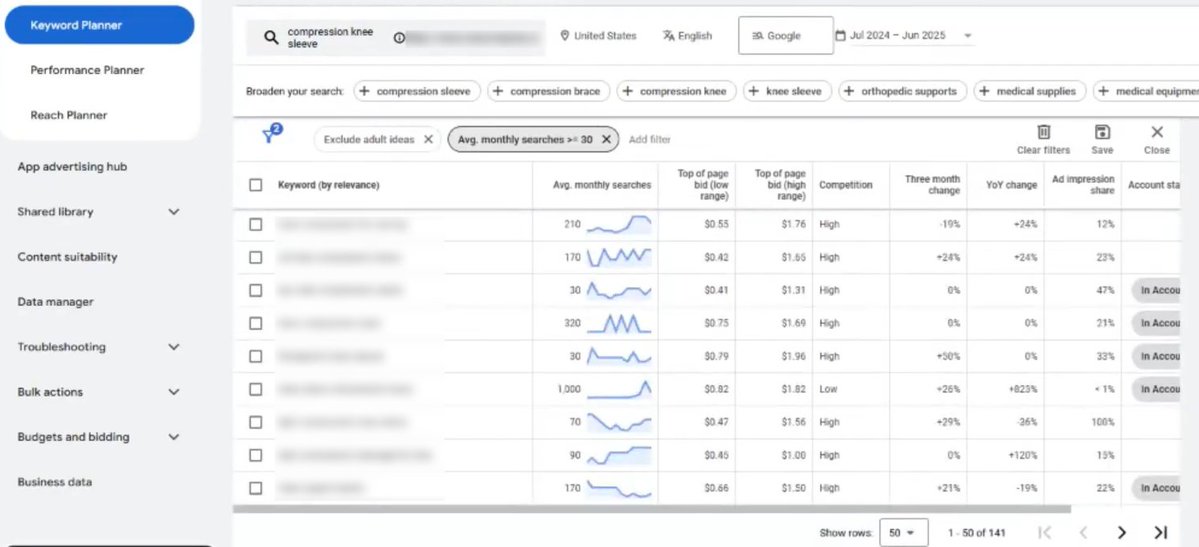
Focus heavily on the high-volume variations. If you see “compression knee sleeves” (9,900 searches) vs “best compression knee sleeve for arthritis” (140), pick the bigger one. Match types will pull in the long-tail variants anyway.
Next, use the Refine Keywords feature to dig deeper. You’ll see specific categories like running, hiking, gender, brand. If you spot themes emerge, create themed ad groups on these.
4. Validate Keywords Pay close attention to the Competition Level for each keyword you're considering. This shows you how many other advertisers are bidding on the same terms. Then examine the top of page bid estimates to see your expected CPCS for positions 1-4.

Finally, run your keywords through Google's Forecast Tool. While it won't predict your exact performance… It reveals how much room exists for scaling your campaigns. Use these insights to set realistic budget expectations and identify which keywords to bid on.

5. Organize Keywords Next, it’s time to structure these keywords in your campaigns. A few rules here: - One theme per ad group - Max 20 keywords per ad group - Around 70% exact match, 30% broad match - Build negatives with low-intent phrases (e.g., “DIY,” “rental”, “repair”).
6. Optimization Roadmap Keyword research isn't something you do once and forget about. It’s ongoing optimization that separates profitable campaigns from money pits. Here’s a simple roadmap to follow:
- Week 1–2: Launch campaigns. Gather data. Add negatives. - Week 3–4: Review search term reports. Add top performers as exact match. - Month 2: Refine negatives and adjust match types. - Month 3+: Create new ad groups around emerging themes.
A quick recap of what I covered: - Prioritize transactional + commercial intent. Layer in informational intent later on. - Use exact match for precision, broad match for discovery. - Each ad group must have ONE theme. Max 20 keywords per ad group. - Treat keyword research as an ongoing system
That's our full playbook for Google Ads keyword research in 2025. Walk through each step and see where you can apply it to your own setup. And if you need our direct help to set it up, my DMs are open.
Want to take your Search Ads performance even further? We created a guide on 4 landing page types we’ve used to cut CPA by 2-3x across multiple accounts. Grab it here: <a target="_blank" href="https://resources.echelonn.io/most-profitable-ecommerce-landing-pages?utm_source=X" color="blue">resources.echelonn.io/most-profitabl…</a>