Canvas & Ratio
Choose your destination platform format
Layout Template
Choose a content structure for your slides
Preset Themes
Typography & Sizing
Brand Kit Customization
AGENCYConfigure brand assets for headers & footers
Outro Slide CTA
Customize your closing call-to-action slide
Background Pattern
Build Your Carousel
Drag and drop any post card below onto a slide, or use the quick buttons to insert content/images instantly!

Your AI SEO content is going to get you penalized. Not because it's AI… But because it SUCKS. Here's my 11-step AI SEO content checklist that actually works. (Lessons from ranking 100s of AI-generated posts) 🧵
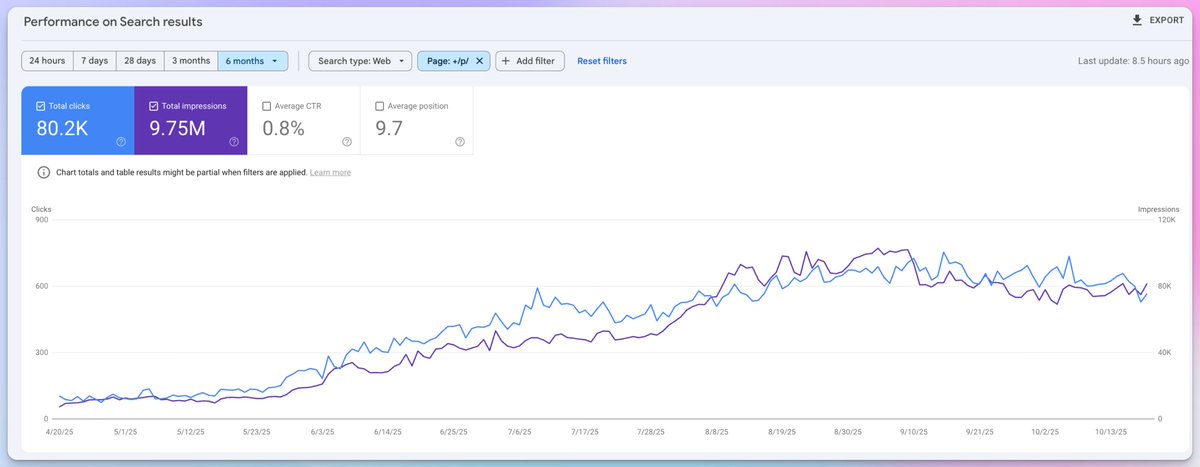
1/ Let's get one thing straight: Google doesn't hate AI content. Google hates LOW-QUALITY content. And 99% of AI content is exactly that: - Generic fluff - Zero original insights - Copied structure from competitors - No screenshots or other visuals Here's how to fix it 👇

2/ Step 1: Stop Using Lazy Prompts ❌ "Write a 2000-word article about email marketing" ❌ "Create an SEO blog post on link building" These prompts = garbage output.
Instead, do this: - Create a detailed outline FIRST - Generate section by section - Include specific examples YOU provide - Add your brand voice guidelines
3/ Step 2: Feed AI Real Context Before you write anything: - Upload your best-performing content - Add competitor articles - Include industry research papers - Share customer feedback - Add your case studies Now AI has actual substance to work with. Not generic web knowledge
4/ Step 3: Kill the AI Intro Dead giveaways that scream "AI WROTE THIS": ❌ "In today's fast-paced digital landscape..." ❌ "Are you struggling to get results with..." ❌ "Email marketing has become increasingly important..." Use the PAS formula instead:
5/ PAS Formula That Works: Problem: "Your AI content ranks for 2 weeks, then disappears" Agitate: "While you're celebrating that page 3 ranking, Google's already planning to bury you on page 50"
Solution: "Here's how to create AI content that stays ranked for months..." Keep it under 150 words total.
6/ Step 4: Add Proof Points Everywhere For EVERY claim you make, add: - Real screenshots - Specific metrics - Tool names - Exact costs - Step-by-step processes - Client examples (with permission) Raw AI content lacks proof. That's YOUR job to add.
7/ Step 5: Make It Scannable Transform AI walls of text into: - 2-3 sentence paragraphs - Bullet points for lists - Clear subheadings every 300 words - Content boxes for key takeaways - Custom graphics (not stock photos) - Real screenshots Remember: readers skim. Make it easy
8/ Step 6: Add YOUR Voice AI sounds robotic because it IS robotic. Here's how to humanize it: - Share your failures - Include controversial opinions - Tell real stories - Challenge industry norms - Add personality - Use casual language No one connects with robot content.
9/ Step 7: The AI Editing Checklist Before you hit publish: ✓ Kill generic intros ✓ Replace vague claims with specific data ✓ Add YOUR examples ✓ Insert real screenshots ✓ Include current pricing ✓ Add step-by-step guides ✓ Cut all fluff ✓ Fix robotic transitions
10/ Step 8: Use Unique Data This is what separates good AI content from great: - Run original surveys - Share your process data - Include client results - Add industry benchmarks - Create custom charts - Show real costs
11/ Step 9: Structure for Featured Snippets For every section, ask yourself: "Could Google pull this for a featured snippet?" If no, rewrite it: - Clear definitions (under 50 words) - Numbered steps (3-7 steps) - Comparison tables - Direct answers to questions
12/ Step 10: Add Expert Insights Go on HARO or Featured and source expert opinions or insights on your topic. Sprinkle these throughout your cornerstone posts.

13/ Step 11: The Internal Linking System AI won't do this automatically: - Link to 5-10 relevant posts - Use keyword-rich anchor text - Connect topic clusters - Link to money pages - Update old posts to link to new content Do this manually every time.