Kafka is super popular among developers and large organizations.
But it can be a little overwhelming to begin with, particularly because of all the terms and concepts.
Not anymore.
This one post is going to get you itching to work with Kafka with all the basics under your belt.
✅ What is Kafka?
Kafka is a distributed event store and streaming platform.
It began as an internal project at LinkedIn.
Over time, it grew rapidly and today, some of the largest data pipelines in the world use Kafka.
Organizations like Netflix and Uber rely on it for their workflows.
Here’s a high-level look at Kafka.
✅ Kafka Messages, Topics and Partitions
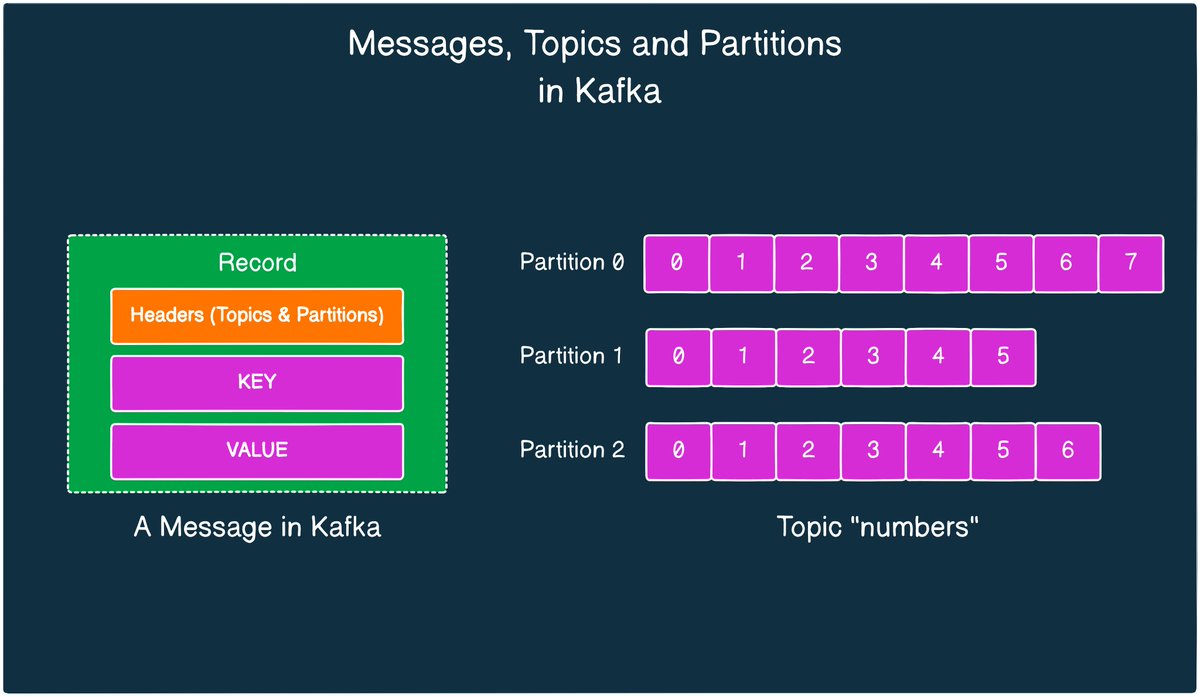
The basic unit of data in Kafka is a Message
Think of a message like a record in a database table. It is transmitted as an array of bytes.
Every message goes to a particular Topic.
You can compare Kafka Topics to a database table or a folder on your computer.
Topics are also made up of multiple partitions.
Partitions improve the redundancy and make the topics horizontally scalable.
Here’s a pictorial look at messages, topics and partitions in Kafka.
✅ Kafka Producer & Kafka Consumer
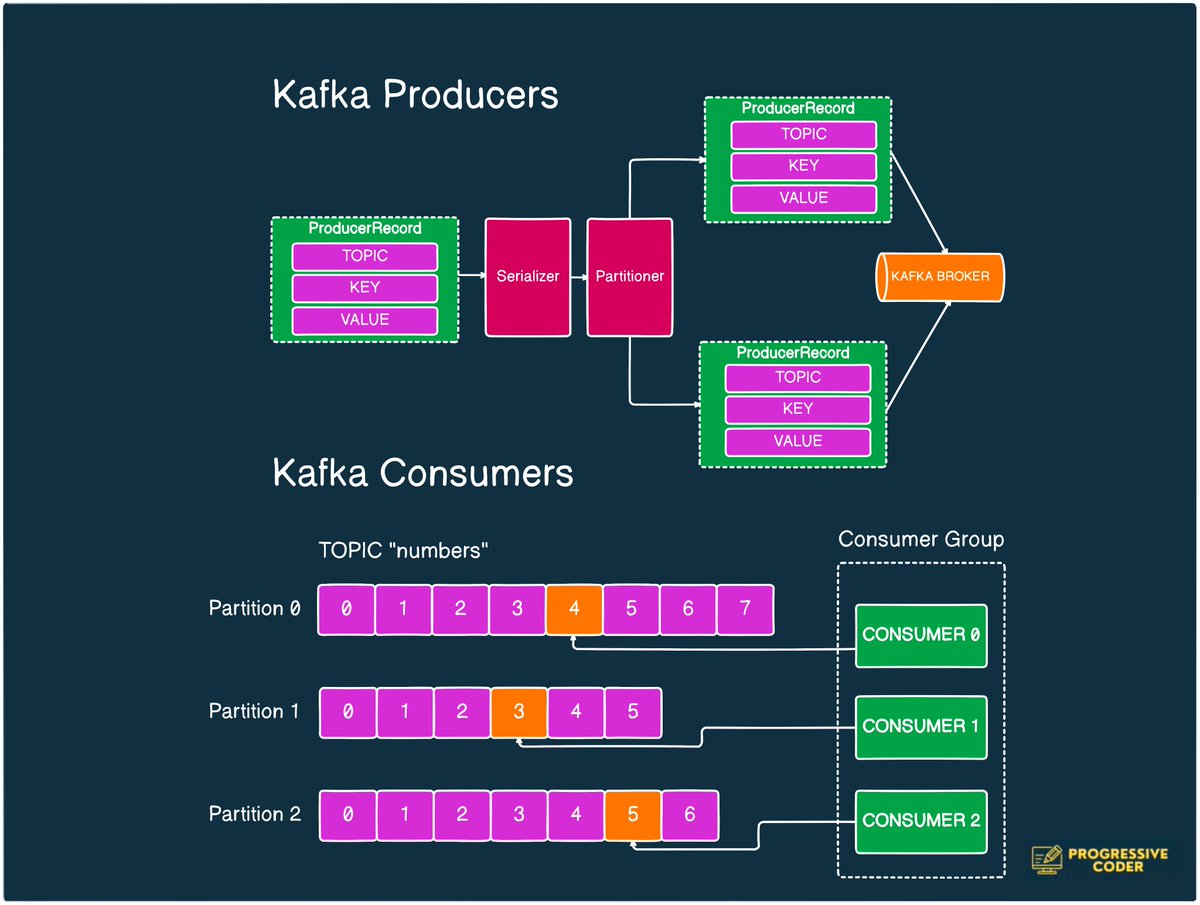
👉 Producers in Kafka create new messages, batch them and send them over to a Kafka topic.
A producer also balances messages across the different partitions of a topic.
You can even provide a custom partitioning strategy to control the distribution of messages.
👉Kafka Consumers read messages from a broker.
One or more consumers work as a consumer group to consume messages from a topic.
A consumer instance is tied to a particular partition.
In other words, a partition is owned by a consumer instance.
Here’s how Kafka Producers and Consumers look on a high level.
✅ Kafka Broker and Cluster
👉A single Kafka server is known as a Broker.
A broker can handle thousands of partitions and millions of messages/second.
Think of the broker as a bridge between the producer and consumer.
It receives messages from producers and handles fetch requests from the consumer.
But the broker doesn’t work in isolation.
It works as part of a Kafka Cluster
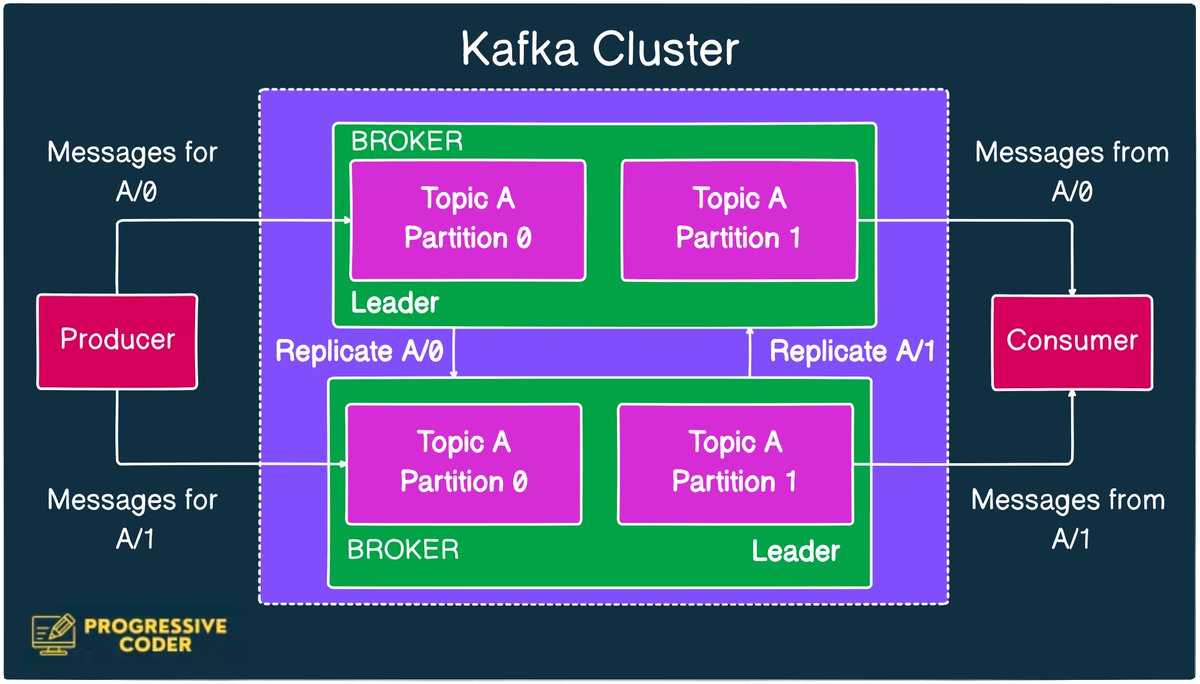
👉 A Kafka Cluster consists of several brokers.
This cluster provides features like replication.
Every partition is replicated across multiple brokers ensuring high-availability and redundancy.
Check the below illustration of a Kafka Cluster
✅ Kafka Advantages
- Handling multiple producers with ease
- Support multiple consumers without interference
- Disk-based retention of data
- Highly scalable
✅ Kafka Disadvantages
- Overwhelming number of configuration options
- Lack of mature client libraries other than Java or C (but this is changing fast)
✅ Common Use Cases of Kafka
- Tracking user activity on front-end application
- Messaging requirements in a distributed system such as notifications and emails to users
- Metrics collection and logging
- and many more…
So, what do you think about Kafka?
And have you or are you planning to use Kafka in your projects?
===
That’s all for now!
If you enjoyed this helicopter view of Kafka, don’t forget to:
- Send the LIKE button to a Kafka topic
- REPOST so that the messages can reach from producer to consumer
- BOOKMARK for future reference
- Follow me for more posts like this.


I publish a newsletter on System Design every Tuesday.
1400+ software engineers read it for practical tips on how to design a system.
Join free here:
progressivecoder.beehiiv.com
1400+ software engineers read it for practical tips on how to design a system.
Join free here:
progressivecoder.beehiiv.com
Generated by Thread Navigator
Press ⌘ + S to quick-export