Graph Engineering: How to Stop Building AI Agents That Wait in Line

A practical guide to designing agent systems as graphs, not chains

Most people who set out to build a multi-step AI agent end up with the same shape: step one, then step two, then step three, each one waiting politely for the last to finish before it starts. It works. It also wastes a good chunk of its own time, because a surprising number of those steps never needed to wait on anything at all.
This is a guide to the alternative: thinking about agent systems as graphs instead of chains, not as a metaphor, but as a genuinely different way to design a system, where independent work runs at once, results converge only where they actually need to, and the shape of the graph becomes your single biggest lever over cost, speed, and reliability. We'll build the idea from the ground up, what's actually broken about the linear approach, the vocabulary that lets you see a graph's real shape, the handful of topologies that cover almost every case, how to build one in practice, where they quietly fail, and where this is all heading.
The concrete implementation running through this piece is Claude Code's dynamic workflows a real, shipped feature, not a hypothetical, but the thinking underneath applies anywhere you're coordinating more than one AI agent.
1. The Problem: Why Your Agent Is Stuck in a Line
Ask most people to build an agent that does something non-trivial, and they'll produce a script that reads like a to-do list: read the file, then summarize it, then check it against the rules, then write the report. Each step is a prompt. Each prompt waits for the one before it to finish. It's the natural shape to reach for, because it matches how we type, one instruction, then the next, in the order they occurred to us.
For short tasks, this is fine. It starts to break down once a job runs long, fans out wide, or asks the agent to judge its own work, and it breaks down in specific, well-understood ways. Anthropic's own engineering team, explaining why they built dynamic workflows into Claude Code, names three failure modes that show up as a single agent works longer inside one context window:
None of these are solved by adding more steps to the chain. They're solved by changing its shape, giving each piece of work its own clean context, and checking results before they're trusted, instead of asking one increasingly loaded context to do everything and grade its own homework.

The same job, drawn two ways. In the chain, C stalling strands A's work with nowhere to go. In the graph, three independent nodes never had to wait on each other in the first place.
There's a simple diagnostic that exposes how much of a typical chain is really necessary: for every "and then" in your process, ask whether the next step actually reads the last step's output. "Summarize the file, then check tomorrow's weather" has no real link between the two halves the weather doesn't consume the summary. That's two independent jobs a linear script chains together anyway, for a wait that buys nothing.
Once you notice that, the reframe becomes obvious: a linear chain is a graph too. It's just the smallest, most fragile one you can draw a single unbranching path where every node has exactly one edge in and one edge out. It has no redundancy. If one link stalls, everything downstream stops, and everything upstream is left stranded with nowhere to put its result. The fix isn't a longer chain. It's a wider graph.
2. The Concept: Nodes, Edges, and the Vocabulary of a Graph
A graph, in this sense, has exactly two ingredients, and most of the confusion in agent design disappears once you keep them straight.
A node is one bounded unit of work: one agent, one clearly scoped job, one input in, one output out. Not "handle the customer conversation" something narrower, like "classify this single ticket" or "check this one file for a specific class of bug."
An edge is a dependency: it says this node's output feeds that node's input. Nothing more. Order isn't an edge. Proximity in your prompt isn't an edge. The only thing that makes an edge real is data actually crossing it a result produced by one node that another node genuinely needs to do its job.
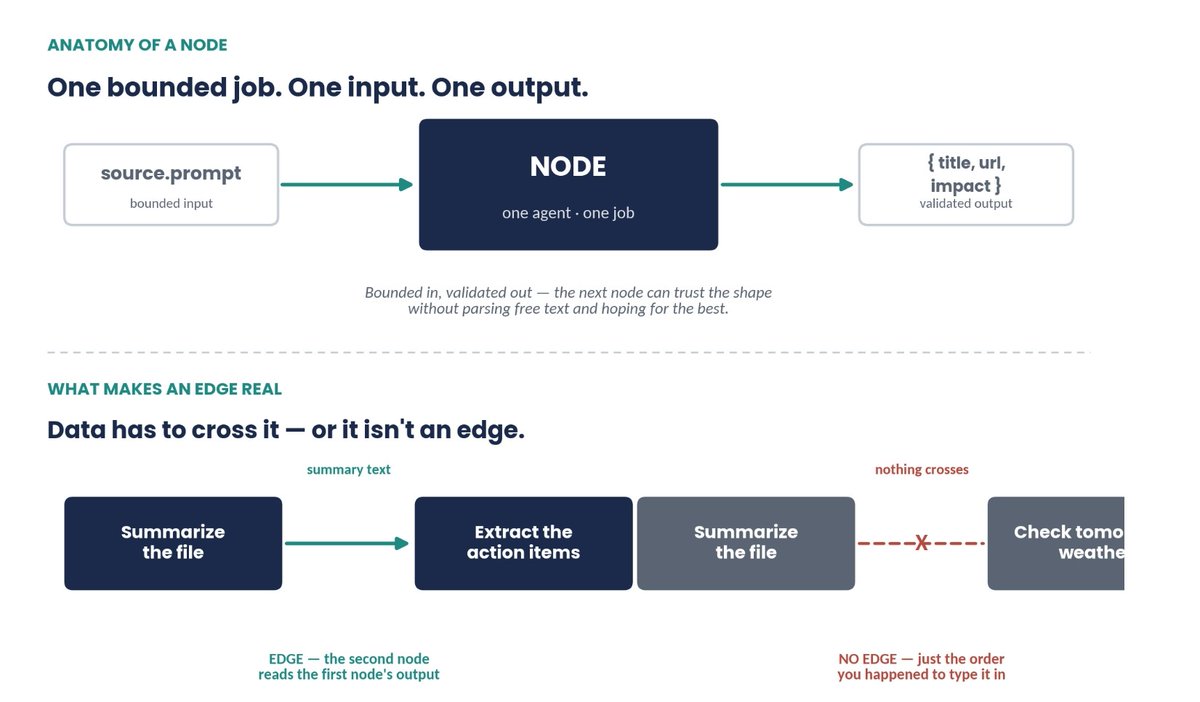
A node in one sentence: bounded input, one job, validated output. An edge in one test: does anything actually cross it?
An edge is a promise, not a formality, it only exists where data actually crosses it.
This is a useful test to run on any agent you've already built: for every arrow you've drawn between two steps, can you point to the specific piece of data that moves across it? If nothing crosses, the two steps are independent, and the wait sitting between them is pure overhead.
Nodes only become safe to wire into a bigger graph once they carry a contract: bounded input, and a defined, ideally validated output shape, ready-to-use structured data, not free text the next step has to parse and hope holds together. This is what lets you swap the agent on either end of an edge, or run several nodes in parallel, without the whole system quietly falling apart the first time an output looks slightly different than expected.
3. The Architecture: Six Topologies, Six Named Patterns
Once nodes and edges are clear, a small number of shapes cover almost every real agent system. Here they are, roughly in the order you'll reach for them.
Fan-out. When you have several independent jobs, N sources to check, N files to review run them at once instead of taking turns. The design discipline that matters here is resilience: one node failing shouldn't sink the batch. Build fan-out so a failed unit comes back empty rather than crashing everything, then filter the empties out before the next stage runs.
Fan-in, at a barrier. A fan-out is only useful if something gathers it. A barrier is the point where every upstream result has to arrive before the next step can start and it should be the exception, not the default. Reach for one only when a stage genuinely needs the whole set together: deduplicating across every source, ranking a full list, deciding whether to stop early because nothing came back at all.
The diamond. Put fan-out and fan-in together and you get the shape behind almost every serious agent system: split, work, merge. The canonical version has three parts worth naming separately fan out to gather breadth, reduce with a few lines of ordinary code to compress it (flatten a list, dedupe it deterministic, and free, since no agent is involved), then synthesize with one final agent that needs the complete, compressed set to actually write the answer.
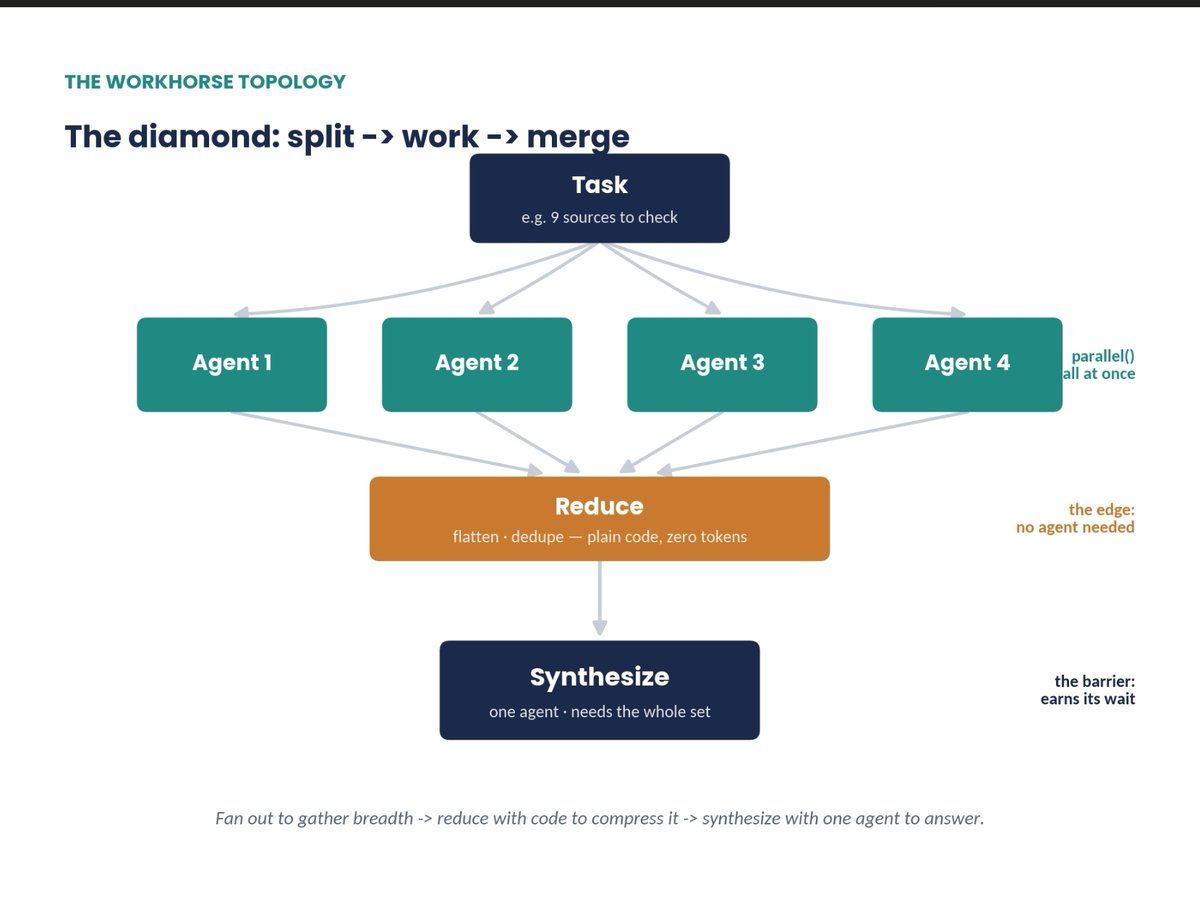
Fan out to gather breadth, reduce with plain code, synthesize with one agent. The edge in the middle is free; the barrier at the bottom is the one that earns its wait.
A graph doesn't get smarter by adding agents. It gets smarter by adding the right edges.
Routing. Not every path through a graph is fixed. A router node inspects a result and decides which edge fires next classify a support ticket, then send it to the right handler; check how large a code change is, then choose a quick review or a full audit. The classification can come from an agent's judgment, but the routing itself is ordinary code, so the same input takes the same path every time no surprise decisions buried inside a model's head.
Verification. The real leverage of a graph isn't more agents doing the work, it's the structure wrapped around them to produce confidence in what they found. A verifier sits on an edge before a result is allowed downstream, and its only job is to try to disprove the finding. If it survives, it passes forward. If it doesn't, it never reaches your report.
Cycles that converge. Some jobs don't have a known size upfront an open-ended bug hunt, where finding one issue reveals three more. That calls for a controlled loop back to an earlier node. The danger is obvious: a cycle with no exit condition is an infinite loop that spends its whole budget rediscovering the same ground. The version that actually works is loop-until-dry: keep going until several consecutive rounds turn up nothing new, then stop and critically, compare every new finding against everything you've ever seen, not just what's been confirmed, or rejected results keep resurfacing forever.
These six shapes aren't just a graph-theory exercise, they map cleanly onto six patterns Anthropic's own Claude Code team has named and documented for dynamic workflows: classify-and-act (routing), fan-out-and-synthesize (the diamond), adversarial verification (the verifier), and loop until done (the converging cycle). Two more round out the official set and are worth knowing even though they haven't come up yet: generate-and-filter (produce a batch of candidates, keep only what survives a rubric) and tournament (agents compete on the same task; a judge compares them pairwise until one wins useful for naming, ranking, or any call that's more comparative than absolute).

You don't invent a pattern per task. You learn to recognize which of these six a task already is.
4. The Implementation: Turning a Topology Into a Working System
Isolate failure, and isolate writes. Two different things can go wrong when nodes run in parallel, and they need two different fixes. The first is a node simply failing the fix is designing fan-out so a thrown error resolves to nothing rather than taking down the whole run:
// One slow or broken node shouldn't sink the batch
const results = await Promise.allSettled(nodes.map(run));
const usable = results
  .filter(r => r.status === "fulfilled")
  .map(r => r.value);
The second failure is subtler: nodes that write to the same files can collide with each other. When that's genuinely happening several agents editing a shared codebase, say give each one its own isolated workspace and merge the results afterward, rather than letting them step on each other mid-run. This is a seatbelt for the one topology that needs it, not a tax you pay on every graph.
Tier your models across the graph. Not every node carries the same weight. A node that extracts one field or classifies one ticket is bounded and repetitive; a node that synthesizes the final report or adjudicates a disputed finding is where the real judgment lives. Run the first kind on a cheaper model and reserve your best model for the second. This has to be deliberate: by default, every node you spawn inherits the model of the session that started it, so tiering only happens if you specify it, node by node.
Topology is your actual cost lever. This is the choice that trips people up most. A barrier makes every downstream step wait for the slowest upstream one to finish, even if the other nine finished in a fraction of the time. Letting each item stream through every stage independently with no synchronization point means a fast item can be three stages ahead of a slow one, instead of idling behind it for no reason.

Same three items, same per-stage durations. The barrier holds every item to the pace of the slowest one; letting them stream lets the fastest item leave four time-units earlier.
Topology is the cost lever nobody profiles first and the one with the biggest number attached to it.
Default to letting items flow independently. Reach for a barrier only when a stage truly cannot proceed without the complete set a cross-set dedupe, an early exit on the total, a comparison against everything else found. "The code is cleaner this way" is not one of those reasons; the extra wait is real, measurable time, and it has to earn its place.
How you actually build one. In Claude Code, you can ask directly, describe the objective and say you want it done as a workflow or use the trigger word ultracode to make sure a workflow gets built rather than handled turn by turn in the ordinary back-and-forth. For anything you'll want to run again a recurring triage pass, a weekly research digest pair it with a recurring schedule (/loop) and a hard completion condition (/goal), and cap how many tokens a run is allowed to spend so an ambitious workflow doesn't balloon past what you expected. When a run turns out well, save the script it generated: it becomes a versioned, reusable asset instead of something you have to re-describe from scratch next time.
A real worked example. The clearest illustration is a large migration. Bun's actual runtime rewrite from Zig to Rust followed exactly this shape: break the job into units small enough that one agent can hold each with confidence a callsite, a failing test, a module spin up one subagent per fix in its own isolated workspace, have a second agent adversarially review every change, then merge. Nobody wrote fifty sequential prompts for that migration. A script coordinated the fleet, and the review was built into the topology itself rather than bolted on afterward.
5. The Pitfalls: Where Graphs Quietly Break
Reaching for this when you don't need it. Anthropic's own guidance is blunt here: most tasks don't need a panel of five reviewers, and a graph has to earn its coordination cost the same way any other architectural decision does. A quick, single-pass prompt is still the right tool for most quick, single-pass jobs.
6. The Future: From Drawing Graphs to Growing Them
The hand-drawn graph is already a big step up from a linear chain, but it isn't the ceiling. The more interesting frontier is not drawing the graph by hand at all describing the objective and letting the system decompose the task, choose its own fan-out, and write the orchestration script tailored to that specific run, rather than a fixed shape you hoped would fit every case that comes through it.
It also makes graphs a shared asset instead of a personal habit. A script generated for a particularly good run can be saved, checked into a repository, and handed to a teammate to launch by name a graph anyone on the team can reuse, not just the person who happened to build it the first time.
If you want somewhere concrete to start, here are six real shapes worth building, mapped to the patterns above:
Two more patterns are worth trying once these feel natural: a tournament for decisions that are more comparative than absolute naming something, ranking a shortlist and generate-and-filter for anything where you'd rather produce twenty candidates and keep the three that survive a rubric than try to get it right in one pass.
As the thread that inspired this piece put it: "A prompter asks a question. An architect draws a graph." The shift isn't asking an agent to do more steps. It's asking, for every job that comes your way: where does it actually split, and where does it need to come back together?
Resources & Further Reading
thanks for reading till the end dawg, follow @mikenevermiss for more of these weekly .
