Kubernetes for People Who Hate Kubernetes

The industry has made Kubernetes cluster design look so complex over time because of the vast number of components it has and the way everything works together but in reality, the core idea isn't that complicated

Let me prove it to you!
Lets forget Kubernetes for a Second
Imagine youre running an Amazon warehouse. thousands of orders coming in every day. You've got packing robots on the floor doing the actual work picking items, packing boxes, shipping them out!
now here is the thing. you dont stand on the warehouse floor and manually tell each robot what to do. You dont walk up to Robot & say
"hey, pack this order." That would be insane at scale
Instead, you have a system. you just say:
"I need 5 packing robots running on the floor at all times."
That's it. That's your only job. You defined what you want from that point on, the warehouse handles everything:
This is Kubernetes for ya! thats literally the entire idea. you tell it the desired state, and it keeps pushing the actual state toward it. every single component in Kubernetes exists to make this loop work, now let's map every part of that warehouse to the actual Kubernetes components.
quick cheat sheet mapping the warehouse roles to Kubernetes components so you can keep them straight:

heres the full picture at a glance the control office, the warehouse zones, the robots, the routing
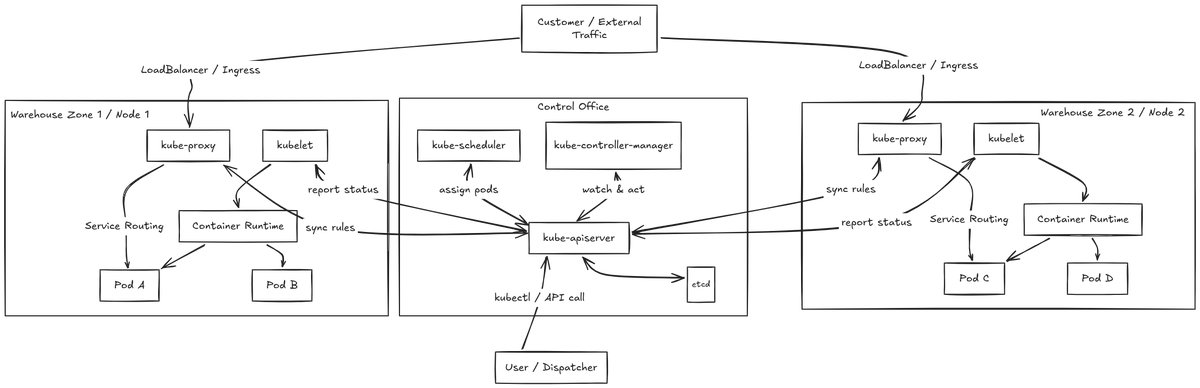
don't worry if it looks like a lot, we're going to break every single piece down! make sure never look back kubernetes again in your lifetime! lol
before we deep dive in to each components lets ask ourselves
What is desired State?
This is the single most important concept in Kubernetes. If you get this, you get everything.
Think about the cruise control in your car.
you set it to 70 MPH. thats your desired state. You don't manually press the gas and brake every 5 seconds. The car does it for you. If you go uphill and drop to 65 MPH, it hits the gas. If you go downhill and hit 75 MPH, it hits the brakes. You set the target once, and the system keeps fighting to maintain it.
Kubernetes works the exact same way.
You don't write scripts to manually start containers, monitor their health, and restart them if they crash. You just write a configuration file (your desired state) that says:
> I want my web app running with 5 replicas
you hand that file to Kubernetes. From that moment on, Kubernetes acts as the cruise control. If a container crashes, it spins up a new one. If a server dies, it moves your app to a healthy server. You set the target once, and Kubernetes keeps fighting to maintain it. That's the entire game.
Mapping Operators to Kube components:
lets break down every single role running the warehouse. Once you understand what each one does, the whole thing clicks
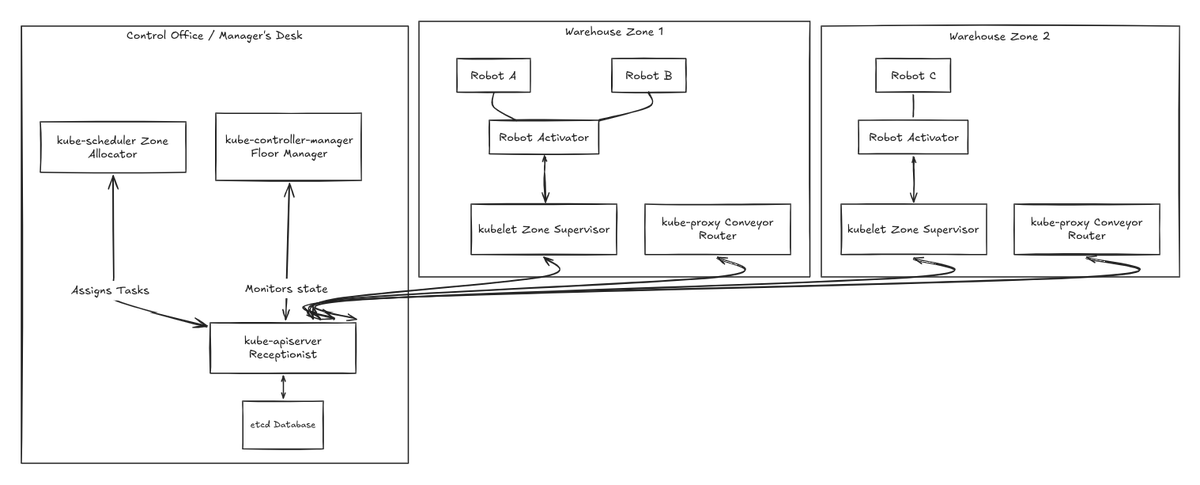
kube-apiserver — The Front Desk
This is the only entry point into the warehouse. Nobody talks to anyone else directly. not the floor manager, not the scheduler, not the zone supervisors. Every single instruction, every status update, every question goes through the front desk first.
It talks to the front desk.
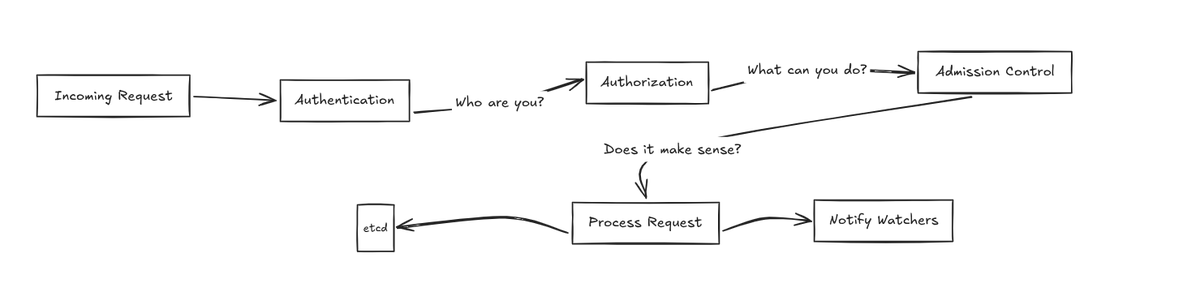
The kube-apiserver also doesn't just blindly accept requests. It validates them first, like a receptionist checking your ID badge. it runs through three gates before anything goes further:
Only after passing all three does the request actually get processed. "everything in Kubernetes flows through this component. If the apiserver goes down, the entire warehouse goes blind & goes down"
etcd — The Warehouse Database
This is the single source of truth for the entire warehouse. every robots IP address, every zone assignment, every configuration detail, every desired state it's all stored here.
Think of it like the warehouse's master inventory system. If it's not in etcd, the warehouse doesn't know about it. The floor manager checks it. The scheduler checks it. The zone supervisors report back to it through the front desk.
The important thing is that only the kube-apiserver talks to etcd directly. No other component touches it. Everything goes through the front desk, and the front desk reads and writes to the database.
If etcd dies and you don't have a backup? You literally lose the entire state of your warehouse. Thats why in production, you always run etcd in a cluster multiple copies, so if one goes down, the others still have the data.

kube-controller-manager — The Floor Manager
This is the one who actually makes things happen. The floor manager doesn't pack boxes. He doesn't assign zones. His entire job is to sit there, watch the database through the front desk, and keep asking one question over and over:
Is the actual state matching the desired state?
If you said you want 5 robots and only 4 are running, the floor manager catches that and tells the front desk:
"Hey, we need one more robot, create it" but heres the thing the controller manager isn't just one controller. It's actually a bunch of controllers running inside a single process:
Each controller runs its own loop: watch → compare → act That's the entire pattern. They watch the state, compare it to what's desired, and take action if theres a mismatch.

kube-scheduler — The Zone Allocator
When the floor manager creates a new robot (Pod), that robot doesn't immediately know which zone (Node) to go to. It just sits there in a "Pending" state, basically
I exist, but I have no home yet!
Thats where the scheduler comes in. The kube-scheduler watches for these homeless Pods through the front desk and figures out the best zone to assign them to.
It doesn't just pick randomly. It actually runs through a process:
Once it's bound, the zone supervisor (kubelet) on that node picks it up and actually starts the robot.

kubelet — The Zone Supervisor
Every warehouse zone (Node) has its own supervisor — the `kubelet`. This is the agent that runs on every single worker node. It doesn't run in the control office. It runs out on the floor, right there in the zone.
The kubelet's job is simple:
The kubelet is also the one that handles liveness probes and readiness probes. If a robot says it's alive but it's not actually responding to work? The kubelet catches that and restarts it.

kube-proxy — The Conveyor Belt Router
This is the component that makes Services work. say the Customer Order Counter? The one with the permanent IP address that routes orders to the right robots?
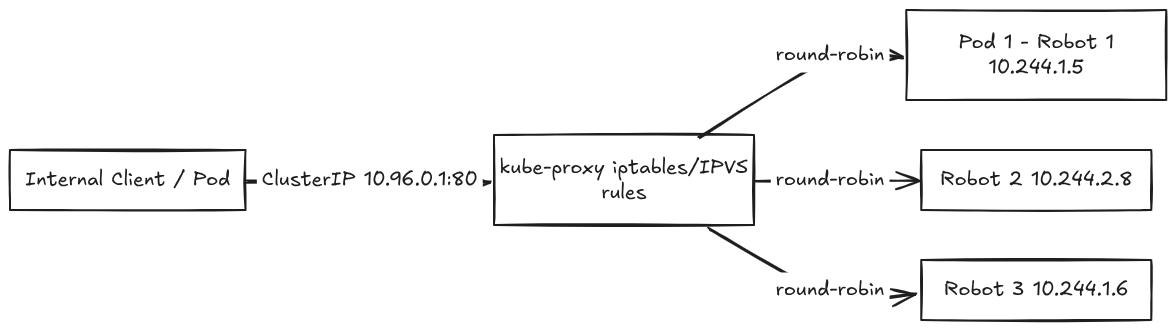
kube-proxy is the one that actually sets up the routing rules on every zone. It runs on every single node, and it maintains the network rules that say:
"If a request comes in for 10.96.0.1:80 (the Service IP), redirect it to one of these pod (robot) IPs: 10.244.1.5, 10.244.2.8, or 10.244.1.6."
When a robot dies and a new one spins up with a different IP, kube-proxy automatically updates its routing tables. The customer never notices. They keep hitting the same Counter IP and the traffic keeps flowing to healthy robots.
It basically runs like a load balancer sitting right there on every node, making sure traffic gets to where it needs to go!
Container Runtime — The Robot Activator
When the kubelet says start this robot, it doesn't do it by itself. It calls the container runtime which is the actual engine that pulls the container image and runs it.
The kubelet says activate Robot A with this software, and the container runtime downloads the code, sets up the isolated environment, and fires it up.
docker used to be the default, but Kubernetes moved away from it. The runtime just needs to speak CRI (Container Runtime Interface) and the kubelet can work with it.
Pod — The Robot
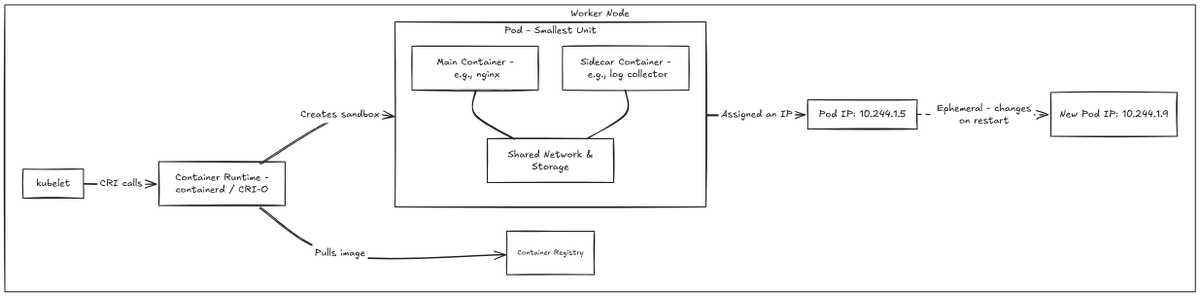
The Pod is the smallest deployable unit in Kubernetes. It is the actual robot doing the real work packing boxes, serving requests, running your application code.
A Pod is basically a wrapper around one or more containers. Most of the time, it's just one container, one robot doing one job but sometimes you have sidecar containers, like a logging agent or a proxy running alongside the main application inside the same Pod.
The key thing about Pods is they are temporary. They're not meant to live forever. If a Pod crashes, Kubernetes doesn't fix it, it kills it and boot new one. That's why you never rely on a Pod's IP address directly. you always go through a Service.
Putting It All Together — How a deployment flows Through the Warehouse
now that you know every single component, let's watch them all work together. This is what happens when you tell the warehouse
"I need 5 packing robots"
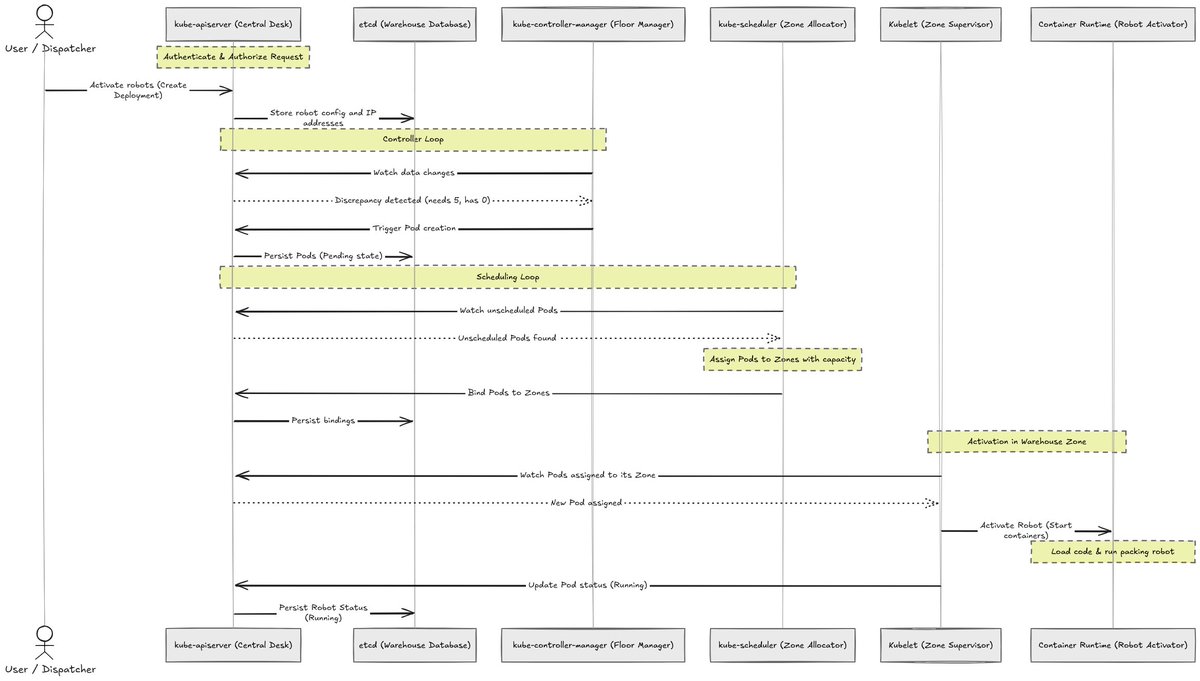
you literally store the robot's config and IP addresses in the database called etcd through the kube-apiserver. The kube-controller-manager watches for these data changes and triggers the pod creation, and the kube-scheduler picks up those pods and assigns them to the zones that have capacity. The kubelet on that zone fires up the robot through the container runtime Done!
before we dive in, let's clear up a major point of confusion: managing the cluster (the Control Plane) is not the same as routing application traffic (the Data Plane).
The workflow we just covered using the API server, etcd, scheduler, and controllers is responsible for managing cluster state and workloads, such as creating Pods and deciding where they run.
Normal user requests to the application do not pass through etcd, the scheduler, or the API server instead, the control plane provides routing configuration to components such as kube-proxy and Ingress or Gateway controllers, which configure the data plane.
actual application traffic then flows through the configured networking pathsuch as a Service, Ingress, Gateway, or load balancer to one of the backend Pods.

Directing Traffic: How we talk with robots ?
okay so now you've got 5 robots running on the floor. but here's the problem their IP addresses keep changing. If a robot runs out of battery and the system replaces it with a new one, the new robot gets a completely different IP.
If a customer wants to send an order to be packed, they can't be expected to keep track of every robot's exact IP address, they are temporary. They come and go!
So the warehouse sets up a Customer Order Counter a permanent desk with a fixed address. The customer always goes to the same counter, and the counter figures out which robot to send the order to.
In Kubernetes, this is called a Service!

Labels, Selectors, and EndpointSlices
we know that each time robot reboots ,it get assigned to new IP address, here you can ask If the Customer Order Counter has a permanent IP, how does it handle it when we have thousands of robots constantly starting, stopping, or crashing?
It uses three concepts that work together:
Here is the problem: In a giant warehouse with 10,000 robots, if you had to rewrite a single 10,000-line master scroll and photocopy it to every single zone supervisor every time a single robot went offline, you would create a massive load. your copy machines would burn out.
In Kubernetes, that's exactly what happened with the old Endpoints system. If a cluster had thousands of Pods, a single Pod state change required sending the entire, massive list to every single node's kube-proxy.
EndpointSlices solve this by splitting the giant list into multiple small sheets, if a single robot crashes, the manager only updates that specific 100 line sheet and sends it out and rest is untouched.

so far we explored how we deploy the cluster but wait
is this how external traffic actually reaches Pods in Production?
Now that we understand how internal traffic flows via Services and kube-proxy, how does external traffic from the public internet actually reach Pods in production?
1. Service IPs (ClusterIPs) are Internal-Only
A standard Service IP (ClusterIP) is virtual and exists exclusively inside the cluster's internal network. If a customer on the public internet tries to connect to 10.96.0.1, the request goes nowhere because public internet routers have no routing record for private cluster IP ranges.
2. How Production External Traffic Actually Enters
To allow external traffic into the cluster, production setups use a Cloud Load Balancer combined with an Ingress Controller (like NGINX, Envoy, or Traefik):

The Ingress Controller bypasses kube-proxy entirely for external ingress traffic. It routes requests directly to target Pod IPs (pod-level load balancing) to eliminate double-routing overhead and latency penalties.
3. If we bypass kube-proxy, why are EndpointSlices critical?
If the Ingress Controller (or a Service Mesh like Istio/Linkerd) routes directly to individual Pod IPs, how does it maintain an upto date registry of active, healthy Pod endpoints?
It reads EndpointSlices directly!
EndpointSlices serve as Kubernetes decoupled, scalable registry of active endpoint locations:
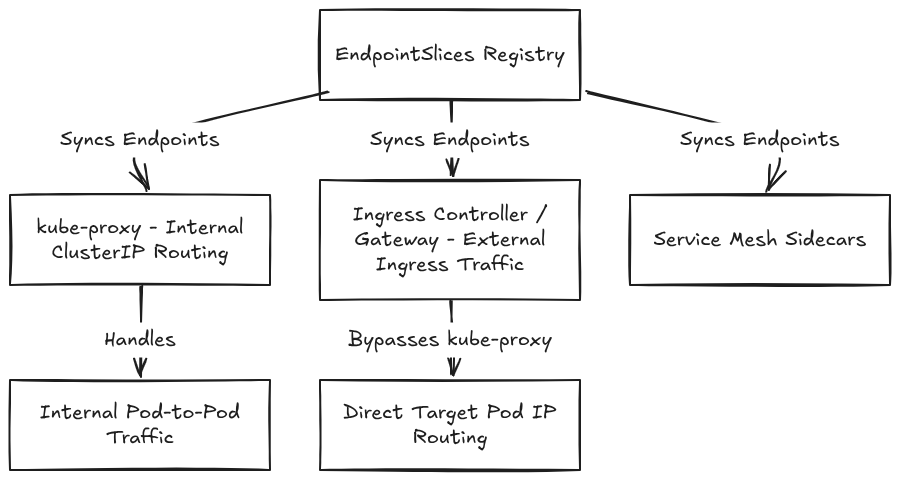
so even when kube-proxy is bypassed by modern Ingress controllers or Service Meshes, EndpointSlices remain the single source of truth for pod endpoint location and health status across the cluster without them, the API server would melt under the weight of routing table updates in large clusters.
Conclusion
I wrote this blog because I found that almost every talk, article, or configuration guide about Kubernetes out there is incredibly messy and hard to understand. I wanted to cut through the noise, lay down a solid foundation, and make it easy for you to understand how these parts connect.
Why This Matters: The Scale is Ridiculous
Sure, a small cluster is easy to manage. But as workloads grow, clusters get incredibly messy. Large-scale platforms like Facebook, YouTube, and Instagram receive millions of requests per second. Without robust, large-scale cluster design, handling that volume would be impossible.
Think about streaming YouTube live or serving 4K videos to millions of active users at once it is ridiculously crazy and hard. Kubernetes sits under the hood making it work like absolute magic.
The internet is growing tremendously and has become a core part of everyone's life, and understanding how all of this technology works under the hood makes me incredibly excited about the future.
What's Next: LLM Infrastructure & Production Inference
right now, the hottest topic in the tech industry is LLM infrastructure.
To understand and run production-grade LLM inference systems, you need a rock-solid grasp of these orchestrators. I've been working closely with the @_llm_d_ team to dive deep into LLM inference scaling, which is exactly why I went down this Kubernetes rabbit hole in the first place.
Thanks for reading until here. now onto the next one!