I Gave My Second Brain 1,500 Conversations and It Changed Everything

Hello everyone, leopardracer here and I almost didn't post this!

The AI workflow in this article is ridiculously underrated.
Follow @leopardracer for AI systems that actually give you an edge.
You know the feeling of explaining yourself over and over to different AI’s. You feel bored, and sometimes, just spend a voice memo, or curse when AI doesn’t remember yesterday.
Well, I’ve been there and done that.
Claude.MD files are a really solid solution for most cases, but what if there is a better way? I already built a simple AI second brain, which is the level 2 after Claude.MD files setup, and can remember a lot of things.
But I don’t want it JUST not to forget. I want it to be able to THINK. And the system I built does this.
How does the AI second brain work?

The system I’ve built connected all my notes using Karpathy’s wiki method.
Simply put, it reads everything I’ve ever made and compiles it into a living wiki, one page per topic.
Every time an agent runs, it doesn’t just hand me an idea; it writes back into the wiki first, so the brain gets a little smarter every single time.
New topic? It opens a new page on its own.
The wiki never stops growing.
And next, the same Hermes agents go through these connections + my previous data (my 238 articles, my 1,391 Claude.ai conversations, my 138 Claude Code sessions) and generate a thought for me, one that can change everything.
My connections are:
Note: Studies my best Substack notes and hands me the next one to write.
These four agents each look at me from a different angle.
Every six hours, they update the wiki and then write me something new, while I sleep, in the journal.
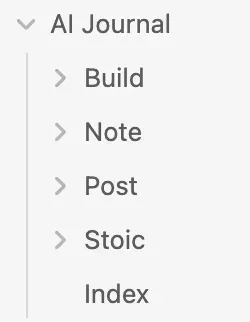
Let me show you a couple of examples from here.
The AI second brain that never forgets
Here is one example “Build” suggestion.
Look at what it did.
It used my previous data (Claude code conversations), created a new SEO page, and also referred to one of my previous projects: cloning a website that generated $50K

How does it generate this?
First, to see how it generates, I clicked on “SEO Agent - Ideas,” the link right under the build.
These ideas were scraped from my previous Claude Code conversations: builds I created but never published as articles.
It also cross-checks them with my article data.

Based on these conversations and my previous X post ideas, I generated a new page called SEO.
Then it analyzed my X post statistics and reminded me that one of my previous articles converted 3 readers into paid subscribers.
So this one has conversion potential too.
The Second Brain That Thinks
I am working a lot. Probably like you.
Sometimes I break; that’s exactly why I lean on Stoic philosophy.
It keeps me consistent and calm, so I read a little Stoicism every day.
And now, I take daily notes about my last few days: how Substack went, what I should do, what I got wrong.
To make it actually work, I analyzed all of my Claude.ai conversations, using Claude itself, to build a profile of me.
How I act when I’m angry. When I get pissed. All of it.
It saved everything to a page called Leo-Psychology, and every day it reads from there, plus my daily journal, then writes notes to me.
That’s the soft part.
Now the pragmatist part. It reads all of my past X note stats, how much each one shared, got liked, got restacked, plus every note I’ve ever written, and it generates new wiki pages using Karpathy’s method.
Then it analyzes the results, does its own web research to make sure my notes actually solve a problem, and suggests the next one to write, like this:

This is beyond crazy. One word: amazing.
Because, believe it or not, I started writing the X notes it told me to.
The X posts actually make sense, and I started backlogging them, and the daily Stoic notes?
They catch the exact mindset I keep losing.
How do you set up?
Now I’m going to explain how to set up. You can do it in 3 steps. Two of them take two minutes.
The third one, the skill does for you while you watch.
Here are the files 👇

Here are the links:
https://drive.google.com/drive/u/0/folders/1tOgFGcdh5h752ojF9T8lbm0wMD06Y5kK
Step 1: Get Obsidian.
Go to obsidian.md and download it.
Open it, click Create new vault,

Give it a name, and pick a folder. Save the paths. That folder is now your brain. Done.
Step 2: Export your Claude.ai history.
Open Claude.ai → Settings → Privacy → Export data.
It emails you a zip in a few hours.

Save it somewhere you’ll find it.
So now you have two piles of raw history: your Claude.ai zip and your Claude Code sessions sitting on your machine. Both are messy. Here’s what happens to them next.
How are your conversations processed?
Raw chats are full of noise.
The system strips each conversation down to what matters: your messages, your decisions, what you actually built.
It turns every conversation into one clean note.
Then it does the interesting part.
It reads across all of them and builds a profile of you.
How do you think? How do you decide? What excites you, what drains you, how you sound when you’re angry.
You don’t have to do this by hand. You give Claude this prompt:
Read all my conversations in [folder].
For each one, keep my messages and the real decisions, drop the tool-noise.
Then write me a profile: how I think, what I get excited about, what blocks me,
how I work. Use real quotes.
Save it as a single page.
What to skip (this part is optional)
Your export has conversations that should never go into the brain.
A partner’s chats. Client work. Anything private.
Tell the system to filter them out before it touches anything:
Before processing, exclude any conversation that mentions [names, topics, clients you want kept out]. Check both the title and the body. When in doubt, drop it.
Be generous here. Better to lose a few real ones than leak a private one.
Now do the same with Claude Code
Your Claude Code history is already on your machine, in ~/.claude/projects/. Same idea, different source. This is your building brain, what you actually made, not just what you talked about:
Read my Claude Code sessions in ~/.claude/projects/.Keep my prompts and what I built, skip the tool-calls and any client project. Write one clean note per session, and flag the things I built but never shipped.
Step 3: Hand it all to Claude
Now you have four piles, all clean:
Drop the SKILL.md and SOUL.md into Claude, point it at these, and tell it to build your second brain by pasting this prompt;
Build my second brain using the attached SKILL.md and SOUL.md.

Here's my data:

Obsidian vault: [path to your vault]
Claude.ai export: [path to your unzipped export]
Claude Code history: ~/.claude/projects/
My own work + numbers: [path to your articles / notes / analytics]
Exclude anything that mentions: [names, clients, private topics] — check titles AND bodies.

Process my conversations into clean notes, build my psychology profile, then compile the Karpathy wiki. Before you wire up any agents, show me the connections you found and let me approve them one by one. Don't go fully autonomous until I've reviewed one test run.
Here’s where it gets good.
The skill reads everything and starts suggesting connections.
You say yes or no. And once you approve, it builds those connections into the wiki. Page by page. One topic at a time.
That’s the brain forming in front of you.
Step 4: Automation
The brain is built. Now you make it run on its own.
Option 1 (easy)
Pass your SOUL.md to your Hermes agent. It asks you for the path to your vault. You give it the path. It sets the cron. Done. From now on it reads, thinks, and writes to you every few hours.
Option 2 (when you’re ready)
Set up a Claude routine on your computer.
But make sure, set a time, when your pc is open, otherwise it won’t process it.
Either way, the brain now runs without you. You wake up to fresh thinking every morning.
If this changed how you think about AI workflows, follow @leopardracer for more content like this and join my telegram channel: https://t.me/+ygATQAt9sUM1N2U6