How to Build a $10,000-Level Website With Animations in Claude Code
Agencies charge $5,000 for a portfolio site that looks this good

I built mine in 2 hours. Here's exactly how
This is the real walkthrough - not a generic template guide
I'm using my own portfolio as the example: references I actually used, prompts I actually sent, bugs I actually hit and fixed.
No coding experience needed
Step 1: Install Design Skills
By default Claude's design output is mediocre. Same fonts, same layouts, same flat look. Two skills fix this
Paste this into Claude Code:
Install this skill: github. com/anthropics/skills/tree/main/frontend-design
Allow changes when prompted. Install globally
Paste this into Claude Code:
Install this plugin using NPM: github. com/nextlevelbuilder/ui-ux-pro-max
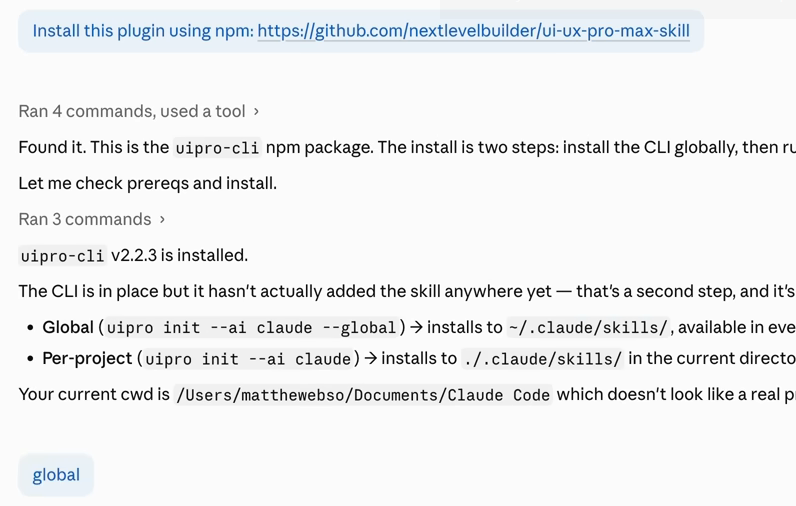
Switch the mode selector to Auto mode so Claude works without asking permission at every step

Step 2: Find References
Don't describe your dream site from scratch. Show Claude what you want.
For my portfolio I used Il Capo Production on Awwwards as my main reference
awwwards. com/sites/il-capo-production dark, cinematic feel was exactly what I wanted
Here's how I actually used it:
I didn't screenshot the full page and say "make me this." I went section by section and grabbed only the parts I liked:

For the portfolio page (the page with the full list of works), the reference didn't have anything that fit. I went to Pinterest, found a different layout in a similar style, and screenshotted that separately as 11.png
Don't try to copy one site exactly. Borrow what works from each
Drop everything into a /reference folder inside your project
Step 3: Write the Build Prompt
Start your prompt with /ui-ux-pro-max to activate the design skill
Here's the exact prompt I used for my portfolio:

TO COPY:
/ui-ux-pro-max
Build a premium personal portfolio website for a frontend developer. It should look expensive,
modern, and technically impressive, with elegant animations that load well on any device.
Use the design references from the reference folder: 1.png is the hero section, 2.png is the
section right below the hero showing a work in a video + title/description format, 6.png is
the footer / bottom of the site, 7.png is the portfolio page with the full list of works,
11.png is an example of an individual project page when opening any work from the portfolio,
and 12.png is the loading screen. In the hero section, place me in the center using me.png.
For all work/project image placeholders, use example.png.

Ask me any clarifying questions you need before building.
The last line is the key
Claude stops and asks 4-6 questions about style, fonts, sections, animation level, content tone. Your answers become the foundation of the entire site
Be specific when answering. The more precise you are here, the less back-and-forth later
After you answer, Claude spends ~5 minutes planning, then ~10 minutes building. First output is already solid

Step 4: The Hero Animation
A plain photo in the center of a dark hero is boring
Something needs to happen when the user moves their mouse
For my portfolio I came up with the flashlight idea:
I described the concept to Claude and asked it to develop and implement it:
In the hero section, I want a flashlight/spotlight cursor effect. Dark background. My photo is barely visible at default. When the cursor moves over the section, it acts as a spotlight - revealing a brighter, warm-lit version of the photo underneath through a soft-edged circular mask that follows the cursor. Radius 100-150px, soft feathered edges. Implement this.
Claude built it in one pass. The effect works exactly as described - the user moves their cursor and the photo lights up where they point.

Step 5: Review Pass - Fix What Doesn't Work
Before running a formal quality check, just scroll through the site yourself and note everything that feels off.
My list after the first build:
Write everything down. Then send it all in one message:
Here are several things that need fixing. Please address all of them:
1. [describe issue 1]
2. [describe issue 2]
3. [describe issue 3]
Sending everything at once matters
Result:
Step 6: Polish Pass
Once the obvious bugs are fixed, run a structured quality check. Paste this into Claude:
Review this site against these criteria and be honest about what needs work:
- Typography (are we using overused AI fonts like Inter?)
- Color (is the palette restrained or all over the place?)
- Hierarchy (does text sizing guide the eye correctly?)
- Animation (smooth and intentional, or choppy and random?)
- Mobile (actually designed for phones, not just shrunk?)
- Copy (restrained and specific, or generic AI filler?)
Claude grades each point. Read through it, agree or disagree with each item, then collect the ones you want fixed into one prompt and send them all at once.
Don't ask it to fix points you disagree with. You know your site better.
Result
You end up with a solid site. Not perfect - but good.
Some things won't be exactly right on the first build. Maybe the mobile layout needs another pass, or a specific animation feels slightly off. That's normal
From here you iterate. Every day you find one thing to improve and fix it